Freedom251 › Event Management Software

Event Schedule
What Event Schedule is
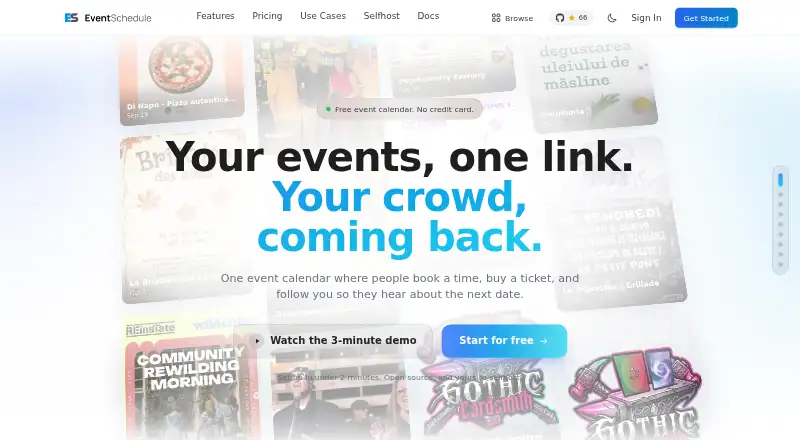
Event Schedule brings event calendars, ticketing, appointment booking, newsletters, and check-ins together in one platform. Organizers can set ticket types, add-ons, promo codes, and reserved seating, then check guests in with QR codes. Ticket payouts go to the organizer's own payment account, and the company says it charges no platform fee. Guests can book free or paid appointments in their time zone, with calendar sync intended to help prevent double-booking. Calendar connections include Google Calendar, Microsoft 365 or Outlook, and CalDAV; payment options include Stripe, PayPal, Payfast, and Invoice Ninja. Newsletter tools include a drag-and-drop editor, audience segments, and A/B testing, with monthly recipient limits that vary by plan. The free plan includes one team member, one free appointment type, and 10 newsletter emails per month. Pro costs $5 a month after a 7-day trial and includes a REST API and webhooks. Enterprise costs $15 a month after the trial and adds reserved seating, multiple team members, custom domains, priority support, and 1,000 newsletter emails per month. The product is open source under the Attribution Assurance License and can be self-hosted.
Who it suits
Event Schedule suits organizers who need ticketing, appointments, newsletters, and check-ins together. The maker describes it for talent, venues, and curators, including musicians, DJs, comedians, and food trucks.
What it does well
- Free plan includes unlimited events and schedules
- Company says it charges no platform fee
- Supports calendar sync and multiple payment options
- Open source and available for self-hosting
- Pro includes REST API and webhooks
What to know first
- Free plan allows one team member
- Free plan includes one free appointment type
- Free plan includes 10 newsletter emails per month
- Pro and Enterprise follow a 7-day trial
Limits
Forever Free includes one team member, one free appointment type and 10 newsletter emails per month. Pro costs $5 a month after the 7-day free trial; Enterprise costs $15 a month after the trial and includes 1,000 newsletter emails per month. The maker says self-hosting includes every Enterprise feature at no cost.
Plans
| Plan | Billed and limits | Price |
|---|---|---|
| Forever Free | $0 /month/year · Unlimited events and schedules · 1 free appointment type · 10 newsletter emails/month · Free event registration and QR check-in | Free |
| Pro | monthly after 7-day trial; $50/year when billed annually · paid tickets and bookings · unlimited appointment types · REST API and webhooks · 100 newsletter recipients/month · 1 team member | $5 a month |
| Enterprise | monthly after 7-day trial; $150/year when billed annually · reserved seating · up to 5 team members · custom domains · private events · WhatsApp creation · 1,000 newsletter recipients/month | $15 a month |
| Free | forever · unlimited events and schedules · unlimited free registration · 1 appointment type · 10 newsletter recipients/month · 1 team member | Free |
As eventschedule.com lists them, read 29 Sept 2026. The maker's own page has the final word.
Getting started
- Visit the Event Schedule website
- Choose the Forever Free plan or start a 7-day trial of a paid plan
- Use the hosted service or install the open-source product on your own server
- Connect a supported calendar or payment option if needed
- Set up event tickets, appointments, newsletters or QR-code check-in
Event Schedule is an all-in-one event platform for organizers who need registration, ticketing, appointments, newsletters and check-in in one system. It is especially well suited to independent performers, venues and small event teams that value an open-source or self-hosted route. The main trade-off is that the free hosted tier is constrained to one team member and a very small newsletter allowance.
Overview
Event Schedule combines event calendars with registration, ticket sales, appointment booking, newsletters and attendee check-in. Ticketing supports multiple ticket types, add-ons, promo codes, reserved seating and QR-code check-in. Registration tools, agenda building, speaker profiles, attendee login and custom domains make it more capable than a simple event listing service.
Organizers receive ticket payouts in their own payment account, and Event Schedule says it charges no platform fee. That is a strong financial proposition for paid events, but paid ticket sales require the Pro plan; the free tier is limited to free registration. Appointment guests can book free or paid sessions in their own time zone, while calendar synchronization is designed to reduce double-booking.
The product is open source under the Attribution Assurance License, and its maker says the hosted-service code is publicly available. Self-hosting is supported on a user’s own server, where the maker says every Enterprise feature is included without charge. That is attractive for technically capable organizations that can operate their own infrastructure; hosted plans are simpler for teams that want a managed service.
Key features
Event operations
Ticket types, add-ons and promo codes cover common sales variations, while reserved seating addresses assigned-seat events. QR check-in provides a practical way to validate attendees at the door. Agenda and speaker tools support conferences and programmed events rather than only single-session gatherings. Attendee login and custom domains can give a registration site a more branded, participant-facing experience.
Appointments and calendars
Guests can book appointments at times displayed in their own time zone, and synchronization works with Google Calendar, Microsoft 365 or Outlook, and CalDAV. This combination is useful for performers, consultants or venues handling both public events and one-to-one bookings. The free plan allows only one free appointment type, so broader appointment catalogs need a paid tier or self-hosting.
Payments, marketing and developer access
Stripe, PayPal, Payfast and Invoice Ninja are supported payment options. Newsletters include a drag-and-drop editor, audience segments and A/B testing, but monthly recipient quotas are modest on hosted plans. Pro adds a REST API and webhooks, making it the sensible choice when event data must connect to another system. Security controls include HTTPS/TLS in transit, encryption at rest for sensitive information, authentication and role-based access. Analytics tracking is opt-in, with no analytics cookies set when a visitor declines or does not respond.
Pricing
Forever Free — free
Billed at $0 per month or year, this plan allows unlimited events and schedules, free event registration and QR check-in, one free appointment type and 10 newsletter emails per month. It suits a solo organizer running occasional free events, but one team member and the 10-email cap make it unsuitable for collaborative operations or regular audience marketing.
Pro — $5 a month
After a 7-day free trial, Pro is billed monthly. It adds paid ticket sales, a REST API, webhooks, 100 newsletter emails per month and no platform fees. Choose it when ticket revenue or integrations matter; the allowance still favors small mailing lists, and reserved seating and multiple team members remain outside this tier.
Enterprise — $15 a month
After the same 7-day free trial, Enterprise is billed monthly. It adds reserved seating, multiple team members, custom domains, priority support and 1,000 newsletter emails per month. This is the hosted fit for growing teams that need collaboration, assigned seating and a larger mailing allowance without managing servers.
Platforms
Event Schedule is offered as a web service, through an API, and as self-hosted software. The API is specifically included with Pro, while self-hosting provides the maker’s stated Enterprise feature set at no cost.
Who it's for
The maker targets talent, venues and curators, including musicians, DJs, comedians and food trucks. Solo performers and small organizers can start with free registration, while ticketed events, integrations or collaborative teams point toward Pro or Enterprise. Self-hosting is the strongest route for organizations with the technical ability to run their own server and wanting the complete feature set without hosted-plan charges.
Pros and cons
Pros
- Combines ticketing, appointments, newsletters and check-in instead of forcing separate services.
- Organizer-controlled payouts and no stated platform fee improve the economics of paid ticket sales on Pro.
- Open-source licensing and self-hosting provide control and access to Enterprise features.
- Calendar, payment and newsletter tools cover both operational and promotional workflows.
- Opt-in analytics and role-based controls support a privacy-conscious setup.
Cons
- The free hosted plan permits only one team member and 10 newsletter emails monthly.
- Paid ticket sales, API access and webhooks start at Pro, not the free tier.
- Reserved seating and multiple team members are held for Enterprise on hosted plans.
- Self-hosting’s value depends on the organization being able to run and maintain its own server.
Alternatives
For a broader directory of event-site products, see Event Website Builders; for tools focused on end-to-end event administration, see Event Management Software.
- EventCreate is a fit for mobile users wanting a free plan limited to one event, 50 attendees and one user, with a 5% ticketing fee.
- Eventbrite suits organizers prioritizing broad mobile and API availability; its free event publishing plan allows unlimited events and free tickets without ticketing fees.
- Eventzilla is worth considering for unlimited events and free registration types, with its Basic plan charging $1.50 per month per registration.
- Indico is a free, open-source, self-hosted alternative when a fully self-managed deployment is the priority.
- Luma fits organizers wanting unlimited events and guests, plus 500 invitations or newsletters per week and three calendar admins on its free plan.
- Evento is a free option for users seeking a straightforward event service across web and mobile platforms.
- Goldcast is a paid-platform alternative with tiered included-event and base-user limits, while prices are custom.
- Hi.Events suits self-hosted or cloud users who accept a 1.25% plus $0.60 fee on paid tickets under its Cloud plan.
Verdict
Choose Event Schedule if you need ticketing, appointments, newsletters and check-in together, particularly as a small creative team or a technically capable self-hosting organization. Its strongest reasons to choose it are the no-platform-fee ticketing model on Pro and the option to run the full Enterprise feature set yourself. Look elsewhere if you need generous free-team collaboration, a larger free newsletter quota or a fully managed service without the hosted plan’s feature gates.
Verdict
Event Schedule covers event registration alongside ticketing, appointments, and newsletters, with free and paid plans. The free plan has small team and newsletter allowances; self-hosting is another option.
Questions
Is Event Schedule free?
Yes. Forever Free costs $0 per month and includes unlimited events and schedules, one free appointment type, 10 newsletter emails per month, free event registration and QR check-in.
How much do the paid plans cost?
Pro is $5 a month and Enterprise is $15 a month, each billed monthly after a 7-day free trial.
Can I self-host Event Schedule?
Yes. Users can install it on their own server. The maker says self-hosting includes every Enterprise feature at no cost.
Is Event Schedule open source?
Yes. It is open source under the Attribution Assurance License, and the maker says the hosted-service code is publicly available.
Which calendars and payment services does it connect to?
Calendar sync supports Google Calendar, Microsoft 365 or Outlook, and CalDAV. Payment options include Stripe, PayPal, Payfast and Invoice Ninja.
Who makes Event Schedule?
Event Schedule says it is made by the team behind Invoice Ninja. Its privacy policy identifies the operator as Event Schedule LLC.
Facts from Event Schedule's own pages
- AI import
- The product can turn pasted text, links or flyer images into event records, subject to daily limits. · eventschedule.com, 15 Oct 2026
- Analytics
- Built-in analytics report views, devices, top events, check-ins and sales without requiring Google Analytics. · eventschedule.com, 15 Oct 2026
- API
- The Pro plan includes a REST API and webhooks. · eventschedule.com, 29 Sept 2026
- API authentication and limits
- API keys are supplied in an X-API-Key header, with limits of 300 reads and 30 writes per minute per IP address. · eventschedule.com, 15 Oct 2026
- Appointment booking
- Appointment types provide weekly hours, buffers, minimum notice and timezone-aware booking pages; one free type is included on Free. · eventschedule.com, 15 Oct 2026
- Appointments
- Guests can book free or paid appointments in their own time zone, with calendar sync intended to prevent double-booking. · eventschedule.com, 29 Sept 2026
- Audience
- The maker describes the product for talent, venues, and curators, including musicians, DJs, comedians, and food trucks. · eventschedule.com, 29 Sept 2026
- Calendar synchronization
- Google Calendar, Outlook/Microsoft 365 and CalDAV can synchronize in both directions. · eventschedule.com, 15 Oct 2026
- Community features
- Organizers can moderate fan photos, videos and comments, collect post-event feedback and provide photo galleries. · github.com, 15 Oct 2026
- Company facts
- LinkedIn lists Event Schedule as a privately held software-development company founded in 2024 with 2–10 employees. · linkedin.com, 15 Oct 2026
- Data policy
- The maker says data is not sold, optional analytics are opt-in and users can export schedules or self-host them. · eventschedule.com, 15 Oct 2026
- Deployment options
- The project supports Docker, Softaculous and manual installation with a browser setup wizard. · github.com, 15 Oct 2026
- Documentation depth
- The documentation site contains 39 guides covering setup, user workflows, self-hosting, SaaS operation, API and a glossary. · eventschedule.com, 15 Oct 2026
- Free plan
- Yes · eventschedule.com, 20 Sept 2026
- Integrations
- Calendar sync supports Google Calendar, Microsoft 365 or Outlook, and CalDAV; payment options include Stripe, PayPal, Payfast, and Invoice Ninja. · eventschedule.com, 29 Sept 2026
- Integrations count
- The integrations page lists fifteen ports, including calendars, payment gateways, Eventbrite import, webhooks, REST API, Meta ads, WhatsApp and Google Wallet. · eventschedule.com, 15 Oct 2026
- Licence
- The source is released under the Attribution Assurance License, which requires attribution to remain with the code. · eventschedule.com, 15 Oct 2026
- Limit: calendar conflicts
- Ordinary events can overlap without an automatic clash warning; appointment slots are the exception. · eventschedule.com, 15 Oct 2026
- Limit: documentation discoverability
- A Reddit commenter said the pricing link was difficult to find on the site at the time of their post. · reddit.com, 15 Oct 2026
- Limit: earlier Docker availability
- A 2025 Reddit discussion reported that Docker Compose support was still planned and that progress appeared slow at that time. · reddit.com, 15 Oct 2026
- Limit: hosted event ceiling
- Hosted schedules have daily event-creation ceilings of 500 events, or 1,000 on Enterprise; self-hosted installations have no stated ceiling. · eventschedule.com, 15 Oct 2026
- Limit: refund handling
- Only Stripe and PayPal refunds move money automatically; other payment methods can only be marked refunded. · eventschedule.com, 15 Oct 2026
- Limit: seat maps
- Specific seat selection is unavailable on Free and Pro plans. · eventschedule.com, 15 Oct 2026
- Maker
- Event Schedule says it is made by the team behind Invoice Ninja; the privacy policy identifies the operator as Event Schedule LLC. · eventschedule.com, 29 Sept 2026
Where Event Schedule stands on Freedom251
- Event Management Software#1 of 181
- Event Website Builders#2 of 33