Freedom251 › Registration Software

EventCreate
by EventCreate
What EventCreate is
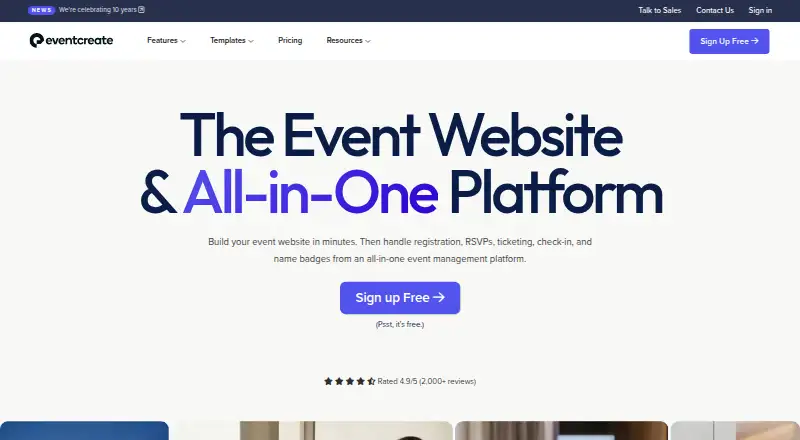
EventCreate is an event management platform for websites, registration, RSVPs, ticket sales, attendee tracking, and event operations. Organizers can build event websites without coding or server setup, then choose Simple, RSVP, Ticketed, or Multi-Event registration. QR-based check-in is available through an app or desktop, with on-demand namebadge printing. The platform accepts major card brands, offline payments, and donations, and says payments transfer directly to organizers. Customers retain ownership of attendee data and can export lists as CSV or Excel files. Salesforce and HubSpot integrations are included, with additional connections available through Zapier. The free plan is free forever and allows one event, 50 attendees, and one user, with a 5% ticketing fee. Paid plans billed annually start at $5.00 per month; Personal includes unlimited events, 50 attendees per event, one user, and a 2% ticketing fee. Higher plans increase attendee limits and lower fees, with Enterprise listing a 0% ticketing fee. Attendee apps are available on iOS and Android in the United States, Canada, and Australia.
Who it suits
EventCreate suits organizers of conferences, workshops, classes, fundraisers, parties, festivals, and reunions. Its listed audiences range from local nonprofits and small gatherings to agencies and enterprise conferences.
What it does well
- Builds event websites without coding or server setup.
- Offers four registration modes, including Multi-Event.
- Supports QR check-in and on-demand namebadge printing.
- Customers can export attendee lists as CSV or Excel.
What to know first
- Free plan allows one event and 50 attendees.
- Free plan has a 5% ticketing fee.
- Attendee apps are listed only in the United States, Canada, and Australia.
Limits
The free plan permits one event, 50 attendees, and one user, and charges a 5% ticketing fee. Annual-billed Personal at $5 a month allows 50 attendees per event and one user, with a 2% ticketing fee.
Plans
| Plan | Billed and limits | Price |
|---|---|---|
| Free | Free Forever · 1 event · 50 attendees per event · 1 user · 5% ticketing fee | Free |
| Personal | Billed $60 annually · Unlimited events · 50 attendees per event · 1 user · 2% ticketing fee | $5 a month |
| Personal+ | Billed $120 annually · Unlimited events · 100 attendees per event · 1 user · 1.5% ticketing fee | $10 a month |
| Pro | Billed $240 annually · Unlimited events · 200 attendees per event · 3 users · 1.25% ticketing fee | $20 a month |
| Business | Billed $360 annually · Unlimited events · 300 attendees per event · 5 users · 1% ticketing fee | $30 a month |
| Agency | Billed $600 annually · Unlimited events · 500 attendees per event · 10 users · 0.75% ticketing fee | $50 a month |
| Corporate | Billed $1,200 annually · Unlimited events · 1,000 attendees per event · 15 users · 0.50% ticketing fee | $100 a month |
| Scale | Billed $3,000 annually · Unlimited events · 2,500 attendees per event · 25 users · 0.25% ticketing fee | $250 a month |
The first 8 of 10 plans, as eventcreate.com lists them, read 28 Sept 2026. The maker's own page has the final word. Every plan
Getting started
- Go to https://www.eventcreate.com/.
- Preview an event website at no commitment, or choose the free plan to publish an event.
- Select Simple, RSVP, Ticketed, or Multi-Event registration.
- Configure ticketing or payments, if needed.
- Use the check-in app or desktop for QR entry and attendee operations.
- Choose a monthly or annual paid plan if you need higher limits or lower ticketing fees.
EventCreate brings event websites, registration, ticket sales, and on-site operations into one service. It suits organizers who want those pieces together and can work within per-event attendee limits; ticketing fees and the steep jump in capacity between plans deserve close attention.
Overview
EventCreate covers conferences, classes, fundraisers, parties, festivals, reunions, and other gatherings. Organizers can build customizable event websites without coding or server setup, then choose Simple, RSVP, Ticketed, or Multi-Event registration. That breadth makes it a practical fit for events that need more than a signup form, though its plan limits make it less suitable for audiences that exceed a tier’s cap.
The service was founded in 2016 and is headquartered in Los Angeles and Chicago. EventCreate says it serves small gatherings, local nonprofits, agencies, Fortune 500 companies, and enterprise conferences.
Key features
- Registration and payments: Registration forms support several event formats, while ticketing accepts Visa, Mastercard, Discover, and American Express. Organizers can also handle offline payments and donations; EventCreate says payments transfer directly to the organizer. This suits varied payment workflows, although paid ticket sales carry a plan-dependent fee.
- Check-in and badges: QR-based entry works through an app or desktop, with on-demand namebadge printing. That gives organizers a check-in path for both mobile and desktop setups.
- Attendee tools and data: EventCreate includes attendee email, an attendee app, and exhibitor tools. Customers retain ownership of attendee data and can export lists as CSV or Excel files, useful for teams that need to reuse or retain their records.
- Integrations: Salesforce and HubSpot integrations are available out of the box, with additional connections through Zapier. EventCreate also names MailChimp, Google, Facebook, and FreshBooks among its integrations, which can reduce manual handoffs for organizations already using those services.
- Security and support: EventCreate says it is SOC 2 certified, follows SOC 2 practices, and is designed to comply with GDPR and CCPA requirements. It requires TLS 1.3 or higher, encrypts stored data, and keeps point-in-time backups for seven days. Support includes 24/7 email, weekday live chat, and optional phone support for accounts; urgent requests are supported around the clock. The company advertises a 10-minute response time and 99.99% uptime.
Pricing
EventCreate has a free plan and paid plans billed monthly or annually. The paid prices below are monthly equivalents with annual billing; annual plans offer up to 80% off monthly billing, and upgrades are prorated for the remaining billing cycle. Verified 501(c)(3) nonprofits and educational institutions can receive 15% off annual plans.
- Free — free, Free Forever: One event, 50 attendees per event, one user, and a 5% ticketing fee. With a monthly email limit of zero, it is best for a small event that does not need attendee email through the platform.
- Personal — $5 a month, billed $60 annually: Unlimited events, 50 attendees per event, one user, and a 2% ticketing fee. It removes the one-event ceiling but not the small audience cap or single-user constraint.
- Personal+ — $10 a month, billed $120 annually: Unlimited events, 100 attendees per event, one user, and a 1.5% ticketing fee. It is a modest capacity step-up, but still leaves collaboration to one user.
- Pro — $20 a month, billed $240 annually: Up to 200 attendees per event, three users, and a 1.25% ticketing fee across unlimited events. This is a more workable entry point for a small team.
- Business — $30 a month, billed $360 annually: Up to 300 attendees per event, five users, and a 1% fee. It adds room for a larger team and event without removing the attendee ceiling.
- Agency — $50 a month, billed $600 annually: Up to 500 attendees per event, ten users, and a 0.75% fee. It suits multi-person teams that need more capacity and lower fees.
- Corporate — $100 a month, billed $1,200 annually: Up to 1,000 attendees per event, 15 users, and a 0.50% fee.
- Scale — $250 a month, billed $3,000 annually: Up to 2,500 attendees per event, 25 users, and a 0.25% fee.
- Enterprise — $500 a month, billed $6,000 annually: Up to 5,000 attendees per event, 50 users, and no ticketing fee. Monthly email limits range from zero on Free to 25,000 on Enterprise.
- Custom — custom pricing: Unlimited events, attendees, and users, for organizations whose needs exceed Enterprise’s stated attendee cap.
EventCreate says previewing an event website is free and carries no commitment. That is not a stated refund policy, so buyers should distinguish a free preview from a paid-plan trial or refund guarantee.
Platforms
EventCreate supports web, Android, and iOS. Its attendee app is available on iOS and Android in the United States, Canada, and Australia, so organizers elsewhere should not assume attendees can use that app in their region.
Who it's for
EventCreate is strongest for organizers who want event pages, registration, ticketing, and check-in together, especially when their attendee count and staff seats fit a defined plan. The Free tier can cover a single event of up to 50 attendees, while paid tiers accommodate repeated events and progressively larger teams. It is a weaker fit for organizers who need a large audience on a low-cost plan, frequent ticket sales at minimal fees, or attendee-app access outside the three named countries.
Pros and cons
- Pros: Multiple registration modes and a no-code event website builder cover the path from event page to signup. QR check-in and on-demand badge printing extend the service to event-day operations. Attendee-data exports, direct organizer payments, and integrations with Salesforce, HubSpot, and Zapier support existing workflows.
- Cons: Free allows only one event, 50 attendees, and one user, and charges a 5% ticketing fee. The lower paid plans still cap attendance at 50 or 100 and allow just one user. Meaningful reductions in fees and increases in capacity require higher annual commitments, while attendee-app coverage is regional.
Alternatives
For simpler link pages or lightweight web presences, Linktree, Beacons, Strikingly, Bio Sites, Carrd, Solo.to, Linkbio, or Milkshake may be worth considering instead of an event-management platform.
Browse One-Page Website Builders for a focused page-building choice, Event Registration Software for registration alternatives, Event Website Builders for event-page options, Event Badge Printing Software for badge-focused tools, or Event Management Software for broader event platforms.
Verdict
Choose EventCreate if you want event websites, registration, ticketing, attendee data, and check-in in one platform, and its plan’s attendee and user caps match your events. Its range of registration and operational tools is the main reason to choose it; constrained lower-tier capacity, ticketing fees, and region-limited attendee apps are the reasons to look elsewhere.
Verdict
EventCreate combines event pages, registrations, ticketing, check-in, and attendee data tools. Compare attendee limits and ticketing fees across plans, and note the listed regional availability of its attendee apps.
Questions
Is EventCreate free?
Yes. The Free plan is free forever and includes one event, 50 attendees, and one user.
How much does EventCreate cost?
Annual-billed Personal starts at $5 a month, billed $60 annually. Other listed plans range up to Enterprise at $500 a month, billed $6,000 annually; Custom pricing is by quote.
What are the ticketing fees?
The Free plan lists a 5% fee, and the Personal plan lists 2%. Fees decrease by plan, reaching 0% on Enterprise.
Which platforms are available?
The listed platforms are Android, iOS, and web. Attendee apps are available on iOS and Android in the United States, Canada, and Australia.
Does EventCreate integrate with other apps?
It offers out-of-the-box Salesforce and HubSpot integrations, plus thousands of tools through Zapier. The integrations listed also include MailChimp, Google, Facebook, and FreshBooks workflows.
What support does EventCreate offer?
Support includes 24/7 email support, weekday live chat, and optional phone support for accounts. The page advertises a 10-minute response time and 99.99% uptime.
Facts from EventCreate's own pages
- Annual Discount
- Annual plans offer up to an 80% discount compared with monthly billing. · eventcreate.com, 28 Sept 2026
- Attendee app
- Yes · eventcreate.com, 21 Sept 2026
- Attendee App
- The attendee app provides schedules, speaker information, maps, networking, agendas, updates, polls, and messaging. · eventcreate.com, 28 Sept 2026
- Data Ownership
- Customers retain ownership of attendee data and can export lists as CSV or Excel files. · eventcreate.com, 28 Sept 2026
- Billing Options
- Monthly and annual billing are available; upgrades are prorated for the remaining billing cycle. · eventcreate.com, 28 Sept 2026
- Check-In Apps
- Check-in supports QR-based entry through an app or desktop, with on-demand namebadge printing. · eventcreate.com, 28 Sept 2026
- CRM Integrations
- Out-of-the-box Salesforce and HubSpot integrations are available, plus thousands of tools through Zapier. · eventcreate.com, 28 Sept 2026
- Data ownership
- EventCreate says customers retain ownership of attendee data and can export lists in CSV or Excel formats. · eventcreate.com, 28 Sept 2026
- Data protection
- The security page states that EventCreate requires TLS 1.3 or higher, encrypts data at rest, and retains point-in-time backups for 7 days. · eventcreate.com, 28 Sept 2026
- Attendee email
- Yes · eventcreate.com, 21 Sept 2026
- Email Limits
- Monthly email limits range from 0 on Free to 25,000 on Enterprise. · eventcreate.com, 28 Sept 2026
- Website Builder
- EventCreate provides customizable event websites without coding or server setup. · eventcreate.com, 28 Sept 2026
- Exhibitor tools
- Yes · eventcreate.com, 21 Sept 2026
- Founded
- 2016 · eventcreate.com, 23 Sept 2026
- Free plan
- Yes · eventcreate.com, 21 Sept 2026
- Free Plan Limits
- The free plan includes 1 event, 50 attendees, and 1 user. · eventcreate.com, 28 Sept 2026
- Hosting
- EventCreate says its platform is fully hosted on Heroku, where event, attendee, and payment-related data is stored and processed. · support.eventcreate.com, 28 Sept 2026
- Integrations
- EventCreate says it integrates with hundreds of apps, including MailChimp, Salesforce, Google, Facebook, Zapier, and FreshBooks workflows. · eventcreate.com, 28 Sept 2026
- Mobile apps
- The EventCreate attendee app is available on iOS and Android in the United States, Canada, and Australia. · support.eventcreate.com, 28 Sept 2026
- Nonprofit Discount
- Verified 501(c)(3) nonprofits and educational institutions can receive 15% off annual plans. · eventcreate.com, 28 Sept 2026
- Onsite check-in
- Yes · eventcreate.com, 21 Sept 2026
- Payments
- The platform accepts Visa, Mastercard, Discover, and American Express, supports offline payments and donations, and states that payments transfer directly to the organizer. · eventcreate.com, 28 Sept 2026
- Trial Commitment
- The page says previewing an event website is free and has no commitment; no refund policy is stated. · eventcreate.com, 28 Sept 2026
- Registration forms
- Yes · eventcreate.com, 21 Sept 2026
Where EventCreate stands on Freedom251
- Registration Software#2 of 28
- Event Management Software#17 of 181
- Event Registration Software#6 of 55
- Event Badge Printing Software#8 of 49
- Event Website Builders#6 of 33
- One-Page Website Builders#7 of 33
- Event Booking Software#9 of 30