Freedom251 › ZX Spectrum Emulators
ESPectrum
What ESPectrum is
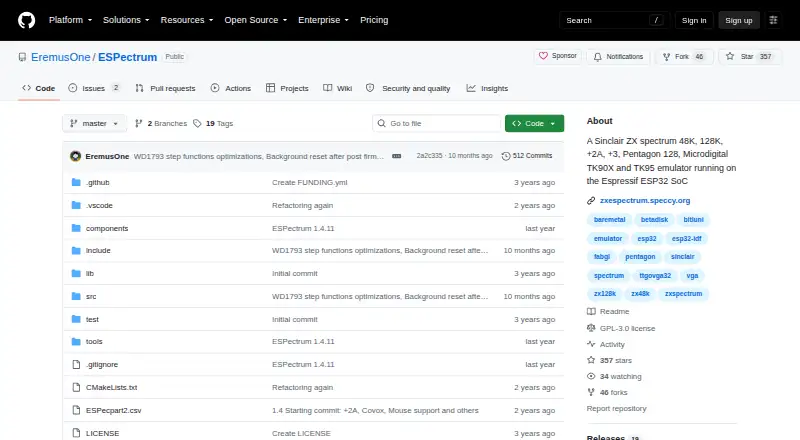
ESPectrum is emulator firmware for running Sinclair ZX Spectrum computers on Espressif ESP32 boards. It supports Spectrum 48K, 128K, +2A and Pentagon 128K machines, as well as Microdigital TK90X and TK95 models. The project lists Lilygo TTGo VGA32 and Olimex ESP32-SBC-FabGL among supported boards. Video can be sent to standard VGA, machine-rate VGA or a 15 kHz CRT display, with 16:9 and 4:3 aspect ratios. Emulation features include a Z80, AY-3-8912 sound, beeper and microphone emulation, contended memory and floating-bus effects. For input, it supports PS/2 keyboards, joystick emulation, two physical joysticks connected through a DB9-to-PS/2 converter, and a PS/2 mouse used as a Kempston mouse. ESPectrum reads TAP and TZX tape files, SNA, Z80, SP, ESP and P snapshots, and Betadisk TRD and SCL disk files. A FAT16- or FAT32-formatted micro SD card holds program and disk files, snapshots and screen captures. Users can install firmware with the online web flasher or flash release binaries to a compatible board. The project is free and open source under GPL-3.0.
Who it suits
ESPectrum suits retro-gaming enthusiasts who want to run classic Spectrum games on ESP32 hardware. It is intended for people with a compatible board and the display, storage and input devices they plan to use.
What it does well
- Emulates several Spectrum and Microdigital computer models.
- Supports standard VGA, machine-rate VGA and 15 kHz CRT output.
- Includes AY-3-8912, beeper and microphone emulation.
- Reads tape, snapshot and Betadisk disk formats.
- Offers an online web flasher and release binaries.
- Free, open-source firmware under GPL-3.0.
What to know first
- Requires an Espressif ESP32-powered board.
- Micro SD storage must use FAT16 or FAT32.
- Physical DB9 joysticks require a DB9-to-PS/2 converter.
Limits
ESPectrum is firmware for Espressif ESP32-powered boards, and its storage instructions call for a FAT16- or FAT32-formatted micro SD card.
Plans
| Plan | Billed and limits | Price |
|---|---|---|
| ESPectrum | Emulator firmware for compatible ESP32 boards | Free |
As github.com lists them, read 8 Oct 2026. The maker's own page has the final word.
Getting started
- Open the ESPectrum GitHub website and review the README and release notes.
- Use a compatible Espressif ESP32-powered board, such as a listed supported board.
- Format a micro SD card as FAT16 or FAT32 for program and media files.
- Install the firmware with the online web flasher or flash release binaries directly to the board.
- Connect supported display and input devices for your setup.
Verdict
Choose ESPectrum if you want to run supported Spectrum models on compatible ESP32 hardware and use its listed display, media and peripheral options. It is a poor fit if you need a general desktop or mobile emulator, since its host platform is ESP32-powered boards.
Questions
How much does ESPectrum cost?
The listed ESPectrum plan costs nothing. The project is open source under GPL-3.0.
Is there a free plan or trial?
The plan is free. No free trial is listed.
Which platforms does it support?
ESPectrum runs on Espressif ESP32-powered boards. The project lists Lilygo TTGo VGA32 and Olimex ESP32-SBC-FabGL among supported boards.
Which computer models does it emulate?
It supports Spectrum 48K, 128K, +2A and Pentagon 128K, plus Microdigital TK90X and TK95 models.
Which files and peripherals does it support?
Tape formats include TAP and TZX; snapshots include SNA, Z80, SP, ESP and P; and Betadisk disks include TRD and SCL. Supported peripherals include PS/2 keyboards and mouse, joysticks, SD card, VGA and CRT displays, Betadisk and audio input.
How can I install it or get help?
Install firmware with the online web flasher or flash release binaries to a compatible board. The project directs users to its README, release notes and public ESPectrum Telegram group for help.
Facts from ESPectrum's own pages
- Development platforms
- The README describes compiling and flashing with PlatformIO on Windows, GNU/Linux and MacOS/X. · github.com, 8 Oct 2026
- Display
- Video output supports standard VGA, machine-rate VGA and 15 kHz CRT modes, with 16:9 and 4:3 aspect ratios. · github.com, 8 Oct 2026
- Hardware
- The project lists Lilygo TTGo VGA32 and Olimex ESP32-SBC-FabGL among supported boards. · github.com, 8 Oct 2026
- Input devices
- It supports PS/2 keyboards, joystick emulation, two physical joysticks through a DB9-to-PS/2 converter, and a PS/2 mouse as a Kempston mouse. · github.com, 8 Oct 2026
- Installation
- Users can install firmware with the online web flasher or flash release binaries directly to a compatible board. · github.com, 8 Oct 2026
- License
- The GitHub repository identifies the project license as GPL-3.0. · github.com, 8 Oct 2026
- Media formats
- The emulator supports tape and snapshot files, including TAP, TZX, SNA, Z80 and SP, plus Betadisk TRD and SCL disk files. · github.com, 8 Oct 2026
- Sound and emulation
- Features include Z80 emulation, AY-3-8912 sound, beeper and microphone emulation, contended memory and floating-bus effects. · github.com, 8 Oct 2026
- Storage requirements
- A micro SD card should be formatted as FAT16 or FAT32; the README lists it for program and disk files, snapshots and screen captures. · github.com, 8 Oct 2026
- Support
- The project directs users to its README, release notes and public ESPectrum Telegram group for help. · zxespectrum.speccy.org, 8 Oct 2026
- Supported models
- It emulates Spectrum 48K, 128K, +2A and Pentagon 128K, as well as Microdigital TK90X and TK95 models. · github.com, 8 Oct 2026
- What it does
- ESPectrum emulates Sinclair ZX Spectrum computers on Espressif ESP32 boards. · github.com, 8 Oct 2026
- Who it is for
- The maker describes the project for retro-gaming enthusiasts who want to run classic Spectrum games on ESP32 hardware. · zxespectrum.speccy.org, 8 Oct 2026
Where ESPectrum stands on Freedom251
- ZX Spectrum Emulators#7 of 23