Freedom251 › ZX Spectrum Emulators
CSpect
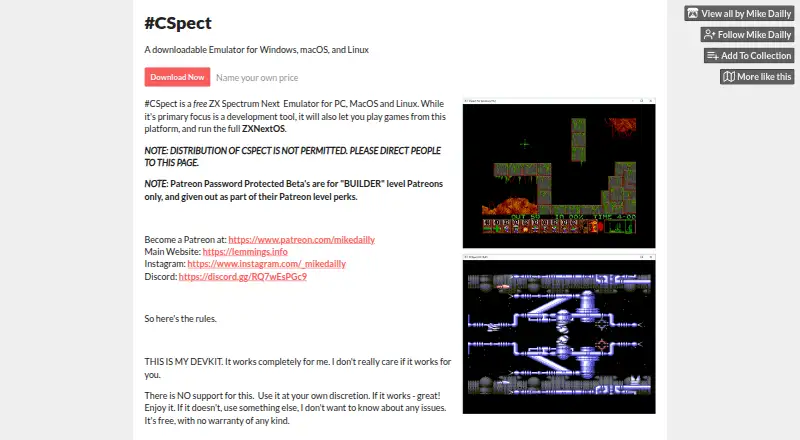
What CSpect is
CSpect is a ZX Spectrum Next emulator for Windows, macOS, and Linux, built primarily for development work. Its maker also describes it as an assembler and debugger; it can run games and the full ZXNextOS. Development features include ULA overlays that provide access to an extra 24 kB of RAM, a resizable debugger, and a `-dscale` option for enlarging debugger text. It supports z88dk map files directly, and its plugin system includes a symbol interface, a Pasta/80 symbol loader, and a z88dk map-file loader. The iCSpect interface includes `AddSymbol()` and `HexToInt64(string)`. Linux shell scripts are included in the release archive, while a `ZXOS.BAT` file is described for downloading and installing the ZX Spectrum Next SD card image. CSpect is free, with a listed price of $0. The maker states that support and warranty are not provided, advises use at the user's discretion, and says updates should not be expected. Redistribution is not permitted.
Who it suits
CSpect suits ZX Spectrum Next developers who want an emulator with assembler and debugger features, as well as users who want to run games or ZXNextOS. It is available on Windows, macOS, and Linux.
What it does well
- Free, with a listed price of $0.
- Runs games and the full ZXNextOS.
- Debugger can be resized and enlarged.
- Supports z88dk map files and plugins.
- Available for Windows, macOS, and Linux.
What to know first
- No support or warranty is provided.
- Updates are not guaranteed.
- Redistribution is not permitted.
Limits
The free plan comes with no support or warranty, and updates are not guaranteed.
Plans
| Plan | Billed and limits | Price |
|---|---|---|
| Name your own price | Name your own price; described as free · No support · No warranty · Updates not guaranteed | Free |
As mdf200.itch.io lists them, read 3 Oct 2026. The maker's own page has the final word.
Getting started
- Open the CSpect product page.
- Choose the name-your-own-price plan, which is described as free.
- Download the release for Windows, macOS, or Linux.
- On Linux, use the shell scripts included in the release archive.
- To set up the full machine, use ZXOS.BAT to download and install the ZX Spectrum Next SD card image.
CSpect is built for people developing software for the ZX Spectrum Next, with games and the full ZXNextOS also in scope. Its mix of an emulator, assembler, debugger, and development-file support makes it a focused tool; the absence of support, warranty, and expected updates is a serious trade-off.
Overview
Rather than concentrating on game playback, CSpect combines a ZX Spectrum Next emulator with tools for building and debugging software. It can also run games and the full ZXNextOS, so it has uses beyond development. Its strongest case is for users who value those tools and can work independently; those who need dependable assistance or ongoing maintenance should look elsewhere.
Key features
Development workflow
The maker describes CSpect as an emulator, assembler, and debugger. It supports z88dk map files directly, and its plugin system includes a symbol interface, a Pasta/80 symbol loader, and a z88dk map-file loader. Together, these features make CSpect particularly relevant to development involving those formats and symbol tools, rather than simply offering a place to run games. The iCSpect interface includes AddSymbol() and HexToInt64(string), which will matter most to people working with that interface.
Debugger and memory
The debugger can be resized, and the -dscale command-line option enlarges its text. Those adjustments can help developers fit the debugger into their workspace and read its contents. ULA overlay support provides access to an extra 24 kB of RAM, a concrete capability for work involving that additional memory.
Machine setup
The release includes a ZXOS.BAT file intended to download and install the ZX Spectrum Next SD card image, allowing users to run the full machine. Linux shell scripts are also included in the release archive. The maker offers password-protected Patreon betas to Builder-level Patreons as a perk, but says users should assume there will never be updates to the product page release.
Pricing
CSpect is free: its “Name your own price” plan is free. There are no paid tiers or seat limits described. The free offer comes with no support or warranty, and updates are not guaranteed; the maker explicitly advises users to assume none will arrive. This suits users willing to take responsibility for their own setup, but it is a poor fit where assistance, warranty protection, or continued maintenance is essential.
Platforms
CSpect supports Windows, macOS, and Linux. The included Linux shell scripts provide a stated platform-specific aid, while the software's core appeal remains its ZX Spectrum Next development tooling across these desktop systems.
Who it's for
CSpect is best suited to ZX Spectrum Next developers who want an emulator with an assembler, debugger, symbol tooling, and z88dk map-file support. Users who want to run games or the full ZXNextOS may also find the emulator useful. It is less suitable for people who expect formal support, warranty coverage, or regular updates, and redistribution is not permitted: the maker directs users to the product page.
Pros and cons
- Pros: Combines emulation with an assembler and debugger, giving development work a dedicated environment.
- Pros: Direct z88dk map-file support, related loader plugins, and a symbol interface cater to development workflows.
- Pros: Runs games and the full ZXNextOS, extending its use beyond coding.
- Cons: No support or warranty leaves setup and troubleshooting to the user.
- Cons: The maker says not to expect updates, which makes it unsuitable for users relying on ongoing maintenance.
- Cons: Redistribution is prohibited, so users must obtain CSpect from the product page.
Alternatives
ZX Spectrum Emulators is a broader category to consider when comparing emulator options.
- JNEXT is another free, open-source option for Linux, macOS, and Windows, with no ads and nothing for sale.
- Unreal Speccy Portable is free and open source, runs on Android as well as Linux, macOS, and Windows, and is licensed under GNU GPL v3 or later.
- zx_go is a free, open-source MIT-licensed emulator for Linux, macOS, and Windows; its licensed Spectrum Next ROMs are not bundled.
- GZX is a free, open-source option for Linux and Windows under a MIT-style license, except for ZX Spectrum ROM files.
- Klive IDE is a free, not-for-profit passion project for Linux, macOS, and Windows x64.
- SpeccyDate is a free option for macOS and Windows from a family-oriented indie game studio.
- Spectral is a free, open-source public-domain emulator for Linux, macOS, and Windows, described as experimental with code prone to change.
- ZEsarUX is free software for Linux, macOS, Windows, and self-hosted use, with optional donations.
Verdict
Choose CSpect if you are developing for the ZX Spectrum Next and want emulation alongside assembly, debugging, and development-file tools, with the ability to run games and ZXNextOS. Its focused workflow is the main reason to choose it; the lack of support, warranty, and expected updates is the main reason to look elsewhere.
Verdict
CSpect combines ZX Spectrum Next emulation with tools for development, including assembly and debugging features. It is free, but the maker offers no support or warranty and says updates should not be expected.
Questions
How much does CSpect cost?
The name-your-own-price plan is described as free and listed as free.
Which operating systems does it support?
The maker lists Windows, macOS, and Linux. Linux shell scripts are included in the release archive.
Can CSpect run games and ZXNextOS?
Yes. It can run games and the full ZXNextOS environment.
What development tools does it include?
The maker describes CSpect as an emulator, assembler, and debugger. Its product page also lists a plugin system and an iCSpect interface.
Does CSpect include support or a warranty?
No. The maker says there is no support and no warranty, and recommends use at the user's own discretion.
Are updates guaranteed?
No. The product page advises users to assume there will never be updates.
Facts from CSpect's own pages
- Beta access
- The product page says password-protected Patreon betas are for Builder-level Patreons as a perk. · mdf200.itch.io, 3 Oct 2026
- Debugger
- The release notes say the debugger became resizable and describe a -dscale command-line option for larger debugger text. · mdf200.itch.io, 3 Oct 2026
- Developer tools
- The maker describes CSpect as a ZX Spectrum Next emulator, assembler, and debugger. · mdf200.itch.io, 3 Oct 2026
- Distribution
- The maker says redistribution of CSpect is not permitted and directs people to the product page. · mdf200.itch.io, 3 Oct 2026
- File support
- The maker says the release added direct support for z88dk map files. · mdf200.itch.io, 3 Oct 2026
- Interface
- The product page says its iCSpect interface includes AddSymbol() and HexToInt64(string). · mdf200.itch.io, 3 Oct 2026
- Operating systems
- The maker lists Windows, macOS, and Linux as supported platforms and says Linux shell scripts are included in the release archive. · mdf200.itch.io, 3 Oct 2026
- Plugins
- The product page lists a plugin system with a symbol interface, a Pasta/80 symbol loader, and a z88dk map-file loader plugin. · mdf200.itch.io, 3 Oct 2026
- Purpose
- CSpect is a ZX Spectrum Next emulator for PC, macOS, and Linux, primarily intended as a development tool; it can also run games and the full ZXNextOS. · mdf200.itch.io, 3 Oct 2026
- Support and warranty
- The maker says there is no support and no warranty, and recommends using the software at the user's own discretion. · mdf200.itch.io, 3 Oct 2026
- ULA overlays
- The public release notes say ULA overlay support provides access to an extra 24 kB of RAM. · mdf200.itch.io, 3 Oct 2026
- Updates
- The product page advises users to assume there will never be updates. · mdf200.itch.io, 3 Oct 2026
- ZXNextOS setup
- The release notes describe a ZXOS.BAT file intended to download and install the ZX Spectrum Next SD card image to run the full machine. · mdf200.itch.io, 3 Oct 2026
Where CSpect stands on Freedom251
- ZX Spectrum Emulators#4 of 23