Freedom251 › Lockdown Browser Software
eSehat Secure Exam Browser
What eSehat Secure Exam Browser is
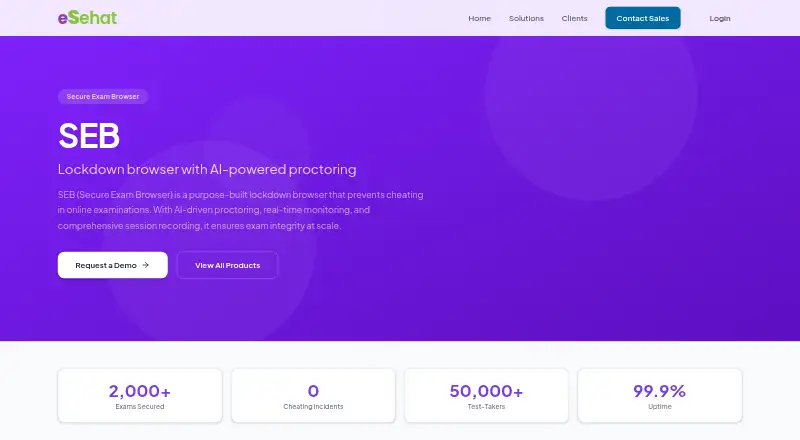
eSehat Secure Exam Browser (SEB) is a lockdown browser for online examinations. It combines exam controls with AI-powered proctoring, real-time monitoring, and session recording. During an exam, Full Lockdown Mode blocks other applications, system menus, copy-paste, and screen capture. AI proctoring detects faces, tracks gaze, detects voices, and flags suspicious behavior. Proctors can monitor test-takers through dashboards that highlight flagged events for review.
SEB records video, audio, and screen activity for each session for forensic review. Exam papers are end-to-end encrypted and support timed release and auto-submit. After an exam, analytics include cheating-attempt logs, proctor notes, and integrity scores. Listed integrations include LMS/LTI, Google Classroom, Canvas, and Moodle. eSehat describes its products as enterprise software for civil testing labs, educational institutions, secure examinations, document verification, and custom ERP. Its homepage describes 24/7 support, a 99.9% uptime guarantee, and SOC 2 compliant infrastructure. The company cites 12+ years of industry experience. SEB is paid, with pricing available on request, and the product page invites prospective customers to request a personalized demo.
Who it suits
SEB is suited to educational institutions and other organizations that conduct online examinations and need lockdown controls, proctor monitoring, and recorded session evidence. Its listed LMS integrations may suit teams using LMS/LTI, Google Classroom, Canvas, or Moodle.
What it does well
- Blocks app switching, system menus, copy-paste, and screen capture.
- AI proctoring detects faces, gaze, voices, and suspicious behavior.
- Records video, audio, and screen activity.
- Exam papers support end-to-end encryption and timed release.
- Post-exam analytics include logs, notes, and integrity scores.
- Lists integrations with LMS/LTI, Google Classroom, Canvas, and Moodle.
What to know first
- Paid product with pricing available on request.
- The product page directs prospective customers to request a personalized demo.
Getting started
- Visit the SEB product page.
- Request a personalized demo.
- Ask eSehat for pricing.
- Connect SEB with a listed LMS integration, such as LMS/LTI, Google Classroom, Canvas, or Moodle.
Verdict
Choose SEB if you need controlled online exam sessions with AI proctoring, live review, and recorded evidence. Teams should look elsewhere if they need a published price before arranging a personalized demo.
Questions
How much does SEB cost?
SEB is paid, and pricing is available on request.
Can I try SEB for free?
The listed availability option is to request a personalized demo; no free plan or free trial is described.
Which learning platforms does SEB integrate with?
The product page lists LMS/LTI, Google Classroom, Canvas, and Moodle.
What does Full Lockdown Mode block?
It blocks other applications, system menus, copy-paste, and screen capture during exams.
What does SEB record?
It records video, audio, and screen activity for each exam session for forensic review.
Who makes SEB?
SEB is an eSehat product. The company describes itself as building enterprise-grade software and cites 12+ years of industry experience.
Facts from eSehat Secure Exam Browser's own pages
- AI proctoring
- AI proctoring includes real-time face detection, gaze tracking, voice detection, and suspicious behavior alerts. · esehat.org, 7 Oct 2026
- Audience
- eSehat describes its software as enterprise-grade and lists secure examinations among the sectors it serves. · esehat.org, 7 Oct 2026
- Availability
- The SEB product page invites prospective customers to request a personalized demo. · esehat.org, 4 Oct 2026
- Company
- eSehat describes itself as a technology company building enterprise-grade software and cites 12+ years of industry experience. · esehat.org, 7 Oct 2026
- Contact and pricing
- The SEB page invites visitors to request a personalized demo; it does not state a price. · esehat.org, 7 Oct 2026
- Environment controls
- Full Lockdown Mode blocks other applications, system menus, copy-paste, and screen capture during exams. · esehat.org, 4 Oct 2026
- Exam delivery
- Exam papers are end-to-end encrypted and support timed release and auto-submit functionality. · esehat.org, 4 Oct 2026
- Infrastructure security
- eSehat's homepage describes its infrastructure as SOC 2 compliant. · esehat.org, 4 Oct 2026
- Integrations
- The product page lists LMS/LTI, Google Classroom, Canvas, and Moodle integrations. · esehat.org, 7 Oct 2026
- Live monitoring
- Proctor dashboards show test-takers with flagged events highlighted for review. · esehat.org, 7 Oct 2026
- Lockdown
- Full Lockdown Mode blocks other applications, system menus, copy-paste, and screen capture during exams. · esehat.org, 7 Oct 2026
- Proctor monitoring
- Proctors can view test-takers on dashboards with flagged events highlighted for review. · esehat.org, 4 Oct 2026
- Purpose
- SEB is a lockdown browser with AI-powered proctoring intended to prevent cheating in online examinations. · esehat.org, 7 Oct 2026
- Recording
- SEB records video, audio, and screen activity for forensic review. · esehat.org, 7 Oct 2026
- Reports
- Post-exam analytics include cheating attempt logs, proctor notes, and integrity scores. · esehat.org, 7 Oct 2026
- Secure delivery
- Exam papers are end-to-end encrypted and support timed release and auto-submit functionality. · esehat.org, 7 Oct 2026
- Security compliance
- The company homepage describes its infrastructure as SOC 2 compliant. · esehat.org, 7 Oct 2026
- Session evidence
- SEB records video, audio, and screen activity for each exam session for forensic review. · esehat.org, 4 Oct 2026
- Support
- The company homepage states that it offers 24/7 support and a 99.9% uptime guarantee. · esehat.org, 7 Oct 2026
Where eSehat Secure Exam Browser stands on Freedom251
- Lockdown Browser Software#21 of 22