Freedom251 › Background removers

EraseBG
What EraseBG is
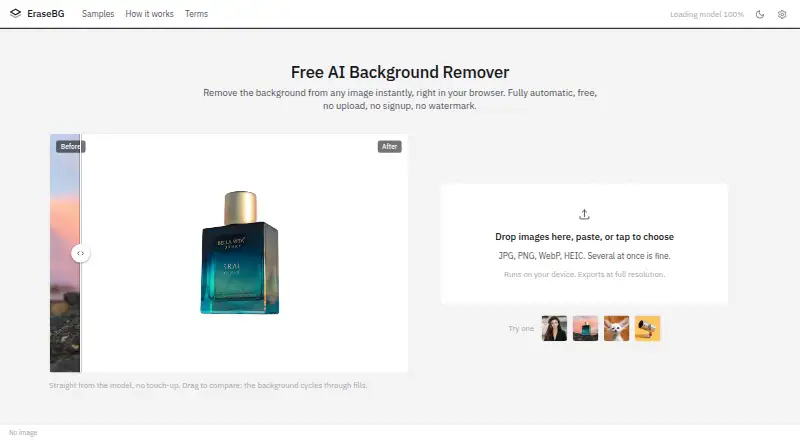
EraseBG removes image backgrounds in the browser on the user's device, with processing performed on the device's GPU or CPU. It accepts JPG, PNG, WebP, and HEIC images, including multiple images at once. The editor provides erase and restore brushes, undo and redo, background choices, and before-and-after comparison. Optional 2× and 4× upscaling is also performed on the device. Users can download full-resolution PNG, WebP, or JPG files, and save batches as a ZIP. EraseBG says images stay in tab memory and are not collected, stored, or transmitted. The site says it has no accounts, tracking, advertising, or third-party analytics; model and theme settings are kept in browser local storage. The model is cached by the browser, so later visits can work offline. It is listed for web, iOS, and Android, and source code is MIT licensed for self-hosting. It is free, has no usage limits, and permits commercial use. Safari exports above about 16 megapixels are scaled to that limit; on iOS, large photos may be processed at reduced working size before full-resolution export. There is no API.
Who it suits
EraseBG suits sellers, small shops, designers, marketers, and people who value photo privacy. It may also suit users who need batch background removal and downloadable image formats without an account.
What it does well
- Processes images on the user's device.
- Supports batch input and ZIP downloads.
- Exports PNG, WebP, and JPG.
- Works offline after the model is cached.
- Commercial use is permitted.
What to know first
- There is no API.
- Safari scales exports above about 16 megapixels.
- Large iOS photos may use a reduced working size.
- WebGPU support is limited to named browsers.
Limits
The free plan has no usage limits and provides full-resolution downloads without an account or watermark. On Safari, exports above about 16 megapixels are scaled to that limit; on iOS, large photos may be processed at a reduced working size before full-resolution export.
Plans
| Plan | Billed and limits | Price |
|---|---|---|
| Free | No usage limits · full resolution downloads · no account or watermark | Free |
As erasebg.dev lists them, read 11 Oct 2026. The maker's own page has the final word.
Getting started
- Open https://erasebg.dev/ in a supported browser.
- Choose JPG, PNG, WebP, or HEIC images to process, singly or in a batch.
- Use the editor’s brushes, background choices, and comparison tools as needed.
- Optionally apply 2× or 4× upscaling.
- Download PNG, WebP, or JPG files, or download a batch as a ZIP.
- For self-hosting, copy the MIT-licensed source code to a web server.
EraseBG is a browser-based background remover that works locally on Android, iOS, desktop browsers, or a self-hosted server. It is a strong match for privacy-conscious sellers, designers, marketers, and small shops handling repeated cutouts. Its no-cost, no-limit workflow is compelling, but the absence of an API and Safari’s large-image export ceiling narrow its fit for automated or high-resolution production pipelines.
Overview
EraseBG accepts JPG, PNG, WebP, and HEIC files, including multiple images in one session. The free plan provides full-resolution downloads without a watermark or account, so occasional users and small businesses can process product photos without recurring fees or credit accounting.
All segmentation runs on the device, using the GPU when WebGPU is available and otherwise the CPU. EraseBG says images stay in tab memory and are not collected, stored, or transmitted. Its terms also describe a service with no accounts, tracking, advertising, or third-party analytics; model and theme settings remain in browser local storage. The cached model can support later offline visits. This is a meaningful advantage for sensitive images, although it leaves no shared online workspace or server-side processing queue.
Key features
The editor provides erase and restore brushes, undo and redo, background choices, and a before-and-after comparison. Automatic removal is therefore not the end of the workflow: users can repair edges, restore omitted areas, and preview replacement backgrounds before exporting. Optional 2× and 4× upscaling also runs on the device, useful when a cutout needs more working resolution without sending it elsewhere.
Exports are available as full-resolution PNG, WebP, or JPG files. Multiple results can be downloaded together as a ZIP, which suits catalog or marketplace batches better than saving each image individually. Batch input and batch export are practical strengths for sellers and small teams, while the lack of an API rules out direct integration into an automated publishing or content pipeline.
Privacy is strongest when the browser can keep processing local, but local computation also depends on the user’s hardware and browser capabilities. Chrome, Edge, Safari 26, and current Firefox are named as WebGPU browsers; other browsers use CPU processing. On iOS 26 Safari, large photos may first be processed at a reduced working size before full-resolution export. Safari exports above about 16 megapixels are scaled to that limit, an important restriction for photographers or print workflows.
Pricing
| Plan | Price | Includes |
|---|---|---|
| Free | free | No usage limits, full-resolution downloads, no account, no watermark |
There is no free trial because the only stated plan is free. The absence of quotas, watermarks, and account requirements makes this more capable than a typical evaluation tier. It is suitable for individuals and commercial users alike, since commercial use is supported. Users who need API access, centralized administration, or a hosted automation service will not find a paid upgrade that adds those capabilities.
Platforms
EraseBG runs on the web and is described as working with Android Chrome and iOS 26 Safari, alongside desktop browsers. The source code is MIT licensed and can be copied to any web server for self-hosting, giving organizations an option to keep deployment under their own control. Support questions are directed to GitHub issues. The product remains browser-only: there is no API, even though self-hosting is available.
Who it's for
Choose EraseBG for private product-photo work, marketing assets, or personal images when local processing and unlimited free use matter more than cloud collaboration. Small shops can process batches and download ZIP archives without buying credits, and designers can make manual brush corrections and replacement-background edits in one session. It is less appropriate for software teams that need programmatic calls, or for workflows that routinely exceed Safari’s roughly 16-megapixel canvas limit.
Pros and cons
Pros
- Unlimited free plan: full-resolution, watermark-free exports avoid per-image costs for ongoing commercial work.
- Local privacy model: images are kept in tab memory, with no stated collection, storage, transmission, accounts, tracking, advertising, or third-party analytics.
- Useful batch workflow: multiple input files and ZIP downloads reduce repetitive catalog work.
- Flexible deployment: web, mobile browser, and MIT-licensed self-hosting options cover personal and controlled environments.
- Format and editing coverage: HEIC input, PNG/WebP/JPG output, brushes, comparison, and optional 2×/4× upscaling address both correction and delivery needs.
Cons
- No API: automated applications and integrations must look elsewhere.
- Safari size cap: exports above about 16 megapixels are scaled, which can disqualify some large originals.
- Browser-dependent performance: unsupported browsers fall back to CPU processing, and iOS may use a reduced working size before export.
- No centralized workspace: local, account-free processing does not provide shared projects or a hosted queue.
Alternatives
Browse AI Background Removers for a wider directory comparison. Pick Cutout.Pro instead when you need a freemium service spanning web, desktop, mobile, and API access, with subscription credit plans starting at $5 a month for 80 credits. Slazzer suits users who need API and desktop platforms and can work within two free credits or a 100-credit monthly subscription.
Pixelcut is the better choice for a mobile/web freemium workflow with limited background removal and upscale on its free tier, plus a watermark-free export. Choose LocalBG when a free trial and local desktop deployment matter, accepting one-image-at-a-time processing and no bulk processing on its free plan. unbagrnd is another free, MIT-licensed option without stated paid tiers or usage limits.
BackgroundRemover is worth considering if you want an open-source project installable locally with pip or from source. RemoveBackgrounds.ai fits browser users who want a free mobile/web tool with batches of up to 30 images. Zawa AI Background Remover (formerly X-Design) is a freemium alternative with daily credits and image-generation allowances.
Verdict
EraseBG is the right choice for anyone who wants unlimited, watermark-free background removal with batch handling and strong local privacy at no cost. Choose it for personal or small-business editing that can stay in a browser; look elsewhere when an API, shared cloud workflow, or unrestricted large-image Safari exports are essential.
Verdict
EraseBG offers local browser-based editing, batch work, and several export formats at no charge. Users should account for its lack of API and the stated Safari and iOS image-size limits.
Questions
How much does EraseBG cost?
Its Free plan costs nothing, with no usage limits.
Is there a free trial?
No. EraseBG has a free plan instead.
Which platforms does EraseBG support?
It is available on web, iOS, Android, and as self-hosted software. The site says it works on iOS 26 Safari and Android Chrome.
What file formats can I use and export?
It accepts JPG, PNG, WebP, and HEIC images. Downloads are available as PNG, WebP, or JPG.
Does EraseBG have an API?
No. EraseBG is browser-only and has no API.
Can I self-host EraseBG, and what is its license?
Yes. Its source code is MIT licensed and can be copied to a web server for self-hosting.
Facts from EraseBG's own pages
- API
- EraseBG has no API and is browser-only. · erasebg.dev, 11 Oct 2026
- API access
- No · erasebg.dev, 21 Sept 2026
- Batch processing
- Yes · erasebg.dev, 21 Sept 2026
- Browser support
- The site names Chrome, Edge, Safari 26, and current Firefox as browsers with WebGPU, and says other browsers run on CPU. · erasebg.dev, 11 Oct 2026
- Commercial use
- Yes · erasebg.dev, 21 Sept 2026
- Data practices
- The terms say the site has no accounts, tracking, advertising, or third-party analytics, and stores model and theme settings in browser local storage. · erasebg.dev, 11 Oct 2026
- Editing
- The editor includes erase and restore brushes, undo and redo, background choices, and before-and-after comparison. · erasebg.dev, 11 Oct 2026
- Export formats
- PNG,WebP,JPG · erasebg.dev, 21 Sept 2026
- Exports
- Users can download full-resolution PNG, WebP, or JPG files and download batches as a ZIP. · erasebg.dev, 11 Oct 2026
- Free plan
- Yes · erasebg.dev, 21 Sept 2026
- Input formats
- It accepts JPG, PNG, WebP, and HEIC images, including multiple images at once. · erasebg.dev, 11 Oct 2026
- Intended users
- The site describes use cases including sellers and small shops, designers and marketers, and people who care about photo privacy. · erasebg.dev, 11 Oct 2026
- License and self-hosting
- The source code is MIT licensed, and the site says it can be copied to any web server for self-hosting. · erasebg.dev, 11 Oct 2026
- Limits
- On Safari, exports above about 16 megapixels are scaled to that limit because of canvas size caps. · erasebg.dev, 11 Oct 2026
- Mobile support
- The site says it works on iOS 26 Safari and Android Chrome; on iOS, large photos may be processed at a reduced working size before full-resolution export. · erasebg.dev, 11 Oct 2026
- Offline use
- The site says the model is cached by the browser and later visits can work offline. · erasebg.dev, 11 Oct 2026
- Privacy
- EraseBG says images are processed in tab memory and are not collected, stored, or transmitted. · erasebg.dev, 11 Oct 2026
- Processing
- The segmentation model runs on the device’s GPU or CPU, with automatic GPU use when the browser supports WebGPU. · erasebg.dev, 11 Oct 2026
- Purpose
- EraseBG removes image backgrounds in the browser on the user’s device. · erasebg.dev, 11 Oct 2026
- Replacement backgrounds
- Yes · erasebg.dev, 21 Sept 2026
- Support
- The terms direct questions about the project to GitHub issues. · erasebg.dev, 11 Oct 2026
- Upscaling
- The editor offers optional 2× and 4× upscaling on the device. · erasebg.dev, 11 Oct 2026
Where EraseBG stands on Freedom251
- Background removers#7 of 70
- AI Background Removers#10 of 94