Freedom251 › Database Design Tools
ER Designer
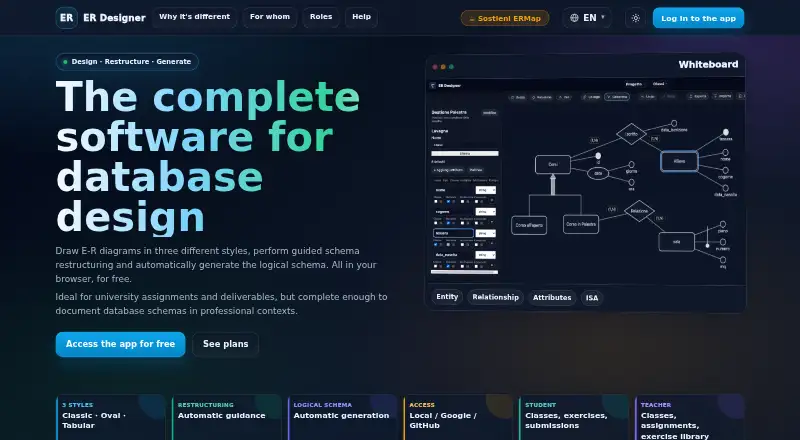
What ER Designer is
ER Designer is a web-based platform for building entity-relationship diagrams, restructuring database schemas, and generating logical schemas. The editor handles entities, attributes, keys, composite and multivalued attributes, relationships, and generalizations, with Classic, Oval, and Tabular diagram styles. A restructuring wizard points out issues such as missing keys, multivalued attributes, and ISA structures, then lays out proposed steps to address them. From a restructured diagram, the tool can generate tables, primary and foreign keys, and crow’s foot notation. Diagram files can be imported and exported as JSON, with PDF and PNG export also available. ER Designer includes classroom workflows: teachers can create classes, assign exercises with attachments, monitor submissions, and review student projects in read-only mode. Students join with a code or invitation, access assigned work, and submit exercises. The site also offers an anonymous whiteboard, while saving projects on the server requires signing in. Sign-in options include email and password, Google, or GitHub OAuth. Student and Teacher plans are free; the Institute / Department plan has a price on request and includes multiple teachers, centralized user management, and dedicated onboarding. Teacher access requires a profile request in account settings that an administrator reviews. The site identifies Di Menna Riccardo as the creator and invites bug reports and suggestions through a feedback form.
Who it suits
ER Designer can suit teachers and students working through database design exercises, as well as independent users and business database design teams. Its diagram editor and guided restructuring also support people who need to turn a diagram into a logical schema.
What it does well
- Supports three diagram styles and a broad set of ER elements.
- Guides users through common schema restructuring issues.
- Generates tables, primary and foreign keys, and crow’s foot notation.
- Imports and exports JSON; exports PDF and PNG.
- Includes class, assignment, and submission workflows for teachers and students.
What to know first
- Saving projects on the server requires signing in.
- Teacher access requires an administrator-reviewed profile request.
- The Institute / Department plan has a price on request.
- It does not offer reverse engineering, forward engineering, or SQL export.
Limits
The Student and Teacher plans are free. Anonymous whiteboards do not save projects on the server; saving requires sign-in, and teacher access requires administrator review of a profile request.
Plans
| Plan | Billed and limits | Price |
|---|---|---|
| Student | Access teacher's classes · Full editor · Exercise submission | Free |
| Teacher | Create and manage classes · Assign work with attachments · Monitor submissions and progress | Free |
| Institute / Department | Price on request · Multiple teachers · Centralized user management · Dedicated onboarding | On request |
As ermap.io lists them, read 10 Oct 2026. The maker's own page has the final word.
Getting started
- Visit https://ermap.io/.
- Open an anonymous whiteboard or sign in with email and password, Google, or GitHub.
- Sign in to save projects on the server.
- Use the Student plan to access a teacher’s classes, the full editor, and exercise submission, or the Teacher plan to create and manage classes.
- Request teacher access through the profile request in account settings and wait for administrator review.
- Ask about the Institute / Department plan for multiple teachers, centralized user management, and dedicated onboarding.
Verdict
Choose ER Designer if you need browser-based ER diagramming with guided schema restructuring or classroom assignment tools. Its free Student and Teacher plans make those workflows available without a listed charge. Look elsewhere if you require reverse or forward engineering or SQL export.
Questions
Does ER Designer have a free plan?
Yes. The Student and Teacher plans are each free.
What does the Student plan include?
It provides access to a teacher’s classes, the full editor, and exercise submission.
What does the Teacher plan include?
Teachers can create and manage classes, assign work with attachments, and monitor submissions and progress.
What platforms does ER Designer support?
It is a web application.
Can I use it without signing in?
The site allows an anonymous whiteboard, but saving projects on the server requires signing in. Sign-in is available with email and password or Google or GitHub OAuth.
Is there an Institute / Department plan?
Yes. Its price is on request, and it includes multiple teachers, centralized user management, and dedicated onboarding.
Facts from ER Designer's own pages
- Anonymous use
- The site says users can open an anonymous whiteboard, but signing in is required to save projects on the server. · ermap.io, 10 Oct 2026
- Diagram elements
- The editor supports entities, attributes, keys, composite and multivalued attributes, relationships and generalizations. · ermap.io, 10 Oct 2026
- Diagram styles
- It offers Classic, Oval and Tabular diagram styles. · ermap.io, 10 Oct 2026
- Guided restructuring
- A wizard highlights issues such as missing keys, multivalued attributes and ISA structures, then proposes step-by-step solutions. · ermap.io, 10 Oct 2026
- Import and export
- Users can import and export diagrams as JSON and export diagrams as PDF or PNG. · ermap.io, 10 Oct 2026
- Integrations and login
- Users can sign in with email and password or through Google or GitHub OAuth. · ermap.io, 10 Oct 2026
- Intended users
- The site describes the tool for teachers, students, independent users and business database design teams. · ermap.io, 10 Oct 2026
- Logical schema
- It can generate tables, primary keys, foreign keys and crow's foot notation from a restructured diagram. · ermap.io, 10 Oct 2026
- Maker
- The site identifies Di Menna Riccardo as the software's creator. · ermap.io, 10 Oct 2026
- Purpose
- ER Designer is a browser-based platform for creating ER diagrams, restructuring database schemas and generating logical schemas. · ermap.io, 10 Oct 2026
- Role activation
- Teacher access requires a profile request in account settings that is reviewed by an administrator. · ermap.io, 10 Oct 2026
- Student workflow
- Students can join classes with a code or invitation, access assigned work and submit exercises. · ermap.io, 10 Oct 2026
- Support
- The help page invites bug reports and improvement suggestions through a feedback form. · ermap.io, 10 Oct 2026
- Teaching tools
- Teachers can create classes, assign exercises with attachments, monitor submissions and review student projects read-only. · ermap.io, 10 Oct 2026
Where ER Designer stands on Freedom251
- Database Design Tools#14 of 35