Freedom251 › AI Video Upscalers
Enhancers AI
What Enhancers AI is
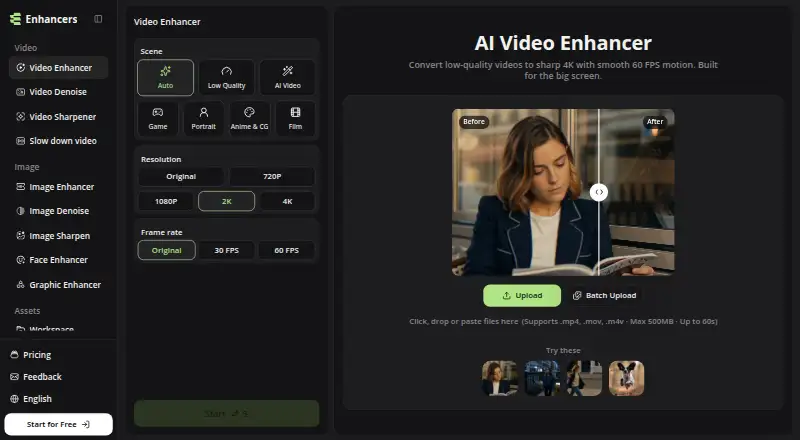
Enhancers AI provides browser-based tools to improve images and videos with AI. Its video enhancer can upscale clips to 4K, interpolate motion to 60 FPS and reduce noise in one workflow. The upload panel accepts MP4, MOV and M4V videos up to 500 MB and 60 seconds. Video modes include Auto, Low Quality, AI, Video Game, Portrait, Anime & CG, and Film; enhanced video downloads have no watermark. Image tools include enhancement up to 8K, face and graphic enhancement, denoising and sharpening. Signup provides 10 free credits without a credit card. Paid plans are Plus at $7.99 a month, Pro at $11.99 a month, and Professional at $29.99 a month. Each lists annual credit totals, 2K/4K video at 60 FPS, 2×/4× image enhancement, bulk processing and unlimited storage. The service describes use for preparing footage for a 4K timeline, reusing talking-head clips and restoring old tapes. Its privacy policy says uploaded content may be sent to service providers and stored in account history.
Who it suits
It suits video editors and creators who want browser-based enhancement, 4K output or motion interpolation. Its image tools and stated restoration use case may also suit people working with older footage and images.
What it does well
- Upscales video to 4K and interpolates motion to 60 FPS.
- Accepts MP4, MOV and M4V video files.
- Image enhancement supports output up to 8K.
- Signup includes 10 free credits without a credit card.
- Enhanced video downloads have no watermark.
What to know first
- Uploads are limited to 500 MB and 60 seconds.
- Subscription plans renew automatically unless cancelled before renewal.
- Uploaded content may be stored in account history.
Limits
The homepage upload panel accepts videos up to 500 MB and 60 seconds. Signup provides 10 free credits; paid plans list annual credit totals of 5,040, 8,400, or 25,200 credits.
Plans
| Plan | Billed and limits | Price |
|---|---|---|
| Pro | $11.99/mo; $143.88/year billed annually · 8,400 credits per year · 2K/4K video at 60 FPS · 2×/4× image enhancement · bulk processing · unlimited storage | $11.99 a month |
| Professional | $29.99/mo; $359.88/year billed annually · 25,200 credits per year · 2K/4K video at 60 FPS · 2×/4× image enhancement · bulk processing · unlimited storage | $29.99 a month |
| Plus | $7.99/mo; $95.88/year billed annually · 5,040 credits per year · 2K/4K video at 60 FPS · 2×/4× image enhancement · bulk processing · unlimited storage | $7.99 a month |
As enhancers.ai lists them, read 8 Oct 2026. The maker's own page has the final word.
Getting started
- Open https://www.enhancers.ai/ in a browser
- Sign up to receive 10 free credits without a credit card
- Upload an MP4, MOV, or M4V video up to 500 MB and 60 seconds, or use the image tools
- Choose an enhancement mode or image operation
- Process the file and download the enhanced video without a watermark
- Select Plus, Pro, or Professional if you need a paid plan
Verdict
Enhancers AI offers video and image tools, with 10 free signup credits and paid plans. Review the upload limits and subscription renewal terms, and note that uploaded content may be handled by service providers or stored in account history.
Questions
Does Enhancers AI have a free option?
Yes. Signup provides 10 free credits, and no credit card is required.
What platforms does Enhancers AI support?
It is available on the web through a browser.
What video formats can I upload?
The upload panel supports MP4, MOV, and M4V files.
How much do the paid plans cost?
Plus is $7.99 a month, Pro is $11.99 a month, and Professional is $29.99 a month. Annual billing amounts are also listed for each plan.
Are enhanced videos watermarked?
The site says enhanced video downloads have no watermark.
Facts from Enhancers AI's own pages
- Data handling
- The privacy policy says uploaded content may be sent to infrastructure, model, storage, or moderation providers and may be stored in account history. · enhancers.ai, 8 Oct 2026
- Exports
- The site says enhanced video downloads have no watermark. · enhancers.ai, 8 Oct 2026
- Free credits
- The homepage says signup provides 10 free credits without requiring a credit card. · enhancers.ai, 8 Oct 2026
- Image tools
- Image tools include image enhancement up to 8K, face enhancement, graphic enhancement, image denoising, and sharpening. · enhancers.ai, 8 Oct 2026
- Integrations
- The terms state the service may integrate with third parties for authentication, payments, storage, analytics, model execution, moderation, email, and customer support. · enhancers.ai, 8 Oct 2026
- Payment data
- The privacy policy says payment card details are handled by payment processors and are not stored directly by EnhancersAI. · enhancers.ai, 8 Oct 2026
- Product
- Enhancers AI provides browser based tools to upscale and enhance images and videos with AI. · enhancers.ai, 8 Oct 2026
- Security
- The privacy policy says the service uses administrative, technical, and organizational safeguards and does not guarantee absolute security. · enhancers.ai, 8 Oct 2026
- Subscription terms
- The terms say subscriptions renew automatically unless cancelled before renewal and payments are generally non-refundable except where law or express terms require otherwise. · enhancers.ai, 8 Oct 2026
- Support
- For privacy requests, the policy directs users to contact EnhancersAI support through the product or website contact channel. · enhancers.ai, 8 Oct 2026
- Typical users
- The site describes use cases including editors matching footage to a 4K timeline, creators reusing talking head clips, and people restoring old tapes. · enhancers.ai, 8 Oct 2026
- Video enhancement
- The video enhancer can upscale clips to 4K, interpolate motion to 60 FPS, and reduce noise in one workflow. · enhancers.ai, 8 Oct 2026
- Video upload limits
- The homepage upload panel supports MP4, MOV, and M4V files up to 500 MB and 60 seconds. · enhancers.ai, 8 Oct 2026
Where Enhancers AI stands on Freedom251
- AI Video Upscalers#12 of 32