Freedom251 › Video Upscaling Software
REAL Video Enhancer
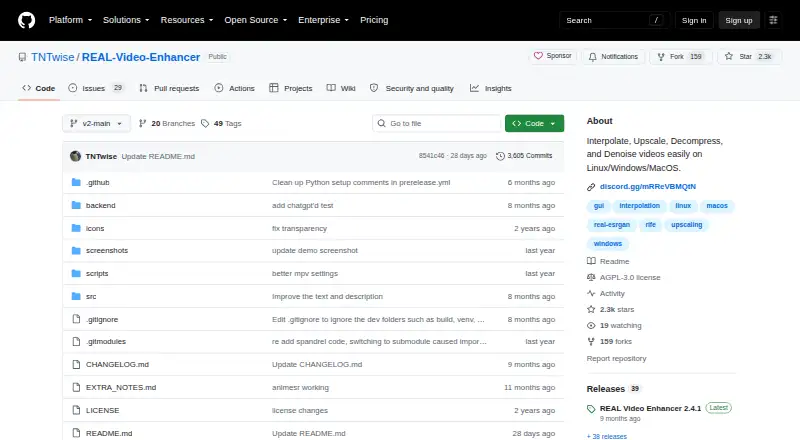
What REAL Video Enhancer is
REAL Video Enhancer is a free application for video frame interpolation, upscaling, decompression, and denoising on Windows, Linux, and macOS. It supports batch processing. Interpolation models include RIFE, GMFSS, and IFRNet, with a 24-to-48-FPS example; upscaling options include SPAN, OpenProteus, AnimeJaNai, AniSD, and AnimeSR. DeH264 is listed for decompression, while DRUnet and DnCNN are available for denoising. Scene-change detection helps preserve sharp transitions, and the app previews the latest rendered frame.
Compute options include TensorRT for NVIDIA RTX GPUs, PyTorch for CUDA 12.6- or ROCm 6.2-capable GPUs, and NCNN for Vulkan 1.3-capable GPUs. Listed minimums include a dual-core x64 CPU, Vulkan 1.3-capable GPU, and 16 GB RAM; NCNN additionally requires 4 GB VRAM and 1 GB free storage. TensorRT optimization can fail with limited VRAM, for which CUDA or NCNN are suggested alternatives. The project is AGPL-3.0 licensed and links to Discord and GitHub issue support. It warns that the Windows binary may be detected as a trojan due to a PyInstaller false positive. Steam offers a $2.99 one-time donation DLC with no content that requires the base Steam application.
Who it suits
REAL Video Enhancer suits people who want batch video processing for interpolation, upscaling, decompression, or denoising, and have compatible hardware. Its compute backend requirements and stated memory minimums are important to review before choosing it.
What it does well
- Free application with batch processing.
- Supports interpolation, upscaling, decompression, and denoising.
- Includes scene-change detection and rendered-frame previews.
- Offers TensorRT, PyTorch, and NCNN compute options.
- Available for Windows, Linux, and macOS.
What to know first
- Lists a 16 GB RAM minimum.
- NCNN requires 4 GB VRAM and 1 GB free storage.
- TensorRT optimization can fail with limited VRAM.
- Windows binary may be flagged as a trojan.
Plans
| Plan | Billed and limits | Price |
|---|---|---|
| REAL Video Enhancer | Free video enhancement application; optional $2.99 Steam donation DLC contains no additional content | Free |
| Steam donation DLC | $2.99 one-time purchase · Donation to support development; requires the base Steam application and contains no content | $2.99, paid once |
As github.com lists them, read 5 Oct 2026. The maker's own page has the final word.
Getting started
- Open the REAL Video Enhancer project website on GitHub.
- Choose the version for Windows, Linux, or macOS.
- Check that your CPU, GPU, RAM, and storage meet the requirements for the processing backend you plan to use.
- Select a processing backend and model for interpolation, upscaling, decompression, or denoising.
- Use the app's latest-frame preview while processing.
Overview
REAL Video Enhancer is a free desktop application for interpolating, upscaling, decompressing, and denoising video on Windows, Linux, and macOS. It best suits users who want several AI processing jobs and model choices in one batch-capable tool, provided their computer meets the demanding memory and GPU requirements. Its broad feature set is compelling, but hardware compatibility and the project’s Windows detection warning should influence the decision.
Key features
Frame interpolation can turn 24 FPS footage into 48 FPS, with RIFE, GMFSS, and IFRNet models to choose from. That makes the app useful for users seeking smoother motion rather than simply a larger image, while the model selection offers alternatives when one approach does not suit a particular source.
Upscaling covers several models, including SPAN, OpenProteus, AnimeJaNai, AniSD, and AnimeSR. This range is particularly relevant to users working with animation or low-resolution material who want to compare model styles. DeH264 decompression addresses compressed footage, and DRUnet and DnCNN provide denoising, so the application can handle restoration tasks alongside enlargement and frame-rate conversion.
Scene-change detection is intended to keep sharp cuts intact during interpolation. The latest rendered frame is previewed while processing, which helps users monitor recent output instead of waiting without visual feedback. Batch processing and AI enhancement are supported, making it better suited to repeated queues than to a single occasional conversion.
GPU backends determine what hardware can be used. TensorRT targets NVIDIA RTX GPUs, PyTorch supports GPUs capable of CUDA 12.6 or ROCm 6.2, and NCNN works with Vulkan 1.3-capable GPUs. TensorRT optimization can fail when VRAM is limited; the project recommends CUDA or NCNN in that situation. Discord Rich Presence works with the Discord system package and Discord Flatpak, a minor convenience for users who want processing activity reflected in Discord.
Pricing
The REAL Video Enhancer application costs free, with no free trial because the application itself is free. There are no paid feature tiers or usage quotas stated for the base plan, so it fits users who want unrestricted desktop processing without a subscription.
Steam also sells a $2.99 one-time donation DLC. It requires the base Steam application and contains no content, so it contributes to development rather than adding capabilities. Paying for it makes sense only as optional support; it does not expand what the free application does.
Platforms
REAL Video Enhancer runs on Windows, Linux, and macOS. Minimum requirements include a dual-core x64 CPU, a Vulkan 1.3-capable GPU, 16 GB of RAM, 4 GB of VRAM for NCNN, and 1 GB of free storage for NCNN. These requirements make it a poor fit for older integrated-graphics systems or machines with limited memory. Windows users should also account for the project’s warning that its binary may be detected as a trojan because of a PyInstaller false positive.
Who it's for
Choose it if you need interpolation, upscaling, decompression, and denoising in one free desktop workflow, especially when batch queues and multiple AI models matter. It is also a practical option for technically minded users who can match a supported CUDA, ROCm, TensorRT, or Vulkan backend and select an alternative backend when TensorRT runs short of VRAM.
Look elsewhere if you need a lightweight tool for modest hardware, a cloud workflow, mobile support, or a paid product with a conventional security-distribution process. The AGPL-3.0 license and community support through Discord and GitHub issues will appeal to open-source users, but may feel less suitable to people seeking vendor-style support.
Pros and cons
Pros
- Four processing jobs in one app: interpolation, upscaling, decompression, and denoising reduce the need to assemble separate tools.
- Many model choices: RIFE, GMFSS, IFRNet, SPAN, OpenProteus, AnimeJaNai, AniSD, AnimeSR, DRUnet, and DnCNN cover varied footage and restoration goals.
- Batch processing: useful for queues of clips rather than one-off edits.
- Free desktop access: the base application has no subscription or stated usage cap.
Cons
- Substantial hardware floor: 16 GB RAM, Vulkan 1.3 graphics, and NCNN’s 4 GB VRAM requirement exclude many low-powered computers.
- Backend caveat: TensorRT may fail with limited VRAM, requiring CUDA or NCNN instead.
- Windows warning: the possible PyInstaller false positive can complicate installation and trust decisions.
- Donation DLC adds nothing: the $2.99 Steam purchase supports development but contains no content.
Alternatives
For a broader comparison, see Video Upscaling Software and AI Video Upscalers. Real-ESRGAN is a free, open-source option spanning desktop, self-hosted, and web environments. Media.io AI Video Upscaler is better when you prefer web and mobile access, though its free trial is limited to three daily check-in credits, one video, 720p exports, a watermark, and 1 GB of cloud storage.
NextGenUp suits users wanting a completely free, open-source MIT-licensed tool with no subscription or watermark. Real-CUGAN is another free open-source choice with downloadable packages and no stated paid tiers or usage limits. Remaker AI fits buyers who prefer credit purchases, starting at $5.99 for 200 credits, while Anime4K focuses on open-source real-time anime upscaling and denoising. Vmake Labs offers a web-oriented free tier with 20 daily credits and 720p output. YouCam Perfect is a mobile alternative with free tools and templates, with advanced AI features and usage limits tied to Premium.
Verdict
REAL Video Enhancer is a strong choice for technically capable users who want a free, multi-purpose batch processor with extensive AI model selection across three desktop platforms. Choose it for breadth and control; look elsewhere if your hardware is modest, you need mobile or cloud convenience, or the Windows binary warning is unacceptable.
Verdict
REAL Video Enhancer offers several video-processing functions and batch processing across three desktop platforms. Check the listed hardware requirements and note the project’s warning about possible Windows binary detection.
Questions
How much does REAL Video Enhancer cost?
The application is free. Steam offers a separate $2.99 one-time donation DLC that requires the base Steam application and contains no content.
Which platforms does it support?
It supports Windows, Linux, and macOS.
What can it do to video?
It provides frame interpolation, upscaling, decompression, and denoising, and supports batch processing.
What license does it use?
The repository identifies the license as AGPL-3.0.
What hardware does it require?
Listed minimums include a dual-core x64 CPU, a Vulkan 1.3-capable GPU, and 16 GB RAM. NCNN also requires 4 GB VRAM and 1 GB free storage.
Where can users get support?
The project links to a Discord community and offers support through GitHub issues.
Facts from REAL Video Enhancer's own pages
- Compute backends
- TensorRT supports NVIDIA RTX GPUs, PyTorch supports CUDA 12.6 and ROCm 6.2 capable GPUs, and NCNN supports Vulkan 1.3 capable GPUs. · github.com, 5 Oct 2026
- Frame interpolation
- The README describes interpolation such as converting video from 24 to 48 FPS and lists RIFE, GMFSS, and IFRNet models. · github.com, 5 Oct 2026
- Hardware requirements
- The README gives minimum requirements of a dual-core x64 CPU, Vulkan 1.3-capable GPU, 4 GB VRAM for NCNN, 16 GB RAM, and 1 GB free storage for NCNN. · github.com, 5 Oct 2026
- Integration
- Discord Rich Presence is supported for the Discord system package and Discord Flatpak. · github.com, 5 Oct 2026
- Known constraint
- The README says TensorRT optimization can fail with limited VRAM and suggests using CUDA or NCNN instead. · github.com, 5 Oct 2026
- License
- The repository identifies its license as AGPL-3.0. · github.com, 5 Oct 2026
- Other processing
- The project lists DeH264 decompression and DRUnet and DnCNN denoising models. · github.com, 5 Oct 2026
- Platforms
- The project documents Windows, Linux, and macOS support, including Ubuntu 22.04+ and macOS 15+ ARM or x86 builds. · github.com, 5 Oct 2026
- Purpose
- REAL Video Enhancer provides video frame interpolation, upscaling, decompression, and denoising. · github.com, 5 Oct 2026
- Scene handling
- Scene change detection is included to preserve sharp transitions, and the app previews the latest rendered frame. · github.com, 5 Oct 2026
- Security notice
- The project warns that the Windows binary may be detected as a trojan and attributes this to a PyInstaller false positive. · github.com, 5 Oct 2026
- Steam purchase
- Steam lists a $2.99 donation DLC that contains no content and requires the base REAL Video Enhancer application. · store.steampowered.com, 5 Oct 2026
- Support
- The project links to a Discord community and offers support through GitHub issues. · github.com, 5 Oct 2026
- Upscaling
- The README lists multiple upscaling models, including SPAN, OpenProteus, AnimeJaNai, AniSD, and AnimeSR. · github.com, 5 Oct 2026
Where REAL Video Enhancer stands on Freedom251
- Video Upscaling Software#15 of 40
- AI Video Upscalers#14 of 32