EM-DOSBox
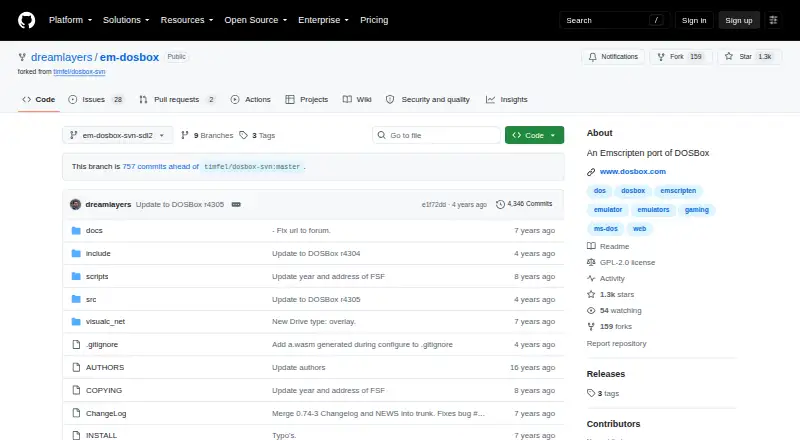
What EM-DOSBox is
EM-DOSBox is a DOSBox version that can be compiled with Emscripten to run DOS games and other DOS programs in a web browser. Its listed host platform is the web, and it supports ISO, CUE/BIN, CUE/IMG, floppy and hard-drive disk images, as well as gamepads and audio CDs. The project says most games run successfully, though some programs can encounter paging exceptions.
A build produces dosbox.js and a basic dosbox.html interface; it also produces dosbox.wasm when WebAssembly is enabled. Asyncify is on by default, allowing more DOSBox features to work, including interactive file loading, with a small performance cost. Packager tools can create web pages that load DOS files into the emulator’s file system and pass command-line arguments to start a selected game or program. A packaged dosbox.conf can adjust emulator speed, audio and graphics settings.
Pages need to be served through a web server because most browsers block access to other files opened through file:// URLs. Building requires a recent stable Emscripten version, a Unix-like environment and GNU Autotools; the packager tools require Python 3. Game saves go into an in-memory file system by default and disappear when the page closes. EM-DOSBox is free, source available, and distributed under the GNU General Public License; its repository includes a GPL version 2 license file.
Who it suits
EM-DOSBox suits people who want to run DOS games or programs in a browser and can build or package the emulator for web serving. It may also fit projects that need to load DOS files, launch a chosen program, or adjust emulator settings through a configuration file.
What it does well
- Runs DOS games and programs in a web browser.
- Supports ISO, CUE/BIN, CUE/IMG, floppy and hard-drive images.
- Gamepad and audio CD support are listed.
- Packager tools can load DOS files and launch a chosen program.
- Configuration can adjust speed, audio and graphics.
What to know first
- Saved games disappear when the web page closes by default.
- Building requires a Unix-like environment; Windows builds are unsupported.
- A few programs can encounter paging exceptions.
Limits
Saved games go into an in-memory Emscripten file system by default and are lost when the page closes. Some DOS programs can encounter paging exceptions.
Getting started
- Open the EM-DOSBox project website.
- Install a recent stable Emscripten version in a Unix-like environment with GNU Autotools.
- Use Python 3 for the included packager tools.
- Build the browser files and package DOS files and any configuration you need.
- Serve the resulting page through a web server, then load it in a browser.
Verdict
Choose EM-DOSBox if you want a free, source-available route to running DOS software in a browser and can serve a packaged page. Look elsewhere if you need saves to persist after closing the page or require a supported Windows build environment.
Questions
What does EM-DOSBox do?
It is a DOSBox version that can be compiled with Emscripten to run DOS games and other DOS programs in a web browser.
Is EM-DOSBox free?
Yes. It is listed as free, and the repository says DOSBox is distributed under the GNU General Public License and includes a GPL version 2 license file.
Which disk image formats does it support?
Listed formats are ISO, CUE/BIN, CUE/IMG, floppy images and hard-drive images.
Can I save game progress?
Saves go into an in-memory file system by default and are lost when the web page closes.
What is needed to build it?
A recent stable Emscripten version and a Unix-like environment with GNU Autotools are required. The packager tools require Python 3, and Windows builds are unsupported.
Who is credited with the Emscripten port?
The README credits Boris Gjenero with getting the Emscripten port working, fixing issues and improving performance.
Facts from EM-DOSBox's own pages
- Asyncify
- Asyncify is enabled by default to make more DOSBox features work, with what the project describes as a very small performance penalty. · github.com, 4 Oct 2026
- Browser features
- With Asyncify enabled, users can interactively load files into DOSBox. · github.com, 5 Oct 2026
- Browser serving
- The README says to serve the page over a web server because most browsers prevent access to required files through file:// URLs. · github.com, 5 Oct 2026
- Build limitation
- Compiling in Windows is not supported because the build process requires a Unix-like environment and GNU Autotools. · github.com, 5 Oct 2026
- Build output
- The build creates dosbox.js and, when WebAssembly is enabled, dosbox.wasm, along with a simple HTML interface. · github.com, 5 Oct 2026
- Compatibility
- The project says most games run successfully in web browsers, though a few programs can have problems due to paging exceptions. · github.com, 5 Oct 2026
- Configuration
- A dosbox.conf file can be included in a package to change emulator speed, audio, or graphics settings. · github.com, 4 Oct 2026
- Creator credit
- The README credits Boris Gjenero with getting the Emscripten port working, fixing issues, and improving performance. · github.com, 4 Oct 2026
- Credits
- The project credits Boris Gjenero with getting DOSBox working through Emscripten and improving its performance for browser use. · github.com, 5 Oct 2026
- Customization
- A packaged DOSBox configuration file can change speed, audio, or graphics settings. · github.com, 5 Oct 2026
- Dependencies
- Building requires a recent stable Emscripten version, and the packager tools require Python 3. · github.com, 5 Oct 2026
- License
- The repository identifies DOSBox as distributed under the GNU General Public License and links to its GPL-2.0 license file. · github.com, 5 Oct 2026
- Loading programs
- The included packager tools can create web pages that load DOS files into the Emscripten file system and pass command-line arguments to DOSBox. · github.com, 4 Oct 2026
- Packaging
- The included packager tools can create web pages that load DOS files and launch a specified game or program. · github.com, 5 Oct 2026
- Purpose
- EM-DOSBox is a DOSBox version that can be compiled with Emscripten to run DOS games and programs in a web browser. · github.com, 5 Oct 2026
- Save-file limitation
- Saved games go into an in-memory Emscripten file system by default and are lost when the web page is closed. · github.com, 4 Oct 2026
- Save files
- Game saves go into an in-memory Emscripten file system by default and are lost when the web page is closed. · github.com, 5 Oct 2026
- Status
- The project says it runs most games successfully in web browsers, though some programs can encounter paging exceptions. · github.com, 4 Oct 2026
Where EM-DOSBox stands on Freedom251
- MS-DOS Emulators#24 of 26