MS-DOS Player
What MS-DOS Player is
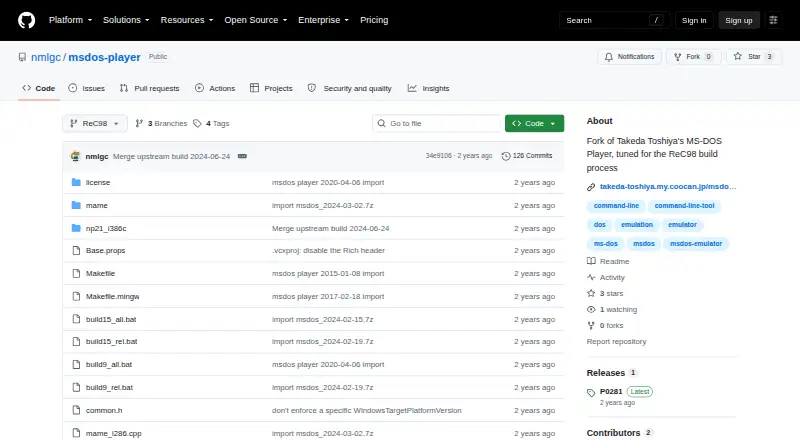
MS-DOS Player is a free command-line emulator for running 16-bit DOS-compatible commands in a Windows environment. It is aimed at text-mode tools such as file converters, compilers, assemblers, debuggers, and text editors. DOS programs can use Windows environment variables and access host file paths directly, so they can work with files on the Windows system. The project provides Windows binaries for several processor emulations, including 8086, 80286, 80386, 80486, Pentium 4, NEC V30, and IA32. Its documented hardware emulation includes 1 MB, 16 MB, or 32 MB of RAM, LIM EMS, serial and parallel I/O, keyboard and mouse input, timers, and text display. Virtual COM1–COM4 can connect to host COM ports, with serial speeds up to 9600 bps; parallel output is saved as a timestamped .PRN file in TEMP. A 16-bit command file can also be embedded in a 32-bit or 64-bit executable that runs without msdos.exe. The repository is a fork tuned for the ReC98 build process, and its source is available under GNU General Public License version 2. It does not emulate graphics or sound hardware, does not support games, and cannot run Win16 executables.
Who it suits
MS-DOS Player suits Windows users who need to run text-mode DOS utilities, including compilers, file converters, and debuggers. Developers working with the ReC98 build process may also find the fork’s stated focus relevant.
What it does well
- Free to use on Windows.
- DOS programs can access host Windows paths and environment variables.
- Offers several processor emulation choices.
- Can embed a DOS command file in a standalone Windows executable.
- Source code is available under GNU General Public License version 2.
What to know first
- Does not support graphics or sound hardware or games.
- Cannot run Win16 executable files.
- Serial connections are limited to 9600 bps.
Limits
The emulator is limited to text display and does not support graphics or sound hardware, games, or Win16 executable files. Serial I/O supports speeds up to 9600 bps.
Plans
| Plan | Billed and limits | Price |
|---|---|---|
| MS-DOS Player | No price stated on the opened project page | Free |
As github.com lists them, read 9 Oct 2026. The maker's own page has the final word.
Getting started
- Open the project website on GitHub.
- Choose a Windows binary from the archive for the processor variant you need.
- Run the DOS-compatible command in the Windows environment.
Verdict
Choose MS-DOS Player if you need to run text-mode DOS commands on Windows or want to embed a command file in a Windows executable. Look elsewhere for games, graphics or sound hardware, or Win16 programs.
Questions
What does MS-DOS Player cost?
It is free.
Which platform does it support?
The listed host platform is Windows, with binaries for 32-bit and/or 64-bit Windows.
Can it run DOS games?
It does not support graphics or sound hardware and does not aim to support games.
Can it run Win16 executables?
No. Win16 executable files are unsupported.
Is the source code available?
Yes. The source is available under GNU General Public License version 2.
Can DOS programs access Windows files?
Yes. The emulator passes through host Windows environment variables and lets DOS programs access host file paths directly.
Facts from MS-DOS Player's own pages
- Build requirements
- The README lists Visual C++ 2008 with Service Pack 1 or Visual C++ 2017 as requirements for building the binaries. · github.com, 8 Oct 2026
- CPU choices
- The archive provides binaries emulating 8086, 80286, 80386, 80486, Pentium 4, NEC V30, and IA32 processors for Windows. · github.com, 8 Oct 2026
- CPU variants
- The archive includes binaries emulating 8086, 80286, 80386, 80486, Pentium 4, NEC V30, and IA32 processors. · github.com, 9 Oct 2026
- Debugger
- An internal developer debugger is included but disabled in the archive binaries; enabling it requires rebuilding, and it opens a telnet port. · github.com, 9 Oct 2026
- Executable conversion
- It can embed a 16-bit command file into a 32-bit or 64-bit executable that can run without msdos.exe. · github.com, 8 Oct 2026
- Fork purpose
- This repository is a fork of Takeda Toshiya's MS-DOS Player tuned for the ReC98 build process. · github.com, 8 Oct 2026
- Graphics and sound
- Graphics and sound hardware are not implemented, and the project says it does not aim to support games. · github.com, 9 Oct 2026
- Host access
- The emulator inherits host Windows environment variables and lets DOS programs access host file paths directly. · github.com, 8 Oct 2026
- Host file access
- The emulator inherits host Windows environment variables and lets DOS programs access host file paths directly. · github.com, 9 Oct 2026
- Intended workloads
- It aims to support text-interface utilities such as file converters, compilers, assemblers, debuggers, and text editors. · github.com, 9 Oct 2026
- License
- The source code is available under GNU General Public License version 2. · github.com, 8 Oct 2026
- Maker location
- The GitHub profile for nmlgc lists Germany as the account location. · github.com, 9 Oct 2026
- Memory and hardware
- The documented emulation includes up to 32 MB of RAM, LIM EMS, serial and parallel I/O, keyboard, mouse, timers, and text display hardware. · github.com, 8 Oct 2026
- Memory and peripherals
- The documented emulation includes 1 MB, 16 MB, or 32 MB RAM, up to 32 MB LIM EMS, serial and parallel I/O, and a two-button mouse. · github.com, 9 Oct 2026
- Print output
- Parallel-port output is written to a timestamped .PRN file in the TEMP directory. · github.com, 9 Oct 2026
- Purpose
- MS-DOS Player is a command-line MS-DOS emulator for 32-bit and 64-bit Windows. · github.com, 9 Oct 2026
- Release note
- The P0281 release says the fork focuses on optimizations and that later upstream versions were not merged because they counteract those optimizations. · github.com, 8 Oct 2026
- Serial integration
- Virtual COM1–COM4 can connect to host COM ports, with optional DTR/DSR and RTS/CTS flow control. · github.com, 9 Oct 2026
- Serial I/O
- Serial I/O can connect virtual COM1–COM4 to host COM ports, with a maximum baud rate of 9600 bps. · github.com, 8 Oct 2026
- Standalone conversion
- A 16-bit command file can be embedded into a generated 32-bit or 64-bit executable that runs without msdos.exe. · github.com, 9 Oct 2026
- Supported Windows versions
- The listed binaries support 32-bit and/or 64-bit Windows, with x64-only variants also provided. · github.com, 9 Oct 2026
- Target workloads
- It is aimed at text-mode utilities such as file converters, compilers, assemblers, debuggers, and text editors. · github.com, 8 Oct 2026
- Win16 limitation
- The emulator does not support Win16 executable files. · github.com, 9 Oct 2026
Where MS-DOS Player stands on Freedom251
- MS-DOS Emulators#21 of 26