Freedom251 › Database Vulnerability Scanners
Unity
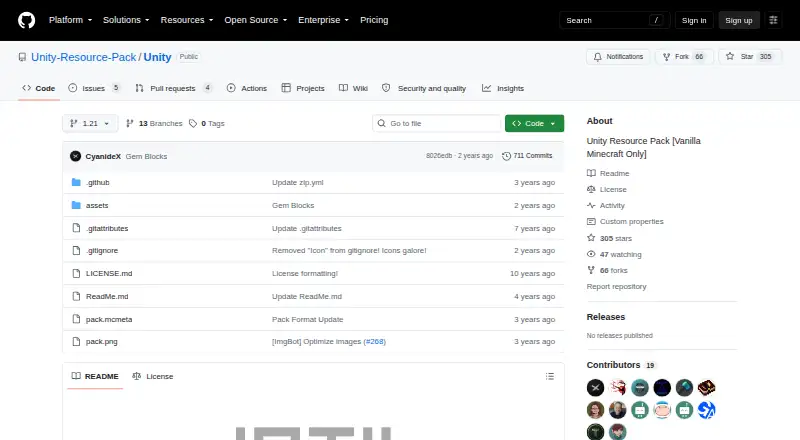
What Unity is
Unity is a free resource pack for Minecraft Java Edition, described as intended for vanilla Minecraft. It retains Minecraft’s traditional aesthetic while adding subtle depth and more natural colors. Its listed supported version is 1.21. Since release 2.0.0 for Minecraft 1.14.4, the pack’s vanilla support, mod support, shader texture maps, and OptiFine random entities and CTM are offered as separate downloads. For mod support, the maker’s GitHub profile points to the related Unity-Modded pack; shader users are directed to Unity PBR. The repository README directs users to builds in its artifacts list, and it also describes downloading the repository as a ZIP and unpacking it into `.minecraft/resourcepacks`. The README points to the branches section for older, deprecated versions. It offers a Photoshop template with samples and texturing details, while the project page directs users to GitHub to submit suggestions. People with questions are directed to message the maker on Twitter at @theCyanideX. The README mentions a planned, slow-paced update for Minecraft 1.18, and CurseForge lists files for Minecraft versions 1.17 through 1.19.4.
Who it suits
Unity suits Minecraft Java Edition players looking for a vanilla resource pack that preserves the game’s traditional aesthetic while adding subtle depth and more natural colors. Players seeking mod textures can look to the related Unity-Modded pack, while shader texture maps are a separate download.
What it does well
- Free plan for Minecraft Java Edition.
- Adds subtle depth and more natural colors.
- Separates vanilla and mod support into different downloads.
- Offers shader texture maps and OptiFine options as separate downloads.
- Includes a Photoshop texturing template with samples.
What to know first
- Its stated scope is vanilla Minecraft; mod support is a separate pack.
- Shader texture maps and OptiFine options require separate downloads.
- Older versions are described as deprecated.
Limits
The pack is described as vanilla Minecraft; mod support, shader texture maps, and OptiFine random entities and CTM are separate downloads. The README mentions a planned update for Minecraft 1.18 at a slow pace, while the listed supported version is 1.21.
Getting started
- Open the Unity GitHub repository.
- Choose an available build from the repository’s artifacts list, or download the repository as a ZIP.
- Place the downloaded pack in `.minecraft/resourcepacks`, or unzip the repository ZIP into that folder.
- Choose separate downloads if you need mod support, shader texture maps, or OptiFine random entities and CTM.
Verdict
Choose Unity if you want a free Java Edition resource pack that keeps Minecraft’s traditional look while adding subtle visual changes. Look elsewhere or to the related Unity-Modded pack if you need mod textures in the same download; shader maps and OptiFine options are also separate.
Questions
How much does Unity cost?
Unity is free and has a free plan.
Which Minecraft edition and version does it support?
The supported edition is Java, and the listed supported version is 1.21. CurseForge lists files for versions 1.17 through 1.19.4.
How do I install Unity?
Download a build from the repository’s artifacts list or download the repository as a ZIP. Place the pack or unzip the archive into `.minecraft/resourcepacks`.
Does Unity include mod and shader support?
Vanilla support, mod support, shader texture maps, and OptiFine random entities and CTM are separate downloads. The maker’s GitHub profile points to Unity-Modded for mod support and Unity PBR for shaders.
Where can I get help or submit a suggestion?
The README directs questions to the maker on Twitter at @theCyanideX. The project page directs suggestions to GitHub.
Facts from Unity's own pages
- Alternative install
- The README also describes downloading the repository as a ZIP and unzipping it into `.minecraft/resourcepacks`. · github.com, 8 Oct 2026
- Creator resource
- The README offers a Photoshop template with samples and details for texturing for Unity. · github.com, 8 Oct 2026
- Download
- The repository README directs users to download available builds from its artifacts list. · github.com, 8 Oct 2026
- Install
- Downloaded resource packs can be placed in the `.minecraft/resourcepacks` folder. · github.com, 8 Oct 2026
- Minecraft versions
- CurseForge lists files for Minecraft versions 1.17 through 1.19.4. · curseforge.com, 8 Oct 2026
- Mod textures
- Mod textures use the vanilla pack as a base and are designed to keep each mod’s original style distinctive. · curseforge.com, 8 Oct 2026
- Modular editions
- Since release 2.0.0 for Minecraft 1.14.4, vanilla support, mod support, shader texture maps, and OptiFine random entities and CTM are separate downloads. · curseforge.com, 8 Oct 2026
- Older versions
- The README directs users to the branches section for older, deprecated versions. · github.com, 8 Oct 2026
- PBR
- The maker’s page points to Unity PBR for use with shaders. · curseforge.com, 8 Oct 2026
- Product
- Unity is a Minecraft resource pack described as vanilla Minecraft only. · github.com, 8 Oct 2026
- Related pack
- The maker's GitHub profile describes Unity-Modded as providing mod support for the Unity resource pack. · github.com, 8 Oct 2026
- Suggestions
- The project page directs users to GitHub to submit suggestions. · curseforge.com, 8 Oct 2026
- Support
- The README asks users with questions to message the maker on Twitter at @theCyanideX. · github.com, 8 Oct 2026
- Support contact
- The GitHub README asks users with questions to message the maker on Twitter at @theCyanideX. · github.com, 8 Oct 2026
- Updates
- The README says the maker planned to update the pack for Minecraft 1.18 at a slow pace. · github.com, 8 Oct 2026
- Visual style
- The pack keeps Minecraft’s traditional aesthetic while adding subtle depth and more natural colors. · curseforge.com, 8 Oct 2026
Where Unity stands on Freedom251
- Database Vulnerability Scanners#13 of 27
- Game Map Generators#19 of 27
- TurboGrafx-16 Emulators#26 of 33
- Game Narrative Design Software#20 of 25
- Game Asset Extractors#22 of 24
- Game Mod Loaders#24 of 26
- Minecraft Resource Packs#16 of 17
- Minecraft Map Repositories#24 of 25
- MS-DOS Emulators#25 of 26