Freedom251 › Game Boy Advance Emulators

Eclipse
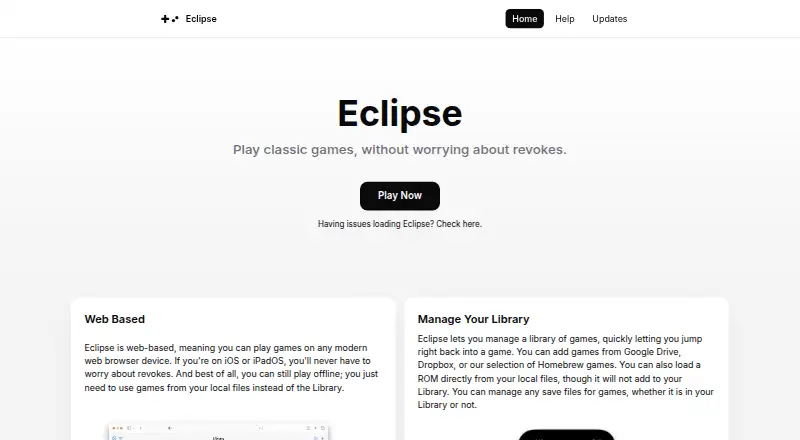
What Eclipse is
Eclipse is a web-based emulator for playing games from classic systems. It supports Game Boy, Game Boy Color, Game Boy Advance, NES, SNES, Sega Master System and Sega Game Gear. Users can add games from Google Drive, Dropbox or the Homebrew selection, or load ROMs from local files. The interface supports touch, keyboard and controllers, with editable default bindings; controller support depends on the JavaScript Gamepad API and operating system.
After the site has been cached, uploaded local games can be played offline, though some features, including the Library, are disabled. Save behavior varies: NES games do not save, SNES and GB/GBC games should save, and GBA has some incompatibilities. The GBA core lacks Real Time Clock support, and most GBA games with auto-save are unsupported. Eclipse has no multiplayer features, including Pokémon trading. User data is stored locally on the device. The developer says it does not track users itself, while Cloudflare collects basic anonymous browser or operating system data for analytics. Eclipse is available on Android, iOS and web and has a free plan.
Who it suits
Eclipse suits people who want to play games from its supported classic systems on Android, iOS or the web. It may fit users comfortable loading games from local files or linked cloud libraries and playing without multiplayer features.
What it does well
- Supports seven classic gaming systems.
- Games can be loaded from local files or linked libraries.
- Touch, keyboard and controller input are supported.
- Cached local games can be played offline.
- User data is stored locally on the device.
What to know first
- NES games do not save.
- Most GBA games with auto-save are unsupported.
- No multiplayer features, including Pokémon trading.
- Some features are disabled during offline play.
Limits
The free plan is listed as free. NES games do not save, most GBA games with auto-save are unsupported, and offline use disables some features such as the Library.
Plans
| Plan | Billed and limits | Price |
|---|---|---|
| Free | No price stated; free play is not explicitly described. | Free |
As eclipseemu.me lists them, read 11 Oct 2026. The maker's own page has the final word.
Getting started
- Visit https://eclipseemu.me/ on the web or use an Android or iOS platform.
- Add a game from Google Drive, Dropbox, or the Homebrew selection, or load a ROM from a local file.
- Choose touch, keyboard, or a compatible controller and edit the default bindings if needed.
- Cache the site to play uploaded local games offline.
Verdict
Eclipse supports a broad set of classic systems and several input methods, with offline play for cached local games. Save limitations vary by system, and multiplayer is not available.
Questions
How much does Eclipse cost?
The Free plan is listed as free.
Which platforms does Eclipse support?
Eclipse is available on Android, iOS, and the web.
Which systems can it emulate?
It supports Game Boy, Game Boy Color, Game Boy Advance, NES, SNES, Sega Master System, and Sega Game Gear.
Can I play offline?
After the site is cached, uploaded local games can be played offline. Some features, including the Library, are disabled.
Does Eclipse support multiplayer?
No. It currently has no multiplayer features, including Pokémon trading.
Who makes Eclipse?
The site identifies Zenith Dev Team as the maker.
Facts from Eclipse's own pages
- GBA limitations
- The GBA core lacks Real Time Clock support, and most GBA games with auto-save functionality are unsupported. · eclipseemu.me, 11 Oct 2026
- Headquarters
- United States · eclipseemu.me, 28 Sept 2026
- Input methods
- Eclipse supports touch, keyboard, and controllers, with editable default bindings; controller support depends on the JavaScript Gamepad API and operating system. · eclipseemu.me, 11 Oct 2026
- Integrations
- The interface can link to Dropbox and Google Drive; Dropbox uses a CORS proxy when needed, while Google Drive requests go directly. · eclipseemu.me, 11 Oct 2026
- Library sources
- Games can be added from Google Drive, Dropbox, or the Homebrew selection, and ROMs can also be loaded from local files. · eclipseemu.me, 11 Oct 2026
- Maker
- The site identifies the maker as Zenith Dev Team, whose site describes Zenith as a team of developers making software experiences. · eclipseemu.me, 11 Oct 2026
- Multiplayer
- Eclipse currently has no multiplayer features, including Pokémon trading. · eclipseemu.me, 11 Oct 2026
- Offline play
- After the site is cached, users can play uploaded local games offline, though some features such as the Library are disabled. · eclipseemu.me, 11 Oct 2026
- Privacy
- The developer says it does not track users itself; Cloudflare collects basic anonymous browser or operating system data for analytics. · eclipseemu.me, 11 Oct 2026
- Purpose
- Eclipse is a web based emulator for playing classic games. · eclipseemu.me, 11 Oct 2026
- Save compatibility
- The FAQ says NES games do not save, SNES and GB/GBC games should save, and GBA games have some incompatibilities. · eclipseemu.me, 11 Oct 2026
- Security and storage
- User data is stored locally on the device; the site says its proxy stores no data beyond a request’s lifetime and records no request details. · eclipseemu.me, 11 Oct 2026
- Support
- The FAQ directs users to the Eclipse Discord server for issue reports because the in app Report Issue button was temporarily removed. · eclipseemu.me, 11 Oct 2026
- Supported systems
- It supports Game Boy, Game Boy Color, Game Boy Advance, NES, SNES, Sega Master System, and Sega Game Gear. · eclipseemu.me, 11 Oct 2026
Where Eclipse stands on Freedom251
- Game Boy Advance Emulators#6 of 29
- Game Gear Emulators#7 of 31
- Multi-System Emulators#15 of 54