Freedom251 › Vector Graphics Software

EazyDraw
by EazyDraw
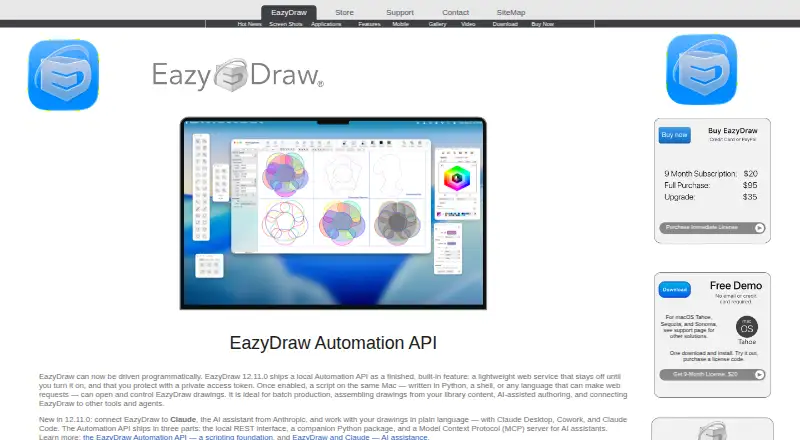
What EazyDraw is
EazyDraw is a vector-based drawing application for illustrations, technical diagrams, logos, icons, buttons, and stylized art. It runs on macOS and iOS, with desktop and mobile apps. Drawing tools include Bezier construction, curved text, gradients, pattern fills, dashed lines, arrows, brushes, grids, guides, and drawing to scale. Associative dimensions update measurements when a target changes size and move with it when repositioned. The application lists uses such as network diagrams, schematics, flow charts, floor plans, maps, and scientific illustrations. SVG and DXF import are supported, and DXF drawings can be opened and saved. Version 12.11.0 adds a local Automation API, Python package, and MCP server. These features can connect with Claude Desktop, Cowork, and Claude Code; the local service stays off until enabled and requires a private access token. A free demo has no time limit but allows about 20 individual graphics, while saving and printing remain available. Purchase options include a 95.00 USD one-time single-user macOS license.
Who it suits
EazyDraw suits people creating vector illustrations, diagrams, logos, maps, floor plans, or scientific graphics on Apple platforms. Its automation features also fit users connecting drawing workflows with supported Claude tools.
What it does well
- Runs on macOS and iOS
- Includes technical and illustration drawing tools
- Supports SVG and DXF files
- Free demo allows saving and printing
- Local automation API and MCP server available
What to know first
- Free demo limits creation to about 20 graphics
- Automation service requires manual enabling and a token
- macOS 14.6 or newer is specified for the ten-pack
Plans
| Plan | Billed and limits | Price |
|---|---|---|
| Basic Mode | No time limit · Limited to one layer and 32 graphics · Saving and printing are not limited | On request |
| One Month Subscription | Non-renewing subscription · Full application access | On request |
| One Year Subscription | Non-renewing subscription · Full application access | On request |
| Download Delivery | Single-user macOS license · Includes the application and documentation | $95 a month |
| EazyDraw Download With Additions Pack | One-time purchase · Version 12 · single-user license · Additions Pack included · 4.0 GB local storage | $105, paid once |
| EazyDraw Additions Pack | One-time purchase · Over 40 video tutorials · libraries, vector maps, calendar templates, examples · 3.7 GB expanded storage | $15, paid once |
| EazyDraw 9-Month License | One-time purchase; license valid for 9 months · Full use · macOS app · license price may be applied toward a full license within 2 months | $20, paid once |
| EazyDraw Electronic Ten Pack | One-time purchase · 10 user licenses · Version 12 · macOS 14.6 or newer | $450, paid once |
The first 8 of 9 plans, as eazydraw.com lists them, read 19 Sept 2026. The maker's own page has the final word. Every plan
Verdict
EazyDraw combines vector drawing tools with technical diagram features and optional local automation. The free demo provides a way to save and print limited work, while full access uses subscriptions or paid licenses.
Facts from EazyDraw's own pages
- AI integration
- The maker says EazyDraw can connect to Claude Desktop, Cowork, and Claude Code through its automation features. · eazydraw.com, 7 Oct 2026
- Automation
- Version 12.11.0 includes a local Automation API, Python package, and MCP server; the homepage says the local service stays off until enabled and requires a private access token. · eazydraw.com, 7 Oct 2026
- CAD dimensions
- Associative dimensions update reported measurements when the target graphic changes size and move with the target when it is moved. · eazydraw.com, 7 Oct 2026
- Desktop app
- Yes · eazydraw.com, 19 Sept 2026
- Drawing tools
- Listed features include Bezier construction, curved text, gradients, pattern fills, dashed lines, arrows, brushes, grids, guides, and drawing to scale. · eazydraw.com, 7 Oct 2026
- File compatibility
- The site lists SVG and DXF import, and says EazyDraw can open and save DXF drawings. · eazydraw.com, 7 Oct 2026
- Free demo
- The maker's demo policy limits creation to about 20 individual graphics while allowing users to print and save their work. · eazydraw.com, 7 Oct 2026
- Free plan
- Yes · eazydraw.com, 19 Sept 2026
- Headquarters
- Poynette, Wisconsin, USA · eazydraw.com, 28 Sept 2026
- Illustration tools
- Yes · eazydraw.com, 19 Sept 2026
- Intended uses
- The maker lists applications including network diagrams, schematics, flow charts, floor plans, logos, maps, and scientific illustrations. · eazydraw.com, 7 Oct 2026
- Mobile app
- Yes · eazydraw.com, 19 Sept 2026
- Platforms
- The maker lists desktop versions for macOS and free mobile versions for iPhone and iPad. · eazydraw.com, 7 Oct 2026
- Presentation design
- Yes · eazydraw.com, 19 Sept 2026
- Privacy
- The privacy policy says the app does not need or retrieve personal information from the operating system and customer records are not sold or traded. · eazydraw.com, 7 Oct 2026
- Product
- EazyDraw is a vector-based drawing application for creating illustrations, technical diagrams, logos, icons, buttons, and stylized art. · eazydraw.com, 7 Oct 2026
- Security
- The maker says EazyDraw is signed and Apple notarized, and its local API requires an access token on every request. · eazydraw.com, 7 Oct 2026
- Support
- Support is available by email, and the maker says requests are usually answered within a few hours. · eazydraw.com, 7 Oct 2026
- Template library
- Yes · eazydraw.com, 19 Sept 2026
Where EazyDraw stands on Freedom251
- Vector Graphics Software#12 of 51
- Graphic Design Software#74 of 150
- Design tools#73 of 146