Freedom251 › Nintendo DS Emulators
DSVita
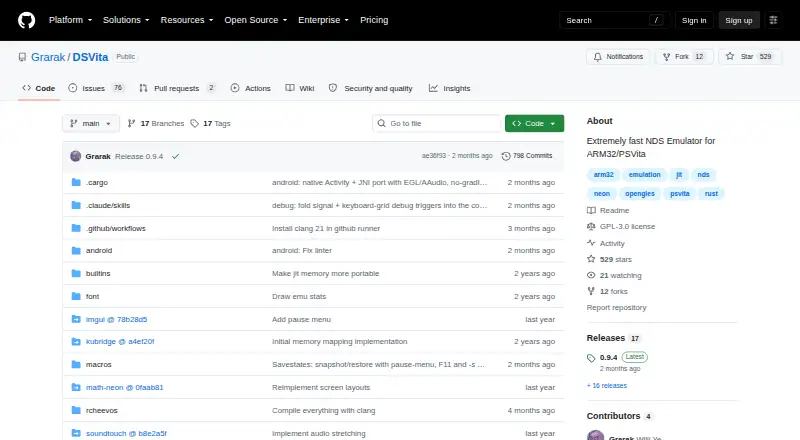
What DSVita is
DSVita is a free Nintendo DS emulator for PlayStation Vita, with experimental Android support and a documented build route for ARM Linux. Its maker says most games run, though compatibility and rendering are not complete. Two-dimensional rendering is mostly complete; three-dimensional rendering is mostly implemented, but some effects such as fog are missing. Games that use 3D on both screens can suffer slowdowns and stutters. The emulator uses automatic frame skipping and does not support scanline rendering, so games that update VRAM mid-frame may display incorrectly.
Release 0.9.4 lists savestates, Action Replay and libretro cheats, touchscreen controls, and customizable control profiles. The rear touchpad can be assigned to the DS touchscreen, and the right stick can control it. ROMs need the .nds extension and must go in ux0:data/dsvita. Vita setup requires libshacccg.suprx and kubridge.skprx version 0.3.1 or later; the maker strongly recommends running the Vita at 500MHz. If a game fails with ARM7 HLE, SoundHle or AccurateLle may improve compatibility, at the cost of slower performance. DSVita is licensed under GPL-3.0, and users can report problems through GitHub issues.
Who it suits
DSVita suits PlayStation Vita owners who want to play Nintendo DS games and can install the required Vita components and ROM files. It may also interest Android users willing to try an experimental port, or ARM Linux users building from the documented instructions.
What it does well
- Free to use and licensed under GPL-3.0.
- Includes savestates and Action Replay and libretro cheats.
- Customizable control profiles and touchscreen controls are listed.
- The rear touchpad and right stick can control the DS touchscreen.
- Supports most games, according to its maker.
What to know first
- The Android port is experimental and has no releases yet.
- Some 3D effects are missing, and dual-screen 3D games can stutter.
- Automatic frame skipping can render mid-frame VRAM updates incorrectly.
- Vita setup requires libshacccg.suprx and kubridge.skprx version 0.3.1 or later.
Limits
DSVita is free. Some 3D effects are unimplemented, dual-screen 3D games can slow down or stutter, and automatic frame skipping may affect games that update VRAM mid-frame. The Android port is experimental and has no releases yet.
Getting started
- Open the DSVita GitHub page.
- Download the latest VPK release for PlayStation Vita.
- Install libshacccg.suprx and kubridge.skprx version 0.3.1 or later.
- Put ROM files with the .nds extension in ux0:data/dsvita.
- Consider setting the Vita to 500MHz, as the maker strongly recommends.
- For ARM Linux, follow the documented build route using the ARMHF toolchain and SDL2 development packages.
Verdict
Choose DSVita if you want a free Nintendo DS emulator for PlayStation Vita with cheats, savestates, and touchscreen controls. Look elsewhere if you need complete 3D rendering or reliable performance in games that use 3D on both screens; Android users should also account for the port's experimental status and lack of releases.
Questions
How much does DSVita cost?
DSVita is free, and its free plan is listed as available.
Which platforms does it support?
PlayStation Vita is the supported platform. The repository also describes an experimental Android port with no releases yet and documents building for ARM Linux.
Is DSVita open source?
The repository identifies its license as GPL-3.0.
What features does it include?
Release 0.9.4 lists savestates, Action Replay and libretro cheats, touchscreen controls, and customizable control profiles.
How do I add games?
ROM files need the .nds extension and belong in ux0:data/dsvita.
What is required for Vita setup?
Vita setup requires libshacccg.suprx and kubridge.skprx version 0.3.1 or later.
Facts from DSVita's own pages
- Android support
- The Android port is experimental and has no releases yet, according to the repository README. · github.com, 7 Oct 2026
- Audio and compatibility
- If a game fails with ARM7 HLE, the maker recommends trying SoundHle or AccurateLle, which it says are more compatible but slower. · github.com, 7 Oct 2026
- Compatibility
- Most games run, but some games do not work with the default ARM7 HLE setting; SoundHle or AccurateLle may be more compatible and slower. · github.com, 7 Oct 2026
- Download and setup
- The README directs users to download the latest VPK release and install required Vita components, including libshacccg.suprx and kubridge.skprx version 0.3.1 or later. · github.com, 7 Oct 2026
- Frame rendering
- The emulator always uses automatic frame skipping and does not support scanline rendering, so games that update VRAM mid-frame may render incorrectly. · github.com, 7 Oct 2026
- Game files
- Users are instructed to put ROM files with the .nds extension in ux0:data/dsvita. · github.com, 7 Oct 2026
- Game support
- The maker says most games run, though some emulation features remain incomplete. · github.com, 7 Oct 2026
- Graphics
- 2D rendering is mostly complete; 3D rendering is mostly implemented, with some effects missing and slowdowns in games that use 3D on both screens. · github.com, 7 Oct 2026
- Installation requirements
- Vita setup requires libshacccg.suprx and kubridge.skprx version 0.3.1 or later. · github.com, 7 Oct 2026
- Known limits
- Some 3D effects such as fog are unimplemented, and games using 3D on both screens can have poor frame rates and stutters. · github.com, 7 Oct 2026
- License
- The repository identifies its license as GPL-3.0. · github.com, 7 Oct 2026
- Linux build
- The README documents building for ARM Linux using the thumbv7neon-unknown-linux-gnueabihf target. · github.com, 7 Oct 2026
- Linux support
- The README documents building for Linux ARMHF using an armhf sysroot with SDL2 development packages. · github.com, 7 Oct 2026
- Performance
- The maker strongly recommends overclocking the Vita to 500MHz. · github.com, 7 Oct 2026
- Performance guidance
- The maker strongly recommends overclocking the Vita to 500MHz. · github.com, 7 Oct 2026
- Purpose
- DSVita is a fast Nintendo DS emulator for ARM32 and PlayStation Vita. · github.com, 7 Oct 2026
- Recent features
- Release 0.9.4 lists savestates, Action Replay and libretro cheats, touchscreen controls, and customizable control profiles. · github.com, 7 Oct 2026
- Rendering
- Its 2D rendering is mostly complete, and 3D rendering is mostly implemented. · github.com, 7 Oct 2026
- ROM setup
- ROMs must use the .nds extension and go in ux0:data/dsvita. · github.com, 7 Oct 2026
- Screen controls
- Release 0.9.4 says the rear touchpad can be mapped to the DS touchscreen and the right stick can control it. · github.com, 7 Oct 2026
- Support
- The maker invites users to report problems by creating a GitHub issue. · github.com, 7 Oct 2026
Where DSVita stands on Freedom251
- Nintendo DS Emulators#9 of 18