Freedom251 › Podcast Show Notes Software

DriftNote
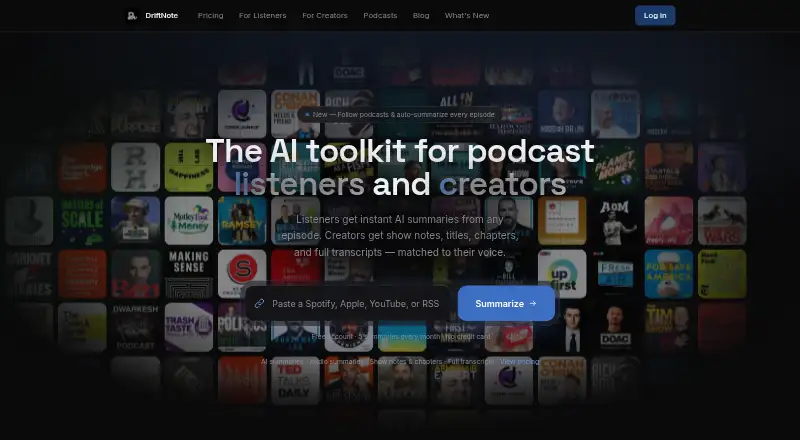
What DriftNote is
DriftNote creates AI podcast summaries for listeners and production materials for podcast creators. Listeners can submit Spotify, Apple Podcasts, YouTube, or RSS links to get summaries with topics, quotes, and timestamps. Following a podcast triggers automatic summaries for new episodes; the free plan allows one followed podcast and five summaries per month. Summaries can sync to Notion, be shared through public links, or be posted to X or LinkedIn. DriftNote also provides an MCP server connection for assistants that support connectors, and its public developer documentation describes a REST API with keys available in Settings. For creators, Producer Studio accepts MP3, MP4, M4A, and WAV uploads. Producer Pro produces transcripts, show notes, timestamped chapters, five title options, and key quotes, and can analyze existing episodes to learn a style profile. AI processing on all plans uses Google Gemini. The listener workflow runs on the website and needs no installation or browser extension. The free plan costs nothing. Pro costs $9.99 a month, billed monthly. Producer Pro costs $24 a month, billed monthly after a 7-day free trial.
Who it suits
DriftNote suits podcast listeners who want summaries and creators who need production materials from uploaded episodes. It may also suit people who want summaries synced to Notion or shared with assistant tools.
What it does well
- Accepts Spotify, Apple Podcasts, YouTube, and RSS links.
- Free plan includes five monthly summaries and one followed podcast.
- Producer Pro creates transcripts, chapters, show notes, and title options.
- Summaries can sync to Notion and be shared publicly.
- Website workflow requires no installation or browser extension.
What to know first
- Free plan limits users to five summaries per month.
- Free plan allows following only one podcast.
- Producer Pro costs $24 a month after a 7-day trial.
Limits
The Free plan includes five summaries per month and one followed podcast. Producer Pro costs $24 a month billed monthly after a 7-day free trial.
Plans
| Plan | Billed and limits | Price |
|---|---|---|
| Free | forever · 5 summaries/month · Notion sync · text transcript processing · follow 1 podcast · public sharing | Free |
| Producer Pro | after 7-day free trial · unlimited episodes · full transcripts · show notes · titles · chapters · key quotes · style profile · listener access | $24 a month |
| Pro | monthly · Unlimited summaries · Notion sync · AI follow-up questions · Audio summaries · Unlimited podcast follows · Priority and audio fallback processing · Public sharing | $9.99 a month |
| Listener Pro | monthly · unlimited summaries · unlimited follows · audio summaries · AI follow-ups · priority processing · audio fallback · public sharing | $9.99 a month |
As driftnote.net lists them, read 15 Oct 2026. The maker's own page has the final word.
Getting started
- Open the DriftNote website.
- Submit a Spotify, Apple Podcasts, YouTube, or RSS link to create a listener summary.
- Choose a plan: Free, Pro at $9.99 a month, or Producer Pro at $24 a month after a 7-day free trial.
- For creator outputs, upload an MP3, MP4, M4A, or WAV file through Producer Studio.
- Connect Notion or use a public link or one-click post to share a summary.
DriftNote combines AI podcast summaries for listeners with production assets for creators. It is a strong fit for people who organize listening notes in Notion and for podcasters who want transcripts and show-note materials from uploaded episodes. The free tier is useful for trying the workflow, but regular listeners or creators will quickly need a paid plan.
Overview
Listeners can submit Spotify, Apple Podcasts, YouTube, or RSS links and receive summaries built around topics, quotes, and timestamps. Following a podcast automatically produces summaries for new episodes, making DriftNote more useful as an ongoing tracking tool than as a one-off summarizer. The website handles the listener workflow without an installation or browser extension.
Creators use Producer Studio to upload MP3, MP4, M4A, or WAV files. Producer Pro turns those episodes into full transcripts, show notes, timestamped chapters, five title suggestions, and key quotes. Its style profiles analyze existing episodes for naming patterns, tone, vocabulary, and formatting preferences, which is useful when generated copy needs to resemble an established show.
Key features
- Listener summaries: Topics, quotations, and timestamps provide a navigable overview rather than just a short abstract. That suits research and catch-up listening, although summaries do not replace the context of a full episode.
- Podcast following: New-episode summaries arrive automatically for followed shows. The free plan permits one followed podcast; Pro removes that ceiling for people tracking several feeds.
- Notion sync: Automatic synchronization to a Notion workspace turns individual summaries into a reusable note library, a practical advantage for knowledge-management workflows.
- Assistant and developer access: An MCP server connection works with Claude, ChatGPT, Meta Muse, and other connector-supporting assistants. Public developer documentation covers a REST API, with API keys available in Settings, so teams can connect DriftNote to their own systems.
- Creator production: Producer Pro combines transcription, chapters, show notes, titles, and quotes in one pass. Style learning can reduce repetitive editing for shows with consistent editorial conventions.
- Sharing and processing: Public links and one-click posts to X or LinkedIn make distribution straightforward. All plans use Google Gemini for AI processing, and paid tiers add audio-related processing options.
Pricing
DriftNote uses a freemium structure with a 7-day trial and paid plans from $9.99 per month.
| Plan | Price | What you get |
|---|---|---|
| Free | free | Five summaries per month, Notion sync, text transcript processing, one followed podcast, and public sharing. |
| Pro | $9.99 a month, billed monthly | Unlimited summaries, Notion sync, AI follow-up questions, audio summaries, unlimited podcast follows, priority and audio fallback processing, and public sharing. |
| Producer Pro | $24 a month, billed monthly after a 7-day free trial | Unlimited episodes, full transcripts, show notes, chapters, titles, key quotes, style-profile learning, and full listener access. |
Free is adequate for occasional summaries, but five per month and one followed podcast make it a sampler for habitual listeners. Pro is the better listener plan when unlimited summaries, follow-up questions, audio summaries, or multiple followed shows matter. Producer Pro is aimed at active podcasters: its $24 monthly price buys unlimited episode processing and the complete production set, while the cheaper tiers do not provide those creator outputs.
Platforms
DriftNote is available through the web and an API. Listener access is browser-based with no installation requirement, while the REST API and MCP connection support integrations for developers and assistant-driven workflows.
Who it's for
Choose DriftNote if you want podcast notes, Notion organization, automatic following, and creator deliverables in the same service. It is especially well matched to listeners managing several shows on Pro and to creators who need transcripts, chapters, and publishable notes without separate tools. It is less suitable for someone who only needs occasional transcription or a broad media-editing toolkit; the free quota is small, and Producer Pro is specialized around podcast production.
Pros and cons
Pros
- One listener-and-creator workflow: Summaries, following, uploads, and production outputs cover both sides of podcast work.
- Useful structured outputs: Timestamps, chapters, quotes, titles, and full transcripts give creators material they can adapt directly.
- Integration depth: Notion sync, public sharing, MCP connectivity, and a documented REST API support different working styles.
- Style-aware generation: Learning a show’s vocabulary and formatting can make recurring outputs more consistent.
Cons
- Restrictive free allowance: Five monthly summaries and one followed podcast limit ongoing use.
- Creator features cost more: Full production outputs start at the separate $24 monthly Producer Pro plan.
- Web-first listener experience: There is no installation-based listener app; use depends on the website.
Alternatives
For a broader comparison of tools focused on episode notes, see Podcast Show Notes Software.
- DomeScribe is a better fit if you need native Android, iOS, desktop, and web access, with a free one-time 30-minute transcription allowance per account and 30-minute/50 MB file limits.
- CraftNote suits users who want calendar connections and cross-platform apps, with a free allowance of 10 uploads or imports per week and two recording hours per week.
- audien·to is preferable for high-volume web transcription, offering 90 minutes per day, three files per day, nine output types, and 67 languages on its free plan.
- ChapterGen is the simpler choice for occasional video chapters, with two free videos up to 20 minutes and one-time paid packages rather than subscriptions.
- Deciphr is an alternative for a text-focused content suite and pay-as-you-go written content.
- EditClips.online is an alternative browser toolkit with an API and a free, no-signup plan.
- Podlink is the better choice when podcast download analytics, listener-app pages, and country breakdowns matter more than summaries.
- Podnotes is an alternative paid web service with a free 50-minute transcription trial and minute-based plans.
Verdict
DriftNote is a good choice for listeners who want structured, shareable podcast notes and creators who want transcripts and show-note assets in the same workflow. Its strongest reason to choose it is the combination of automatic following, Notion and assistant integrations, and style-aware production outputs. Look elsewhere if five free summaries are insufficient, if you need a native multi-platform app, or if your main requirement is analytics or general-purpose media editing rather than podcast understanding.
Verdict
DriftNote covers both listener summaries and creator production outputs, with podcast following and several sharing options. Check the free-plan limits and the separate Producer Pro price if you need creator tools.
Questions
Is DriftNote free?
Yes. Its Free plan costs nothing and includes five summaries per month, Notion sync, text transcript processing, one followed podcast, and public sharing.
What does Pro cost?
Pro costs $9.99 a month, billed monthly. It includes unlimited summaries and podcast follows, AI follow-up questions, audio summaries, priority and audio fallback processing, Notion sync, and public sharing.
What does Producer Pro cost?
Producer Pro costs $24 a month, billed monthly after a 7-day free trial. It includes unlimited episodes, full transcripts, creator assets, style profile learning, and full listener access.
Which platforms does DriftNote support?
The listed platforms are web and API. The listener workflow runs through the website without installation or a browser extension.
Can DriftNote connect to other tools?
It can automatically sync summaries to Notion and offers an MCP server connection for assistants that support connectors. Public developer documentation describes a REST API, with keys available in Settings.
Which AI provider does it use?
The pricing page says all plans include AI-powered processing via Google Gemini.
Facts from DriftNote's own pages
- AI assistant integration
- DriftNote offers an MCP server connection for Claude, ChatGPT, Meta Muse, and other assistants that support connectors. · driftnote.net, 3 Oct 2026
- AI provider
- The pricing page says every plan uses Google Gemini for AI processing. · driftnote.net, 15 Oct 2026
- API authentication
- The service supports bearer API keys and OAuth 2.1 with dynamic client registration, PKCE S256, and a podcasts scope. · driftnote.net, 15 Oct 2026
- API limits
- Free accounts receive five summaries monthly, each account may process three summaries concurrently, and follow-up questions and follows require Pro. · driftnote.net, 15 Oct 2026
- Apple app listing
- An iPad/iPhone app named DriftNote: Drift a Note is a social pen-pal product from Beijing Suanwu Yice Technology Co., Ltd.; Apple says it lacks enough ratings for a review overview. · apps.apple.com, 15 Oct 2026
- Audio recaps
- Pro users can generate conversational audio versions of episode summaries with eight voices and four delivery styles. · driftnote.net, 15 Oct 2026
- Chrome extension scope
- The Chrome listing is a separate sidebar note-taking extension with local storage, search, tags, offline use, and a declaration that it does not collect data. · chromewebstore.google.com, 15 Oct 2026
- Company facts
- No headquarters, legal entity name, employee count, founding year, funding, or owner details are stated on the official pages opened. · driftnote.net, 15 Oct 2026
- Creator outputs
- Producer processing generates show notes, timestamped chapters, five title options, key quotes, and a full transcript. · driftnote.net, 15 Oct 2026
- Creator uploads
- The creator workflow accepts MP3, MP4, M4A, and WAV files and states there is no episode-length limit. · driftnote.net, 15 Oct 2026
- Developer access
- The changelog states that public developer docs include a REST API and that API keys are available in Settings. · driftnote.net, 3 Oct 2026
- Latest release
- Version 2.5.0 dated September 20, 2026 added MCP connectivity, assistant registration, API-key settings, and public developer documentation. · driftnote.net, 15 Oct 2026
- Launch date
- The changelog records the first public release as version 1.0.0 on February 18, 2026. · driftnote.net, 15 Oct 2026
- Licence
- The official pages opened describe a hosted service but do not state an open-source licence or a self-hosting package. · driftnote.net, 15 Oct 2026
- Limit: positioning
- In a Reddit launch post, the maker says the product positioning was still being refined and asks whether it should focus more on listeners or creators. · reddit.com, 15 Oct 2026
- Limit: review evidence
- Capterra and Software Advice both show no user reviews, so there is little independent evidence about reliability or support quality. · softwareadvice.com, 15 Oct 2026
- Listener summaries
- Listener results include an overview, key topics, takeaways, notable quotes, and timestamps. · driftnote.net, 15 Oct 2026
- Maker
- A Microlaunch listing identifies Keval as DriftNote's solo founder. · microlaunch.net, 15 Oct 2026
- MCP connector
- DriftNote exposes an MCP endpoint that can connect to Claude, ChatGPT, Meta Muse, and other connector-capable assistants. · driftnote.net, 15 Oct 2026
- MCP tools
- Published MCP tools include podcast search, latest-episode and individual-episode summarization, summary polling, summary listing, episode questions, sharing, and following. · driftnote.net, 15 Oct 2026
- Notion integration
- Summaries can be automatically written into a connected Notion workspace or database. · driftnote.net, 15 Oct 2026
- Platform requirements
- The listener workflow requires no installation or browser extension; it runs through the website. · driftnote.net, 3 Oct 2026
- Podcast following
- Users can follow shows and have new episodes summarized automatically; unlimited following is a Pro feature. · driftnote.net, 15 Oct 2026
- Praise: creator workflow
- The maker reports that a producer of a top-100 Spotify show considered the style-profile and timestamped-quote features decisive for production use. · reddit.com, 15 Oct 2026
Where DriftNote stands on Freedom251
- Podcast Show Notes Software#6 of 22