Freedom251 › Podcast Show Notes Software
ChapterGen
What ChapterGen is
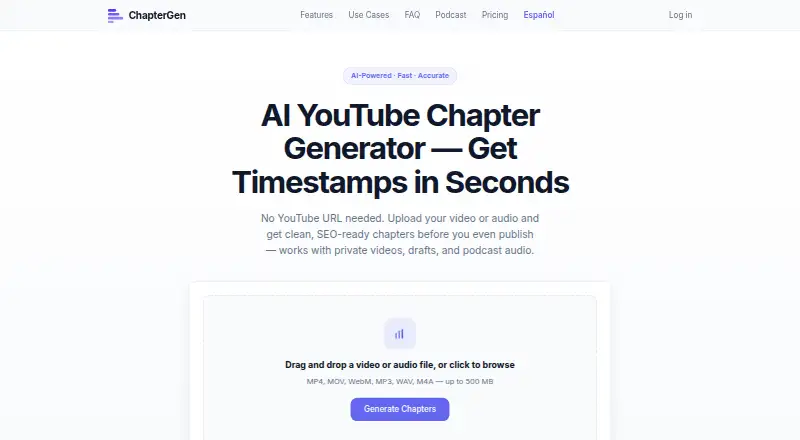
ChapterGen turns uploaded audio or video into YouTube chapters. It transcribes the recording, detects topic shifts, identifies sections, and drafts descriptive titles with timestamps. You can edit both before copying; the output begins at 0:00 and is formatted for a video description. Uploading means you can prepare chapters for unpublished, private, or unlisted videos without a public YouTube URL. ChapterGen also accepts audio-only content such as podcasts, interviews, and voice recordings. Its Whisper-based AI auto-detects language and the site lists support for 90+ languages. The FAQ names MP4, MOV, AVI, WebM, MKV, MP3, WAV, M4A, AAC, OGG, and FLAC, with a 500 MB maximum file size. The homepage upload prompt lists a smaller set of formats. Uploaded files are automatically deleted after processing, according to the homepage. ChapterGen runs on the web. The free plan allows 2 videos up to 20 minutes each with no signup; one-time plans cost $5, paid once for 5 videos or $12, paid once for 15 videos.
Who it suits
It suits creators preparing chapters for long-form videos, including podcast and course creators. The audio-only support also covers interviews and voice recordings.
What it does well
- Works without a public YouTube URL
- Supports audio-only recordings
- Titles and timestamps are editable
- Auto-detects language across 90+ languages
- Free plan includes 2 videos without signup
What to know first
- Free videos are limited to 20 minutes each
- Uploads are limited to 500 MB
- The homepage upload prompt lists fewer formats than the FAQ
- Paid plans are one-time purchases for limited video counts
Limits
The free plan includes two videos, each up to 20 minutes, with no signup. The listed one-time plans cover five videos for $5, paid once or 15 videos for $12, paid once.
Plans
| Plan | Billed and limits | Price |
|---|---|---|
| Free | 2 videos free · up to 20 minutes each · no signup | Free |
| Creator | 15 videos · no subscription | $12, paid once |
| Starter | 5 videos · no subscription | $5, paid once |
As chaptergen.com lists them, read 4 Oct 2026. The maker's own page has the final word.
Getting started
- Open https://chaptergen.com/.
- Upload a video or audio file supported by the service.
- Use the generated chapter titles and timestamps, editing them as needed.
- Copy the formatted result into a YouTube video description.
ChapterGen turns uploaded recordings into editable YouTube chapter markers, making it a focused option for creators preparing long-form video or audio. Its upload-first workflow is useful before a video is public, but the free allowance covers only two short videos.
Overview
The service transcribes a recording, detects topic changes and creates descriptive chapter titles with timestamps. You can edit both before copying the result into a YouTube description. Chapters start at 0:00, matching YouTube’s expected format, though the generated divisions and titles still merit review before publishing.
Unlike tools that depend on a public video link, ChapterGen accepts uploads for unpublished, private and unlisted videos. That makes it practical during preparation, including when a creator wants to add chapters before making a video public.
Key features
File support and languages
ChapterGen supports audio-only recordings as well as video, so podcasts, interviews and voice recordings can use the same chapter workflow. The FAQ names MP4, MOV, AVI, WebM, MKV, MP3, WAV, M4A, AAC, OGG and FLAC, with a maximum file size of 500 MB. The homepage upload prompt shows a shorter list—MP4, MOV, WebM, MP3, WAV and M4A—so files in the additional FAQ formats may require checking in the upload flow.
The site says its Whisper-based AI auto-detects language and supports more than 90 languages. This is useful for multilingual creators who do not want to set a transcription language manually, though the language claim does not establish how well each language handles specialized terminology or accents.
Editable, copy-ready chapters
Generated titles and timestamps can be adjusted before copying. That control matters because automated topic boundaries may not align with the chapter divisions a creator wants to present. The output is formatted for a YouTube description, not described as a publishing or channel-management tool.
Uploaded files are automatically deleted after processing, according to the homepage. This is a useful privacy measure for unpublished material, but it is not a substitute for reviewing the service’s own data practices when handling sensitive recordings.
Pricing
The free plan costs nothing and allows two videos of up to 20 minutes each, with no signup. That is enough to try the workflow on short clips, but it is restrictive for full-length interviews, courses or podcast episodes.
Starter costs $5, paid once for five videos, with no subscription. It suits occasional users who need more than the free allowance but do not need a recurring plan. Creator costs $12, paid once for 15 videos, also with no subscription; it is the better fit for a small batch of longer-form projects. The published plan terms do not state a per-video duration allowance for either paid package, so creators should confirm that their intended uploads fit before buying.
Platforms
ChapterGen runs on the web. Its file-upload workflow and copyable output suit creators working from a browser, while no other platform is identified.
Who it's for
ChapterGen is best suited to YouTube creators who want chapter text from an audio or video file, especially podcast and course creators working with long recordings. It also makes sense for tutorials, webinars, product reviews and vlogs. The upload route is a particular advantage when a video is not yet public. It is less compelling for users needing substantial free capacity or a broader publishing workflow.
Pros and cons
Pros
- Works from uploads, including unpublished, private and unlisted videos, so a public YouTube URL is not a prerequisite.
- Handles audio-only files as well as video, covering podcast and interview workflows.
- Editable titles and timestamps let creators refine chapter boundaries before copying.
- One-time Starter and Creator plans avoid a subscription commitment.
- Automatic deletion after processing is a privacy-conscious approach for uploaded recordings.
Cons
- The free plan stops at two videos of up to 20 minutes each, limiting its usefulness for longer recordings.
- Paid plans sell fixed video batches, which may not suit creators who need ongoing chapter generation.
- The homepage upload prompt names fewer formats than the FAQ, creating uncertainty for some file types.
- Generated chapters still need editorial review; the service creates suggested titles and boundaries rather than replacing that judgment.
Alternatives
For broader podcast-related tools, see Podcast Show Notes Software. Pick DomeScribe instead if you want an option spanning mobile, desktop and web with a free tier that includes 30 minutes of transcription and TXT export. CraftNote is a better fit when calendar syncing and weekly recording allowances matter more than YouTube chapter formatting. Choose audien·to for multiple output types, a 90-minute daily free allowance and 67-language support. Deciphr may suit users seeking a wider written-content workflow, with a free text-only tier up to 40 minutes. DriftNote is oriented toward podcast summaries and Notion sync, rather than direct YouTube chapter generation. EditClips.online offers a broad collection of browser tools, while Podlink focuses on podcast download analytics and show pages. Podnotes is another transcription and content option, with 50 free minutes to try its app.
Verdict
Choose ChapterGen if you need editable, YouTube-formatted chapters from an uploaded recording, particularly before a video is public, and prefer paying once for a defined batch. Look elsewhere if you need a generous free allowance, recurring high-volume use or tools beyond chapter generation.
Verdict
ChapterGen provides an upload-based route to editable YouTube chapters, including for private or unpublished content. The free plan is limited to two videos of up to 20 minutes each; larger batches are covered by one-time plans.
Questions
How much does ChapterGen cost?
The free plan costs nothing and includes two videos. One-time plans cost $5, paid once for five videos or $12, paid once for 15 videos.
Is there a free plan?
Yes. It includes two videos of up to 20 minutes each, and does not require signup.
What platforms does ChapterGen support?
ChapterGen is available on the web.
What file types can I upload?
The FAQ lists MP4, MOV, AVI, WebM, MKV, MP3, WAV, M4A, AAC, OGG, and FLAC. The maximum file size is 500 MB.
Can I use ChapterGen for audio-only content?
Yes. The site says it supports podcasts, interviews, and voice recordings.
Do I need a public YouTube URL?
No. You can upload files to make chapters for unpublished, private, and unlisted videos.
Facts from ChapterGen's own pages
- Audio and video
- The FAQ lists MP4, MOV, AVI, WebM, MKV, MP3, WAV, M4A, AAC, OGG, and FLAC, with a maximum file size of 500 MB. · chaptergen.com, 4 Oct 2026
- Data handling
- The homepage says uploaded files are automatically deleted after processing. · chaptergen.com, 4 Oct 2026
- Editable output
- Chapter titles and timestamps can be edited before copying the result. · chaptergen.com, 4 Oct 2026
- Languages
- The site says its Whisper-based AI auto-detects language and supports 90+ languages. · chaptergen.com, 4 Oct 2026
- Limits
- The homepage upload prompt lists MP4, MOV, WebM, MP3, WAV, and M4A files up to 500 MB; the FAQ lists additional supported formats. · chaptergen.com, 4 Oct 2026
- No YouTube URL
- Uploads can be used to generate chapters for unpublished, private, and unlisted videos without a public YouTube URL. · chaptergen.com, 4 Oct 2026
- Other use cases
- The site presents tutorials, webinars, courses, product reviews, and vlogs as use cases. · chaptergen.com, 4 Oct 2026
- Podcast use
- The site says audio-only content such as podcasts, interviews, and voice recordings is supported. · chaptergen.com, 4 Oct 2026
- Purpose
- ChapterGen generates YouTube chapters from uploaded video or audio files. · chaptergen.com, 4 Oct 2026
- Who it is for
- The site describes the product for creators producing long-form content, including podcast and course creators. · chaptergen.com, 4 Oct 2026
- Workflow
- It transcribes audio, detects topic changes, identifies sections, and creates descriptive chapter titles. · chaptergen.com, 4 Oct 2026
- YouTube formatting
- Generated chapters are formatted to start at 0:00 and are intended to be copied into a YouTube video description. · chaptergen.com, 4 Oct 2026
Where ChapterGen stands on Freedom251
- Podcast Show Notes Software#4 of 22