Freedom251 › Podcast Show Notes Software
CraftNote
What CraftNote is
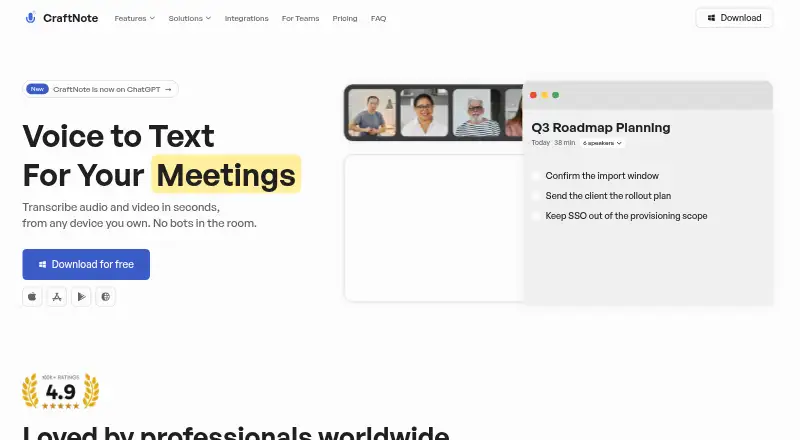
CraftNote records audio and video meetings, then produces transcripts and summaries without placing bots in the meeting. Its AI tools include meeting notes, chat with notes, and daily digests. The Free plan lists more than 100 languages, two hours of recording per week, ten uploads and imports per week, and Google and Outlook calendar sync. CraftNote lists Microsoft Teams, Zoom, Google Meet, and Slack Huddles for recording or note capture. Other listed connections include Google Calendar, Outlook Calendar, Linear, Slack, Notion, Claude, ChatGPT, Codex, and MCP clients. Users can share public links and export to PDF and DOCX. The Individual plan includes more than 30 summary templates, unlimited notes and transcripts, and recordings up to four hours. It is listed at $8.33/month billed annually; the page also shows $9.99/month. CraftNote Teams is $12.00/month billed annually per user, while its FAQ lists $15/user/month billed monthly. The privacy policy says meeting content is not used to train models. CraftNote is not HIPAA-covered and is not intended for sensitive data.
Who it suits
CraftNote suits people who want meeting recordings turned into transcripts and summaries, including business, education, recruiting, legal, research, and personal users. Its listed solutions also include healthcare and media or podcasting, but the service is not intended for sensitive data.
What it does well
- Records and summarizes without meeting bots
- Free plan lists 100+ languages
- Exports to PDF and DOCX
- Meeting content is not used to train models
What to know first
- Free plan limits recording to two hours per week
- Free plan limits uploads and imports to ten per week
- Not a HIPAA-covered service
- Not intended for sensitive data
Limits
Free allows 10 uploads and imports and two hours of recording per week. Individual recordings can be up to four hours; the listed plan also has unlimited meeting notes and transcripts.
Plans
| Plan | Billed and limits | Price |
|---|---|---|
| Free | Free forever · no credit card · 10 uploads & imports per week · 2 hours of recording per week · Google & Outlook calendar sync · AI meeting notes & transcripts · 100+ languages | Free |
| CraftNote Teams | $144/year per user; page FAQ also states $15/user/month billed monthly · Everything in Individual · shared team notes · centralized billing · MCP integrations · admin control & role based access | $12 a month |
| Individual | $99.99/year; page also shows $9.99/month · Everything in Free · unlimited meeting notes & transcripts · recordings up to 4 hours · advanced models · chat with notes · bot-free recording | $8.33 a month |
As craftnote.com lists them, read 29 Sept 2026. The maker's own page has the final word.
Getting started
- Visit https://craftnote.com/.
- Start with the Free plan, which does not require a credit card, or choose a paid plan.
- Use a listed platform: Android, iOS, macOS, web, Windows, or browser extension.
- Connect Google or Outlook Calendar, or use a listed meeting platform for recording or note capture.
- Use the free allowance or select Individual or CraftNote Teams for additional listed features.
Overview
CraftNote turns recorded meetings into transcripts and summaries without adding a bot to the call. It suits individuals and teams who want meeting capture connected to calendars and work apps. The free tier is a useful starting point, but its weekly caps and the service’s restriction on sensitive data matter before adopting it for ongoing work.
Key features
Bot-free recording is CraftNote’s defining advantage: meetings can be captured without a bot joining the room. It also records audio and video, accepts uploads and imports, and provides automatic transcription, timestamps, chapter generation, AI notes, chat with notes, and daily digests. That breadth makes it useful for turning meetings into material people can revisit and work with, not just a brief recap.
Recording or note-capture integrations cover Microsoft Teams, Zoom, Google Meet, and Slack Huddles. Google and Outlook calendar sync is included on Free; other integrations include Linear, Slack, Notion, Claude, ChatGPT, Codex, and MCP clients. Public links and PDF and DOCX exports support sharing, while markdown is also an export format.
Free supports more than 100 languages, but its limited weekly allowance constrains how much multilingual material can be processed. Individual adds more than 30 summary templates, advanced models, and chat with notes. CraftNote says recordings, transcripts, summaries, and chat content are not used to train its own or third-party models. Its listed backends encrypt data at rest with vendor-managed AES-256 and use TLS 1.2 or higher in transit. However, CraftNote is not HIPAA-covered and is not intended for special-category or sensitive data, so it is not suitable for those records.
Pricing
Free costs nothing, forever, with no credit card required. It includes 10 uploads and imports per week, two recording hours per week, Google and Outlook calendar sync, AI meeting notes and transcripts, and support for 100+ languages. Those caps make it a sensible way to try the workflow or handle occasional meetings, but a poor fit for regular high-volume recording.
Individual costs $8.33 a month when billed at $99.99/year; the page also shows $9.99/month. It includes everything in Free, unlimited meeting notes and transcripts, recordings up to four hours, advanced models, chat with notes, and bot-free recording. It is the clearest fit for an individual with steady meeting volume who can use annual billing; the longer recording limit still excludes sessions over four hours.
CraftNote Teams costs $12 a month, billed $144/year per user; its FAQ also states $15/user/month billed monthly. It adds shared team notes, centralized billing, MCP integrations, admin control, and role-based access to Individual. Per-user annual pricing suits teams that need shared administration, while monthly billing costs more. CraftNote offers a 30-day trial. For help with website subscriptions, billing changes, or refunds, it directs users to [email protected].
Platforms
CraftNote is available on Android, iOS, macOS, Windows, web, and as an extension, giving users options across desktop, mobile, and browser workflows.
Who it's for
CraftNote is a strong fit for individuals and teams that want bot-free meeting capture, searchable transcripts, and notes connected to calendars or other work tools. Its listed audiences include business, recruiting and HR, education, personal use, lawyers, healthcare, researchers, and media and podcasting. That breadth does not override its privacy boundary: it should not be chosen for sensitive data or HIPAA-covered work.
Pros and cons
- Pro: Bot-free recording avoids placing a meeting bot in the room.
- Pro: Calendar sync is included on Free, and integrations span major meeting services and work tools.
- Pro: Transcription, summaries, chat with notes, digests, and several export and sharing options support follow-up beyond the call.
- Con: Free is capped at 10 uploads and imports and two recording hours per week, limiting sustained use.
- Con: Individual’s standard annual rate is $99.99/year, and recordings are limited to four hours.
- Con: It is not HIPAA-covered and is not intended for sensitive data.
Alternatives
For podcast-oriented workflows, compare Podcast Show Notes Software. DomeScribe may suit a one-off transcription need: its free plan offers 30 minutes of transcription once, with a 30-minute and 50 MB per-file limit. audien·to is worth considering for daily file processing, with 90 minutes per day and up to three 30-minute files on Free. ChapterGen is a narrower free option for generating chapters from two videos up to 20 minutes each, without signup.
Deciphr offers a free text-only content suite for up to 40 minutes. DriftNote may fit podcast-following and transcript-processing workflows, with five monthly summaries and Notion sync on Free. EditClips.online offers more than 50 browser tools on its free plan. Show Notes Generator provides a free episode upload for transcript and show notes. Podflow is another option for creators who need a paid upload allowance, with plans beginning at 8 uploads per month.
Verdict
Choose CraftNote if bot-free capture, integrations, and a connected transcript-and-notes workflow are more important than generous free usage. Individual is the natural step up for regular solo use, while Teams adds shared notes and administration for per-user pricing. Look elsewhere if you need sensitive-data handling or expect more from the free tier than its weekly limits allow.
Verdict
CraftNote combines bot-free meeting capture with transcripts, summaries, and a range of integrations. Review the free-plan limits and privacy restriction before choosing it for your work.
Questions
Does CraftNote have a free plan?
Yes. Free is billed at no cost, with no credit card required. It includes 10 uploads and imports and two hours of recording per week.
How much does Individual cost?
Individual is listed at $8.33 per month billed annually at $99.99 per year; the page also shows $9.99 per month.
How much does CraftNote Teams cost?
It is listed at $12.00 per month per user billed annually at $144 per year. The FAQ also states $15 per user per month billed monthly.
Which platforms are supported?
CraftNote lists Android, browser extension, iOS, macOS, web, and Windows.
Which meeting platforms can it capture?
The integrations page lists Microsoft Teams, Zoom, Google Meet, and Slack Huddles for recording or note capture.
Is CraftNote intended for sensitive data?
No. Its privacy policy says CraftNote is not HIPAA-covered and is not intended for special-category or sensitive data.
Facts from CraftNote's own pages
- AI data use
- The privacy policy says recordings, transcripts, summaries, and chat content are not used to train any model, ours or a third party’s. · craftnote.com, 29 Sept 2026
- AI features
- The product offers AI meeting notes and transcripts, chat with notes, and daily digests. · craftnote.com, 29 Sept 2026
- Exports and sharing
- The homepage lists public links and export to PDF and DOCX. · craftnote.com, 29 Sept 2026
- Headquarters
- Istanbul, Türkiye · craftnote.com, 23 Sept 2026
- Languages
- The Free plan lists support for 100+ languages. · craftnote.com, 29 Sept 2026
- Meeting platforms
- The integrations page lists Microsoft Teams, Zoom, Google Meet, and Slack Huddles for recording or note capture. · craftnote.com, 29 Sept 2026
- Other integrations
- The integrations page lists Google Calendar, Outlook Calendar, Linear, Slack, Notion, Claude, ChatGPT, Codex, and MCP clients. · craftnote.com, 29 Sept 2026
- Platforms
- CraftNote offers Mac, Windows, iOS, Android, and browser versions; the Mac and Windows apps are labeled Beta. · craftnote.com, 29 Sept 2026
- Privacy limitation
- The policy says CraftNote is not a HIPAA-covered service and is not intended for special-category or sensitive data. · craftnote.com, 29 Sept 2026
- Security
- The privacy policy says its listed backends encrypt data at rest with vendor-managed AES-256 and use TLS 1.2 or higher in transit. · craftnote.com, 29 Sept 2026
- Support
- The pricing page directs users to [email protected] for assistance with website subscriptions, billing changes, and refunds. · craftnote.com, 29 Sept 2026
- Templates
- The site lists more than 30 summary templates on the Individual plan. · craftnote.com, 29 Sept 2026
- What it does
- CraftNote records audio and video and transcribes and summarizes meetings without requiring bots in the room. · craftnote.com, 29 Sept 2026
- Who it is for
- The homepage lists solutions for business, recruiting and HR, education, personal use, lawyers, healthcare, researchers, and media and podcasting. · craftnote.com, 29 Sept 2026
Where CraftNote stands on Freedom251
- Podcast Show Notes Software#1 of 22