Freedom251 › Podcast Show Notes Software

audien·to
What audien·to is
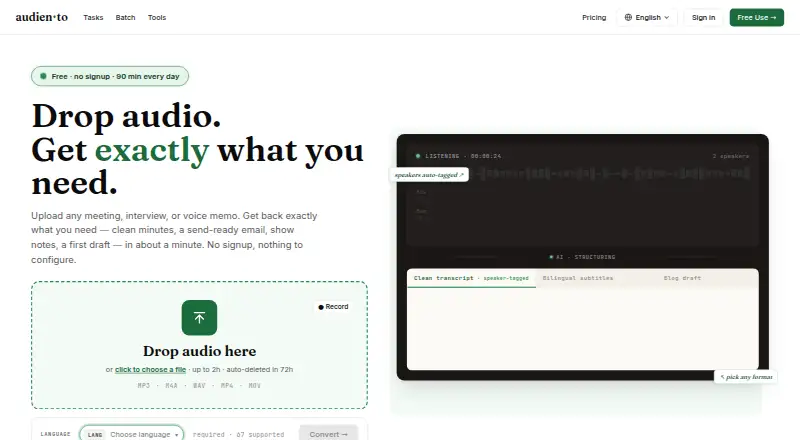
audien·to transcribes audio and turns transcripts into structured outputs such as summaries, show notes, meeting minutes, email recaps, article drafts, and study notes. Audio can be uploaded, supplied by URL, or recorded through a browser microphone; listed file formats include MP3, M4A, WAV, MP4, and MOV. The service states support for 67 languages. Transcripts include timestamps and speaker separation, can be edited, and can be exported as TXT, SRT, VTT, DOCX, or Markdown. Other available outputs include clean transcripts and custom formats. The free plan allows up to 90 transcription minutes per day, three files per day, and 30 minutes per file. Pro allows 10,000 minutes per month; the annual option is $10.00 per year, billed at $120 per year, and the monthly option is $20.00 per month. Uploaded audio is automatically deleted within 72 hours, while transcripts and generated outputs remain until deletion, account closure, or anonymous-session expiry. The maker says customer content is not used to train AI models.
Who it suits
audien·to suits podcasters, students, teams, and others who write from recordings. It offers both audio transcription and a range of structured outputs for turning recordings into written material.
What it does well
- Accepts files, URLs, and browser microphone recordings
- Supports 67 languages
- Transcripts have timestamps and speaker separation
- Exports transcripts in five listed formats
- Offers nine listed output types on the free plan
What to know first
- Free tier caps each file at 30 minutes
- Free tier allows up to three files daily
- Free tier allows 90 transcription minutes daily
- Uploaded audio is deleted within 72 hours
Limits
The free plan allows 90 transcription minutes per calendar day, up to three files per day, and 30 minutes per file. Pro allows 10,000 minutes per month; annual Pro lists files up to five hours, while monthly Pro lists files up to 10 hours.
Plans
| Plan | Billed and limits | Price |
|---|---|---|
| Free | 90 min/day · 3 files/day × 30 min each · all 9 output types · 67 languages · shared links · files auto-deleted in 72h | Free |
| Pro (annual) | $120/YEAR · SAVE 50% · billed yearly · 10,000 minutes/month · up to 5-hours, 512 MB files · batch processing · shared links · priority processing | $120 a year |
| Pro (monthly) | Billed monthly · 10,000 minutes/month · up to 10-hour, 512 MB files · batch processing · shared links · priority processing | $20 a month |
As audien.to lists them, read 30 Sept 2026. The maker's own page has the final word.
Getting started
- Go to https://audien.to/.
- Use the web service.
- Provide an audio file, URL, or browser microphone recording.
- Choose a transcript or one of the available generated output types.
- Use the free plan or select Pro annual or monthly billing.
Overview
audien·to is a browser-based transcription service that also turns recordings into useful written material. It is a strong fit for podcasters, students and teams who need to move from spoken content to notes, recaps or drafts in one workflow. Its broad output range is appealing, though daily file caps on Free make it less suited to long or intensive sessions.
Key features
Users can upload audio or video, provide a URL, or record through a browser microphone. The service names MP3, M4A, WAV, MP4 and MOV support and says it handles 67 languages. Transcripts are timestamped, separated by speaker and editable, then exportable as TXT, SRT, VTT, DOCX or Markdown. Those options make the transcript adaptable as a readable record, caption file or document.
Alongside transcripts and clean transcripts, audien·to can produce summaries, show notes, meeting minutes, email recaps, article drafts, study notes and custom outputs. Chapter generation and link extraction are also listed. This is a meaningful advantage for people who regularly repurpose recordings; users who only need a plain transcript may have little use for the additional transformations.
Uploaded audio is automatically deleted within 72 hours, while transcripts and generated outputs remain until deletion, account closure or anonymous-session expiry. The maker says customer audio, transcripts and outputs are not used to train AI models, and its subprocessors are contractually barred from doing so. Its privacy policy describes encryption in transit and at rest, restricted production access and logged administrative access. It also describes user and California privacy rights and safeguards for certain international transfers. BytePlus handles speech-to-text, Dify language-model transformations, and Cloudflare R2 audio storage; authentication uses Keycloak, with optional Google OAuth, and Stripe processes payments. Product, billing, data and privacy questions go to the maker's contact email.
Pricing
The Free plan costs nothing and includes all nine output types, 67 languages and shared links. Its allowance is 90 transcription minutes per calendar day, with no more than three files daily and a 30-minute limit per file. That is generous for short, frequent recordings, but the per-file ceiling rules out longer sessions even when daily minutes remain.
Pro (annual) is $10 a year, billed $120/YEAR and billed yearly. It includes 10,000 minutes per month, files up to five hours and 512 MB, batch processing, shared links and priority processing. Pro (monthly) costs $20 a month, billed monthly, and includes the same monthly minutes and processing features, but allows files up to 10 hours and 512 MB. Annual is the lower-cost option for a sustained workflow; monthly costs more but accepts longer single files and avoids an annual billing commitment. Both paid plans are a clearer fit than Free for high-volume work or recordings beyond 30 minutes.
Platforms
audien·to runs on the web, with browser recording as an input option.
Who it's for
Choose audien·to if you work from recordings and want transcripts alongside ready-to-edit summaries, notes, show notes or drafts. It is less compelling for occasional users whose recordings exceed Free's 30-minute file cap, or for anyone seeking only a basic transcript without the extra writing tools.
Pros and cons
- Pros: Nine output types extend transcription into common writing tasks; editable, speaker-separated transcripts have several export formats; the Free plan has a substantial daily allowance; uploaded audio is deleted within 72 hours.
- Cons: Free restricts users to three files per day and 30 minutes per file; Pro's annual plan bills $120/year upfront; transcripts and generated outputs persist until the user deletes them, closes the account or an anonymous session expires.
Alternatives
Podcast Show Notes Software is a useful category to browse if you want to compare tools centered on show-note workflows.
- DomeScribe is worth considering if you want mobile and desktop apps as well as web access, or prefer a free one-time 30-minute allowance with TXT export.
- CraftNote may suit users who want calendar sync and a weekly allowance of two recording hours rather than audien·to's daily transcription cap.
- ChapterGen is a focused option for people who need chapters for a small number of videos: its free plan covers two videos up to 20 minutes each, with one-time paid plans also available.
- Deciphr may fit users looking for a text-only content suite with a free allowance of up to 40 minutes or a one-time written-content purchase.
- DriftNote is an alternative for podcast listeners who want Notion sync, text transcript processing and the ability to follow one podcast on its free plan.
- EditClips.online is a browser-based alternative offering more than 50 browser tools on its free plan.
- Podlink is a better match for podcast publishers who need download analytics, listener and country breakdowns, and a page for one connected show on the free plan.
- Podnotes is another web-based transcription option, with 50 free minutes to try the app.
Verdict
audien·to is a good choice for people who routinely turn recordings into more than transcripts: its output range and editable, exportable text make it useful across creator, study and meeting workflows. The main reason to look elsewhere is the Free plan's short per-file limit; longer recordings require Pro, and annual billing means committing $120 upfront for its lower monthly rate.
Verdict
audien·to pairs transcription with several ways to shape and export the resulting text. The free tier has daily and per-file limits; Pro lists 10,000 minutes monthly at $10.00 per year billed annually or $20.00 per month.
Questions
Is there a free plan?
Yes. The free plan costs 0.00 USD and allows 90 transcription minutes per calendar day, up to three files per day, and 30 minutes per file.
How much does Pro cost?
Annual Pro is listed at $10/mo (annual), billed at $120/YEAR. Monthly Pro costs $20 a month.
Which platforms does audien·to support?
The listed platform is web.
What can I submit for transcription?
You can provide an audio file, a URL, or a browser microphone recording. Listed formats include MP3, M4A, WAV, MP4, and MOV.
How long is uploaded audio kept?
Uploaded audio is automatically deleted within 72 hours. Transcripts and generated outputs remain until deletion, account closure, or anonymous-session expiry.
Does audien·to use customer content to train AI models?
The maker says it does not use customer audio, transcripts, or outputs to train AI models, and says its subprocessors are contractually prohibited from doing so.
Facts from audien·to's own pages
- AI training and data use
- The maker says it does not use customer audio, transcripts, or outputs to train AI models, and says its subprocessors are contractually prohibited from doing so. · audien.to, 30 Sept 2026
- Audio input
- Users can provide an audio file, a URL, or browser microphone recording; the homepage lists MP3, M4A, WAV, MP4, and MOV formats. · audien.to, 30 Sept 2026
- Integrations
- The privacy policy lists BytePlus for speech-to-text, Dify for language-model transformations, Cloudflare R2 for audio storage, Keycloak for authentication, optional Google OAuth, and Stripe for payments. · audien.to, 30 Sept 2026
- Intended users
- The maker describes the product as built for podcasters, students, teams, and anyone who writes from recordings. · audien.to, 30 Sept 2026
- Language support
- The service states that it supports 67 languages. · audien.to, 30 Sept 2026
- Output types
- Its listed output types include transcripts, clean transcripts, summaries, show notes, meeting minutes, email recaps, article drafts, study notes, and custom outputs. · audien.to, 30 Sept 2026
- Plan limits
- The free tier allows up to 90 transcription minutes per calendar day, at most three files per day, and at most 30 minutes per file; Pro allows 10,000 minutes per month. · audien.to, 30 Sept 2026
- Privacy and compliance
- The privacy policy describes data rights for users, California privacy rights, and use of Standard Contractual Clauses or equivalent safeguards for certain international transfers where required. · audien.to, 30 Sept 2026
- Retention
- Uploaded audio is automatically deleted within 72 hours, while transcripts and generated outputs are retained until deletion, account closure, or anonymous-session expiry. · audien.to, 30 Sept 2026
- Security
- The privacy policy says data is encrypted in transit with TLS and at rest, production access is restricted, and administrative access is logged. · audien.to, 30 Sept 2026
- Support
- The maker directs product, billing, data, and privacy questions to its listed contact email. · audien.to, 30 Sept 2026
- Transcript features
- Transcripts are timestamped, speaker-separated, editable, and exportable as TXT, SRT, VTT, DOCX, or Markdown. · audien.to, 30 Sept 2026
- What it does
- audien·to transcribes uploaded or recorded audio and can transform the transcript into structured outputs such as notes, summaries, drafts, and show notes. · audien.to, 30 Sept 2026
Where audien·to stands on Freedom251
- Podcast Show Notes Software#3 of 22