Freedom251 › AI Game Asset Generators
DreamForge Asset Studio
What DreamForge Asset Studio is
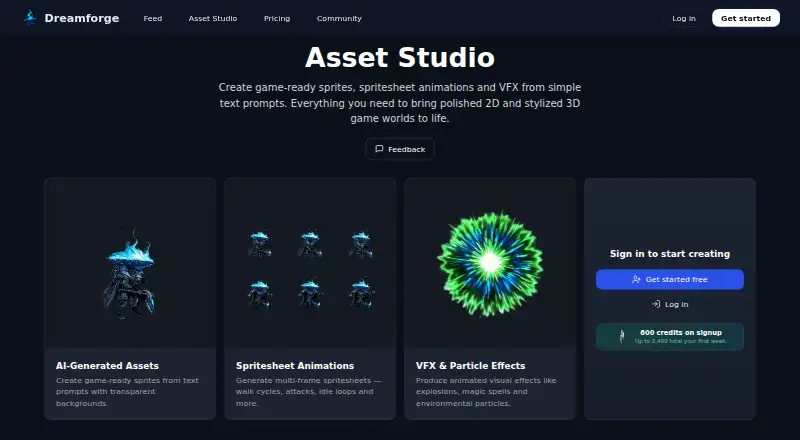
DreamForge Asset Studio is a web tool for generating game assets from text prompts. It creates transparent-background sprites, multi-frame animation sheets, and animated visual effects for 2D and stylized 3D games with consistent art direction. The guide describes sprites for characters, enemies, bosses, props, items, and environmental objects, and animations such as idle, walk, attack, hit, and death. Sheets use consistent frame sizes and alignment and are designed to go into a game without manual slicing. The tool can also generate effects such as explosions, magic spells, and environmental particles. Texture generation is supported, but text-to-3D assets are not. DreamForge positions Asset Studio within a larger prompt-based game creation platform that also generates code, textures, art, animation, and gameplay. The maker says users can create, customize, and play games without coding, then share browser-play pages. A free plan gives 600 signup credits and 600 bonus credits per login day during the first week, up to three times. Paid plans are Core at $20 a month, Pro at $50 a month, and Studio at $200 a month. DreamForge does not guarantee outputs will be bug-free, unique, or suitable for a specific purpose.
Who it suits
Asset Studio suits game creators looking for prompt-generated sprites, animation sheets, effects, or textures for 2D and stylized 3D projects. Its maker also positions the broader platform for people who want to create games without coding.
What it does well
- Generates transparent-background sprites from prompts.
- Creates multi-frame animation sheets.
- Supports texture generation.
- Sheets are designed to need no manual slicing.
- Free plan offers signup and login-day credits.
What to know first
- Text-to-3D asset generation is not supported.
- Outputs are not guaranteed to be unique.
- Outputs are not guaranteed to fit a specific purpose.
Limits
The free plan provides 600 credits on signup, with 600 bonus credits per login day during the first week up to three times, for up to 2,400 credits total. Paid monthly allowances are 5 000 credits on Core, 15 000 on Pro, and 70 000 on Studio.
Plans
| Plan | Billed and limits | Price |
|---|---|---|
| Core | 5 000 credits per month | $20 a month |
| Studio | 70 000 credits per month | $200 a month |
| Pro | 15 000 credits per month | $50 a month |
| Free | 600 free credits on signup · 600 bonus credits per login day during first week, up to three times | On request |
As dreamforge.ai lists them, read 5 Oct 2026. The maker's own page has the final word.
Getting started
- Visit the Asset Studio website.
- Use the free plan’s signup credits to begin.
- Generate sprites, spritesheets, effects, or textures from text prompts.
- Choose Core, Pro, or Studio if you want a paid monthly credit plan.
- Use generated spritesheets in a game, then share a browser-play page through DreamForge’s game shipping workflow.
DreamForge Asset Studio turns text prompts into sprites, spritesheet animations, visual effects, and textures for games. It suits developers building 2D or stylized 3D games who want a prompt-led asset workflow. Its generous first-week credits make it worth exploring, but paid use hinges on whether the monthly credit allowance matches your production needs.
Overview
Asset Studio is focused on game assets rather than text-to-3D models: it can generate sprites with transparent backgrounds, multi-frame animations, animated effects, and textures. The maker positions it within a broader game-creation platform for generating code, art, animation, textures, and gameplay from prompts, with no-code creation and shareable browser play pages as part of the workflow.
That broader setup may appeal to someone shaping a game as well as its art, while the asset tools address concrete production needs: characters, enemies, bosses, props, items, and environmental objects. The maker says generated spritesheets can go directly into a game without manual slicing. DreamForge does not guarantee outputs will be bug-free, unique, or suitable for a particular purpose, so generated assets should not be treated as production-ready without review.
Key features
- Prompt-based sprites: Creates game-ready sprites on transparent backgrounds, useful for individual characters, props, and environmental objects.
- Spritesheet animation: Generates multi-frame sheets for idle, walk, attack, hit, and death sequences, with consistent frame sizes and alignment. Direct integration without manual slicing could reduce asset-preparation work.
- Animated effects and textures: Supports effects such as explosions, spells, and environmental particles, alongside texture generation. That gives the asset workflow more range than sprites alone, though text-to-3D assets are not supported.
- Game creation workflow: Asset Studio sits within DreamForge’s prompt-led game platform, which also supports no-code creation and browser-play sharing.
Pricing
DreamForge uses a freemium model. The Free plan offers 600 credits at signup, plus 600 bonus credits per login day during the first week, up to three times; that is up to 2,400 credits in total. It is a useful way to assess the workflow, but the allowance is front-loaded rather than a stated recurring monthly quota.
- Core — $20 a month: 5 000 credits per month. A fit for regular individual use that exceeds the free allowance without moving to the larger monthly quotas.
- Pro — $50 a month: 15 000 credits per month. The middle option triples Core’s monthly credits for teams or projects with heavier generation needs.
- Studio — $200 a month: 70 000 credits per month. Its much larger quota is aimed at sustained, high-volume production; the higher monthly commitment makes it a harder fit for occasional asset work.
The plans are differentiated by credits, and no seat counts are given. DreamForge’s terms make clear that outputs are not guaranteed to be bug-free, unique, or fit for a specific purpose, a material consideration before relying on generated work in a game.
Platforms
Asset Studio is available on the web, making it accessible through a browser. DreamForge is headquartered in Stockholm, Sweden.
Who it's for
Asset Studio is best suited to developers making 2D or stylized 3D games who need prompt-generated sprites, animations, effects, or textures and value a route from asset creation into a broader no-code game workflow. The free credits help with initial exploration; ongoing use is a better fit when a project can make practical use of a monthly credit plan.
It is less suitable for projects that require text-to-3D asset generation or guaranteed uniqueness and fitness for purpose. Those limits matter particularly when assets must meet specific production requirements.
Pros and cons
Pros
- Useful animation coverage: Idle, walk, attack, hit, and death sequences address common game needs, and consistent frame sizes and alignment support cleaner spritesheets.
- Less spritesheet preparation: The maker says sheets can be used directly without manual slicing, potentially removing a separate asset-preparation step.
- Substantial initial allowance: Up to 2,400 credits during the first week gives newcomers room to explore before choosing a paid plan.
Cons
- No text-to-3D assets: Developers seeking prompt-generated 3D models will need another tool.
- Output guarantees are limited: DreamForge does not guarantee assets will be bug-free, unique, or suitable for a specific purpose, so the tool is not a substitute for checking production assets.
- Free credits are time-limited in practice: The bonus credits arrive on login days during the first week, up to three times, rather than forming a stated continuing monthly allowance.
Alternatives
Browse AI Game Asset Generators to compare tools in this category. Choose Meshy instead if you want an option available on Android, iOS, web, and API, with a free plan that includes 100 credits and 10 monthly downloads for Meshy 6 Lite models.
AnnoMotion is another freemium option with web, Windows, and API platforms, a free trial, and free credits after email verification plus daily credits. Asset Forge may suit someone seeking a one-time purchase option: its Starter plan costs $19, paid once and includes 4,000 credits, transparent PNGs, batch generation, and an AI feedback loop.
DeepMotion Animate 3D is an alternative for animation needs, with a free tier of 25 credits per month, 20 seconds per clip, and 1080p output. Goblin3D offers a free 150-credit allowance for public models, with a standard queue and one concurrent 3D generation.
Hyper3D Rodin is another freemium alternative. Layer Audio Cleanup is also freemium, with web, API, and extension access. For a broader game-asset workflow, Scenario offers a free tier with 50 daily credits for personal and evaluation use, as well as a $15 a month Starter plan.
Verdict
DreamForge Asset Studio is a strong candidate for 2D and stylized 3D game developers who want prompt-generated sprites, animation, effects, and textures connected to a broader no-code game workflow. Its animation details and direct-use spritesheets are practical strengths, and the first-week credit allowance gives room to explore. Look elsewhere if you need text-to-3D assets or dependable guarantees that generated output will meet a specific production standard.
Verdict
Asset Studio focuses on 2D and stylized 3D game assets, with sprites, animations, effects, and textures. Keep the stated output guarantees in mind, and compare the free credit allowance with the monthly credit plans.
Questions
How much does DreamForge Asset Studio cost?
The free plan provides 600 signup credits and up to 2,400 total during the first week. Core costs $20 a month, Pro costs $50 a month, and Studio costs $200 a month.
What platforms does Asset Studio support?
Asset Studio is listed for web.
What can Asset Studio generate?
It generates sprites, multi-frame spritesheets, animated visual effects, and textures from prompts. It does not generate text-to-3D assets.
Can I use its spritesheets directly in a game?
DreamForge says generated spritesheets are ready to plug into a game and do not require manual slicing.
Does DreamForge require coding?
DreamForge says users can create, customize, and play games without coding. It also describes shareable browser-play pages as part of its game shipping workflow.
Does DreamForge guarantee the generated assets?
No. Its terms say it does not guarantee outputs will be bug-free, unique, or fit for a specific purpose.
Facts from DreamForge Asset Studio's own pages
- Animation details
- The guide lists idle, walk, attack, hit, and death animations, with consistent frame sizes and alignment. · dreamforge.ai, 5 Oct 2026
- Animations
- It generates multi-frame spritesheets for walk cycles, attacks, idle loops, and other animations. · dreamforge.ai, 5 Oct 2026
- Browser play
- DreamForge describes shareable browser play pages as part of its game shipping workflow. · dreamforge.ai, 5 Oct 2026
- Free allowance
- Asset Studio advertises 600 credits on signup and up to 2,400 total during the first week. · dreamforge.ai, 5 Oct 2026
- Headquarters
- Stockholm, Sweden · dreamforge.ai, 28 Sept 2026
- Integration
- The maker says generated spritesheets are ready to plug directly into the game and require no manual slicing. · dreamforge.ai, 5 Oct 2026
- Limits
- The terms say DreamForge does not guarantee outputs will be bug-free, unique, or fit for a specific purpose. · dreamforge.ai, 5 Oct 2026
- No-code
- DreamForge says users can create, customize, and play games without coding. · dreamforge.ai, 5 Oct 2026
- Purpose
- Asset Studio creates game-ready sprites, spritesheet animations, and VFX from text prompts. · dreamforge.ai, 5 Oct 2026
- Sprites
- It generates game-ready sprites from text prompts with transparent backgrounds. · dreamforge.ai, 5 Oct 2026
- Support
- DreamForge provides a contact page inviting users to get in touch with its team. · dreamforge.ai, 5 Oct 2026
- Supported use
- The maker’s Asset Studio guide describes sprite generation for characters, enemies, bosses, props, items, and environmental objects. · dreamforge.ai, 5 Oct 2026
- Target games
- The product is designed for 2D and stylized 3D gameplay with consistent art direction. · dreamforge.ai, 5 Oct 2026
- Visual effects
- It can produce animated visual effects such as explosions, magic spells, and environmental particles. · dreamforge.ai, 5 Oct 2026
- Workflow
- The maker describes Asset Studio as part of its game creation platform, which also generates game code, textures, art, animation, and gameplay from prompts. · dreamforge.ai, 5 Oct 2026
Where DreamForge Asset Studio stands on Freedom251
- AI Game Asset Generators#8 of 26