Freedom251 › AI Game Asset Generators
PixelLab
What PixelLab is
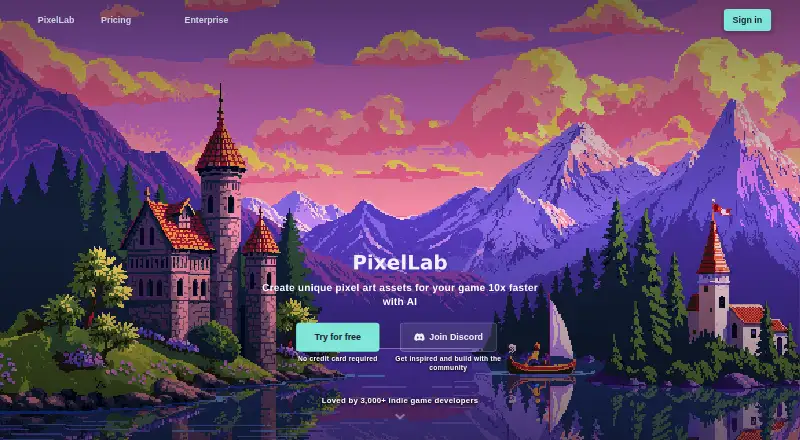
PixelLab generates 2D pixel art assets for games, including characters, animations, environments, maps, tilesets, textures, and UI elements. It supports character animation through text prompts, skeleton-based controls, or an automatic character creator. For characters and objects, users can generate four- or eight-direction views for isometric and top-down games. Inpainting tools modify images while maintaining style consistency with the original. PixelLab offers an Aseprite extension, an in-browser Pixelorama editor, API access, and an MCP toolkit for AI coding assistants. Its MCP documentation names clients including Claude Code, Codex CLI, Cursor, VS Code, Gemini CLI, and others. The product runs on Android, iOS, Linux, macOS, Windows, and the web, as well as through its API and extension. PixelLab says its models run on cloud GPUs, so users do not need a high-performance computer or strong graphics card. It says it does not store generated or input images unless a tool or documentation says otherwise, and does not use user content to train its models. A free trial is available, with paid plans starting at $12 a month.
Who it suits
PixelLab suits game creators who need pixel art assets, character animation, directional views, or image edits that preserve a consistent style. It may also suit teams using Aseprite, Pixelorama, an API, or supported MCP clients in their creative workflow.
What it does well
- Generates characters, environments, maps, tilesets, textures, and UI elements.
- Supports three approaches to character animation.
- Creates four- or eight-direction views for game assets.
- Inpainting edits aim to maintain the source image's style.
- Offers API, Aseprite extension, Pixelorama editor, and MCP toolkit.
- Cloud GPU processing avoids a need for high-performance local graphics hardware.
What to know first
- Free trial images are limited to 200×200.
- Map tools are excluded from the free trial.
- The free trial switches to slower daily generations after 40 fast generations.
Limits
The free trial includes 40 fast generations, then five slower generations per day, with a storage cap of 20. Images are limited to 200×200 and map tools are not included. The listed paid tiers include 2,000, 5,000, or 10,000 monthly generations, depending on tier.
Plans
| Plan | Billed and limits | Price |
|---|---|---|
| Free trial | 40 fast generations · then 5 slower generations daily (store up to 20) · images up to 200×200 · map tools not included | Free |
| Tier 1: Pixel Apprentice | Monthly billing; page notes discounted monthly rates with annual billing: 12 -> 10 -> 9.5 -> 9.0 · 2,000 generations per month · images up to 320×320 · animation and map generation · Discord support | $12 a month |
| Tier 2: Pixel Artisan | Monthly billing; page notes discounted monthly rates with annual billing: 24 -> 23 -> 22.5 -> 22 · 5,000 generations per month · images and edits up to 512×512 · up to 10 concurrent background jobs · priority support | $24 a month |
| Tier 3: Pixel Architect | Monthly billing; page says save $100 with annual billing · 10,000 generations per month · up to 20 concurrent background jobs · highest priority generation · team feedback and feature prioritization | $50 a month |
| Enterprise | Annual contracts with custom terms; invoice billing · Custom generation pool · dedicated queue · no per-seat limits · SAML 2.0 SSO · priority support | On request |
As pixellab.ai lists them, read 7 Oct 2026. The maker's own page has the final word.
Getting started
- Open https://www.pixellab.ai/.
- Choose a platform: Android, iOS, Linux, macOS, Windows, web, API, or extension.
- Start with the free trial, which provides 40 fast generations followed by five slower generations daily.
- Choose a paid tier if you need its listed generation capacity, image size, animation, map generation, or support options.
- Connect through the Aseprite extension, Pixelorama editor, API, or MCP toolkit if that matches your workflow.
Verdict
Choose PixelLab if your game workflow needs generated pixel art, animation, directional views, or style-consistent edits, especially when its editor and coding-assistant integrations fit your tools. Look elsewhere if the free trial's image-size and map restrictions do not suit your work, or if you need Enterprise pricing before making a decision.
Questions
Is PixelLab free?
A free trial is available free of charge. It includes 40 fast generations, then five slower generations daily, with images up to 200×200 and no map tools.
Which platforms does PixelLab support?
PixelLab lists Android, API, extension, iOS, Linux, macOS, web, and Windows.
Can generated images be used commercially?
PixelLab's FAQ says generated images may be used commercially, but users must not train new models with them.
Does PixelLab use user content to train its models?
PixelLab says it does not use user inputs or generated content to train its models.
What integrations does PixelLab offer?
It offers an Aseprite extension, an in-browser Pixelorama editor, API access, and an MCP toolkit for AI coding assistants.
Facts from PixelLab's own pages
- Animation
- It supports character animation using text prompts, skeleton-based controls, or an automatic character creator. · pixellab.ai, 7 Oct 2026
- Cloud processing
- PixelLab says its models run on cloud GPUs, so users do not need a high-performance computer or strong graphics card. · pixellab.ai, 7 Oct 2026
- Commercial use
- The FAQ says generated images may be used commercially, with the restriction that users must not train new models with them. · pixellab.ai, 7 Oct 2026
- Data collection
- The privacy policy says it may collect voluntarily provided name, email, and phone number, as well as device information, IP address, and app usage data. · pixellab.ai, 7 Oct 2026
- Editing
- Its editing tools use inpainting to modify images while maintaining style consistency with the original. · pixellab.ai, 7 Oct 2026
- Enterprise SSO
- Enterprise supports SAML 2.0 single sign-on with Okta, Azure AD, Google Workspace, or any SAML 2.0-compliant identity provider. · pixellab.ai, 7 Oct 2026
- Image privacy
- PixelLab says it does not store generated or input images unless the specific tool or documentation clearly says otherwise. · pixellab.ai, 7 Oct 2026
- Integrations
- PixelLab offers an Aseprite extension, an in-browser Pixelorama editor, API access, and an MCP toolkit for AI coding assistants. · pixellab.ai, 7 Oct 2026
- MCP clients
- The documentation lists Claude Code, Claude Desktop, Codex CLI, Cursor, VS Code, Gemini CLI, Windsurf, Zed, Cline, Continue, Droid, Kiro, Junie, Warp, BoltAI, LM Studio, and Perplexity Desktop as supported clients. · pixellab.ai, 7 Oct 2026
- Platforms
- The web creator works on desktop and mobile browsers; Pixelorama is desktop-browser only, and the product FAQ says it works on Windows, Mac, and Linux. · pixellab.ai, 7 Oct 2026
- Product
- PixelLab generates pixel art assets for games, including characters, animations, environments, maps, tilesets, textures, and UI elements. · pixellab.ai, 7 Oct 2026
- Rotation
- It can generate four or eight directional views of characters and objects for isometric and top-down games. · pixellab.ai, 7 Oct 2026
- Security
- Its privacy policy says it uses access controls and regular security assessments as reasonable measures to protect information. · pixellab.ai, 7 Oct 2026
- Support
- Enterprise inquiries receive a reply within 1–3 business days, while the paid plans list Discord support or priority support depending on tier. · pixellab.ai, 7 Oct 2026
- Training
- PixelLab says it does not use user inputs or generated content to train its models. · pixellab.ai, 7 Oct 2026
Where PixelLab stands on Freedom251
- AI Game Asset Generators#7 of 26