Freedom251 › UKG Marketplace Software

DocuSign eSignature
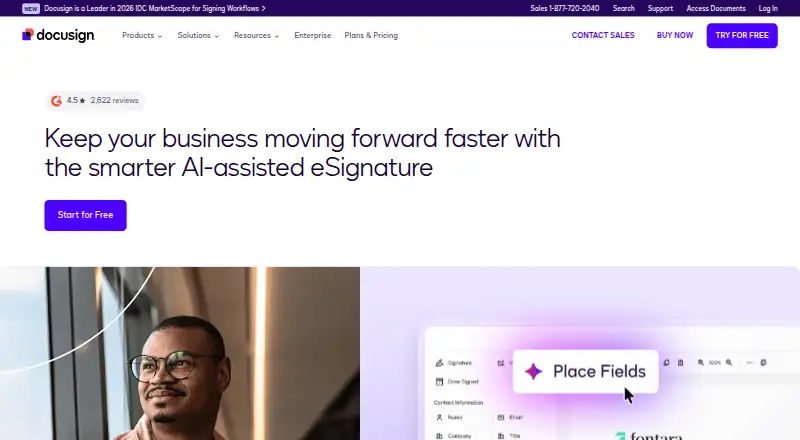
What DocuSign eSignature is
DocuSign eSignature is a cloud service for sending, signing, and managing agreements. Signers can complete documents on any device without an account. Listed capabilities include document templates, bulk sending, signature ordering, approval workflows, renewal tracking, an audit trail, and API access. The maker lists a free plan and a 30-day trial for sending, signing, and managing agreements. Its paid-plan facts include Personal at 10 USD per user per month billed annually, Standard at 25 USD per user per month billed annually, and Business Pro at 40 USD per user per month billed annually. Personal is limited to 5 envelopes per month; Standard and Business Pro list 100 envelopes per user per year. More than 1,100 pre-built integrations are available, and SMS sending starts at $0.36 per delivery. Enhanced plans include centralized organization management and 24/7 live technical support. The plans table lists ISO 27001, SOC 2 Type II, WCAG 2.0 Level AA, and GDPR. DocuSign was founded in 2003 and is headquartered in San Francisco, California.
Who it suits
It suits individuals and organizations that need to send, sign, and manage agreements electronically. Teams can consider the paid plans for higher envelope limits or centralized administration and support options.
What it does well
- Signers can complete documents on any device without an account.
- Includes templates, bulk sending, and signature ordering.
- Provides audit trails and API access.
- More than 1,100 pre-built integrations are available.
- A 30-day trial is listed.
What to know first
- Personal is limited to 5 envelopes per month.
- Standard and Business Pro list 100 envelopes per user per year.
- SMS sending starts at $0.36 per delivery.
Limits
Personal allows 5 envelopes per month. Standard and Business Pro allow 100 envelopes per user per year. Enhanced plans have customized envelope limits.
Plans
| Plan | Billed and limits | Price |
|---|---|---|
| Personal | Annual | Billed monthly; annual commitment of $132 · 5 envelopes per month | $11 a month |
| Standard | Annual | Billed monthly; annual commitment of $360 · 100 envelopes per user per year · Up to 50 users | $30 a month |
| Business Pro | Annual | Billed monthly; annual commitment of $540 · 100 envelopes per user per year · Up to 50 users | $45 a month |
| Enhanced plans | Customized envelope limits · Centralized organization management · 24/7 live technical support · Single sign-on | On request |
As docusign.com lists them, read 27 Sept 2026. The maker's own page has the final word.
Getting started
- Open the DocuSign eSignature website.
- Choose the free plan or start the 30-day trial.
- Select a paid plan if its envelope limit and features fit your needs.
- Send an agreement for signing; signers can complete it on any device without an account.
DocuSign eSignature is a cloud service for preparing, sending, and signing agreements. It is best suited to people and teams with recurring signature workflows or a need to connect signing to business systems. Its workflow tools are broad, but envelope caps and annual commitments make plan fit a practical concern.
Overview
Templates, approval workflows, renewal tracking, and signature-order options extend the service beyond collecting a signature. Audit trails support recordkeeping, while bulk sending is useful for repeatable requests. Signers can complete documents on any device without an account, which keeps recipient access straightforward.
Key features
More than 1,100 pre-built integrations and API access give organizations ways to connect eSignature with existing systems. SMS authentication adds a verification option; SMS sending starts at $0.36 per delivery, so using it regularly brings an additional cost.
The plans table lists ISO 27001, SOC 2 Type II, WCAG 2.0 Level AA, and GDPR. Enhanced plans add centralized management of users, policies, and integrations, plus single sign-on and 24/7 live technical support. These controls are more relevant to organizations with administrative and support requirements than to individual senders.
Pricing
There is a free plan, though no free-plan envelope allowance is given. A 30-day trial is available for sending, signing, and managing agreements. Paid prices below are per user per month with annual billing; annual commitments and envelope quotas matter more than the monthly figure alone.
- Personal: $10 per user per month, billed annually at $120, with an annual commitment of $132 and a limit of 5 envelopes per month. This is aimed at an individual with light, predictable use; the monthly cap makes it a poor fit for busier workflows.
- Standard: $25 per user per month, billed annually at $300, with an annual commitment of $360. It allows 100 envelopes per user per year and up to 50 users. The higher allowance and team capacity suit regular shared use, but teams sending beyond the quota need another arrangement.
- Business Pro: $40 per user per month, billed annually at $480, with an annual commitment of $540. It also allows 100 envelopes per user per year and up to 50 users. The same stated envelope limit as Standard means higher volume alone does not explain the price step; choose it only if its plan-level fit meets your needs.
- Enhanced plans: Custom pricing, customized envelope limits, centralized organization management, 24/7 live technical support, and single sign-on. This is the tier for organizations needing administrative controls and tailored limits rather than a published per-user price.
Additional tax may apply. Qualifying annual subscriptions can be refunded within 30 days; monthly plans can be canceled at any time without next-month billing.
Platforms
Deployment is cloud-based. The platform listing identifies API availability, and signers can complete documents on any device without an account.
Who it's for
DocuSign eSignature fits individuals and teams that send agreements repeatedly, need templates or approval steps, or want integrations and audit trails around signing. The free plan or Personal may suit occasional use, but the Personal cap is only five envelopes monthly. Teams should compare their expected annual volume with the 100-envelope per-user limits on Standard and Business Pro. Organizations seeking centralized administration, tailored envelope limits, or enhanced support should consider custom-priced Enhanced plans.
Pros and cons
- Pro: Templates, approvals, renewal tracking, and bulk sending support repeatable agreement work, not just signature collection.
- Pro: Recipients can sign on any device without an account, avoiding a sign-up hurdle.
- Pro: More than 1,100 integrations and API access offer multiple paths to connect signing with business systems.
- Con: Personal is capped at five envelopes per month, while Standard and Business Pro each cap usage at 100 per user per year.
- Con: Annual commitments are $132, $360, and $540 for the respective paid tiers, so the monthly display does not tell the full commitment.
- Con: SMS sending starts at $0.36 per delivery, adding cost when that verification route is used.
Alternatives
For broader contract work or a different signing model, consider these options:
- Contractbook has a free plan and trial, web and API platforms, and an Essential plan with one user, 100 signed contracts per year, and five templates. It may suit a solo user prioritizing that stated contract allowance and template count.
- OpenAgree offers two contracts or agreements free to start, with no credit card, subscription, or hidden fees. It may suit someone who wants a small no-subscription start.
- Icertis Contract Management is an enterprise contract lifecycle management option with demo-based pricing; choose it when that enterprise lifecycle focus is the priority.
- LinkSquares uses custom pricing based on organizational needs. It is an option for organizations seeking a tailored quote.
- Canveo is another paid option.
- Sirion offers enterprise custom pricing based on organizational requirements, deployment scope, users, integrations, and contract volume. It may suit organizations evaluating those enterprise-specific needs.
- Docusign CLM is a paid, contact-sales option for readers considering a contract lifecycle management product.
- Juro lists Essentials and Growth plans with unlimited users, workflows, and templates. It may suit teams prioritizing those stated plan allowances.
For adjacent categories, browse Contract Negotiation Software, Contract Lifecycle Management Software, Legal Contract Management Software, Real Estate Transaction Management Software, Online Notary Software, and Document Workflow Software.
Verdict
Choose DocuSign eSignature if you need recurring agreement workflows, audit trails, and integrations around signing, and can keep usage within the relevant envelope allowance. Look elsewhere if your expected volume exceeds those caps or you want to avoid an annual commitment; the plan limits and total annual cost are central to the decision.
Verdict
DocuSign eSignature combines agreement workflows with signing, audit trails, and integrations. Compare the envelope limits and annual per-user prices with your expected volume before choosing a plan.
Questions
Is there a free plan or trial?
Yes. A free plan and a 30-day trial are available.
What do the paid plans cost?
The listed plan prices are $11.00 per month for Personal, $30.00 per user per month for Standard, and $45.00 per user per month for Business Pro, billed annually. Additional tax may apply.
What are the envelope limits?
Personal includes 5 envelopes per month. Standard and Business Pro include 100 envelopes per user per year.
Which devices can signers use?
Signers can complete documents on any device without an account.
Does it include integrations and API access?
Yes. API access is available, along with more than 1,100 pre-built integrations.
Where is DocuSign headquartered?
DocuSign is headquartered in San Francisco, California, United States, and was founded in 2003.
Facts from DocuSign eSignature's own pages
- Annual refund
- Refund available within 30 days for qualifying annual subscriptions · ecom.docusign.com, 27 Sept 2026
- API access
- Yes · ecom.docusign.com, 20 Sept 2026
- Audit trail
- Yes · ecom.docusign.com, 20 Sept 2026
- Bulk sending
- Yes · ecom.docusign.com, 20 Sept 2026
- Bulk sending
- Business Pro supports bulk sending to multiple recipients · ecom.docusign.com, 27 Sept 2026
- Business Pro limit
- 100 envelopes per user per year · docusign.com, 27 Sept 2026
- Business Pro price
- $40 per user per month, billed annually at $480 · docusign.com, 27 Sept 2026
- Centralized administration
- Enterprise administration can manage users, policies, and integrations centrally · docusign.com, 27 Sept 2026
- Customer count
- Docusign says it powers progress for 1.7 million customers · docusign.com, 27 Sept 2026
- Document templates
- Yes · ecom.docusign.com, 20 Sept 2026
- Enterprise support
- Enhanced plans include 24/7 live technical support · ecom.docusign.com, 27 Sept 2026
- Founded
- 2003 · docusign.com, 28 Sept 2026
- Free plan
- Yes · ecom.docusign.com, 20 Sept 2026
- Free trial
- A free trial is available for starting to send, sign, and manage agreements · docusign.com, 27 Sept 2026
- Headquarters
- San Francisco, California, United States · docusign.com, 28 Sept 2026
- Integration count
- More than 1,100 pre-built integrations are available · docusign.com, 27 Sept 2026
- Monthly cancellation
- Monthly plans can be canceled at any time without next-month billing · ecom.docusign.com, 27 Sept 2026
- Personal envelope limit
- 5 envelopes per month · docusign.com, 27 Sept 2026
- Personal price
- $10 per user per month, billed annually at $120 · docusign.com, 27 Sept 2026
- Security certifications
- The plans table lists ISO 27001, SOC 2 Type II, WCAG 2.0 Level AA, and GDPR · ecom.docusign.com, 27 Sept 2026
- Signature order
- both · ecom.docusign.com, 20 Sept 2026
- SMS add-on price
- SMS sending starts at $0.36 per delivery · ecom.docusign.com, 27 Sept 2026
- SMS authentication
- Yes · ecom.docusign.com, 20 Sept 2026
- Standard envelope limit
- 100 envelopes per user per year · docusign.com, 27 Sept 2026
Where DocuSign eSignature stands on Freedom251
- UKG Marketplace Software#1 of 18
- Salesforce AppExchange Apps#2 of 23
- E-signature tools#13 of 68
- Document Workflow Software#7 of 32
- Digital Signature API Software#7 of 28
- E-Signature Software#19 of 68
- Electronic Signature Software#11 of 33
- E-Signature APIs Software#10 of 26
- Electronic Signature APIs#11 of 27