Freedom251 › Action Item Tracking Software

DinaBot
What DinaBot is
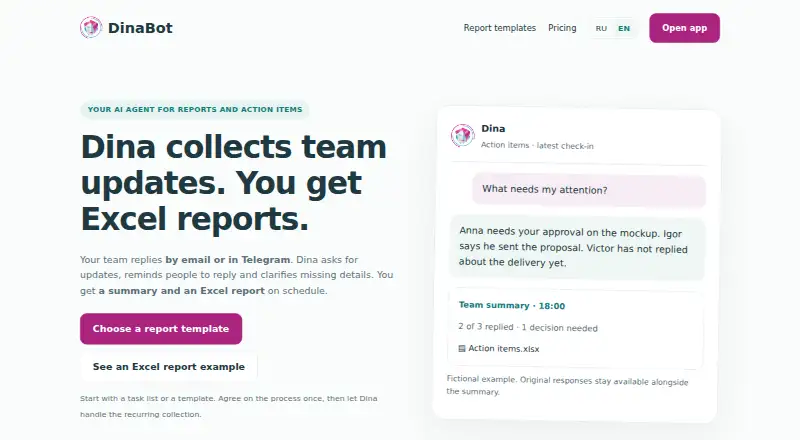
DinaBot collects team updates and turns them into summaries and scheduled Excel reports. Employees can reply through its web app, email, Telegram or MAX. Dina can send reminders, ask follow-up questions when information is incomplete and collect progress on assigned action items, including deadlines, blockers and changes. The service describes workflows for daily work reports, standups, project tracking, construction reports, attendance and daily sales. Managers can receive reports by email, in personal Telegram or MAX chats, or in a verified Telegram group; MAX report delivery is limited to personal chats. Dina supports English and Russian for the app, report setup and conversations. Its web app imports task lists from XLSX, UTF-8 CSV, DOCX, text-based PDF, TXT and Markdown files, subject to per-upload limits. It keeps original employee messages, but reports rely on the updates people provide and do not independently confirm that work is complete. DinaBot is a web service operated by DinaTech LLC. The maker provides pricing and setup information by email, and says current V2 pricing, access periods and limits are available on request.
Who it suits
DinaBot suits project managers, coordinators, engineering and facilities managers, and site or installation managers who need recurring team updates and action-item progress. It is also suited to teams that can share updates through its supported web, email, Telegram or MAX channels and use Excel reports.
What it does well
- Collects team updates through web, email, Telegram and MAX.
- Follows up on incomplete answers with reminders and clarifying questions.
- Tracks action-item owners, deadlines, blockers and changes.
- Supports English and Russian conversations and report setup.
- Imports several document and spreadsheet formats through the web app.
What to know first
- Task uploads are capped at 8 MB, 100 action items and 40 PDF pages.
- Scans without text, images, audio and video are unsupported for task imports.
- MAX report delivery is limited to personal chats.
- Google Sheets, Slack and Microsoft Teams integrations are not offered.
Getting started
- Visit the DinaBot website.
- Email [email protected] for setup information and current pricing.
- Use the web app or a connected email, Telegram or MAX channel to collect employee updates.
- Import a supported task list through the web app, within its upload limits.
- Set up scheduled questions and reports for the selected workflow.
Verdict
Choose DinaBot if your team needs scheduled update collection, action-item follow-up and Excel reporting through its supported channels. Look elsewhere if you require Google Sheets, Slack or Microsoft Teams integrations, or independent verification that reported work is complete.
Questions
How much does DinaBot cost?
The maker has no published V2 price list. Contact [email protected] for current pricing, access periods and limits.
Is there a free trial?
English Excel example files are available to download without registration. The maker says those examples do not establish a subscription or trial.
Which platforms and channels does it support?
The app is web-based. Employees can respond through the web app, email, Telegram or MAX; reports can be delivered by email, personal Telegram or MAX chats, or a verified Telegram group.
What files can I import?
The web app accepts XLSX, UTF-8 CSV, DOCX, text-based PDF, TXT and Markdown, with limits of 8 MB, 100 action items and 40 PDF pages per upload.
Does DinaBot connect to Slack or Microsoft Teams?
The maker says Google Sheets, Slack and Microsoft Teams integrations are not offered. Its current workflow uses Excel exports, document import and connected web, email, Telegram or MAX channels.
Who operates DinaBot?
The legal documents identify DinaTech LLC as the service operator, with a legal address in Moscow, Russia.
Facts from DinaBot's own pages
- Action item tracking
- For action item tracking, Dina asks owners about progress and prepares a report with deadlines, blockers and change history. · dinabot.com, 8 Oct 2026
- AI follow-up
- After setup approval, Dina asks scheduled questions, reminds people, interprets replies and clarifies missing information. · dinabot.com, 8 Oct 2026
- Channel limitation
- MAX currently supports personal chats; group report delivery is available in Telegram. · dinabot.com, 8 Oct 2026
- Channels
- Employees can respond through the web app, email, Telegram or MAX; reports can be delivered by email, to personal Telegram or MAX chats, or to a verified Telegram group. · dinabot.com, 8 Oct 2026
- Company
- The legal documents identify the service operator as DinaTech LLC, with a legal address in Moscow, Russia. · dinabot.com, 8 Oct 2026
- Daily reports
- Daily work reports collect results, next steps and requests for manager help, including follow-up on incomplete answers. · dinabot.com, 8 Oct 2026
- Data rights
- The privacy policy describes rights to request access, correction, blocking or deletion of personal data and to withdraw consent where processing is based on consent. · dinabot.com, 8 Oct 2026
- Examples
- English Excel example files can be downloaded without registration; the pricing page says this does not establish a subscription or trial. · dinabot.com, 8 Oct 2026
- Import limitations
- Audio recordings, images and scans without a text layer are not supported for task import. · dinabot.com, 8 Oct 2026
- Import limits
- Task imports are limited to 8 MB, 100 action items and 40 PDF pages; scans, images, audio and video are unsupported. · dinabot.com, 8 Oct 2026
- Integrations
- The site says Google Sheets, Slack and Microsoft Teams integrations are not offered; the current workflow uses Excel exports, document import and connected Telegram, MAX, email or web channels. · dinabot.com, 8 Oct 2026
- Intended users
- The site describes use by project managers, coordinators, engineering managers, facilities managers, site coordinators and installation managers. · dinabot.com, 8 Oct 2026
- Languages
- The app, report setup and conversations with Dina support English and Russian, and email supports questions, replies, clarification and report delivery. · dinabot.com, 8 Oct 2026
- Pricing
- The maker says there is no published V2 price list and asks prospective customers to contact it for current pricing, access periods and limits. · dinabot.com, 8 Oct 2026
- Privacy
- The privacy policy says DinaTech LLC processes personal data under Russian Federal Law No. 152-FZ and may share data with service providers as needed to operate the service. · dinabot.com, 8 Oct 2026
- Purpose
- Dina collects team updates by email or Telegram and prepares summaries and scheduled Excel reports. · dinabot.com, 8 Oct 2026
- Reporting caveat
- Dina reports employee-provided updates and preserves original messages; it does not independently verify whether work is complete. · dinabot.com, 8 Oct 2026
- Report types
- The site describes daily work reports, standups, project task tracking, construction reports and attendance tracking, and daily sales reports. · dinabot.com, 8 Oct 2026
- Support
- For setup, pricing and service questions, the maker directs users to email [email protected]. · dinabot.com, 8 Oct 2026
- Support and pricing
- The maker directs users to email [email protected] for setup, pricing and service questions, and says no public V2 price list is available yet. · dinabot.com, 8 Oct 2026
- Task import
- Task lists can be imported from XLSX, UTF-8 CSV, DOCX, text-based PDF, TXT and Markdown files. · dinabot.com, 8 Oct 2026
- Task tracking
- It collects progress updates on assigned action items, including deadlines, blockers and changes. · dinabot.com, 8 Oct 2026
- What it does
- Dina collects team updates by email or Telegram, sends reminders and clarifying questions, then prepares a summary and Excel report. · dinabot.com, 8 Oct 2026
Where DinaBot stands on Freedom251
- Action Item Tracking Software#25 of 26