
Dillinger
What Dillinger is
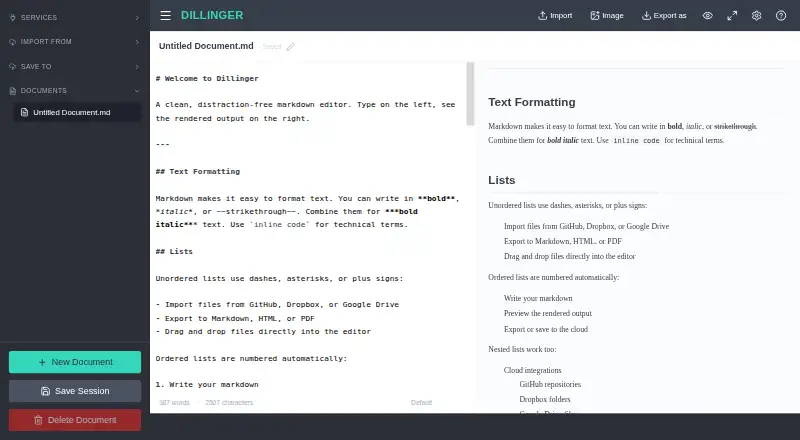
Dillinger is a free web-based Markdown editor with a live preview, cloud sync, and no signup requirement. Its Monaco editor provides syntax highlighting, multiple cursors, find and replace, and autocompletion. A side-by-side preview updates as you write and keeps scrolling aligned with the editor. Files can be imported by drag and drop, then exported as Markdown, styled HTML, or PDF. Dillinger also imports and saves documents through GitHub, Dropbox, Google Drive, OneDrive, and Bitbucket; GitHub support includes private repositories and saving edits back. After the initial page load, the editor can work offline and stores drafts in local storage, but cloud sync needs connectivity. Writing options include dark mode, fullscreen Zen mode, and Vim and Emacs keybindings. The site describes use for developers, technical writers, and AI builders preparing READMEs, documentation, blog posts, and LLM prompts. Dillinger says documents save automatically in the browser and are not stored on its servers.
Who it suits
Dillinger suits developers, technical writers, and AI builders writing Markdown documents, prompts, or documentation. It may also fit users who want local drafts, file export, and connections to supported cloud services.
What it does well
- Free plan has no signup or usage limits.
- Preview renders Markdown as you type.
- Exports Markdown, styled HTML, and PDF.
- Works offline after the initial load.
- Offers GitHub, Dropbox, Drive, OneDrive, and Bitbucket integrations.
What to know first
- Cloud sync requires connectivity.
- Offline editing begins only after the initial load.
- Available platform is web.
Plans
| Plan | Billed and limits | Price |
|---|---|---|
| Free | No signup · no paywall · no usage limits | Free |
As dillinger.io lists them, read 3 Oct 2026. The maker's own page has the final word.
Getting started
- Open https://dillinger.io/ in a web browser.
- Start writing without creating an account.
- Drag and drop a file to import it, or connect a listed file service.
- Choose an export format when your document is ready.
Dillinger is a browser-based Markdown workspace for developers, technical writers, and AI builders who need to draft, review, and move documents without creating an account. It is strongest when live rendering and file-service access matter more than a full desktop writing environment. The no-cost, no-limit plan makes it an easy editor to adopt, provided you understand the difference between local drafts and connected cloud storage.
Overview
Dillinger puts Markdown editing and rendered output side by side. The preview updates while you type and keeps its scroll position aligned with the editor, so you can catch heading, list, and other formatting problems without repeatedly changing modes. That workflow is particularly useful for README files, technical documentation, blog drafts, and prompts.
There is no signup requirement, and documents save automatically in the browser. Dillinger says documents are not stored on its servers, which suits writers who prefer browser-local drafts. After the initial page load, editing continues offline with drafts in local storage. That is convenient on an unreliable connection, but it does not provide cloud backup until connectivity returns.
Key features
Editor and preview
The Monaco editor supplies syntax highlighting, multiple cursors, find and replace, and autocompletion. These are meaningful advantages for long technical documents and repetitive edits, where navigating and changing several passages quickly matters. It remains a focused Markdown editor rather than a general-purpose word processor.
Dark mode and fullscreen Zen mode can reduce visual distraction, while Vim and Emacs keybindings accommodate writers who already use those control schemes. The aligned live preview gives immediate structural feedback, although users seeking extensive layout or publishing controls will need a broader tool.
Files and integrations
Drag-and-drop import and export cover Markdown, styled HTML, and PDF. Dillinger can import from and save to GitHub, Dropbox, Google Drive, OneDrive, and Bitbucket, making it practical for moving a document between local work and an existing repository or drive. GitHub support includes public and private repositories and lets you save edits back, which is especially useful for README and documentation maintenance.
Cloud integrations are a productivity strength, not an offline guarantee: synchronization requires a connection. Dropbox connects through OAuth, with the integration describing the credentials as secure. Local file support and browser storage let you keep drafting without handing documents to Dillinger's servers.
AI-oriented writing
Dillinger positions Markdown editing for prompts, AI-generated content, technical documentation, and knowledge bases used with large language models. That makes it a sensible staging area for structured text, but the editor itself is still centered on writing and file movement rather than model hosting or an AI service.
Pricing
Dillinger has one plan and no trial because the product is free to use. There is no paywall, signup requirement, or stated usage limit, so occasional writers and teams that only need an editor can use the same feature set without a subscription decision.
| Plan | Price | What it includes | Best for |
|---|---|---|---|
| Free | free | No signup, no paywall, no usage limits; Markdown editing, preview, import/export, local drafts, and supported integrations | Anyone needing a browser Markdown editor without recurring cost |
Because there is no paid tier, there are no paid-only seats, quotas, or renewal terms to weigh. The practical constraint is operational: local drafts remain in the browser while cloud synchronization needs connectivity.
Platforms
Dillinger runs on the web. That keeps access broad across supported browsers and avoids a desktop installation, but writers who want a dedicated Linux, macOS, or Windows application should consider a desktop alternative.
Who it's for
Choose Dillinger for README maintenance, documentation, Markdown blog posts, and LLM prompts when you value a rendered preview, keyboard-oriented editing, and the ability to move files through GitHub or major cloud drives. It also works well for no-account, occasional drafting and for offline writing after the page has loaded.
Look elsewhere if your workflow depends on a native desktop app, a wider note-taking system, or guaranteed online synchronization while disconnected. Browser-local storage is useful for continuity, but it is not the same as an always-available remote copy.
Pros and cons
- Pros: Free access with no signup, paywall, or usage limits removes adoption friction.
- Pros: Monaco editing tools, aligned live preview, and Vim/Emacs bindings support serious Markdown work.
- Pros: GitHub, Dropbox, Google Drive, OneDrive, and Bitbucket connections simplify file transfer and repository edits.
- Pros: Browser saving, local file support, and post-load offline drafting keep work available without a connection.
- Cons: Cloud sync stops when connectivity does, so offline drafts do not automatically serve as remote backups.
- Cons: The web-only format is a poor fit for readers who require a dedicated desktop editor.
- Cons: Its focus on Markdown leaves broader writing and note-management needs to other software.
Alternatives
StackEdit is a free, open-source web editor with no stated usage limits or paid plans; pick it when open-source licensing is a priority.
PanWriter is free and open source on Linux, macOS, and Windows; choose it for a native cross-platform desktop workflow.
HackMD offers a free web plan for up to three teammates with specific collaboration quotas; choose it when shared editing and team invitations matter.
MarkText is free, open source, desktop software with no account or subscription; choose it for local, account-free editing.
HedgeDoc is an AGPL-licensed, open-source self-hosted or web option; choose it when hosting control is central.
Ghostwriter is free, open source, and available for Linux, macOS, and Windows; choose it for a desktop Markdown environment.
Zettlr is free, open-source desktop software with no payment required to download; choose it for a broader local writing setup.
Muesli is a free AGPL-3.0 service spanning web, desktop, API, and self-hosted platforms; choose it when deployment flexibility matters. For category browsing, see Markdown editors and Note-taking apps.
Verdict
Dillinger is a strong choice for developers, technical writers, and AI builders who want a capable Markdown editor with immediate rendering and convenient repository or drive connections at no cost. Its main reason to choose it is the combination of Monaco editing, aligned preview, and broad import/export access without an account. Look elsewhere when you need native desktop software, a full note-taking suite, or cloud access that remains dependable while offline.
Verdict
Dillinger combines a live Markdown preview with file import, export, and supported storage integrations at no cost. Note that offline work uses local drafts, while cloud sync depends on connectivity.
Questions
How much does Dillinger cost?
The Free plan costs nothing, with no signup, paywall, or usage limits.
Is there a free plan or trial?
Yes. Dillinger has a free plan; there is no free trial.
Which platforms does Dillinger support?
The listed platform is web.
Which file formats can I export?
You can export Markdown, styled HTML, or PDF.
Which services does Dillinger integrate with?
It can import and save files with GitHub, Dropbox, Google Drive, OneDrive, and Bitbucket.
Can I use Dillinger offline?
After the initial load, the editor works offline and keeps drafts in local storage. Cloud syncing requires connectivity.
Facts from Dillinger's own pages
- AI workflows
- Dillinger describes Markdown editing for prompts, AI-generated content, technical documentation, and knowledge bases used with LLMs. · dillinger.io, 3 Oct 2026
- Audience
- The homepage describes the editor as a tool for developers, technical writers, and AI builders writing READMEs, documentation, blog posts, and LLM prompts. · dillinger.io, 3 Oct 2026
- Cloud sync
- Yes · dillinger.io, 20 Sept 2026
- Editor
- It uses the Monaco editor and includes syntax highlighting, multiple cursors, find and replace, and autocompletion. · dillinger.io, 3 Oct 2026
- Export formats
- Markdown,HTML,PDF · dillinger.io, 20 Sept 2026
- Free plan
- Yes · dillinger.io, 20 Sept 2026
- GitHub support
- Dillinger can import Markdown files from public and private GitHub repositories and save edits back to GitHub. · dillinger.io, 3 Oct 2026
- Import and export
- Users can import files by drag and drop and export documents as Markdown, styled HTML, or PDF. · dillinger.io, 3 Oct 2026
- Integrations
- Dillinger can import and save files with GitHub, Dropbox, Google Drive, OneDrive, and Bitbucket. · dillinger.io, 3 Oct 2026
- Local file support
- Yes · dillinger.io, 20 Sept 2026
- OAuth
- The integrations page says Dropbox connects via OAuth and describes the credentials as secure. · dillinger.io, 3 Oct 2026
- Offline use
- After the initial load, the editor works offline and keeps drafts in local storage; cloud sync requires connectivity. · dillinger.io, 3 Oct 2026
- Supported platforms
- web · dillinger.io, 20 Sept 2026
- Preview
- The side-by-side preview renders Markdown as you type and keeps scrolling aligned with the editor. · dillinger.io, 3 Oct 2026
- Purpose
- Dillinger is a free online Markdown editor with a live preview, cloud sync, and no signup requirement. · dillinger.io, 3 Oct 2026
- Security
- The features page says documents save automatically in the browser and that no data is stored on Dillinger’s servers. · dillinger.io, 3 Oct 2026
- Writing modes
- The editor offers dark mode, fullscreen Zen mode, and Vim and Emacs keybindings. · dillinger.io, 3 Oct 2026
Where Dillinger stands on Freedom251
- Text App#6 of 24
- Markdown editors#10 of 31
- Note-taking apps#153 of 216