Diktafon
What Diktafon is
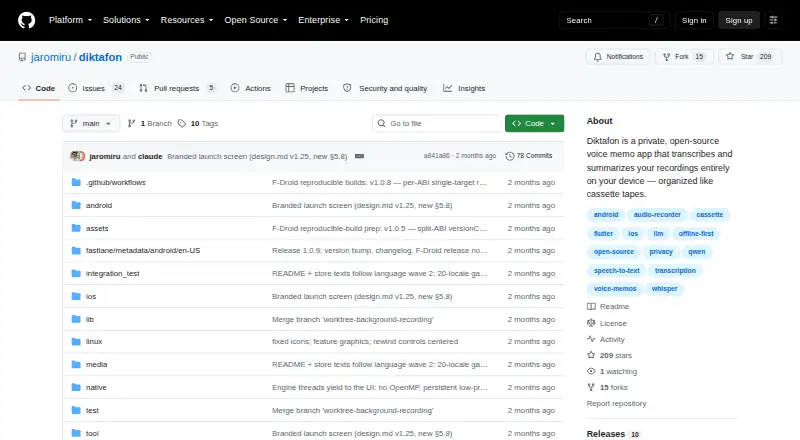
Diktafon is a free voice memo app that transcribes and summarizes recordings on the device, then groups them into topic-based cassettes. Transcription uses Whisper and summaries use Qwen; the models download on first run and can be changed in Settings. Each memo’s spoken language is detected, so a cassette can include recordings in different languages. Selecting a transcript word takes playback to that point in the recording. Cassettes can be exported as archives containing audio and readable text, and imported content is added without replacing existing items. The app’s privacy policy says recordings, transcripts, summaries, labels and settings stay in private app storage, with no data collected or shared. Its stated network activity is limited to model downloads over HTTPS from Hugging Face and its CDN when requested. There are no user accounts, analytics, crash reporting, advertising or third-party service SDKs. Diktafon is available for Android, iOS, Linux and macOS. Android 7.0 or newer is required; 4 GB of RAM is recommended for the default models. The project is designed by Jaromír Janisch.
Who it suits
Diktafon suits people who want on-device voice memo transcription and summaries, with recordings organized by topic. It may also suit users who need transcripts and audio exported together or recordings in multiple languages within one cassette.
What it does well
- Free and open source, with no ads.
- Transcribes and summarizes recordings on the device.
- Transcript words jump playback to their audio position.
- Exports cassettes as archives with audio and readable text.
- No accounts, analytics, or data sharing, per its policy.
What to know first
- Android requires version 7.0 or newer.
- 4 GB RAM is recommended for default Android models.
- Linux instructions list several runtime dependencies.
Limits
There is no charge for the free plan. The default models are downloaded on first run; Android 7.0 or newer is required, and 4 GB RAM is recommended for those models.
Plans
| Plan | Billed and limits | Price |
|---|---|---|
| Free and open-source | No cost · no ads · MIT-licensed | Free |
As github.com lists them, read 2 Oct 2026. The maker's own page has the final word.
Getting started
- Open the project website on GitHub.
- Choose an available platform: Android, iOS, Linux, macOS or Windows.
- Install the app for that platform.
- Run the app and download its models when prompted.
- Record memos and organize them into cassettes; change models in Settings if needed.
Overview
Diktafon is a voice memo app for people who want recordings turned into text and summaries without moving that work off their device. Its strongest fit is someone who values privacy and topic-based organization more than a cloud account or a browser-based workflow.
That local-first approach is appealing, but the model downloads and platform requirements matter: the default models are best suited to capable devices, and Linux has additional runtime dependencies.
For more choices in this category, browse Voice Note Apps.
Key features
- On-device transcription and summaries: Whisper transcribes memos and Qwen produces summaries. Models download on first run and can be changed in Settings. Keeping processing on the device suits privacy-conscious users, though the initial model download and recommended memory requirements make this less attractive on constrained hardware.
- Transcript-linked playback: Tapping a word in the transcript jumps to that moment in the recording, which is useful when checking a passage without scrubbing through the full memo.
- Language detection per memo: Diktafon detects the spoken language separately for each recording, so a cassette can group multilingual material without requiring a single language setting.
- Cassette archives: Export packages audio with readable text. Importing adds material without replacing existing items, a practical safeguard when combining collections or restoring an archive.
- Private storage and limited network use: Recordings, transcripts, summaries, labels and settings stay in the app’s private storage. The privacy policy says there are no accounts, analytics, crash reporting, ads or third-party service SDKs; network use is limited to user-requested HTTPS downloads of machine-learning models from Hugging Face and its CDN.
- Release verification: Releases include SHA256SUMS files and GitHub build-provenance attestations, giving technically minded users ways to check release artifacts.
Pricing
Diktafon’s Free and open-source plan costs nothing. It is free of charge, has no ads and is MIT-licensed. For an individual who wants transcription, summaries and audio and text export without a subscription, that is a strong proposition; there is no paid tier to weigh against it.
There is no free trial, but the free plan itself has no cost. No seat or usage quota is attached to the plan. The trade-off is not a paid feature gate: users need compatible hardware and must download the models to use the local processing workflow.
Platforms
Diktafon supports Android, iOS, Linux and macOS; the project’s supported-platform list does not include Windows. Android requires version 7.0 (API 24) or newer, with 4 GB RAM recommended for the default models. iOS requires version 13.0 or newer, and a recent device is recommended for those models.
Linux users should be comfortable installing or managing libmpv, parecord and ffmpeg, which the instructions identify as runtime dependencies. The build uses Ubuntu 24.04 with glibc 2.39, so Linux compatibility is less turnkey than choosing one of the mobile platforms.
Who it's for
Diktafon is a good fit for people who want private, on-device transcription and summaries, especially those organizing recurring or multilingual notes into topic-based collections. Its export format also suits users who want to keep audio and readable text together outside the app.
It is a weaker choice for someone who needs a Windows version, expects a browser workflow, or uses a device that falls short of the memory recommendation. Linux users should also account for the listed dependencies before settling on it.
Pros and cons
- Pros: Local transcription and summaries, with no accounts or analytics, support a privacy-focused workflow.
- Pros: Word-level transcript playback and per-memo language detection make reviewing and organizing varied recordings more practical.
- Pros: Free, ad-free and MIT-licensed, with audio and readable text export.
- Cons: The 4 GB Android RAM recommendation and advice to use a recent iOS device may rule out older or lower-spec phones for default models.
- Cons: Linux requires three runtime dependencies, and Windows is absent from the supported-platform list.
- Cons: Models must be downloaded on first run, so the local-processing benefit comes with an initial download step.
Alternatives
Voice Notebook is worth considering if you need web access or Windows alongside mobile and desktop platforms; its free Basic web service transcribes audio files up to 15 minutes.
AudioPen may suit someone who wants transcription and rewriting across web and extension platforms; its free plan limits recordings to three minutes and includes limited voice-typing sessions.
Whispr Notes is an option for users who prefer a monthly transcription allowance, with a free plan that includes 10 hours each month and platforms including web and Windows.
Easy Voice Recorder is a simpler alternative for someone who prioritizes recording without time limits; its free plan contains ads and in-app purchases.
Voicenotes may fit users who want a web or Windows option and a stated weekly transcription allowance: its free Basic plan includes 100 minutes per week and 30-day history.
Offscript is another Android and iOS option with core voice notes, on-device transcription and search on its free plan.
Voice Inbox is an iOS and macOS alternative with on-device Whisper transcription and a voice memo inbox workflow.
Yuho may be a better fit for an iOS or macOS user looking for a recording and diary-oriented app, with a free core diary plan.
Verdict
Choose Diktafon if you want free, open-source voice notes with on-device transcription, summaries and exportable cassette archives, and your device can handle the default models. Look elsewhere if you need Windows, browser access or a more forgiving setup on lower-spec hardware.
Verdict
Diktafon combines on-device transcription, summaries and cassette organization with audio and text export. Check the platform requirements, especially the Android memory recommendation and Linux dependencies, before choosing it.
Questions
How much does Diktafon cost?
Its Free plan costs 0.00 USD. The plan states no cost and no ads.
Does Diktafon have a free trial?
No. The listed free trial is no; the app has a free plan.
Which platforms does it support?
The supported-platform list names Android, iOS, Linux, macOS and Windows.
Is Diktafon open source?
The plan is described as MIT-licensed.
Where are recordings and transcripts stored?
The privacy policy says recordings, transcripts, summaries, labels and settings stay in the app’s private storage.
Who made Diktafon?
The project says it was designed by Jaromír Janisch.
Facts from Diktafon's own pages
- Accounts and analytics
- The app has no user accounts, analytics, crash reporting, advertising, or third-party service SDKs, according to its privacy policy. · github.com, 2 Oct 2026
- Android requirements
- Android 7.0 (API 24) or newer is required, and 4 GB RAM is recommended for the default models. · github.com, 2 Oct 2026
- Download verification
- Each release ships a SHA256SUMS file, and the repository says release artifacts include GitHub build-provenance attestations. · github.com, 2 Oct 2026
- Export and import
- Cassettes can be exported as archives containing audio and readable text, and imports add content without overwriting existing items. · github.com, 2 Oct 2026
- Headquarters
- Všenory, Czechia · github.com, 23 Sept 2026
- iOS requirements
- The iOS app requires iOS 13.0 or newer, and the project recommends a recent device for the default models. · github.com, 2 Oct 2026
- Languages
- The spoken language is detected for each memo, so a cassette can contain recordings in multiple languages. · github.com, 2 Oct 2026
- Linux requirements
- The Linux instructions list libmpv, parecord, and ffmpeg as runtime dependencies, and say the build uses Ubuntu 24.04 with glibc 2.39. · github.com, 2 Oct 2026
- Maker
- The project says it was designed by Jaromír Janisch. · github.com, 2 Oct 2026
- Network use
- The policy says the app’s only network activity is downloading machine-learning models over HTTPS from Hugging Face and its CDN at the user’s request. · github.com, 2 Oct 2026
- On-device privacy
- The privacy policy says recordings, transcripts, summaries, labels, and settings stay in the app’s private storage, and the app collects and shares no data. · github.com, 2 Oct 2026
- Purpose
- Diktafon is a voice memo app that transcribes and summarizes recordings on the device and organizes them into topic-based cassettes. · github.com, 2 Oct 2026
- Support
- The privacy policy lists [email protected] and opening a GitHub issue as contact options. · github.com, 2 Oct 2026
- Transcription and summaries
- The app uses Whisper for transcription and Qwen for summaries, with models downloaded once on first run and switchable in Settings. · github.com, 2 Oct 2026
- Transcript playback
- Tapping a word in a transcript jumps playback to that point in the recording. · github.com, 2 Oct 2026
Where Diktafon stands on Freedom251
- Voice Note Apps#3 of 34