Freedom251 › Art Learning Apps
DigitalPainting.School
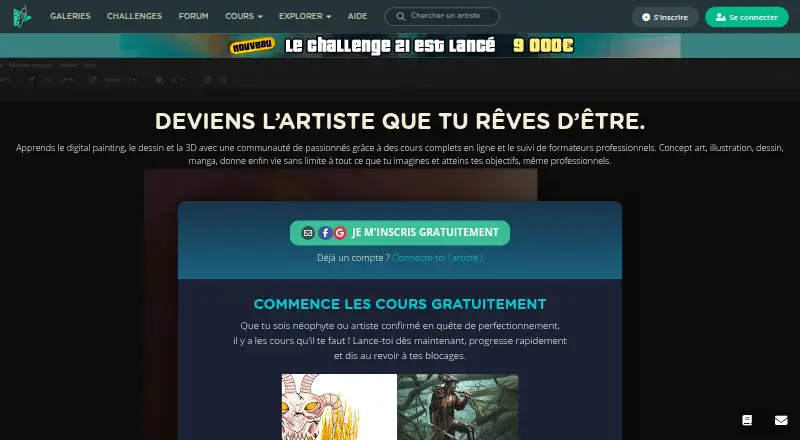
What DigitalPainting.School is
DigitalPainting.School is a web-based learning platform with courses and resources for digital painting. It was founded in 2016 and offers free registration, free courses and resources, and introductory chapters from paid courses. The course catalogue includes lessons on painting a complete character, advanced matte painting, realistic materials, fantasy landscapes, and digital painting with Procreate. Listed materials vary by course and include HD or structured video, PSD and PNG files, exercises, and downloadable Procreate files. The Procreate course includes more than 20 hours of video, exercises, downloadable files, and lifetime access. Longer programs provide extensive study and practice: Programme indispensable — Partie 1 includes over 60 hours of video, more than 300 hours of exercises, and professional feedback. Programme indispensable — pack complet lists over 170 hours of structured video, more than 900 hours of exercises, and lifetime access. The MégaPack covers six areas, including digital painting, Blender, sculpting, and freelance content. The platform also offers guided projects, instructor feedback, live classes, and progress tracking. It can suit learners starting with free material as well as those looking for a structured course or extended program. Prices for the listed paid courses are not provided in the plan details.
Who it suits
DigitalPainting.School suits people learning digital painting through video lessons, exercises, and guided projects. Its free courses and introductory chapters can serve newcomers, while the longer programs offer substantial practice and professional feedback for learners seeking a structured course.
What it does well
- Free registration includes courses, resources, and paid-course introductory chapters.
- Courses cover character painting, matte painting, materials, fantasy landscapes, and Procreate.
- Some courses include PSD, PNG, or downloadable Procreate files.
- Longer programs include hundreds of hours of exercises.
- Guided projects, instructor feedback, live classes, and progress tracking are available.
What to know first
- The listed paid course prices are not provided.
- Some free access is limited to introductory chapters of paid courses.
Plans
| Plan | Billed and limits | Price |
|---|---|---|
| Free courses and introductory chapters | Free registration · Free courses and resources · Introductory chapters of paid courses | Free |
| Comment peindre un personnage entier | 2h44 of HD video · Two PSD files included | On request |
| Cours de matte painting avancé “Le Temple Perdu” | 3h20 of video · PSD and PNG files included | On request |
| Comment peindre des matières réalistes | 3h38 of HD video · PSD files included | On request |
| Comment peindre un paysage réaliste de Fantasy | 9h25 of HD video · PSD files included | On request |
| Digital painting sur Procreate | 20+ hours of video · Exercises and downloadable Procreate files · Lifetime access | On request |
| Programme indispensable — Partie 1 | 60+ hours of video · 300+ hours of exercises · Professional feedback | On request |
| Programme indispensable — pack complet | 170+ hours of structured video · 900+ hours of exercises · Lifetime access | On request |
The first 8 of 9 plans, as digitalpainting.school lists them, read 21 Sept 2026. The maker's own page has the final word. Every plan
Getting started
- Open the DigitalPainting.School website.
- Register for free to access free courses, resources, and introductory chapters.
- Choose a course or program based on its subject and listed materials.
- Use the available videos, exercises, and downloadable files for the chosen course.
DigitalPainting.School is a web-based school for digital painting, offering free introductory material, focused courses and extensive study programs. It best suits learners who want structured practice rather than isolated tips, especially those willing to work through exercises and seek critique. Its depth is appealing, but anyone comparing paid courses needs prices before deciding.
Overview
Founded in 2016, DigitalPainting.School concentrates on digital-art instruction delivered through a browser. The range runs from free resources and introductory chapters to individual subjects such as realistic materials, fantasy landscapes and matte painting, then expands into programs measured in dozens of video hours and hundreds of exercise hours.
This is a better fit for a deliberate learning plan than for a quick answer to one technical question. The free entry point lowers the risk of trying the teaching approach, while the larger programs are designed for sustained progression. Because the service is web-only, artists who require a dedicated Android or iOS app should consider a different platform.
Key features
Video courses are supported by downloadable working files. Individual classes include PSD assets, and the Procreate course adds exercises and downloadable Procreate files. Those materials let students follow demonstrations in an editable format instead of relying on playback alone.
Course scale varies considerably. Comment peindre un personnage entier contains 2h44 of HD video and two PSD files; the advanced matte-painting course, Le Temple Perdu, runs 3h20 and includes PSD and PNG files. Comment peindre des matières réalistes offers 3h38 of HD video with PSD files, while the fantasy-landscape course extends to 9h25 of HD video and includes PSD files.
The Procreate course provides more than 20 hours of video, exercises, downloadable files and lifetime access. At the highest end, the platform combines guided projects, progress tracking, live classes and instructor feedback. The first part of the Programme indispensable pairs more than 60 hours of video with over 300 hours of exercises and professional feedback. That level of practice can support serious development, but it demands a substantial time commitment.
Pricing
The free plan costs nothing. Free registration gives access to free courses and resources, along with introductory chapters from paid courses. It is the practical starting point for evaluating the instruction, but it does not replace the complete paid curricula.
Paid offerings use custom pricing. The focused courses cover a single outcome: painting a complete character, advanced matte painting, realistic materials or a realistic fantasy landscape. Their published runtimes range from 2h44 to 9h25, with PSD or PSD/PNG files included.
Digital painting sur Procreate includes 20+ hours of video, exercises, downloadable Procreate files and lifetime access. The Programme indispensable — Partie 1 adds 60+ hours of video, 300+ hours of exercises and professional feedback. The Programme indispensable — pack complet expands to 170+ hours of structured video, 900+ hours of exercises and lifetime access. MégaPack spans six areas, including digital painting, Blender, sculpting and freelance content. Since prices are not published for these paid plans, buyers must obtain a quote before comparing total cost.
Platforms
DigitalPainting.School runs on the web. That suits desktop-based digital painting and access from a browser, but there is no Android or iOS platform in the offering.
Who it's for
Choose it if you want a progressive digital-painting curriculum with guided projects, exercises and the possibility of instructor feedback. The free courses suit newcomers exploring the subject; the focused classes fit artists targeting one technique; and the indispensable programs are for learners prepared to invest hundreds of hours in practice.
Look elsewhere if you need mobile-first lessons, a short casual practice routine or transparent paid-course prices before making a shortlist.
Pros and cons
- Pro: Free registration, courses and introductory chapters provide a no-cost way to begin.
- Pro: Downloadable PSD, PNG and Procreate files make demonstrations usable as working references.
- Pro: Professional feedback, live classes and progress tracking add support beyond self-paced video.
- Pro: Large programs offer unusually extensive exercise volumes, including 900+ hours in the complete pack.
- Con: Paid prices are custom pricing, so comparing the courses requires a quote.
- Con: The longest programs require hundreds of hours, which will not suit learners seeking brief lessons.
- Con: Web-only delivery excludes students who want a native mobile app.
Alternatives
Art Explora Academy is a better choice for free art-history learning across Android, iOS and the web, with 11 thematic courses and certification tied to quizzes and a minimum €5 donation.
ArtWorkout suits mobile learners who want free daily energy for practice and optional one-time lesson or course purchases.
Sketchar is the alternative when you want a freemium Android, iOS and web app with templates, a basic canvas and a free trial.
Animation Mentor is for students seeking paid, 12-week character, game, creature or 3D modeling workshops.
Ctrl+Paint offers a web-based free library of hundreds of ad-free videos, with premium series sold as one-time purchases.
Drawspace fits learners who prefer web lessons, including over 50 free lessons and a $9.50-per-month member plan.
Schoolism is suited to course-by-course study, with free tutorials and lifetime access options such as its 124.98 USD facial-expressions course.
Sketch a Day is a mobile freemium option for daily drawing, with a Gold membership adding portfolio and profile features.
Browse more options in Art Learning Apps.
Verdict
DigitalPainting.School is a strong choice for artists who want web-based digital-painting instruction that grows from free introductions into exercise-heavy programs with feedback and lifetime-access options. Its main reason to look elsewhere is equally clear: paid pricing is not published, and mobile learners are not supported.
Verdict
Choose DigitalPainting.School if you want web-based digital painting instruction with free material, focused courses, or extended programs with exercises and feedback. It offers several ways to study, from introductory content to courses with lifetime access. Buyers who need to compare paid course costs will need pricing details before choosing among the listed options.
Questions
Is DigitalPainting.School free?
Free registration provides free courses and resources, as well as introductory chapters of paid courses.
Which platform does it support?
DigitalPainting.School is available on the web.
What subjects are covered?
Listed subjects include character painting, matte painting, realistic materials, fantasy landscapes, and digital painting with Procreate. The MégaPack also spans digital painting, Blender, sculpting, and freelance content.
Do courses include downloadable materials?
Several listed courses include PSD files; one also includes PNG files. The Procreate course includes exercises and downloadable Procreate files.
Are instructor feedback and live classes available?
Yes. Instructor feedback and live classes are available, and Programme indispensable — Partie 1 specifically includes professional feedback.
Which courses include lifetime access?
The Procreate course and Programme indispensable — pack complet list lifetime access.
Facts from DigitalPainting.School's own pages
- Founded
- 2016 · digitalpainting.school, 23 Sept 2026
Where DigitalPainting.School stands on Freedom251
- Art Learning Apps#19 of 27