Freedom251 › Art Learning Apps
Ctrl+Paint
What Ctrl+Paint is
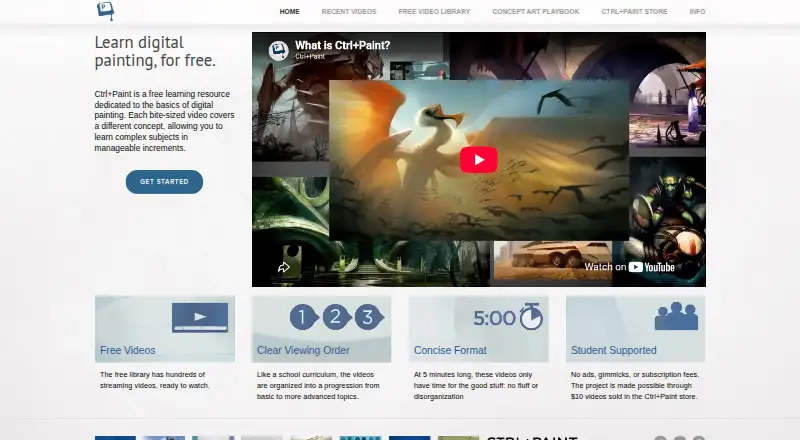
Ctrl+Paint is a web learning resource for digital painting, with a free library of hundreds of short videos arranged from basic to more advanced subjects. The videos are described as five minutes long and cover drawing, composition, reference, Photoshop tools, painting techniques, color, masking, vector tools, and art history. The library page says a new free video appears every Tuesday and Thursday. Learners can also use the Concept Art Playbook, which provides game-industry-style visual problem-solving challenges to follow at their own pace. The free library has no ads or subscription fees. Individual premium series cost $10, paid once and cover beginner-to-intermediate topics. The Digital Painting Starter Kit costs $55, paid once and includes six video series, 362 minutes of video, worksheets, line art, and PSD files. A stylus is needed for the pressure-sensitive techniques, and Wacom tablets are recommended. Premium purchases are delivered by email with download instructions and a link.
Who it suits
It suits beginners learning digital painting who want short lessons and a structured progression, as well as learners seeking self-paced concept-art challenges. A stylus is required for the taught techniques; the site does not provide personal tutoring or portfolio reviews.
What it does well
- Hundreds of free videos, with no ads or subscription fees
- Lessons progress from basic to more advanced topics
- Concept Art Playbook offers self-paced practice challenges
- Starter Kit includes worksheets, line art, and PSD files
What to know first
- A stylus is required for the taught techniques
- No personal tutoring or portfolio reviews
- No mobile platform is listed
Limits
The free video library provides streaming videos. The $10, paid once premium series are individual collections, while the $55, paid once Starter Kit contains six premium series and 362 minutes of video.
Plans
| Plan | Billed and limits | Price |
|---|---|---|
| Free video library | Hundreds of streaming videos · no ads or subscription fees | Free |
| Premium series | One-time purchase · Individual in-depth video collections · beginner to intermediate topics | $10, paid once |
| Digital Painting Starter Kit | One-time purchase · 6 premium series · 362 minutes · worksheets, line art, and PSD files | $55, paid once |
As ctrlpaint.com lists them, read 7 Oct 2026. The maker's own page has the final word.
Getting started
- Open the Ctrl+Paint website in a web browser.
- Start with videos in the free library, or choose topics in its basic-to-advanced progression.
- Use a stylus for the techniques taught; Wacom tablets are recommended.
- For a premium series or Starter Kit, complete a purchase and use the emailed download instructions and link.
Ctrl+Paint is a web-based digital painting resource for learners who want structured instruction and are comfortable practicing on their own. Its free, ad-free video library makes it an accessible place to build fundamentals, while paid series add more focused instruction and downloadable materials.
Overview
The library contains hundreds of short videos arranged from basic to more advanced topics. The site describes the videos as five minutes long, a format that makes individual concepts approachable but leaves learners to set aside time to practice and connect lessons. New free videos are released every Tuesday and Thursday.
Topics include drawing, composition, reference, Photoshop tools, painting techniques, color, masking, vector tools, and art history. The Concept Art Playbook adds self-paced challenges modeled on visual problem-solving in the game industry. Together, these offer both foundational study and applied practice, without a personal instructor to review the work.
Key features
A sequenced video library
Moving from basic to more advanced material gives beginners a clearer route than an unstructured collection of tutorials. The range of subjects also makes the library useful for returning to a specific technique. The short format is less suited to learners who want extended, guided lessons or someone to confirm whether they are applying a technique correctly.
Challenges and downloadable resources
The Concept Art Playbook gives learners visual problem-solving challenges to complete at their own pace. Premium purchases add individual video collections; the Digital Painting Starter Kit bundles six series, totaling 362 minutes, with worksheets, line art, and PSD files. After a premium-series purchase is paid, download instructions arrive by automated email.
Equipment and support
A stylus is necessary because the taught techniques rely on pressure sensitivity; the FAQ recommends Wacom tablets. The creator reads support emails personally and asks users to check the FAQ and keep messages concise. There is no personal tutoring or portfolio review, a meaningful limitation for learners who need critique. Logging in is only for commenting and does not unlock content.
Pricing
Ctrl+Paint uses a freemium model, with no free trial and no subscription fees for its free library.
| Plan | Price | What it includes |
|---|---|---|
| Free video library | free | Hundreds of streaming videos, with no ads or subscription fees. |
| Premium series | $10, paid once | Individual in-depth video collections covering beginner to intermediate topics. |
| Digital Painting Starter Kit | $55, paid once | Six premium series, 362 minutes, worksheets, line art, and PSD files. |
The free plan is the sensible starting point for learners who want to follow the progression without paying. A single Premium series suits someone looking to deepen a particular area; the Starter Kit is the broader one-time purchase for buyers who want all six included series and their practice files. Both paid options are one-time purchases rather than recurring subscriptions.
Platforms
Ctrl+Paint is available on the web. It has no mobile platform, so learners need web access and a pressure-sensitive stylus for the techniques taught. Premium downloads provide offline access to purchased materials, but the free library is described as streaming video.
Who it's for
Ctrl+Paint is a good fit for beginners and self-directed learners who want a coherent introduction to digital painting, can practice independently, and have a pressure-sensitive stylus. Its breadth also helps learners who want to revisit particular subjects such as color, masking, or composition. It is a weaker fit for anyone seeking mobile lessons, personal tutoring, or portfolio feedback.
Pros and cons
Pros
- Hundreds of free videos progress from basic to advanced topics, offering a substantial learning path without a subscription.
- No ads in the free library, so study is not interrupted by advertising.
- Self-paced visual problem-solving challenges and paid worksheets, line art, and PSD files add ways to practice beyond watching videos.
- One-time paid options avoid recurring subscription fees.
Cons
- A pressure-sensitive stylus is required, which rules out learners without suitable equipment.
- No personal tutoring or portfolio reviews means learners must assess their own progress.
- No mobile platform limits study to web access.
- The free library is streaming video; offline access applies to premium downloads rather than the free video collection.
Alternatives
Art Learning Apps is a broader directory for comparing art-learning options. Choose Art Explora Academy instead for free access across Android, iOS, and web, with 11 thematic courses and an art-history library; certification requires passing all 11 quizzes and a minimum €5 donation. ArtWorkout is an alternative for Android or iOS learners who want free daily energy to unlock and practice lessons, with individual lesson or course purchases also offered.
Sketchar is another option for Android, iOS, and web learners; its free plan includes 1,000+ built-in templates, a basic canvas, and step-by-step lessons, and it offers a free trial. Choose DigitalPainting.School for web-based free courses, resources, and introductory chapters of paid courses. Drawspace offers over 50 free lessons and adds three more free lessons each month after registration; its Member plan costs $9.50 a month.
Schoolism is a paid alternative with free tutorials and lesson-one previews where offered; one listed course, Facial Expressions, has Lifetime Access for $124.98, paid once. Animation Mentor is a web-based paid option for learners seeking 12-week character animation or game animation courses and workshops, with prices not stated. Sketch a Day is a mobile drawing alternative for Android and iOS, with a free app and a Gold Membership offering a portfolio website, personalized in-app profile, private artist chat, and an ad-free experience.
Verdict
Choose Ctrl+Paint if you want a substantial, ad-free route through digital painting fundamentals and are willing to practice independently with a pressure-sensitive stylus. Its main strength is the combination of a growing free library, self-paced challenges, and optional one-time purchases for deeper lessons and materials. Look elsewhere if you need mobile access, personal feedback, or instructor-led guidance.
Verdict
Ctrl+Paint combines a broad free video library with optional paid series and a self-paced challenge resource. It is a fit for learners comfortable practicing independently with a stylus.
Questions
Is Ctrl+Paint free?
Yes. The free video library has hundreds of videos, with no ads or subscription fees.
What do the paid options cost?
Premium series cost $10, paid once. The Digital Painting Starter Kit costs $55, paid once.
What comes with the Starter Kit?
It includes six premium series, 362 minutes of video, worksheets, line art, and PSD files.
What equipment do I need?
The FAQ says a stylus is needed because pressure sensitivity is essential to the techniques taught. Wacom tablets are recommended.
Can I get tutoring or a portfolio review?
No. Ctrl+Paint says it does not offer personal tutoring or portfolio reviews.
What happens when I log in?
Logging in is only for commenting and does not provide special access to content.
Facts from Ctrl+Paint's own pages
- Advertising
- The About page says Ctrl+Paint is free and has no ads, and that the store helps support the site. · ctrlpaint.com, 7 Oct 2026
- Comments login
- The FAQ says logging in is only for commenting and does not provide special access to content. · ctrlpaint.com, 7 Oct 2026
- Concept art practice
- The Concept Art Playbook offers hands-on, game-industry-style visual problem-solving challenges that learners can follow at their own pace. · ctrlpaint.com, 7 Oct 2026
- Equipment requirement
- The FAQ says a stylus is needed because pressure sensitivity is essential to the techniques taught, and recommends Wacom tablets. · ctrlpaint.com, 7 Oct 2026
- Learning progression
- The videos are organized into a progression from basic to more advanced topics. · ctrlpaint.com, 7 Oct 2026
- Library
- The free video library contains hundreds of short videos on digital painting basics. · ctrlpaint.com, 7 Oct 2026
- Materials
- The Digital Painting Starter Kit includes six video series and associated worksheets, line art, and PSD files. · ctrlpaint.myshopify.com, 7 Oct 2026
- Premium downloads
- After a premium-series purchase is paid, the buyer receives an automated email with download instructions and a link. · ctrlpaint.com, 7 Oct 2026
- Purpose
- Ctrl+Paint is a free learning resource dedicated to the basics of digital painting, taught through bite-sized videos. · ctrlpaint.com, 7 Oct 2026
- Release schedule
- The library page says a new free video is released every Tuesday and Thursday. · ctrlpaint.com, 7 Oct 2026
- Support
- The creator says he reads support emails personally and asks users to check the FAQ and keep messages concise. · ctrlpaint.com, 7 Oct 2026
- Support limits
- The FAQ says Ctrl+Paint does not offer personal tutoring or portfolio reviews, citing its one-person operation and goal of teaching many beginners. · ctrlpaint.com, 7 Oct 2026
- Topics
- The library includes lessons on drawing, composition, reference, Photoshop tools, painting techniques, color, masking, and vector tools. · ctrlpaint.com, 7 Oct 2026
- Video length
- The site describes its videos as five minutes long. · ctrlpaint.com, 7 Oct 2026
Where Ctrl+Paint stands on Freedom251
- Art Learning Apps#6 of 27