Freedom251 › Art Learning Apps
DrawUp
What DrawUp is
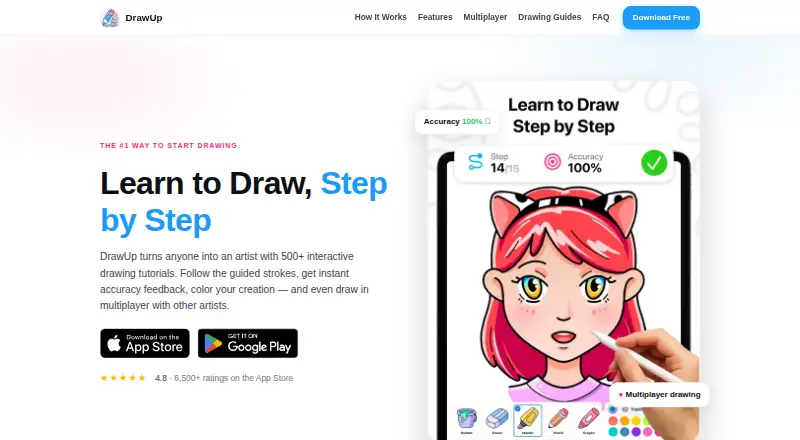
DrawUp is a mobile app for learning to draw through guided, interactive lessons. Its maker says the library has more than 500 tutorials, with new lessons added weekly. A moving guide and live accuracy scoring help learners follow each drawing, while first-try stars and mistake tracking show how they are progressing. Guided projects and progress tracking are included. For practice beyond tutorials, the app offers coloring and free-draw modes with bucket fill, marker, pencil, crayon, and curated palettes. DrawUp also supports real-time multiplayer drawing sessions, so players can follow the same lesson together. Achievements, badges, and daily drawing streaks add progress markers, and users can export speedpaint videos. The app is free to download and provides dozens of free lessons. A Premium subscription opens the complete tutorial library, multiplayer, and gallery. DrawUp is published by Outlane, Inc. and is available for Android and iOS. Its privacy policy describes use of third-party services including Google Analytics for Firebase and Facebook. Google Play says the app may share device or other IDs and may collect app information and performance data plus device or other IDs; data is encrypted in transit, and data deletion is unavailable. Support is listed at [email protected].
Who it suits
DrawUp suits beginners and learners of all ages who want guided drawing lessons on an Android or iOS device. Its free lessons, progress tracking, and drawing modes also suit people who want to practice at their own pace.
What it does well
- More than 500 tutorials, with new lessons weekly
- Moving guide and live accuracy scoring
- Includes coloring and free-draw modes
- Multiplayer sessions let players follow one lesson together
- Achievements, badges, streaks, and speedpaint export
What to know first
- The full tutorial library, multiplayer, and gallery require Premium
- Data deletion is unavailable, according to Google Play
- Available on Android and iOS
Limits
The free download includes dozens of lessons. Premium unlocks the full library, multiplayer, and gallery; the listed subscriptions are $9.99 a month for one month, $29.99 a year for 12 months, and $39.99 a year for six months.
Plans
| Plan | Billed and limits | Price |
|---|---|---|
| DrawUp Premium — 12 months | Premium subscription | $29.99 a year |
| DrawUp Premium — 6 months | Premium subscription | $39.99 a year |
| DrawUp Premium — 1 month | Premium subscription | $9.99 a month |
As getdrawup.com lists them, read 8 Oct 2026. The maker's own page has the final word.
Getting started
- Visit the DrawUp website at https://getdrawup.com/.
- Download the app for Android or iOS.
- Start with the dozens of lessons included for free.
- Choose a Premium subscription to unlock the full library, multiplayer, and gallery.
Verdict
Choose DrawUp for guided mobile drawing practice, with progress features and shared lessons available through Premium. Look elsewhere if you need the full library, multiplayer, and gallery without a subscription, or need data deletion.
Questions
Is DrawUp free?
Yes. It is free to download and includes dozens of free lessons.
What does Premium unlock?
Premium unlocks the full tutorial library, multiplayer, and gallery.
What does DrawUp cost?
The listed options are $9.99 a month for one month, $29.99 a year for 12 months, and $39.99 a year for six months.
Which platforms support DrawUp?
DrawUp is available on Android and iOS.
Who publishes DrawUp?
The app is published by Outlane, Inc.
What data safety details are provided?
Google Play says the app may share device or other IDs, may collect app information and performance plus device or other IDs, encrypts data in transit, and does not allow data deletion.
Facts from DrawUp's own pages
- Audience
- The maker describes DrawUp as suitable for beginners and says it works for all ages. · getdrawup.com, 8 Oct 2026
- Data safety
- Google Play states that the app may share device or other IDs, may collect app info and performance plus device or other IDs, encrypts data in transit, and does not allow data deletion. · play.google.com, 8 Oct 2026
- Developer
- The app is published by Outlane, Inc. · play.google.com, 8 Oct 2026
- Drawing guidance
- Lessons use a moving guide and live accuracy scoring, with first-try stars and mistake tracking. · getdrawup.com, 8 Oct 2026
- Drawing tools
- The app includes coloring and free-draw modes with bucket fill, marker, pencil, crayon, and curated palettes. · getdrawup.com, 8 Oct 2026
- Free access
- The app is free to download and includes dozens of free lessons; Premium unlocks the full library, multiplayer, and gallery. · getdrawup.com, 8 Oct 2026
- Headquarters
- Dover, Delaware, United States · getdrawup.com, 28 Sept 2026
- Multiplayer
- DrawUp supports real-time multiplayer drawing sessions in which players can follow the same lesson side by side. · getdrawup.com, 8 Oct 2026
- Privacy and security
- The privacy policy says the app uses third-party services including Google Analytics for Firebase and Facebook, and says it cannot guarantee absolute security. · kunchevsky.com, 8 Oct 2026
- Product
- DrawUp is an app for learning to draw with step-by-step interactive tutorials. · getdrawup.com, 8 Oct 2026
- Progress features
- The app includes achievements, badges, daily drawing streaks, and speedpaint video export. · getdrawup.com, 8 Oct 2026
- Support
- The listed support contact is [email protected]. · getdrawup.com, 8 Oct 2026
- Tutorial library
- The maker says DrawUp has 500+ tutorials and adds new lessons weekly. · getdrawup.com, 8 Oct 2026
Where DrawUp stands on Freedom251
- Art Learning Apps#7 of 27