Freedom251 › Art Learning Apps
Sketch a Day
What Sketch a Day is
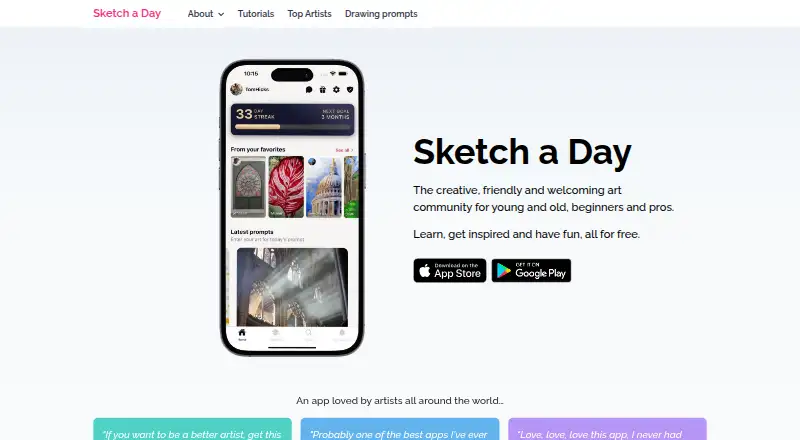
Sketch a Day is a drawing app and art community for beginners and professional artists of different ages. Available on iOS and Android, it gives members hand-picked prompts each day and ways to draw, compare, like, favourite and share work. The app also offers free tutorials from professional artists, while community members write tutorials and exchange hints, tips and feedback. Guided projects and progress tracking provide additional ways to build skills and follow progress. Drawing milestones and streaks let users add famous artworks to a collection and learn about the artists behind them. Sketch a Day has a free plan at no cost. Gold Membership adds an automatically updated portfolio website, a personalised in-app profile with a header image, bio and website link, private artist chat and an ad-free experience. Artists can choose whether to be contacted through chat. The privacy policy identifies Firebase Analytics as a third-party service and describes commercially acceptable protection measures, while acknowledging that absolute security cannot be guaranteed. Users can request data deletion through Settings, and the support team aims to respond to email within 24–48 hours.
Who it suits
Sketch a Day describes itself as an art community for beginners and professional artists, young and old. Artists who want a portfolio website, a personalised profile or private artist chat can consider Gold Membership.
What it does well
- Daily prompts invite drawing, comparison and sharing.
- Free tutorials come from professional artists.
- Community members contribute tutorials and exchange feedback.
- Milestones and streaks unlock famous artworks to collect.
- Guided projects and progress tracking are available.
What to know first
- Private chat depends on artists opting in to contact.
- The app is available on iOS and Android.
Limits
The Free plan is available at no cost.
Plans
| Plan | Billed and limits | Price |
|---|---|---|
| Free | App provided at no cost | Free |
| Gold Membership | Portfolio website · Personalised in-app profile · Private artist chat · Ad-free experience | On request |
As sketchaday.app lists them, read 8 Oct 2026. The maker's own page has the final word.
Getting started
- Visit https://sketchaday.app/.
- Install the app on iOS or Android.
- Start with the Free plan at no cost.
- Choose Gold Membership for its portfolio website, personalised profile, private chat and ad-free experience.
Verdict
Choose Sketch a Day for daily drawing prompts, tutorials and community feedback on iOS or Android.
Questions
Is Sketch a Day free?
Yes. Its Free plan is available at no cost.
Which platforms does it support?
Sketch a Day is available on iOS and Android.
What does Gold Membership include?
It includes an automatically updated portfolio website, a personalised in-app profile, private artist chat and an ad-free experience.
Can artists be contacted through private chat?
Yes, but artists can opt in to being contacted.
Can users request deletion of their data?
Yes. Users can request data deletion in the app through Settings.
What analytics service does the app use?
Its privacy policy identifies Firebase Analytics as a third-party service used by the app.
Facts from Sketch a Day's own pages
- Analytics
- The privacy policy identifies Firebase Analytics as a third-party service used by the app. · sketchaday.app, 8 Oct 2026
- Community learning
- Community members write tutorials, and users can get hints, tips, and feedback in the iOS and Android app. · sketchaday.app, 8 Oct 2026
- Daily prompts
- The app offers hand-picked daily prompts for everyone to draw, compare, like, favourite, and share. · sketchaday.app, 8 Oct 2026
- Data deletion
- Users can request data deletion in the app through Settings. · sketchaday.app, 8 Oct 2026
- Gold ads
- Gold membership removes ads; the site says ads help cover some hosting costs. · sketchaday.app, 8 Oct 2026
- Gold portfolio
- Gold members receive an automatically updated portfolio website for showing their work. · sketchaday.app, 8 Oct 2026
- Gold private chat
- Gold membership includes private artist chat, and artists can opt in to being contacted. · sketchaday.app, 8 Oct 2026
- Gold profile
- Gold members can add a header image, bio, and website link to their in-app profile. · sketchaday.app, 8 Oct 2026
- Purpose
- Sketch a Day describes itself as an art community for beginners and professional artists, young and old. · sketchaday.app, 8 Oct 2026
- Rewards
- Users can earn milestones and streaks that let them add famous artworks to a collection and learn about the artists. · sketchaday.app, 8 Oct 2026
- Security
- The privacy policy says the maker uses commercially acceptable protection measures but cannot guarantee absolute security. · sketchaday.app, 8 Oct 2026
- Support
- The support page says the team aims to respond to support emails within 24–48 hours. · sketchaday.app, 8 Oct 2026
- Tutorials
- It offers free tutorials from professional artists to help users improve their skills. · sketchaday.app, 8 Oct 2026
Where Sketch a Day stands on Freedom251
- Art Learning Apps#17 of 27