Freedom251 › Legal Deposition Software
DepoFlow
What DepoFlow is
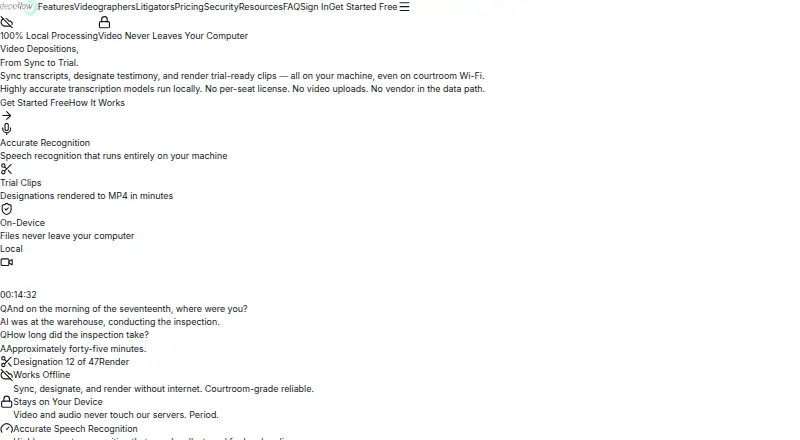
DepoFlow is a deposition workflow tool for syncing transcripts with video, organizing testimony designations, and rendering trial-ready clips on the user's machine. Local speech recognition aligns transcript words with video moments, and completed syncs receive color-coded quality scores. Its Review app shows transcript and video side by side, with page-line navigation, full-text search, and line selection that jumps to the matching moment. Users can arrange page-line ranges into designation sets, add ranges in bulk, and import opposing counsel's lists in TXT, CSV, XLSX, and DOCX formats. Exports include stitched MP4 clips, designation PDFs, and page-line exchange lists, with targets such as TrialDirector, Sanction, Summation, LiveNote/Case Notebook, RealLegal, AMICUS, and OpenDVT. A standalone HTML viewer lets clients open synced video and transcript in a browser without installation or internet access. After initial installation, desktop syncing, designation work, and clip rendering can continue offline. Video, audio, and transcript text are processed locally; account syncing carries job and billing details. Plans include free viewing, $7.50 per sync credit, and a one-time $99 transcript unlock for designations and clip exports.
Who it suits
DepoFlow is presented for videographers, court reporters, litigators, attorneys, paralegals, and trial techs. Its workflows cover both transcript review and preparation of designated testimony and clips.
What it does well
- Transcript words are aligned to video locally.
- Review supports page-line navigation and full-text search.
- Designation lists can be imported in four formats.
- Standalone viewer works without installation or internet.
- Desktop syncing and clip rendering can work offline.
What to know first
- DepoFlow says it does not currently hold SOC 2 certification.
- A transcript unlock costs 99.00 USD once for designations and exports.
- Sync credits cost $7.50 an hour of video.
Limits
The free plan is for viewing and searching synced depositions. A sync credit costs $7.50 and covers one hour of video; designation and clip exports require a $99 one-time unlock per transcript.
Plans
| Plan | Billed and limits | Price |
|---|---|---|
| Litigators & Support Staff — Viewing | Free/ always · View and search synced depositions · Mac and Windows | Free |
| DepoFlow Designate viewing | Free viewing and search · Open compatible sync data · page-and-line navigation · full-text search · Apple Silicon Mac and Windows 10/11 desktop apps | Free |
| Videographers | $7.50/ credit; one credit covers one hour of video time on a sync job · Free account and desktop app · credits never expire · no subscription or per-seat license | $7.50, paid once |
| Litigators & Support Staff — Designations & Clip Exports | $99/ transcript; one-time unlock per transcript · One unlock covers everyone at your firm · designations, stitched MP4, designation PDF, and page-line exchange list | $99, paid once |
| DepoFlow Designate unlock | $99 per transcript, one-time firm purchase · Designation sets · bulk add · TXT/CSV/XLSX/DOCX list import · stitched MP4 clips · designation PDF · page-line exchange list | $99, paid once |
| Custom | Custom pricing · Firm pricing available on request | On request |
As depoflow.com lists them, read 7 Oct 2026. The maker's own page has the final word.
Getting started
- Visit depoflow.com.
- Create a free account and install the desktop app for Mac or Windows.
- Use the free viewing plan to view and search synced depositions.
- Buy a $7.50 credit for each hour of video to run a sync job.
- Unlock designations and clip exports for $99 per transcript when needed.
DepoFlow is deposition software for syncing video and transcripts, managing designations, and exporting testimony clips. It is best suited to videographers and litigation teams that need those tasks in a desktop workflow. Its strongest case is local processing that can continue offline; its per-credit and per-transcript charges warrant attention.
Overview
DepoFlow links transcript review to deposition video, so users can find testimony, assemble page-line ranges, and turn selected passages into trial materials. That focused workflow suits teams preparing recorded testimony, rather than readers looking for a broad case-management system. A standalone HTML viewer also gives clients a way to review synced transcript and video in a browser without installation or internet access.
Video, audio, and transcript text are processed locally. Account sync carries job details and billing information, not the media or transcript text. Device traffic uses TLS, stored cloud objects use provider-managed encryption at rest, and records are scoped to each firm. These controls are relevant to firms weighing data handling, though DepoFlow does not currently hold SOC 2 or ISO 27001 certification.
Key features
Transcript review and sync
Local speech recognition aligns transcript words with points in the video, and each completed sync receives a color-coded quality score. The Review app places transcript and video side by side, supports full-text search and page-line navigation, and lets users jump to a moment by selecting a transcript line. That combination is practical when locating a precise passage matters; the score also gives users a quick indication of sync quality.
Designations and exports
Users can group page-line ranges into designation sets, add ranges in bulk, and import opposing counsel's lists in TXT, CSV, XLSX, or DOCX. Selected testimony can be exported as a stitched MP4, designation PDF, and page-line exchange list. Export targets include TrialDirector, Sanction, Summation, LiveNote/Case Notebook, RealLegal, AMICUS, and OpenDVT, making the workflow more useful to teams already using those trial tools.
Offline work and data handling
After initial installation, the desktop app can sync, designate, and render clips without an internet connection. Account job status and billing reconcile when it reconnects, a useful distinction for work away from a reliable connection. Local processing limits what account sync contains, but firms requiring SOC 2 or ISO 27001 certification should look elsewhere: DepoFlow says SOC 2 is on its roadmap and currently holds neither certification.
Pricing
DepoFlow uses a freemium model, with paid options starting at $7.50. The free Litigators & Support Staff — Viewing plan costs nothing and allows viewing and searching synced depositions on Mac and Windows. It is a sensible entry point for staff who only need to consult existing synced testimony, but it does not include designation or clip exports.
Videographers pay $7.50, paid once, billed at $7.50/ credit. One credit covers one hour of video time on a sync job. The free account and desktop app are included, credits never expire, and there is no subscription or per-seat license. This keeps occasional work from being tied to a recurring fee, though sync-job time determines how far each credit goes.
Litigators & Support Staff — Designations & Clip Exports costs $99, paid once, billed at $99/ transcript. It unlocks designations, stitched MP4, designation PDF, and page-line exchange list exports, with one unlock covering everyone at the firm. That is the relevant paid option for teams producing trial materials; the charge applies per transcript rather than per seat. Custom pricing covers volume pricing for videographers and firm-wide litigation-team plans, with priority support and onboarding.
Platforms
DepoFlow supports macOS, Windows, and web browsers. Its Videographer and Review offerings are described for Mac and Windows; the browser-based standalone viewer is useful for sharing synced testimony without requiring an installed app or an internet connection.
Who it's for
The product is aimed at videographers, court reporters, litigators, attorneys, paralegals, and trial techs. Videographers can pay by sync-hour credit, while litigation teams can organize testimony and unlock exports per transcript. It is a stronger fit for deposition-to-trial preparation than for teams seeking a general-purpose legal platform. In-person support and transcript coordination are also offered.
Pros and cons
- Pros: Local processing and offline desktop work let teams sync and prepare clips without a continuing internet connection.
- Pros: One $99 transcript unlock covers a firm, avoiding per-seat licensing for designation and export access.
- Pros: Multiple paper, video, and trial-software exports connect testimony preparation to downstream trial workflows.
- Cons: A $99 charge applies to each transcript for designation and clip exports, which can add up for teams handling many transcripts.
- Cons: The free plan is limited to viewing and searching, so teams needing production tools must pay.
- Cons: Firms that require SOC 2 or ISO 27001 certification will not find those certifications here.
Alternatives
For a broader comparison, see Legal Deposition Software.
eDepoze is a paid option with a free plan and iOS and web platforms; its complimentary witness and attending-guest services may suit readers focused on session participation. MyVeritext is a free Android, iOS, and web client portal, a better fit for readers seeking portal access, while court reporting and other services may incur separate charges. Remote Counsel offers paid streaming across Android, iOS, Mac, web, and Windows; consider it when streaming is the priority, noting that its minimum charge is one connection per event and transcript-only streams have no setup fee.
vTestify is another paid option on Android, iOS, and web. Colibri Legal runs on Mac, web, and Windows with a low monthly subscription, page-charged final transcripts, and optional court reporter appearance fees; it may suit teams preferring that subscription structure. DepoDash is available for Mac, web, and Windows and offers a free trial, with pay-as-you-go and subscription plans; readers who want to compare those plan formats can consider it.
eLitigateZE is a paid Android, iOS, and web option with testimony tools for up to 500 participants, requiring an Esquire digital reporter. Veritext Virtual is a paid Android, iOS, and web service charged per user per day, with rates available from a local Veritext office.
Verdict
DepoFlow is a strong choice for videographers and litigation teams that need to connect deposition footage to searchable transcripts, designations, and trial-ready exports, especially when offline work matters. Its local processing and firm-wide transcript unlock are compelling advantages. Look elsewhere if your team needs certified SOC 2 or ISO 27001 controls, or if per-credit sync and per-transcript export charges do not fit your volume.
Verdict
DepoFlow combines deposition review, designation management, and clip exports, with local media processing and offline desktop workflows. Readers should note that the company says SOC 2 is on its roadmap and it does not currently hold SOC 2 or ISO 27001 certifications.
Questions
Is there a free plan?
Yes. The free Viewing plan lets users view and search synced depositions on Mac and Windows.
How much does DepoFlow cost?
Videographer sync credits cost $7.50 per credit, with one credit covering one hour of video. Designations and clip exports cost $99 per transcript as a one-time unlock.
Which platforms does it support?
DepoFlow lists macOS, Windows, and web browser. The Videographer and Review desktop offerings are described for Mac and Windows.
Can it be used offline?
After initial installation, the desktop app can sync, designate, and render clips without internet. Account job status and billing reconcile when it reconnects.
Does it export to trial software?
Listed export targets include TrialDirector, Sanction, Summation, LiveNote/Case Notebook, RealLegal, AMICUS, and OpenDVT.
Does DepoFlow hold SOC 2 or ISO 27001 certification?
No. DepoFlow says SOC 2 is on its roadmap and that it does not currently hold SOC 2 or ISO 27001 certifications.
Facts from DepoFlow's own pages
- Access isolation
- Server-side checks scope firm records to authorized users and devices can be revoked from account settings. · depoflow.com, 14 Oct 2026
- AI training policy
- DepoFlow says recordings, transcripts, designations and case content are not used to train or fine-tune AI models. · depoflow.com, 14 Oct 2026
- API and SDKs
- The site mentions desktop API tokens for account security but publishes no public API reference, SDK or developer documentation. · depoflow.com, 14 Oct 2026
- Audit limitation
- Server logs cover sign-ins and selected content-access events but are not a complete audit trail of offline desktop work. · depoflow.com, 14 Oct 2026
- Client viewer
- Users can export a standalone HTML viewer for synced video and transcript that works in a browser without installation or an internet connection. · depoflow.com, 7 Oct 2026
- Clip and paper exports
- DepoFlow can export designated testimony as a stitched MP4, a designation PDF, and a page-line exchange list. · depoflow.com, 7 Oct 2026
- Clip export
- Selected designation ranges are rendered locally into a stitched MP4, with users instructed to review boundaries. · depoflow.com, 14 Oct 2026
- Cloud feature scope
- Hosted transcription, remote live transcription, cloud media sharing and server-rendered deliverables are not part of the current commercial offer. · depoflow.com, 14 Oct 2026
- Compliance status
- DepoFlow states that it does not currently hold SOC 2, ISO 27001 or ISO 42001 certifications or attestations. · depoflow.com, 14 Oct 2026
- Credit billing
- The standard Sync rate is $5 per video hour with a one-credit minimum per sync. · depoflow.com, 14 Oct 2026
- Data handling
- Video, audio, and transcript text are processed locally; account sync contains job details and billing information rather than the media or transcript text. · depoflow.com, 7 Oct 2026
- Data not uploaded by default
- Video, audio, transcript text and saved timings are not sent through account synchronization in the current desktop workflow. · depoflow.com, 14 Oct 2026
- Designation sets
- The Designate app organizes selected page-line ranges into named, color-coded designation sets. · depoflow.com, 14 Oct 2026
- Designation workflow
- Users can organize page-line ranges into designation sets, bulk-add ranges, and import opposing counsel's lists in TXT, CSV, XLSX, and DOCX formats. · depoflow.com, 7 Oct 2026
- Documentation
- The help center contains setup, file-format, syncing, export, designation, account-linking and billing guides. · depoflow.com, 14 Oct 2026
- Free credits
- New accounts receive $10 in free sync credits without a card, covering two credits. · depoflow.com, 14 Oct 2026
- Input requirement
- The current local workflow requires a recording and matching reporter page-and-line TXT transcript; PDF, DOCX and PTX are not directly supported in that workflow. · depoflow.com, 14 Oct 2026
- Intended users
- The product is presented for videographers, court reporters, litigators, attorneys, paralegals, and trial techs. · depoflow.com, 7 Oct 2026
- Licence
- The terms grant a limited, non-exclusive, non-transferable right to use the proprietary service and say DepoFlow and its licensors own the software, design and branding. · depoflow.com, 14 Oct 2026
- Limit: alignment accuracy
- The terms warn that automated transcription and transcript-to-video alignment can mishear speakers or misalign timestamps, requiring user review before legal reliance. · depoflow.com, 14 Oct 2026
- Limit: device security
- DepoFlow says local storage reduces transmission but does not replace the customer's device and backup security controls. · depoflow.com, 14 Oct 2026
- Limit: offline reconciliation
- Job status and billing may not refresh until the desktop app reconnects to the account service. · depoflow.com, 14 Oct 2026
- List import
- Designation ranges can be pasted in bulk or imported from TXT, CSV, XLSX and DOCX files. · depoflow.com, 14 Oct 2026
- Local processing
- Transcript alignment, review, designation work and clip rendering run on the user's computer. · depoflow.com, 14 Oct 2026
Where DepoFlow stands on Freedom251
- Legal Deposition Software#3 of 29