Freedom251 › Legal Deposition Software
Veritext Virtual
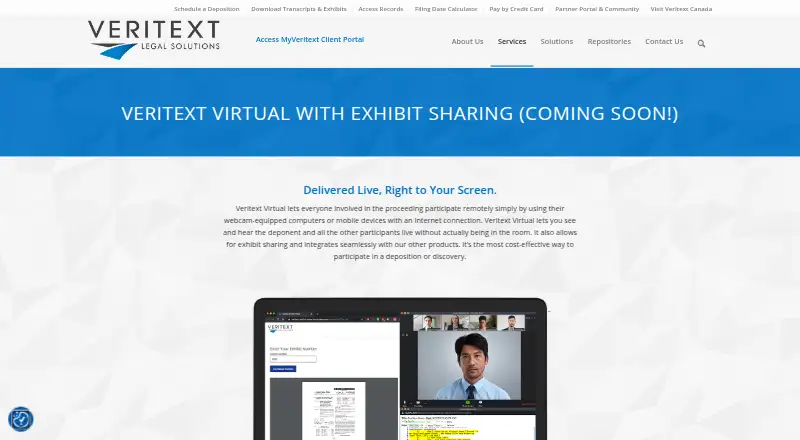
What Veritext Virtual is
Veritext Virtual lets deposition participants see and hear a deponent and other attendees remotely through a webcam-equipped computer or internet-connected mobile device. Sessions can include five to 500 participants, with live video of the deponent, questioners, and others. Transcript text can be displayed live, paused, scrolled, annotated, marked with case-specific issue codes, and saved. Exhibit Share lets participants view and stamp exhibits during a remote proceeding. When a videographer is present and recording is requested, Veritext can provide a trial-ready video deliverable. Participants access proceedings and Exhibit Share through the MyVeritext portal; Veritext says Zoom supports its telephone, chat, meeting, and remote proceeding services. Current Chrome, Safari, and Firefox versions work with the service, but Internet Explorer is not supported. Mobile use requires the Zoom app, and Zoom and Exhibit Share cannot both be viewed at once on mobile. On-call technical support is available, with scheduled Concierge Technical Support also offered. Pricing is available from a local Veritext office.
Who it suits
It suits legal teams and deposition participants who need remote video, transcript, and exhibit access. Mobile attendees should note the requirement to install Zoom and the restriction on viewing Zoom and Exhibit Share together.
What it does well
- Supports sessions of five to 500 participants
- Live transcript can be annotated and saved
- Participants can view and stamp exhibits remotely
- On-call technical support is available
What to know first
- No public rate is listed
- Internet Explorer is unsupported
- Zoom and Exhibit Share cannot be viewed together on mobile
- Remote workstations may restrict webcam access
Limits
Pricing varies by user and day, with rates available through local Veritext offices. On mobile, Zoom and Exhibit Share cannot be viewed at the same time; Internet Explorer is unsupported.
Plans
| Plan | Billed and limits | Price |
|---|---|---|
| Veritext Virtual | Per user per day; contact a local Veritext office for rates. · Pricing varies by user and day · No public rate listed | On request |
As veritext.com lists them, read 4 Oct 2026. The maker's own page has the final word.
Getting started
- Visit the Veritext Virtual website.
- Contact a local Veritext office for rates.
- Access proceedings through the MyVeritext portal.
- Use a current version of Chrome, Safari, or Firefox.
- For mobile access, download the Zoom app before the session.
Verdict
Veritext Virtual combines remote deposition video with transcript and exhibit tools, plus technical support options. Confirm local rates and consider the mobile viewing and remote workstation limitations before a session.
Questions
How much does Veritext Virtual cost?
The service is billed per user per day, and pricing varies by user and day. Contact a local Veritext office for rates.
How many people can join a session?
Sessions can connect from five to 500 participants.
Which browsers are supported?
The latest versions of Chrome, Safari, and Firefox work with MyVeritext, Veritext Virtual, and Exhibit Share. Internet Explorer is not supported.
Can participants use mobile devices?
Yes. Phones, tablets, and other mobile devices are supported when the Zoom mobile app is downloaded before the session. Zoom and Exhibit Share cannot be viewed together on mobile.
Can participants work with transcripts and exhibits?
Transcript text can be streamed, paused, scrolled, annotated, coded with case-specific issue codes, and saved. Exhibit Share lets participants view and stamp exhibits.
What technical support is available?
Veritext provides on-call technical support and offers scheduled Concierge Technical Support, which can include private breakout rooms or a dedicated live technician.
Facts from Veritext Virtual's own pages
- Access and integration
- Participants can access remote proceedings and Exhibit Share through the MyVeritext portal; Veritext says it uses Zoom for telephone, chat, meeting, and remote proceeding services. · veritext.com, 4 Oct 2026
- Browser support
- The latest versions of Chrome, Safari, and Firefox work with MyVeritext, Veritext Virtual, and Exhibit Share; Internet Explorer is not supported. · veritext.com, 4 Oct 2026
- Company compliance
- Veritext lists SOC 2 Type 2, HIPAA, PCI, and CCPA among its U.S. compliance credentials, and PIPEDA, PIPA, and CSAE 3416 among its Canadian credentials. · veritext.com, 4 Oct 2026
- Company profile
- Veritext says its headquarters are in Livingston, New Jersey, and it was founded in 1997. · veritext.com, 4 Oct 2026
- Exhibits
- Exhibit Share lets participants view and stamp exhibits during a remote proceeding. · veritext.com, 4 Oct 2026
- Founded
- 1997 · veritext.com, 28 Sept 2026
- Live video
- Participants can view the deponent, questioners, and other participants in real time. · veritext.com, 4 Oct 2026
- Mobile access
- Phones, tablets, and other mobile devices are supported when the Zoom mobile app is downloaded before the session; Zoom and Exhibit Share cannot both be viewed at once on mobile. · veritext.com, 4 Oct 2026
- Purpose
- Veritext Virtual lets deposition participants see and hear the deponent and other participants remotely using a webcam-equipped computer or mobile device with an internet connection. · veritext.com, 4 Oct 2026
- Remote workstation limitation
- Veritext says remote workstations such as Citrix often restrict webcam access and can cause connection errors. · veritext.com, 4 Oct 2026
- Security
- Veritext's remote deposition security guide says proceedings use unique user IDs and self-managed passwords and encrypt content at the application layer with AES 256-bit encryption. · info.veritext.com, 4 Oct 2026
- Session size
- The service connects from five to 500 participants. · veritext.com, 4 Oct 2026
- Technical support
- Veritext provides on-call technical support, and offers advance-scheduled Concierge Technical Support for private breakout rooms or a dedicated live technician. · veritext.com, 4 Oct 2026
- Transcript streaming
- The deposition text can be displayed live, paused, scrolled, annotated, coded with case-specific issue codes, and saved. · veritext.com, 4 Oct 2026
- Video deliverable
- When a videographer is present and recording is requested, Veritext can provide a trial-ready video deliverable. · veritext.com, 4 Oct 2026
Where Veritext Virtual stands on Freedom251
- Legal Deposition Software#21 of 29