Freedom251 › Driver Updater Software

Dell Command | Update
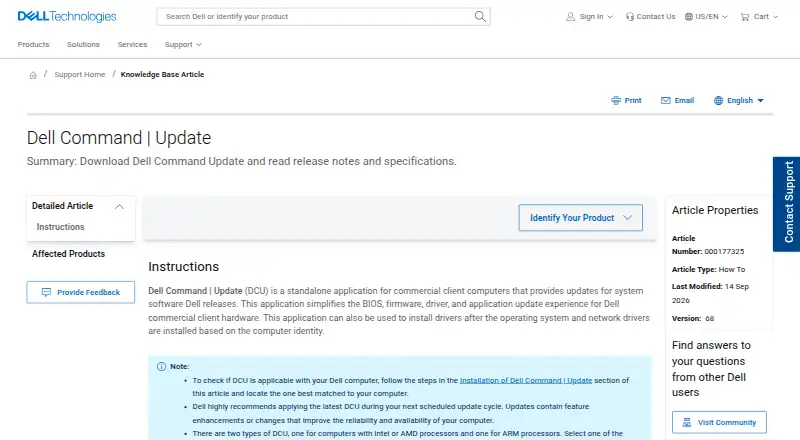
What Dell Command | Update is
Dell Command | Update is a free standalone application for managing BIOS, firmware, driver, and application updates on Dell commercial client computers. Its interface helps identify updates, apply them, and schedule when they run. The application can install drivers after the operating system and network drivers are installed, using the computer identity to determine what is needed. A command-line interface supports automated driver installations and updates. Administrators can configure download and storage locations, filters, schedules, an internet proxy, settings import or export, and the driver library location. The user guide also lists Advanced Driver Restore for Windows reinstallation. Version 5.1 and later supports Intel and ARM CPU architectures, with separate releases listed for Intel or AMD computers and ARM computers. Dell lists Windows 10 and Windows 11 support; the UWP version supports Windows 10 build 14393 or later and Windows 11. Installing version 5.7.2 requires .NET Desktop Runtime 10.0 version 10.0.8 or later. Dell warns that manually installing DCU 5.7.2 while Dell Client Device Manager 1.1 is present may corrupt the DellClientManagement Service, causing it to stop and be disabled.
Who it suits
Dell Command | Update is for administrators managing updates on Dell commercial client systems. Its controls and command-line interface also suit administrators who need scheduled or automated update workflows.
What it does well
- Identifies, applies, and schedules updates.
- Command-line interface supports automated driver updates.
- Administrators can configure update filters and schedules.
- Includes Advanced Driver Restore for Windows reinstallation.
- Supports Intel and ARM architectures from version 5.1.
What to know first
- Installing version 5.7.2 requires .NET Desktop Runtime 10.0 version 10.0.8 or later.
- Manual installation with Dell Client Device Manager 1.1 may corrupt a service.
- Only administrators can modify application settings.
Limits
The free plan is a standalone utility for Dell client systems. Only administrators can modify application settings, and an administrator policy disables Restore Defaults.
Plans
| Plan | Billed and limits | Price |
|---|---|---|
| Dell Command | Update | Standalone utility for Dell client systems · Intel or AMD and ARM versions | Free |
As dell.com lists them, read 9 Oct 2026. The maker's own page has the final word.
Getting started
- Identify your Dell product in Drivers & Downloads.
- Download Dell Command | Update for the product.
- For version 5.7.2, install .NET Desktop Runtime 10.0 version 10.0.8 or later.
- Install the application on a supported Windows system.
- Use the interface to identify, apply, or schedule updates, or use the command-line interface to automate driver installations and updates.
Verdict
Dell Command | Update provides update management and automation for Dell commercial client computers, with configurable administrative controls. Check the runtime requirement and Dell's stated 5.7.2 issue before installing that version.
Questions
How much does Dell Command | Update cost?
The listed plan is free.
Which Windows versions are supported?
Dell lists Windows 10 in 32-bit and 64-bit versions, and Windows 11. The UWP version supports Windows 10 build 14393 or later and Windows 11.
Does it support ARM computers?
Version 5.1 and later supports Intel and ARM CPU architectures. Dell lists separate releases for Intel or AMD computers and ARM computers.
What does version 5.7.2 require?
Installing version 5.7.2 requires .NET Desktop Runtime 10.0 version 10.0.8 or later.
Where can I download it?
Dell directs users to Drivers & Downloads to identify their Dell product and download the application.
Who can change application settings?
Only administrators can modify application settings. An administrator policy disables Restore Defaults.
Facts from Dell Command | Update's own pages
- Automation
- Its command-line interface can automate driver installations and updates. · dell.com, 9 Oct 2026
- Current runtime requirement
- Installing version 5.7.2 requires .NET Desktop Runtime 10.0 version 10.0.8 or later. · dell.com, 9 Oct 2026
- Deployment constraint
- Only administrators can modify application settings, and an administrator policy disables Restore Defaults. · dell.com, 9 Oct 2026
- Download and support
- Dell directs users to Drivers & Downloads to identify their Dell product and download DCU, and links to product support resources, troubleshooting articles, and the Dell community. · dell.com, 9 Oct 2026
- Driver setup
- The application can install drivers after the operating system and network drivers are installed, based on the computer identity. · dell.com, 9 Oct 2026
- Founded
- 1984 · dell.com, 28 Sept 2026
- Free plan
- Yes · dell.com, 20 Sept 2026
- Headquarters
- Round Rock, Texas, United States · dell.com, 28 Sept 2026
- Known issue
- Dell states that manually installing DCU 5.7.2 while Dell Client Device Manager 1.1 is present may corrupt the DellClientManagement Service, causing it to stop and be disabled. · dell.com, 9 Oct 2026
- Processor support
- Version 5.1 and later supports Intel and ARM CPU architectures, and Dell lists separate releases for Intel or AMD computers and ARM computers. · dell.com, 9 Oct 2026
- Purpose
- Dell Command | Update is a standalone application for commercial client computers that simplifies BIOS, firmware, driver, and application updates for Dell commercial client hardware. · dell.com, 9 Oct 2026
- System restore
- The user guide lists Advanced Driver Restore for Windows reinstallation among the product features. · dell.com, 9 Oct 2026
- Update controls
- Settings let administrators configure update download and storage locations, filters, schedules, internet proxy, settings import or export, and driver library location. · dell.com, 9 Oct 2026
- Update interface
- Its user interface helps identify, apply, and schedule required updates for client systems. · dell.com, 9 Oct 2026
Where Dell Command | Update stands on Freedom251
- Driver Updater Software#4 of 28
- Monitor Control Software#10 of 24
- Driver updaters#20 of 37
- Keyboard and Mouse Customization Software#85 of 105