Freedom251 › Software Uninstaller Tools
DeepPurge
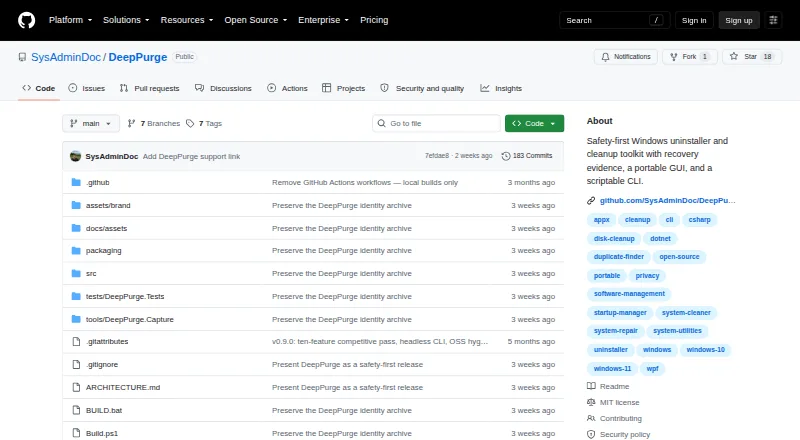
What DeepPurge is
DeepPurge is a free Windows uninstaller and cleanup toolkit for reviewing software, finding leftovers, and keeping a recovery trail. Before removal, it displays an item's source, command, publisher, signature, and risk, then checks native uninstall commands again just before execution. Its cleanup tools group junk files by category and size, with previews, age limits, and protected-path checks. Deletion Recovery records how an item was removed and the rollback route that remains, with dry-run checks before restoration. Other listed tools include forced and batch uninstall, Windows AppX and MSIX management, disk analysis, startup management, repair routes, and duplicate finding. The scriptable CLI has read-only commands for normal terminal use; cited contexts include Task Scheduler, Intune, and SCCM. The README says it runs locally without an account, telemetry service, or cloud upload. Portable desktop and CLI executables are built for Windows x64. The v0.9.3 release is not Authenticode-signed, and SmartScreen may warn. Secure deletion and some system operations cannot be undone.
Who it suits
DeepPurge suits Windows users who want to inspect software and cleanup changes before applying them. Its CLI and script-use contexts may also suit administrators managing software operations.
What it does well
- Reviews uninstall source, command, publisher, signature, and risk
- Cleanup previews include age and protected-path checks
- Deletion Recovery records remaining rollback routes
- Runs locally without an account or cloud upload
What to know first
- Windows x64 executables are not Authenticode-signed
- Secure deletion and some system operations cannot be undone
Limits
The free plan has no stated quota or trial limit. Secure deletion and some system operations cannot be undone, and secure deletion applies to selected files rather than claiming to wipe volume free space.
Getting started
- Open the DeepPurge GitHub project page.
- Download the portable desktop executable or scriptable CLI executable for Windows x64.
- Verify the downloaded executable with its published SHA256 value using PowerShell Get-FileHash.
- Run the portable desktop app or use the CLI's read-only commands in a normal terminal.
- Review an uninstall or cleanup preview before applying changes.
DeepPurge is a Windows uninstaller and cleanup toolkit for people who want to inspect software removals and cleanup changes before they run. It suits users who value local operation and a recovery trail; its limits on reversibility and Windows-only downloads are important trade-offs.
Overview
DeepPurge inventories installed software, traces leftovers, and scores system hygiene. It runs locally without an account, telemetry service, or cloud upload, which suits users who prefer to keep this work on their own machine. The project is MIT-licensed, but the repository does not describe a support service, and security fixes cover only the latest minor release.
Its defining strength is a guarded workflow: users can review proposed changes, and recovery records explain how an item was removed and what rollback path remains. That is useful for cautious maintenance, but it is not a safety net for every action. Secure deletion and some system operations cannot be undone.
Key features
Reviewed uninstall and cleanup
Before uninstalling, DeepPurge shows the program's source, command, publisher, signature, and risk, then rechecks native uninstall commands immediately before execution. This gives users more context than a simple remove button, while forced uninstall and batch processing help with stubborn or multiple programs. The toolkit also manages Windows AppX and MSIX apps and supports winget, Scoop, and Chocolatey package sources.
Junk Cleaner groups candidate files by category and size. Preview mode, age limits, and protected-path checks make it better suited to deliberate cleanup than unattended deletion. Disk analysis, startup management, repair routes, duplicate finding, and validated custom JSON cleaners broaden its maintenance role, though each adds another area where users should understand the proposed change.
Recovery and automation
Deletion Recovery records how an item was removed and which rollback route remains; dry-run restore checks let users inspect a recovery before applying it. Preview and dry-run paths report intended changes without deleting, while protected Windows paths, registry roots, services, and Microsoft task namespaces fail closed. These guardrails reduce the chance of an unsafe action, but do not reverse secure deletion or every system operation. Secure Delete applies to selected files and does not claim to wipe volume free space.
A scriptable CLI offers read-only commands in a normal terminal, with elevation available for operations that require it. Scripts, Task Scheduler, Intune, and SCCM are named use contexts, making the CLI relevant to administrators who want to incorporate checks into existing routines. A portable WPF desktop executable and CLI executable are provided for Windows x64; the README gives SHA256 values and PowerShell instructions to verify them. The v0.9.3 builds are not Authenticode-signed, so Windows SmartScreen may warn before launch.
Pricing
DeepPurge is free, with no free trial because there is no paid plan described. That makes it accessible for individual maintenance and scripting without a subscription decision; readers seeking a paid support commitment should look elsewhere, as no support service is described.
Platforms
Despite a broad platform entry, DeepPurge's stated product scope and released executables are for Windows, with the downloads built for Windows x64. Do not choose it for a Linux or macOS cleanup workflow.
Who it's for
DeepPurge is a strong fit for Windows users who want to inspect uninstall commands and cleanup candidates, keep recovery evidence, or automate read-only inventory and checks. Administrators may value its CLI and named management-tool contexts. It is a weaker choice for users who need guaranteed rollback, signed builds, a support service, or software for macOS or Linux.
Pros and cons
Pros
- Detailed uninstall review: source, command, publisher, signature, and risk are visible before removal, with a final command check.
- Local by design: it requires no account, telemetry service, or cloud upload.
- Useful recovery and guardrails: removal records, dry-run restore checks, and fail-closed protected locations support cautious maintenance.
Cons
- Irreversible cases remain: secure deletion and some system operations cannot be undone, so recovery evidence is not a universal restore guarantee.
- Windows-only release: the actual executables target Windows x64, not Linux or macOS.
- SmartScreen warning: the current release builds are unsigned, which may complicate launching them.
- Limited support scope: no support service is described, and security fixes apply only to the latest minor release.
Alternatives
IObit Uninstaller is worth considering if you want a free Windows option centered on batch uninstall, Windows app removal, drag-and-drop uninstall, and automatic leftover cleanup.
Revo Uninstaller may suit readers who prefer a Pro edition with a 30-day trial and a stated yearly price for one computer.
Argente Uninstall Manager offers a free one-PC plan and paid tiers organized for one, three, or ten PCs.
Bulk Crap Uninstaller is a free alternative for private and commercial use under Apache 2.0, with support for Windows 10 or newer.
Geek Uninstaller has a free personal-use edition with no support, alongside a Pro edition.
HiBit Uninstaller is another free Windows uninstaller option.
O&O AppBuster is a free, installation-free option without a paid edition.
WhatInStartup is the narrower pick if your priority is listing, enabling, disabling, deleting, or exporting Windows startup items.
For broader category browsing, see Software Uninstaller Tools.
Verdict
Choose DeepPurge if you want a free Windows maintenance toolkit that makes uninstall and cleanup decisions reviewable, records recovery routes, and offers a local CLI for routine checks. Look elsewhere if you need a signed release, support service, non-Windows software, or confidence that every change can be reversed.
Verdict
DeepPurge emphasizes review before uninstalling and records recovery options for eligible changes. Keep its stated limits in mind: some operations cannot be reversed, and its current release may prompt a SmartScreen warning.
Questions
How much does DeepPurge cost?
DeepPurge is free, with a free plan.
Does DeepPurge have a free trial?
No. The listed free offering is a free plan.
Which platforms does it support?
The listed platform is Windows. The portable desktop and CLI executables are built for Windows x64.
Is DeepPurge open source?
Yes. The repository identifies it as MIT-licensed.
Does it work with package managers?
The README names winget, Scoop, and Chocolatey as supported package sources.
Can its changes be rolled back?
Deletion Recovery records the available rollback route and offers dry-run restore checks. Secure deletion and some system operations cannot be undone.
Facts from DeepPurge's own pages
- Batch uninstall
- Yes · github.com, 23 Sept 2026
- Cleanup
- Junk Cleaner groups files by category and size, with preview mode, age limits, and protected-path checks. · github.com, 29 Sept 2026
- CLI
- A scriptable CLI provides read-only commands in a normal terminal by default; operations requiring elevation can be run elevated. · github.com, 29 Sept 2026
- Command-line use
- The product includes a scriptable CLI whose read-only commands work in a normal terminal, and the README cites scripts, Task Scheduler, Intune, and SCCM as use contexts. · github.com, 28 Sept 2026
- Downloads
- The project offers a portable WPF desktop app and CLI as Windows executables, with published SHA256 checksums. · github.com, 29 Sept 2026
- Download verification
- The README links published SHA256 values for both executables and describes verifying them with PowerShell Get-FileHash. · github.com, 28 Sept 2026
- Forced uninstall
- Yes · github.com, 23 Sept 2026
- Free plan
- Yes · github.com, 23 Sept 2026
- Guardrails
- Preview and dry-run routes report intended changes without deleting, while protected Windows paths, registry roots, services, and Microsoft task namespaces fail closed. · github.com, 28 Sept 2026
- Install monitoring
- Yes · github.com, 23 Sept 2026
- Integrations
- The README lists winget, Scoop, Chocolatey, and winapp2.ini integrations, plus script use with Task Scheduler, Intune, and SCCM. · github.com, 29 Sept 2026
- Intended users
- The maker describes DeepPurge as useful for uninstalling programs and their leftovers, with review before removal and a recovery trail afterward. · github.com, 29 Sept 2026
- Leftover scan
- Yes · github.com, 23 Sept 2026
- License
- The repository says DeepPurge is released under the MIT License. · github.com, 29 Sept 2026
- License and support scope
- The repository identifies the project as MIT-licensed, and its security policy says only the latest minor release receives security fixes. · github.com, 28 Sept 2026
- Local operation
- The project says everything runs locally and that no account, telemetry service, or cloud upload is required. · github.com, 29 Sept 2026
- Other capabilities
- Listed capabilities include forced uninstall, Windows AppX and MSIX management, disk analysis, startup management, repair routes, duplicate finding, and validated custom JSON cleaners. · github.com, 28 Sept 2026
- Package integrations
- The README names winget, Scoop, and Chocolatey as supported package sources. · github.com, 28 Sept 2026
- Portable version
- Yes · github.com, 23 Sept 2026
- Product
- DeepPurge is a Windows uninstaller and cleanup toolkit that inventories software, traces leftovers, scores system hygiene, and records recovery evidence before guarded changes. · github.com, 28 Sept 2026
- Purpose
- DeepPurge is a Windows uninstaller and cleanup toolkit that inventories software, traces leftovers, scores system hygiene, and records recovery evidence. · github.com, 29 Sept 2026
- Recovery
- Deletion Recovery records how items were removed and available rollback paths, and offers dry-run restore checks. · github.com, 29 Sept 2026
- Recovery limits
- The README says secure deletion and some system operations cannot be undone, and limits Secure Delete to selected files without claiming to wipe volume free space. · github.com, 28 Sept 2026
- Release signing
- The v0.9.3 release says its executables are not Authenticode-signed because no release certificate was available, so Windows SmartScreen may show a warning. · github.com, 29 Sept 2026
Where DeepPurge stands on Freedom251
- Software Uninstaller Tools#8 of 35
- Uninstaller apps#12 of 36
- Uninstallers#14 of 35
- Call blocker apps#23 of 41