Freedom251 › AI Database Assistants
DBQuill
What DBQuill is
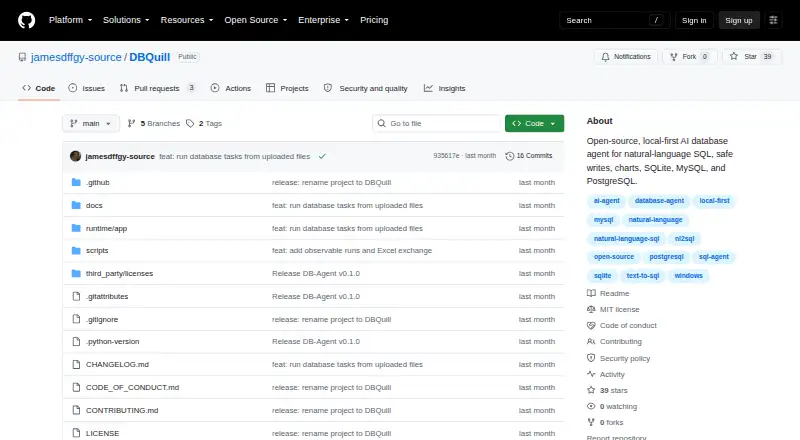
DBQuill is a free, open-source Windows desktop app for asking database questions in natural language, reviewing operations, and viewing charts. It supports SQLite and provides read paths for MySQL 8.4 and PostgreSQL 17. You can attach CSV or .xlsx files, which the app converts into a local SQLite database; legacy .xls files are not supported. Writes require validation, a preview of the change, and explicit confirmation, while remote DDL is blocked. Reads are limited to a single statement and bounded rows, and SQLite reads use physical read-only connections plus query_only. DBQuill accepts an OpenAI-compatible text-model endpoint without requiring a particular model vendor. Credentials, model profiles, sessions, audit records, and uploads are stored locally outside the source tree. Audit records keep controlled metadata and hashes rather than raw prompts, SQL, credentials, or result rows. The release target is Windows 10 or 11 x64 with CPython 3.12 and Microsoft Edge WebView2 Runtime. Distribution is source-first, and a signed native installer is not yet provided.
Who it suits
DBQuill is for people working with SQLite, MySQL, or PostgreSQL databases and tabular files who want natural-language queries and controlled updates. It suits Windows users comfortable with a source-first desktop release.
What it does well
- Free and open source.
- Writes require validation, preview, and explicit confirmation.
- Credentials and project records are stored locally.
- Accepts OpenAI-compatible text-model endpoints without a specific vendor.
What to know first
- Targets Windows 10 or 11 x64 only.
- Requires CPython 3.12 and Microsoft Edge WebView2 Runtime.
- No signed native installer is provided.
- Legacy .xls files are unsupported.
Limits
The release target is Windows 10 or 11 x64 with CPython 3.12 and Microsoft Edge WebView2 Runtime. Reads are single-statement and row-bounded; writes require validation, a preview, and confirmation, and remote DDL is blocked.
Plans
| Plan | Billed and limits | Price |
|---|---|---|
| DBQuill | Open-source · source-first Windows desktop app | Free |
As github.com lists them, read 4 Oct 2026. The maker's own page has the final word.
Getting started
- Open the DBQuill GitHub project and follow its installation guide.
- Use Windows 10 or 11 x64 with CPython 3.12.
- Ensure Microsoft Edge WebView2 Runtime is available.
- Configure an OpenAI-compatible text-model endpoint.
- Connect to SQLite or use a read path for MySQL 8.4 or PostgreSQL 17.
DBQuill is an open-source desktop agent for querying databases in natural language, reviewing changes and viewing charts. It is best suited to Windows users working with SQLite or reading from supported MySQL and PostgreSQL databases. The guarded write workflow is its strongest reason to choose it; the source-first setup and narrow platform target are meaningful trade-offs.
Overview
DBQuill combines natural-language queries with database operations and visual results. It supports SQLite, with read paths for MySQL 8.4 and PostgreSQL 17. That distinction matters: users should not expect to make changes to remote MySQL or PostgreSQL databases. The app accepts OpenAI-compatible text-model endpoints, so it does not require a particular model vendor.
Its local-first approach keeps database credentials, model profiles, sessions, audit records and uploads on the user's machine, outside the source tree. Audit records retain controlled metadata and hashes rather than raw prompts, SQL, credentials or result rows. That is a considered boundary for sensitive work, though local storage alone does not make the app suitable for every security or deployment requirement.
Key features
Queries, files and charts
Users can ask questions in natural language and view results as charts. CSV and .xlsx attachments are converted into a local SQLite database, bringing tabular files into the same workflow without requiring a separate database server. Legacy .xls is unsupported, so older spreadsheet archives may need conversion first.
Controlled writes and bounded reads
Writes require validation, a change preview and explicit confirmation. Remote DDL is blocked, limiting one class of potentially destructive operation. These checkpoints suit users who want to inspect proposed changes rather than let an agent apply them silently; they also add friction for workflows that depend on unattended updates.
Reads are single-statement and row-bounded, while SQLite reads use physical read-only connections plus query_only. Those safeguards constrain the query path, but do not remove the need to review database access and permissions in the user's environment.
Pricing
DBQuill is free: its DBQuill plan costs nothing and is open source. The plan includes natural-language queries, write operations, a semantic layer and result visualizations, with self-hosted deployment. There is no paid tier or free-trial decision to weigh; the trade-off is that users take on a source-first installation rather than receiving a signed native installer.
Platforms
The current release targets Windows 10 or 11 x64 with CPython 3.12 and Microsoft Edge WebView2 Runtime. It is not yet a release target for macOS, Linux, Windows on ARM or other Python versions. Because distribution is source-first and there is no signed native installer, setup is better suited to users comfortable following installation guidance than to anyone expecting a conventional packaged desktop app.
Who it's for
DBQuill fits people who work with SQLite, need read access to MySQL 8.4 or PostgreSQL 17, or want to query tabular files while keeping data and audit records local. Its explicit review-before-write process is especially relevant when users want control over database changes. It is a poor fit for users who need remote schema changes, a broad operating-system choice, or a committed support response time.
Pros and cons
- Pros: The validation, preview and confirmation steps make writes deliberate rather than automatic.
- Pros: Local storage and audit records that omit raw prompts, SQL and result rows limit what the audit trail retains.
- Pros: CSV and .xlsx imports become local SQLite data, extending the tool beyond existing database connections.
- Cons: MySQL and PostgreSQL have read paths, while SQLite is the supported database for direct write use.
- Cons: Windows 10 or 11 x64 is the sole current release target, and installation is source-first without a signed native installer.
- Cons: Legacy .xls files are unsupported, and support offers guidance through installation materials, diagnostics and GitHub issues without a response-time or security-report bounty guarantee.
Alternatives
For a wider choice among products in this category, browse AI Database Assistants.
- DataZen is a free, GPLv3 option for Linux, macOS and Windows users who want a cross-platform alternative and can bring their own AI provider.
- Insight O' Mate may suit a founder working with one database who can stay within 20 analyses per day on its free plan, or who wants a paid plan with unlimited queries and advanced export.
- Outerbase AI is worth considering for a small group needing a web, API, self-hosted or desktop option; its free plan caps usage at 5 users, 1 base and 10 EZQL queries per month.
- YourQL is another free desktop application for Linux, macOS and Windows, though it is described as a work in progress.
- Florentine.ai is a web and API alternative for MongoDB or MySQL users; its free plan allows 1 database, 5 active collections or tables and 500 requests per month.
- Wren AI offers an open-source context engine for individual developers through CLI and MCP without a UI, making it a different fit from a desktop app.
- DataLine is a free open-source project for users seeking an alternative with Linux, macOS, Windows, web or self-hosted availability.
- Kyligence is a paid alternative with a free trial for users whose platform requirements match its API, Linux, self-hosted or web offerings.
Verdict
Choose DBQuill if you use Windows 10 or 11 x64, want natural-language work across SQLite and read-only MySQL or PostgreSQL paths, and value explicit approval before changes. Its main advantage is the combination of local handling and guarded writes; look elsewhere if you need a signed installer, macOS or Linux support, remote DDL, or a defined support commitment.
Verdict
DBQuill pairs natural-language database work with explicit write controls and local storage. Its current release is narrowly targeted at Windows 10 or 11 x64 and is distributed source-first.
Questions
How much does DBQuill cost?
The DBQuill plan is free. It is open source, and there is no free trial.
Which databases does DBQuill support?
It supports SQLite and provides read paths for MySQL 8.4 and PostgreSQL 17.
Which platforms can run DBQuill?
The current release target is Windows 10 or 11 x64 with CPython 3.12 and Microsoft Edge WebView2 Runtime. macOS, Linux, Windows on ARM, and other Python versions are not release targets yet.
Does DBQuill require a particular AI model vendor?
No. It accepts an OpenAI-compatible text-model endpoint and does not require a specific model vendor.
How does DBQuill handle writes and audit records?
Writes require validation, a change preview, and explicit confirmation; remote DDL is blocked. Audit records retain controlled metadata and hashes rather than raw prompts, SQL, credentials, or result rows.
Facts from DBQuill's own pages
- Audit privacy
- Audit records retain controlled metadata and hashes rather than raw prompts, SQL, credentials, or result rows. · github.com, 4 Oct 2026
- Database support
- It supports SQLite and provides read paths for MySQL 8.4 and PostgreSQL 17. · github.com, 4 Oct 2026
- Distribution
- DBQuill is source-first and does not yet provide a signed native installer. · github.com, 4 Oct 2026
- File imports
- Users can attach CSV or .xlsx files, which DBQuill converts into a local SQLite database; legacy .xls is not supported. · github.com, 4 Oct 2026
- Intended users
- The project describes natural-language querying and controlled updates for people working with SQLite, MySQL, or PostgreSQL databases and tabular files. · github.com, 4 Oct 2026
- Local data
- Database credentials, model profiles, sessions, audit records, and uploads are stored locally outside the source tree. · github.com, 4 Oct 2026
- Model compatibility
- DBQuill accepts an OpenAI-compatible text-model endpoint and does not require a specific model vendor. · github.com, 4 Oct 2026
- Other platform limits
- macOS, Linux, Windows on ARM, and other Python versions are not release targets yet. · github.com, 4 Oct 2026
- Purpose
- DBQuill is an open-source, local-first AI database agent for asking questions in natural language, reviewing database operations, and viewing charts. · github.com, 4 Oct 2026
- Security
- Reads are single-statement and row-bounded, and SQLite reads use physical read-only connections plus query_only. · github.com, 4 Oct 2026
- Support
- Support guidance directs users to the installation guide, diagnostics, and GitHub issues; no response-time or bounty guarantee is offered for security reports. · github.com, 4 Oct 2026
- Supported platform
- The current release target is Windows 10 or 11 x64 with CPython 3.12 and Microsoft Edge WebView2 Runtime. · github.com, 4 Oct 2026
- Write controls
- Writes require validation, a change preview, and explicit confirmation; remote DDL is blocked. · github.com, 4 Oct 2026
Where DBQuill stands on Freedom251
- AI Database Assistants#7 of 21