Freedom251 › AI Database Assistants

AI for Database
What AI for Database is
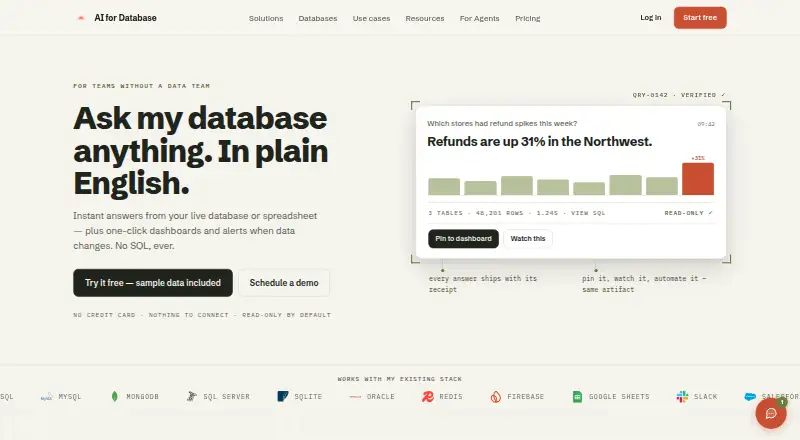
AI for Database lets teams ask questions about live databases or spreadsheets in plain English, then create dashboards and alerts without writing SQL. It generates natural-language queries, supports follow-up questions, and can export results to Sheets or CSV. Answers can become charts, scheduled reports, or shareable dashboards. Workflows can trigger Slack alerts, email notifications, webhooks, and CRM updates. Listed database connections include PostgreSQL, MySQL, MariaDB, MongoDB, SQL Server, SQLite, Oracle, Firebase, Firestore, Redis, and Google Sheets. Other integrations include analytics and action services such as BigQuery, Slack, Salesforce, HubSpot, Notion, and Airtable. Access is also described through Claude, ChatGPT, Muse, and a public REST and OpenAPI interface. Database connections begin read-only, with permissions configurable for specific actions. The security page says data is encrypted at rest with AES-256 and in transit with TLS 1.3, and queries and actions are logged; it says only schema metadata goes to AI providers while query results stay in the user's environment. A free plan is available. Pro costs $20 a month per user, and Team costs $50 a month per user.
Who it suits
It is aimed at teams without a data team, including sales managers, operations teams, product managers, and founders. It may suit users who want to query connected data in plain English and turn answers into dashboards, reports, or workflows.
What it does well
- Queries databases and spreadsheets in plain English
- Answers can become charts, reports, and shareable dashboards
- Connections start read-only
- Lists AES-256 encryption at rest and TLS 1.3 in transit
- Free plan is available
What to know first
- Pro costs $20 a month per user
- Team costs $50 a month per user
- AI usage pauses when the credit balance runs out
Limits
The free plan is available, but its limits are not described here. Pro and Team payments become per-user credits that do not expire; AI usage pauses when the balance runs out, and top-ups are offered in $10, $25, $50, and $100 amounts.
Plans
| Plan | Billed and limits | Price |
|---|---|---|
| Pro | billed monthly; annual billing is $192 per user · per user · $20 credits per payment · unlimited workflows · credits do not expire | $20 a month |
| Team | billed monthly; annual billing is $480 per user · per user · $50 credits per payment · unlimited workflows · credits do not expire | $50 a month |
| Enterprise | Terms agreed separately · custom usage and seats · support and deployment terms by contract | On request |
As aifordatabase.com lists them, read 4 Oct 2026. The maker's own page has the final word.
Getting started
- Visit https://www.aifordatabase.com/.
- Choose the free plan or a paid plan; Pro and Team are billed monthly or annually.
- Connect a supported database or Google Sheets.
- Start with read-only access and configure permissions for any specific actions you need.
- Ask a question in plain English, then create a chart, report, dashboard, or workflow.
Verdict
AI for Database brings natural-language queries, visualizations, and database-driven workflows together, with connections starting read-only. Its paid plans use per-user credits that do not expire, but AI usage pauses when the balance runs out.
Questions
Is AI for Database free?
A free plan is available. Pro costs $20 a month per user, and Team costs $50 a month per user.
What platforms does it support?
Web, API, and self-hosted access are listed. Deployment is described as hybrid.
Which databases can it connect to?
Listed options include PostgreSQL, MySQL, MariaDB, MongoDB, Microsoft SQL Server, SQLite, Oracle, Firebase, Firestore, Redis, and Google Sheets.
Can it write to connected databases?
Write operations are not supported. Connections start read-only, with permissions configurable for specific actions.
Which AI assistants and integrations are listed?
Access through Claude, ChatGPT, and Muse is described, along with a public REST and OpenAPI interface. Listed integrations include analytics and action services such as Mixpanel, BigQuery, Slack, Salesforce, HubSpot, Notion, and Airtable.
What happens when credits run out?
AI usage pauses when the balance is depleted. Top-ups are offered in $10, $25, $50, and $100 amounts.
Facts from AI for Database's own pages
- AI assistants
- The site describes access through Claude, ChatGPT, and Muse, as well as a public REST and OpenAPI interface for agents. · aifordatabase.com, 4 Oct 2026
- AI data handling
- The security page says only schema metadata is sent to AI providers and query results stay in the user's environment. · aifordatabase.com, 4 Oct 2026
- Answers and queries
- The product generates natural language queries, supports follow-up questions, and can export results to Sheets or CSV. · aifordatabase.com, 4 Oct 2026
- Compliance
- The security page labels SOC 2 as enterprise ready, GDPR as designed for, HIPAA as enterprise available, and ISO 27001 as aligned. · aifordatabase.com, 4 Oct 2026
- Credit limits
- Subscription payments become per-user credits that do not expire; AI usage pauses when the balance runs out, and top-ups are offered in $10, $25, $50, and $100 amounts. · aifordatabase.com, 4 Oct 2026
- Dashboards
- Answers can be turned into charts, scheduled reports, and shareable dashboards. · aifordatabase.com, 4 Oct 2026
- Database integrations
- Listed connectors include PostgreSQL, MySQL, MongoDB, SQL Server, SQLite, Oracle, Firebase, Redis, and Google Sheets. · aifordatabase.com, 4 Oct 2026
- Encryption and audit
- The security page states that data is encrypted at rest with AES-256 and in transit with TLS 1.3, and that queries and actions are logged. · aifordatabase.com, 4 Oct 2026
- Intended users
- The site describes the product as built for teams without a data team, including sales managers, operations teams, product managers, and founders. · aifordatabase.com, 4 Oct 2026
- Other integrations
- Listed analytics and action integrations include Mixpanel, Amplitude, CleverTap, MoEngage, Braze, Sentry, BigQuery, Slack, Salesforce, HubSpot, Notion, and Airtable. · aifordatabase.com, 4 Oct 2026
- Purpose
- It lets teams ask questions of live databases or spreadsheets in plain English and create dashboards and alerts without writing SQL. · aifordatabase.com, 4 Oct 2026
- Read-only access
- Database connections start read-only, with permissions configurable to enable specific actions as needed. · aifordatabase.com, 4 Oct 2026
- Support
- The pricing page lists support as contact-based for Pro and Team, with enterprise support terms agreed by contract. · aifordatabase.com, 4 Oct 2026
- Workflows
- Database-driven workflows can trigger Slack alerts, email notifications, webhooks, and CRM updates. · aifordatabase.com, 4 Oct 2026
Where AI for Database stands on Freedom251
- AI Database Assistants#3 of 21