Freedom251 › Agentic Analytics Software
DataLine
What DataLine is
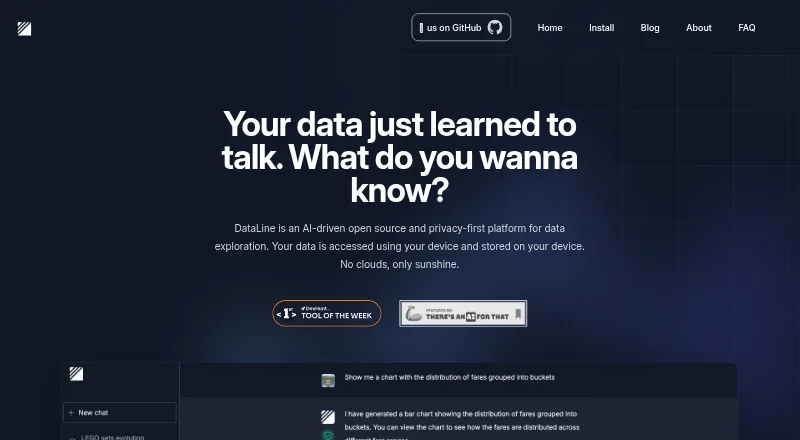
DataLine is an open-source AI tool for asking questions of data and creating tables, charts, dashboards, and reports. It can translate natural-language prompts into SQL, execute queries, and let users edit, save, and rerun SQL results. Chart queries can also be edited and refreshed. Listed data sources include Postgres, Snowflake, MySQL, Azure SQL Server, Microsoft SQL Server, Excel, SQLite, CSV, and sas7bdat. The project is aimed both at non-technical people querying data and developers seeking text-to-SQL. DataLine is available through downloadable binaries and a Docker image, with Docker described by the maker as more suitable for business use. The project says data is accessed and stored on the user’s device rather than in cloud storage, and that data is hidden from the LLMs used by default; this can be disabled for non-sensitive data. Basic username and password authentication is available in self-hosted mode, but not in the executable, and the current setup supports a single user. Excel sheets are imported as separate tables, and an import fails if any sheet fails. DataLine is free and uses the GPL-3.0 license.
Who it suits
It may suit non-technical users who want to query data in natural language and developers looking for a text-to-SQL tool. It also fits users who prefer self-hosted or device-local data handling.
What it does well
- Natural-language prompts can generate and run SQL.
- Supports charts, dashboards, and reports.
- Open-source project under the GPL-3.0 license.
- Maker says data is not stored in cloud storage.
- Offers downloadable binaries and a Docker image.
What to know first
- Current setup supports a single user.
- Executable mode does not support username and password authentication.
- Any failed Excel sheet causes the import to fail.
- Local LLM support is marked as coming soon.
Getting started
- Visit https://dataline.app/.
- Choose an installation option for Linux, macOS, Windows, or Docker, or use the web or self-hosted version.
- Connect a supported database or add a supported file source.
- Ask a question in natural language, then review or edit the generated SQL.
Overview
DataLine brings conversational analysis, SQL editing and reporting into one open-source application. It is a strong fit for individuals who want to explore data without starting in SQL, and for developers who want an editable text-to-SQL workflow. Its local-first approach is appealing, but write operations and single-user authentication make deployment choices consequential.
It connects to PostgreSQL, Snowflake, MySQL, Azure SQL Server, Microsoft SQL Server and SQLite, as well as CSV and Excel files; the project also lists sas7bdat among its connections. DataLine is GPL-3.0 licensed. The project began as a prototype in April 2023, its team formed in January 2024, and it was open-sourced in February 2024.
DataLine is one option in the AI Database Assistants category.
Key features
From natural language to editable SQL
Users can ask a question in ordinary language and have DataLine generate and execute SQL, then modify, save and rerun the result. That bridges exploratory questions and repeatable queries, while giving developers a chance to refine the SQL rather than treating the generated answer as a black box. DataLine also supports write operations, so it is not just a reporting layer; take care when connecting it to data that should not be changed.
Charts and reporting
Natural-language charting, editable and refreshable chart queries, dashboards and report building extend the workflow beyond individual query results. That makes DataLine useful when an answer needs to become a recurring visual or a report. It does not, however, change the product's single-user constraint.
Data handling and deployment
The maker describes DataLine as keeping data on the user's device, without cloud storage. Its README says data is hidden from the LLMs used by default, with an option to disable that protection for non-sensitive data. The privacy policy says database structure is processed locally and not accessed or stored by DataLine; optional error reporting may send information through Sentry, and configured integrations such as LangSmith tracing may share information with those services. Local LLM support is marked as coming soon, so it should not be treated as a current option.
Downloadable binaries and a Docker image are offered, with Docker described as more suitable for business use. Self-hosted mode supports basic username-and-password authentication, but the executable does not; the current setup supports one user. That makes the executable a poor fit for shared deployment, while Docker's business positioning does not remove the single-user limit.
Spreadsheet imports
Excel sheets are ingested as separate tables. The maker advises putting column names in the first row and removing padding rows and columns; an import fails if any sheet fails. Workbooks that are not consistently prepared may therefore require cleanup before they can be brought in.
Pricing
DataLine is free, with a free plan and no paid plan stated. The free offering makes it accessible for individual evaluation and use, but the single-user setup and lack of executable authentication matter more than price for anyone planning a shared deployment.
Platforms
DataLine supports Linux, macOS, Windows, web and self-hosted use. Installation options include Docker, macOS Intel and Apple Silicon binaries, Windows and Linux downloads, Homebrew and GitHub Releases. The range is useful for both desktop and hosted setups, though authentication differs between self-hosted mode and the executable.
Who it's for
DataLine suits non-technical users who want to query databases conversationally, and developers seeking a text-to-SQL tool with SQL they can edit and rerun. Its combination of database and file connections, visualizations and reporting is most compelling for individual analysis that benefits from moving from a question to a saved query or dashboard.
It is less suitable for teams that need multiple user accounts, and its write capability calls for caution where changes to connected data carry risk. Users working with sensitive data should also consider the stated LLM handling, optional error reporting and any third-party integrations they choose to configure.
Pros and cons
Pros
- Natural-language querying with editable SQL: users can move from a plain-language question to a query they can modify, save and rerun.
- Reporting beyond query results: charting, dashboards and report building support turning analysis into visual outputs.
- Broad input options: listed database connections include six commonly used database systems, alongside CSV, Excel and sas7bdat support.
- Local-first positioning and open source: the GPL-3.0 project offers binaries and Docker deployment, with data described as staying on the user's device.
Cons
- Single-user setup: it does not fit deployments that need multiple accounts.
- Authentication is limited by install type: basic credentials are available in self-hosted mode, not in the executable.
- Write operations raise the stakes: users need to be careful when connecting data they cannot risk changing.
- Excel imports are sensitive to workbook structure: a failure in any sheet fails the import, and padding rows or columns should be removed.
Alternatives
For another free, open-source desktop option, DataZen offers Linux, macOS and Windows support, no account requirement and the option to bring your own AI provider. Pick it if those terms matter more than DataLine's stated combination of charts, dashboards and reports.
Insight O' Mate has a free tier capped at 20 database analyses per day, one founder and one database, plus a Pro plan at $29 a month with unlimited queries, priority queue and advanced export. It may suit someone whose needs fit those daily and database limits, or who values the stated Pro features.
Outerbase AI offers a free tier for up to five users, but caps it at one base, 10 EZQL queries per month, three saved queries and one dashboard, and limits it to transactional databases. Consider it instead if its multi-user free tier and base-based workflow fit better than DataLine's single-user setup.
YourQL is a free desktop application for Linux, macOS and Windows described as a work in progress. It is an option for readers willing to consider a product in that state.
Vanna AI offers web, API and self-hosted options, with an Explorer plan at $50 a month that includes 20 questions per day, an API, admin features in Vanna OSS or Vanna Cloud, and same-day email support. Choose it if those daily-use and support terms suit your needs better.
Wren AI provides a free open-source context engine for individual developers through CLI and MCP, without a UI. It is the more relevant alternative for developers specifically seeking that UI-free approach.
AI for Database has a Pro plan at $20 a month with $20 in credits per payment, unlimited workflows and credits that do not expire; annual billing is $192 per user. It may suit readers who prefer that credit-based pricing and workflow allowance.
Florentine.ai is another freemium, web-based option.
Verdict
Choose DataLine if you want a free, open-source way to ask questions of data, work with the resulting SQL and carry analysis through to charts or reports, with a device-local approach. Look elsewhere if your deployment needs multiple users or executable authentication; those constraints, along with the ability to make write operations, are the clearest reasons to choose a different tool.
Verdict
DataLine pairs natural-language querying with SQL editing and visual reporting, with a stated device-local approach to data. Its single-user setup and authentication limits are important considerations for deployment.
Questions
Does DataLine have a free plan?
Yes. The pricing model is free, and a free plan is listed.
Which platforms does DataLine support?
Linux, macOS, Windows, web, and self-hosted use are listed.
Is DataLine open source?
Yes. The project is open source under the GPL-3.0 license.
Which data sources can it connect to?
Listed sources include Postgres, Snowflake, MySQL, Azure SQL Server, Microsoft SQL Server, SQLite, Excel, CSV, and sas7bdat.
Does DataLine store data in the cloud?
The maker says data is accessed and stored on the user's device, with no cloud storage. The README says data is hidden from the LLMs used by default.
Facts from DataLine's own pages
- Audience
- The maker describes it as useful for non-technical people querying data and developers seeking a text-to-SQL tool. · dataline.app, 28 Sept 2026
- Authentication limit
- Basic username and password authentication is supported in self-hosted mode, but not when running the executable; the README says the current setup supports a single user. · github.com, 28 Sept 2026
- Company timeline
- The About page lists the first prototype in April 2023, team formation in January 2024, and open sourcing in February 2024. · dataline.app, 29 Sept 2026
- Database support
- The site lists PostgreSQL, MySQL, SQLite, Microsoft SQL Server, Snowflake, and BigQuery as supported databases. · dataline.app, 29 Sept 2026
- Data sources
- The project lists connections to Postgres, Snowflake, MySQL, Azure SQL Server, Microsoft SQL Server, Excel, SQLite, CSV, and sas7bdat. · github.com, 28 Sept 2026
- Deployment
- The project offers downloadable binaries and a Docker image, and says Docker is more suitable for business use. · github.com, 28 Sept 2026
- Downloads
- The site lists Docker, macOS Intel, macOS Apple Silicon, Windows, Linux, Homebrew, and GitHub Releases as installation options. · dataline.app, 29 Sept 2026
- File support
- The site lists CSV and Excel support. · dataline.app, 29 Sept 2026
- Founders
- The About page names Rami Awar and Anthony Malkoun as the team behind DataLine. · dataline.app, 29 Sept 2026
- History
- The About page dates the first prototype to April 2023, the team formation to January 2024, and open-sourcing to February 2024. · dataline.app, 28 Sept 2026
- Intended users
- The site describes DataLine as useful for non-technical people querying data and developers seeking a text-to-SQL solution. · dataline.app, 29 Sept 2026
- LLM handling
- The project README says DataLine hides data from the LLMs used by default, and that this can be disabled when the data is not sensitive. · github.com, 28 Sept 2026
- Local LLM
- The site marks local LLM support as “Coming soon.” · dataline.app, 29 Sept 2026
- Maker and team
- The About page names Rami Awar and Anthony Malkoun as the team behind DataLine. · dataline.app, 28 Sept 2026
- Natural-language queries
- DataLine can generate and execute SQL from natural language, and users can modify, save, and rerun SQL results. · github.com, 28 Sept 2026
- Open source
- The site describes DataLine as an open-source platform and links to its project on GitHub. · dataline.app, 29 Sept 2026
- Privacy
- The site says data is accessed and stored on the user's device and that nothing is stored in the cloud. · dataline.app, 29 Sept 2026
- Privacy policy
- The privacy policy says database structure is processed locally and DataLine does not access or store it; it also says optional error reporting may send information through Sentry. · dataline.app, 29 Sept 2026
- Product
- DataLine is an AI data analysis and visualization tool that lets users chat with data to generate tables, charts, and dashboards. · dataline.app, 29 Sept 2026
- Spreadsheet limit
- Excel sheets are ingested as separate tables; the README advises placing column names in the first row and removing padding rows and columns, and says an import fails if any sheet fails. · github.com, 28 Sept 2026
- Support
- The privacy policy provides [email protected] for questions about privacy or data practices. · dataline.app, 29 Sept 2026
- Third-party integrations
- The privacy policy says users who configure third-party integrations such as LangSmith tracing may share information with those services. · dataline.app, 29 Sept 2026
- Visualization
- The site lists data visualization and describes generating tables, charts, and dashboards. · dataline.app, 29 Sept 2026
Where DataLine stands on Freedom251
- Agentic Analytics Software#3 of 22
- AI Database Assistants#5 of 21