Freedom251 › AI Database Assistants
YourQL
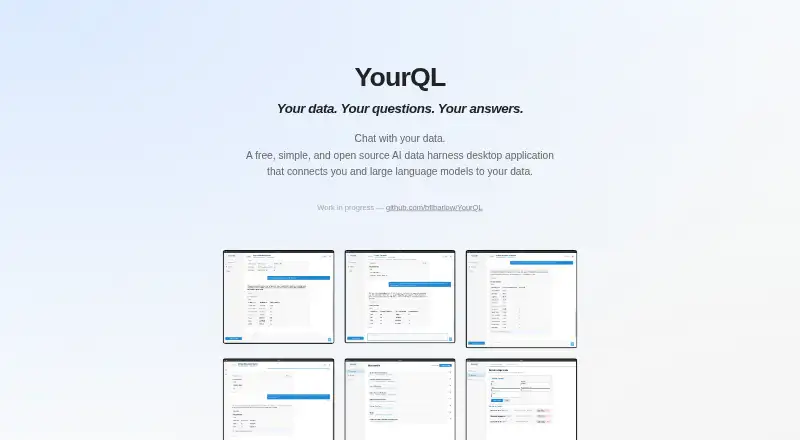
What YourQL is
YourQL is a free desktop application that turns plain-English database questions into SQL queries, interactive tables, charts, and summaries. It runs on Linux, macOS, and Windows and connects to databases and files including MySQL, MariaDB, PostgreSQL, SQLite, SQL Server, Snowflake, BigQuery, Redshift, CSV, Excel, and Google Sheets. Users can configure OpenAI, Anthropic Claude, Ollama, or a custom OpenAI-compatible endpoint. YourQL reads a schema, sends the prompt to the configured model, executes the generated SQL, and can return errors for correction and retry. The maker says source queries are limited to SELECT statements and writes are forbidden; exploration queries have configurable strict, moderate, or relaxed safety modes. Conversations, settings, and connection details are stored locally, and cloud transmission occurs only when a cloud model provider is configured. YourQL says it has no telemetry or analytics. Users can set database-specific prompts and rules, describe tables and columns, and activate reusable Markdown skills. Discussions can be exported as PDF, HTML, or Markdown. The site describes the project as work in progress.
Who it suits
It suits people who want to explore supported databases with natural-language prompts and view results as tables, charts, or summaries. It is also relevant to users who want local storage and control over which model endpoint is configured.
What it does well
- Connects to databases, spreadsheets, and CSV files.
- Supports OpenAI, Claude, Ollama, and custom endpoints.
- Restricts source queries to SELECT statements.
- Stores conversations, settings, and connection details locally.
- Exports discussions as PDF, HTML, or Markdown.
What to know first
- Using an AI model gives that model access to configured databases.
- The official site describes the project as work in progress.
- Write operations are forbidden.
Limits
The Free plan costs 0.00 USD and is described as a free desktop application. The project is work in progress; using an AI model gives that model access to configured databases.
Plans
| Plan | Billed and limits | Price |
|---|---|---|
| Free | Free desktop application; work in progress | Free |
As yourquerylanguage.com lists them, read 3 Oct 2026. The maker's own page has the final word.
Getting started
- Visit the YourQL website.
- Install the desktop application for Linux, macOS, or Windows.
- Connect a supported database, CSV, Excel file, or Google Sheet.
- Configure an AI provider such as Ollama or a supported cloud provider.
- Ask a database question and review the generated query and results.
Overview
YourQL is a desktop database assistant that turns plain-English questions into SQL and visual results. It is most compelling for people who want to explore several databases or spreadsheets without writing every query by hand. The free app offers broad provider and source choices, but remains a work in progress and is strictly read-only.
Key features
YourQL reads a source's schema, sends a prompt to the configured language model, runs the generated SQL, and can return query errors to the model for a correction attempt. That workflow lowers the barrier to ad hoc investigation, though users should verify results before relying on them for consequential decisions.
Connections include MySQL, MariaDB, PostgreSQL, SQLite, SQL Server, Snowflake, BigQuery, Redshift, CSV, Excel, and Google Sheets. This makes it useful when information is spread across databases and tabular files. The app can run read-only exploration in strict, moderate, or relaxed safety modes; its maker says queries are limited to SELECT and cannot write data. That is a meaningful guardrail, but also rules out using it to change records.
Results can include interactive tables, automatic charts, and summaries, and discussions can be exported as PDF, HTML, or Markdown. Users can tailor database-specific prompts and business rules, annotate tables and columns, and activate reusable Markdown skills for a conversation. These controls can help align questions with local terminology, while adding some setup before the assistant is useful.
YourQL supports OpenAI, Anthropic Claude, Ollama, and custom OpenAI-compatible HTTP endpoints. Conversations, settings, and connection details are stored locally; the maker says the app has no telemetry or analytics and communicates only with configured model endpoints and connected databases. Provider keys and database credentials are stored in the local database and sent to the configured provider or database as applicable. The central trade-off is that using a model gives it access to configured databases, so provider choice and connection scope deserve care.
Pricing
YourQL's Free plan costs nothing and is a free desktop application. There are no paid tiers or quotas described in this plan, so it is an accessible option for individual evaluation and read-only work. Its work-in-progress status is the main qualification: readers needing a mature, supported production workflow may prefer another tool.
Platforms
YourQL is a self-hosted desktop application for Linux, macOS, and Windows. That cross-platform availability suits users who want a local desktop workflow, rather than a browser-only service.
Who it's for
YourQL fits analysts, developers, and other database users who need read-only exploration across supported databases and spreadsheets, want visual summaries, and value a choice of model provider. It is a poor fit for write workflows or anyone unwilling to let a configured model access connected databases.
Pros and cons
- Pros: Broad database and spreadsheet connections make it practical for mixed-source exploration.
- Pros: Multiple hosted and local provider options let users choose how prompts are handled.
- Pros: Charts, summaries, and export formats give users ways to share or inspect results beyond a query table.
- Cons: SELECT-only access prevents edits and other write operations.
- Cons: A configured model gets access to connected databases, which is a significant privacy and access-control consideration.
- Cons: The project is a work in progress, making it less suitable for workflows that depend on a mature product.
Alternatives
For a broader comparison, see AI Database Assistants. DataZen is another free Linux, macOS, and Windows option, with GPLv3 licensing, no account, and a bring-your-own AI provider model. Insight O' Mate may suit someone who wants a defined free allowance of 20 analyses a day for one founder and one database, or a Pro plan with unlimited queries and priority queue for $29 a month. Outerbase AI is worth considering for a web or API-accessible setup as well as desktop, with a free tier capped at five users, one base, and 10 EZQL queries per month. DBQuill is a free, open-source, source-first desktop app for Windows users. Florentine.ai offers web and API access, with its free tier limited to one database, five active collections or tables, and 500 monthly requests. Wren AI offers an open-source context engine for individual developers through CLI and MCP, without a UI. DataLine is a free open-source project available across desktop, web, and self-hosted platforms. Kyligence is a paid option with a free trial.
Verdict
Choose YourQL if you want a free, cross-platform desktop tool for read-only natural-language exploration across databases and spreadsheets, with a choice of model providers and built-in visual results. Its breadth and export options are persuasive for investigation; look elsewhere if you need to write data, require a finished product, or cannot accept model access to connected databases.
Verdict
YourQL combines natural-language database queries with visual results and configurable model providers. Its read-only query policy and stated model access to connected databases are important constraints to weigh before use.
Questions
How much does YourQL cost?
The Free plan costs 0.00 USD.
Which platforms does YourQL support?
It is available for Linux, macOS, and Windows.
Which data sources can it connect to?
Supported sources include MySQL, MariaDB, PostgreSQL, SQLite, SQL Server, Snowflake, BigQuery, Redshift, CSV, Excel, and Google Sheets.
Which AI providers can I use?
YourQL supports OpenAI, Anthropic Claude, Ollama, and custom OpenAI-compatible HTTP endpoints.
Can YourQL write to a database?
The maker says data source queries are restricted to SELECT statements and write operations are forbidden.
Does YourQL store conversations locally?
Conversations, settings, and connection details are stored locally. Data is sent to a cloud only if a cloud AI provider is configured.
Facts from YourQL's own pages
- AI providers
- YourQL supports OpenAI, Anthropic Claude, Ollama, and custom OpenAI-compatible HTTP endpoints. · github.com, 3 Oct 2026
- Credentials
- Provider API keys and database credentials are stored in the local database and are sent only to the configured LLM provider or connected database as applicable. · github.com, 3 Oct 2026
- Customization
- Users can define database-specific prompts and business rules, add table and column descriptions, and activate reusable Markdown skills per conversation. · github.com, 3 Oct 2026
- Database connections
- Supported data sources include MySQL, MariaDB, PostgreSQL, SQLite, SQL Server, Snowflake, BigQuery, Redshift, CSV, Excel, and Google Sheets. · github.com, 3 Oct 2026
- Exploration
- The app can run read-only exploration queries under configurable strict, moderate, or relaxed safety modes. · github.com, 3 Oct 2026
- Limit
- The maker notes that using an AI model gives that model access to the configured databases. · github.com, 3 Oct 2026
- Local operation
- Conversations, settings, and connection details are stored locally; data is sent to a cloud only if a cloud LLM provider is configured. · github.com, 3 Oct 2026
- Platforms
- The maker describes installation using a macOS DMG, a Linux AppImage, and a Windows EXE installer. · github.com, 3 Oct 2026
- Product
- YourQL is a desktop application for asking questions about databases in plain English and getting queries, interactive tables, charts, and summaries. · github.com, 3 Oct 2026
- Project status
- The official site describes YourQL as work in progress. · yourquerylanguage.com, 3 Oct 2026
- Query workflow
- YourQL reads database schema, sends a prompt to the configured LLM, executes generated SQL, and can return errors to the model for correction and retry. · github.com, 3 Oct 2026
- Read-only enforcement
- The maker says data source queries are restricted to SELECT statements and write operations are forbidden. · github.com, 3 Oct 2026
- Results and exports
- YourQL supports automatic charts and summaries and exports discussions as PDF, HTML, or Markdown. · github.com, 3 Oct 2026
- Security and privacy
- YourQL says it has no telemetry or analytics and communicates only with configured LLM endpoints and connected databases. · github.com, 3 Oct 2026
Where YourQL stands on Freedom251
- AI Database Assistants#10 of 21