Freedom251 › Database Client Software

DB Browser for SQLite
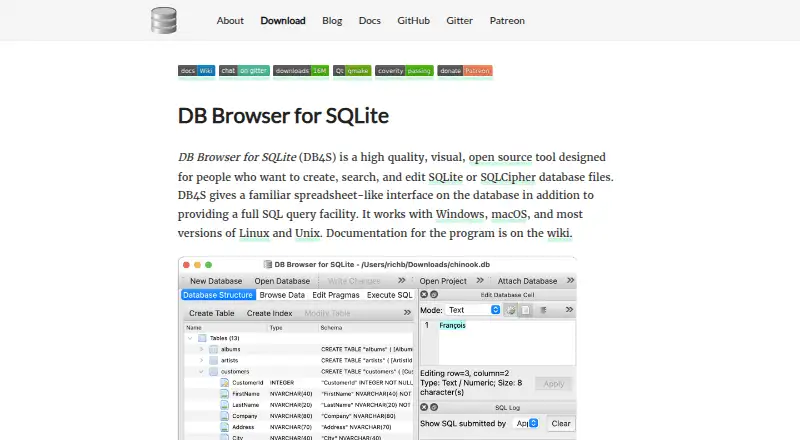
What DB Browser for SQLite is
DB Browser for SQLite is a free, open source desktop tool for creating, searching, and editing SQLite or SQLCipher database files. It runs on Linux, macOS, and Windows, with a spreadsheet-like interface for browsing records and a full SQL query facility. Controls and wizards can create or compact database files, change tables and indexes, and add, edit, browse, or delete records. Users can import and export records as text, tables as CSV files, and databases as SQL dumps. The tool can run queries, inspect results, review a log of SQL commands, and plot simple graphs from table or query data. It can also add, change, or remove SQLCipher encryption on database files. Downloads include Homebrew installation for macOS and AppImage, Snap, distribution packages, and source build instructions for Linux. Windows options include 32-bit, 64-bit, and ARM64 installers and ZIP packages; the project says ARM64 Windows has no portable version. Documentation is available through the project wiki. The project says the application does not transfer information to other networked systems unless specifically requested by the user or operator.
Who it suits
This desktop application suits people who need to inspect, query, or edit SQLite and SQLCipher files on Linux, macOS, or Windows. It also fits workflows that need CSV or SQL dump exchange, query logs, or simple graphs.
What it does well
- Free, open source desktop application
- Edits SQLite and SQLCipher database files
- Imports and exports records, tables, and databases
- Can add, change, or remove SQLCipher encryption
- Runs on Linux, macOS, and Windows
What to know first
- No portable version for ARM64 Windows
- Desktop application, not a web service
Limits
The application is a desktop product, and the project says there is no portable version for ARM64 Windows. The listed plan is free and covers SQLite and SQLCipher database files.
Plans
| Plan | Billed and limits | Price |
|---|---|---|
| DB Browser for SQLite | SQLite and SQLCipher database files · desktop application | Free |
As sqlitebrowser.org lists them, read 11 Oct 2026. The maker's own page has the final word.
Getting started
- Open the project website
- Choose a download route for Linux, macOS, or Windows
- Install using Homebrew, an AppImage, Snap, distribution package, source build, installer, or ZIP package
- Open a SQLite or SQLCipher database file
- Use the spreadsheet interface or SQL query facility
Verdict
DB Browser for SQLite combines record editing, SQL queries, and import or export tools at no cost. Check the download options for your system, especially if you need a portable ARM64 Windows package.
Questions
How much does DB Browser for SQLite cost?
Its listed plan costs nothing, and the pricing model is free.
Which operating systems are supported?
It supports Linux, macOS, and Windows.
Which databases can it open?
The listed database support is SQLite and SQLCipher.
Can it edit database data?
Yes. It can browse, edit, add, and delete records, and modify tables and indexes.
What can it export?
Records can be exported as text, tables as CSV, databases as SQL dumps, and results as CSV or JSON.
Is it open source?
Yes. The purpose description identifies it as an open-source tool.
Facts from DB Browser for SQLite's own pages
- Analysis
- It can issue SQL queries, inspect results, examine a log of SQL commands, and plot simple graphs from table or query data. · sqlitebrowser.org, 11 Oct 2026
- Code signing
- The project says its Windows binaries receive free code signing from SignPath.io, with a certificate from SignPath Foundation. · sqlitebrowser.org, 11 Oct 2026
- Database operations
- Its controls and wizards can create and compact database files, create and modify tables and indexes, and browse, edit, add, or delete records. · sqlitebrowser.org, 11 Oct 2026
- Encryption
- It can add, change, or remove SQLCipher encryption from database files. · sqlitebrowser.org, 11 Oct 2026
- Founded
- 2003 · sqlitebrowser.org, 19 Oct 2026
- History
- The About page says the first version was released to the public domain on 2003-08-19. · sqlitebrowser.org, 11 Oct 2026
- Import and export
- It can import and export records as text, tables as CSV files, and databases as SQL dump files. · sqlitebrowser.org, 11 Oct 2026
- Integrations
- The download page lists Homebrew installation for macOS and AppImage, Snap, distribution packages, and source build instructions for Linux. · sqlitebrowser.org, 11 Oct 2026
- Interface
- It provides a spreadsheet-like interface and a full SQL query facility. · sqlitebrowser.org, 11 Oct 2026
- Maintainers
- The About page names @mgrojo, @lucydodo, @justinclift, and @chrisjlocke as primary maintainers, with major contributions from @scottfurry. · sqlitebrowser.org, 11 Oct 2026
- Platforms
- The project says DB4S works with Windows, macOS, and most versions of Linux and Unix. · sqlitebrowser.org, 11 Oct 2026
- Privacy
- The privacy policy says the application does not transfer information to other networked systems unless specifically requested by the user or the person installing or operating it. · sqlitebrowser.org, 11 Oct 2026
- Purpose
- DB Browser for SQLite is a visual, open source tool for creating, searching, and editing SQLite or SQLCipher database files. · sqlitebrowser.org, 11 Oct 2026
- Support and documentation
- The project directs users to its wiki documentation and has a Gitter link in its site navigation. · sqlitebrowser.org, 11 Oct 2026
- Windows builds
- The download page offers 32-bit, 64-bit, and ARM64 Windows installers and ZIP packages; it says there is no portable version for ARM64 Windows. · sqlitebrowser.org, 11 Oct 2026
Where DB Browser for SQLite stands on Freedom251
- Database Client Software#8 of 53