Freedom251 › Database Design Tools
Database Workbench
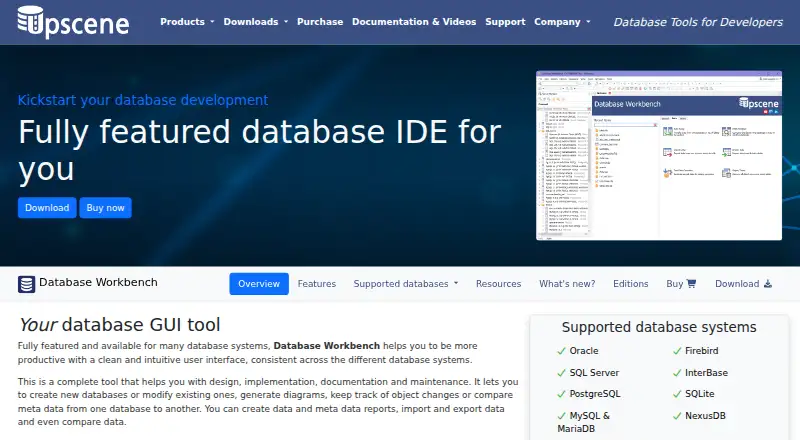
What Database Workbench is
Database Workbench is a desktop IDE for designing, implementing, documenting, and maintaining databases. It lists Oracle, Firebird, SQL Server, InterBase, PostgreSQL, SQLite, MySQL, MariaDB, and NexusDB among supported systems. Design tools include logical and physical diagrams, reverse engineering, visual object editors, migration, and schema comparison. SQL Insight provides join completion in the SQL and code editors, and a drag-and-drop Visual Query Builder is also available. Users can view and edit data, import and export it, transfer data between sources, compare it, and work with BLOBs. Additional tools include test data generation, query profiling, stored procedure debugging, and custom reports through Report Manager. Professional adds ODBC and ADO connections and data pumping from those sources. Enterprise adds shared servers and databases, non-local workspaces, team to-do lists, shared SQL and code catalogs, and built-in version control. The product is described as a 64-bit Windows application that can run under Linux via Wine. Free Lite editions are listed for Firebird and MySQL, and a Trial Pro Edition is available. Without a SQLite module license, Pro and Enterprise editions can open SQLite databases only in metadata read-only mode.
Who it suits
Database Workbench suits people working on database design, development, documentation, or maintenance. Enterprise adds collaboration tools for development teams, while Professional adds connections to ODBC and ADO sources.
What it does well
- Supports a wide range of database systems.
- Includes visual design and migration tools.
- Provides query profiling and procedure debugging.
- Free Lite editions are available for Firebird and MySQL.
What to know first
- Linux use requires Wine.
- SQLite access can be metadata read-only without a module license.
- Lite editions are listed only for Firebird and MySQL.
Limits
The free Lite editions are for Firebird and MySQL. Pro and Enterprise without a SQLite module license can open SQLite databases only in metadata read-only mode, without full tool support.
Plans
| Plan | Billed and limits | Price |
|---|---|---|
| Database Workbench Lite | Personal use · Limited functionality · MySQL or Firebird editions | Free |
| Lite | Free Lite editions are listed for Firebird and MySQL | Free |
| Database Workbench module | Perpetual licence; one year of updates and support included · One selected database-system module · VAT excluded | €199, paid once |
| Database Workbench Pro for SQLite | Windows desktop · 21-day trial before purchase | €259, paid once |
| Database Workbench Pro for NexusDB | Windows desktop · 21-day trial before purchase | €289, paid once |
| Database Workbench Pro for PostgreSQL | Windows desktop · 21-day trial before purchase | €299, paid once |
| Database Workbench Pro for MySQL/MariaDB | Windows desktop · 21-day trial before purchase | €299, paid once |
| Database Workbench Pro for Firebird | Windows desktop · 21-day trial before purchase | €299, paid once |
The first 8 of 14 plans, as upscene.com lists them, read 15 Oct 2026. The maker's own page has the final word. Every plan
Getting started
- Visit the Database Workbench website.
- Choose a free Lite edition for Firebird or MySQL, or get the Trial Pro Edition from the downloads page.
- Install the 64-bit Windows application; on Linux, run it through Wine.
- Select a database system to work with.
Verdict
Database Workbench combines database design, SQL, data management, and testing tools, with additional connectivity and collaboration in higher editions. Check SQLite module requirements if that database is part of your workflow.
Questions
Which database systems does Database Workbench support?
It lists Oracle, Firebird, SQL Server, InterBase, PostgreSQL, SQLite, MySQL, MariaDB and NexusDB.
Is there a free version?
Yes. Free Lite editions are available for Firebird and MySQL.
Can I try a paid edition?
The downloads page lists a Trial Pro Edition.
Which platforms can run Database Workbench?
It is a 64-bit Windows application and can run under Linux via Wine.
What does Enterprise add?
Enterprise adds shared servers and databases, non-local workspaces, team to-do lists, shared SQL and code catalogs, and built-in version control.
What does a license include?
The purchase page describes a perpetual license with one year of free updates and support.
Facts from Database Workbench's own pages
- BLOB handling
- The BLOB viewer/editor supports images, hexadecimal data, HTML, PDF and several document formats. · upscene.com, 15 Oct 2026
- Company focus
- LinkedIn says Upscene focuses on tools for database developers and supports the nine database systems listed above. · linkedin.com, 15 Oct 2026
- Company founding
- LinkedIn states that Upscene Productions was founded in 2002. · linkedin.com, 15 Oct 2026
- Company headquarters
- LinkedIn gives the company headquarters as Oss, Netherlands. · linkedin.com, 15 Oct 2026
- Company size
- LinkedIn lists Upscene Productions as a privately held software company with 2–10 employees. · linkedin.com, 15 Oct 2026
- Connectivity
- Professional adds connections to ODBC and ADO sources and data pumping from those sources. · upscene.com, 4 Oct 2026
- Database design
- Its design tools create logical and physical diagrams and can reverse-engineer existing databases. · upscene.com, 15 Oct 2026
- Database systems
- The product lists Oracle, Firebird, SQL Server, InterBase, PostgreSQL, SQLite, MySQL/MariaDB and NexusDB as supported database systems. · upscene.com, 4 Oct 2026
- Data comparison
- Data Compare maps source and destination tables and produces scripts to synchronize changed data. · upscene.com, 15 Oct 2026
- Data migration
- The migration tool converts data types and defaults while moving between supported database systems or ODBC and ADO sources. · upscene.com, 15 Oct 2026
- Data Pump
- Data Pump transfers data between supported engines and from ODBC or ADO data sources. · upscene.com, 15 Oct 2026
- Data tools
- It can view and edit data, import and export data, transfer data between sources, compare data, and view or edit BLOBs. · upscene.com, 4 Oct 2026
- Design and migration
- It supports logical and physical diagrams, reverse engineering, visual object editors, database migration and schema comparison. · upscene.com, 4 Oct 2026
- Documentation
- Upscene lists documentation for Database Workbench versions 6, 5, 4 and 3. · upscene.com, 15 Oct 2026
- Enterprise collaboration
- Enterprise adds a central server and database repository, shared workspaces, to-do lists and metadata version control. · upscene.com, 15 Oct 2026
- Headquarters
- The Netherlands · upscene.com, 28 Sept 2026
- Independent classification
- Firebird’s third-party-tools directory classifies Database Workbench as a commercial GUI tool for SQL development. · firebirdsql.org, 15 Oct 2026
- Intended users
- The maker describes editions for individual projects and entire teams, and calls Enterprise a special edition for development teams. · upscene.com, 4 Oct 2026
- Licence model
- Wikipedia identifies Database Workbench as trialware rather than open-source software. · en.wikipedia.org, 15 Oct 2026
- License and support
- The purchase page says the license is perpetual and includes one year of free updates and support. · upscene.com, 4 Oct 2026
- Limit: trial restriction
- The unregistered Softpedia download is limited to a 21-day trial and displays nag screens. · softpedia.com, 15 Oct 2026
- Notable module limit
- Pro and Enterprise editions without a SQLite module license can open SQLite databases only in metadata read-only mode and without full tool support. · upscene.com, 4 Oct 2026
- Operating system
- The current application is a 64-bit Windows program; Wine is used for Linux, FreeBSD or macOS operation. · en.wikipedia.org, 15 Oct 2026
- Platform
- Database Workbench is described as a 64-bit Windows application that can run under Linux via Wine. · upscene.com, 4 Oct 2026
Where Database Workbench stands on Freedom251
- Database Design Tools#1 of 35
- Database Client Software#6 of 53