Freedom251 › Data Modeling Software

ChartDB
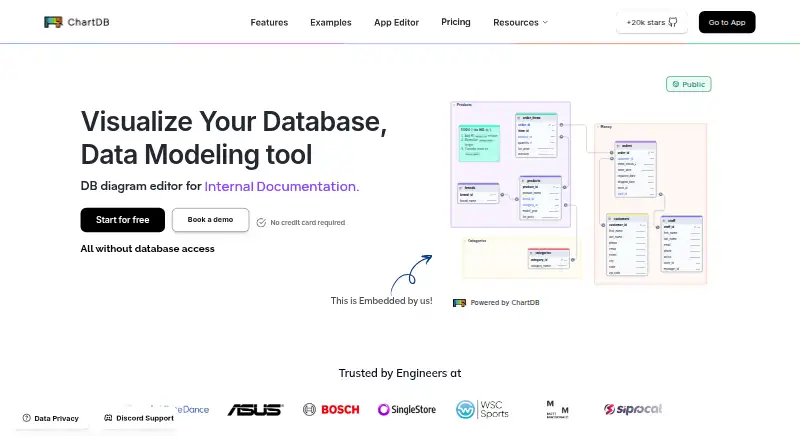
What ChartDB is
ChartDB is a database visualization and diagramming tool for designing and managing database schemas. It retrieves a schema with a single query and says it can create a diagram in about 15 seconds. The editor lets users work with tables, fields, relationships, layouts, colors, and filters; diagrams can be exported as SQL, images, diagram JSON, or DBML. Listed database support includes PostgreSQL, MySQL, SQLite, SQL Server, MariaDB, ClickHouse, CockroachDB, and Cloudflare D1. Teams can invite others to view or edit diagrams in real time. Other features include database synchronization, schema-change diffs, and version history. AI tools generate schema diagrams and ERD visualizations; ChartDB says third-party AI providers, including OpenAI, may process inputs, outputs, and personal information. The free plan allows one user, one database, and 10 tables per diagram. Pro is $25 a month, and Teams is $59 a month. ChartDB also describes a free, open-source self-hosted version that gives users control over data and setup.
Who it suits
It suits developers and product teams who need to understand, design, or share database schemas. Teams can collaborate on diagrams, and users wanting control over deployment can consider the self-hosted version.
What it does well
- Exports diagrams as SQL, images, diagram JSON, and DBML.
- Supports real-time diagram collaboration.
- Tracks synchronization, schema diffs, and version history.
- Free, open-source self-hosted version is described.
What to know first
- Free plan limits diagrams to 10 tables each.
- AI providers may process inputs, outputs, and personal information.
- Free plan allows one user and one database.
Plans
| Plan | Billed and limits | Price |
|---|---|---|
| Free | billed monthly · 1 user · 1 database · 10 tables per diagram · 2 private diagrams | Free |
| Pro | $25/month for one person · 1 user · 1 database · 100 tables in one database | $25 a month |
| Teams | Monthly pricing shown for the Basic team tier · Up to 3 users · Up to 5 databases · 200 tables per database | $59 a month |
| Custom | Custom payment terms · SAML SSO · User activity log · Granular permissions | On request |
| ChartDB Free | 1 user · 1 database · 2 diagrams · 10 tables/diagram · Community support forum · Self-hosted or cloud deployment | Free |
| ChartDB Pro | /month for one person · 1 user · 1 database · Up to 100 tables in one database · 3-day email support · Hosted by ChartDB | $25 a month |
| ChartDB Teams | Up to 3 users · Up to 5 databases · Up to 200 tables per database · Priority support · Real-time collaboration · Auto-Sync | $59 a month |
| Custom Plan | Custom pricing · SAML SSO · User Activity Log · Granular Permissions (RBAC) · Custom payment terms | On request |
As chartdb.io lists them, read 20 Sept 2026. The maker's own page has the final word.
ChartDB is a database-schema visualization and design workspace for developers and product teams. It is strongest when you need to turn an existing schema into a shareable diagram, keep that diagram synchronized, and collaborate on changes. Individual projects fit the free or Pro tiers; larger, multi-database teams will need Teams or custom terms.
Overview
ChartDB connects to a database, retrieves its schema with one query, and says it can produce a diagram in about 15 seconds. That short path from a live structure to a visual model is useful for documenting an unfamiliar system or discussing a redesign. The same product supports both reverse engineering of existing databases and forward engineering of new designs, so it can cover discovery and planning rather than only documentation.
The diagram editor handles tables, fields, relationships, layouts, colors, and filters. Exports include SQL, images, diagram JSON, and DBML. Images are suitable for presentations and tickets, while JSON and DBML preserve more of the model for later editing or migration work.
Key features
Database coverage and change tracking
ChartDB supports PostgreSQL, MySQL, SQL Server, MariaDB, SQLite, Cloudflare D1, CockroachDB, and ClickHouse. Database synchronization, schema-change diffs, and version history make it more practical for evolving systems than a one-off drawing tool: teams can compare changes and retain earlier designs.
Collaboration and AI
Real-time collaboration allows invited teammates to view and edit diagrams. Teams adds auto-sync, making the service better suited to a diagram that several people maintain. AI tools can generate database-schema diagrams and ERD visualizations, but ChartDB's privacy notice says inputs, outputs, and personal information may be processed by third-party AI providers including OpenAI. Organizations with strict data policies should assess that before enabling AI features.
For BigQuery, ChartDB says its integration reads schema metadata only and does not read data stored in tables. It describes organizational and technical safeguards for personal information while acknowledging that absolute security cannot be guaranteed.
Pricing
Free options
The Free plan costs nothing and supports one user, one database, 10 tables per diagram, and two private diagrams. It includes a community support forum. The similarly described ChartDB Free tier can be deployed self-hosted or in the cloud, which makes it a sensible choice for trying the workflow or keeping a small personal model under your control. Ten tables per diagram and two private diagrams become restrictive for production schemas.
Paid plans
Pro costs $25 a month for one person. It keeps one user and one database but raises capacity to up to 100 tables in that database, includes 3-day email support, and is hosted by ChartDB. Choose it when a single owner needs a substantially larger model; it does not solve multi-user or multi-database requirements.
Teams costs $59 a month for the Basic team tier, with up to three users, five databases, and 200 tables per database. It adds priority support, real-time collaboration, and auto-sync. This is the first tier aimed at a small group maintaining several schemas, though the seat and database ceilings still matter for growing organizations.
Custom pricing adds SAML SSO, a user activity log, granular permissions (RBAC), and custom payment terms. It is the appropriate route for organizations needing enterprise access controls or negotiated terms.
Platforms
ChartDB is offered on the web and as a self-hosted deployment. The self-hosted version is described as free and open source, giving administrators control over data and setup. Pro is hosted by ChartDB, while the free tier permits either hosted or self-hosted use.
Who it's for
Developers and product teams that need to understand, design, and share database schemas will get the most from ChartDB. It suits teams standardizing diagrams across supported database engines and tracking schema changes over time. A solo user with a modest schema can start free; a single owner with more than 10 tables per diagram should consider Pro. Teams with several databases and active co-editing should evaluate Teams, while organizations requiring SAML SSO or role-based permissions need Custom. Projects needing many seats or databases beyond those limits should look elsewhere.
Pros and cons
Pros
- One-query schema import and rapid diagram generation shorten the path from database to documentation.
- Editing, reverse and forward engineering, and four export formats support both design and implementation workflows.
- Synchronization, diffs, and version history help keep diagrams aligned with changing schemas.
- Self-hosting is free and open source, offering control over deployment and data.
- Teams combines collaboration, auto-sync, and support for up to five databases.
Cons
- The free tier allows only one user, one database, 10 tables per diagram, and two private diagrams.
- Pro remains limited to one user and one database despite its higher table allowance.
- AI processing may involve third-party providers, including OpenAI, which may conflict with sensitive-data policies.
- Teams is capped at three users and 200 tables per database; larger organizations must request custom pricing.
Alternatives
Browse Database Design Tools for a broader category comparison. Choose Hackolade Studio instead if you need Linux, macOS, Windows, or web access and a model-object-based Community Edition. MySQL is the better pick when you need a GPL-licensed database platform with replication and high-availability components rather than a diagram workspace. Choose DbSchema for desktop schema synchronization and saved design files. pgModeler suits PostgreSQL-focused users seeking single-user or team licensing. Schemity is worth considering for browser-based design and link sharing. SQL Power Architect is a free GPL v.3 desktop option requiring Java Runtime 8. Database Workbench is an alternative desktop database tool for Linux and Windows. DB Designer fits web users who need a free starter allowance of two models and 10 tables per model.
Verdict
Choose ChartDB if you want fast schema visualization, editable and exportable diagrams, change tracking, and collaboration across mainstream databases, with the option to self-host. Look elsewhere if the free quotas are too small, you need more than one database on Pro, require extensive seats, or cannot accept third-party AI processing for submitted information.
Verdict
ChartDB covers schema visualization, editing, exports, and team collaboration, with a free plan and self-hosted option. Consider its free-plan limits and AI data-processing notice when evaluating it.
Facts from ChartDB's own pages
- AI
- ChartDB offers AI tools for generating database schema diagrams and ERD visualizations, and its privacy notice says inputs, outputs, and personal information may be processed by third-party AI providers including OpenAI. · chartdb.io, 30 Sept 2026
- Collaboration
- The product lists real-time collaboration for teams, including inviting teammates to view and edit diagrams. · chartdb.io, 30 Sept 2026
- Company founding
- ChartDB says it was founded in 2024 and began building the product in August 2024. · chartdb.io, 30 Sept 2026
- Data access
- ChartDB says its BigQuery integration reads schema metadata only and does not access or read data stored in BigQuery tables. · chartdb.io, 30 Sept 2026
- Database support
- The documentation lists PostgreSQL, MySQL, SQLite, SQL Server, MariaDB, ClickHouse, and CockroachDB as supported systems. · docs.chartdb.io, 30 Sept 2026
- Diagram editing
- The editor supports adding and managing tables, fields, relationships, layouts, colors, and filters. · docs.chartdb.io, 30 Sept 2026
- Exports
- Diagrams can be exported as SQL, images, diagram JSON, and DBML. · docs.chartdb.io, 30 Sept 2026
- Founded
- 2024 · chartdb.io, 28 Sept 2026
- Intended users
- ChartDB says it was built to help developers and product teams understand database schemas and create shareable diagrams. · chartdb.io, 30 Sept 2026
- Privacy and security
- ChartDB says it uses organizational and technical measures to protect personal information, while noting it cannot guarantee absolute security. · chartdb.io, 30 Sept 2026
- Purpose
- ChartDB is a database visualization and diagramming tool for visualizing, designing, and managing database schemas. · chartdb.io, 30 Sept 2026
- Schema import
- ChartDB retrieves a database schema with a single query and says it can produce a diagram in about 15 seconds. · chartdb.io, 30 Sept 2026
- Schema tracking
- ChartDB lists database synchronization, schema change diffs, and version history among its features. · chartdb.io, 30 Sept 2026
- Self-hosting
- ChartDB describes its self-hosted version as free and open source and says it gives users control over their data and setup. · chartdb.io, 30 Sept 2026
- Support
- The free plan includes a community support forum, Pro lists 3-day email support, and Teams lists priority support. · chartdb.io, 30 Sept 2026
Where ChartDB stands on Freedom251
- Data Modeling Software#2 of 27
- Database Design Tools#3 of 35