Freedom251 › Screen Recording Software

Dadan
by Dadan
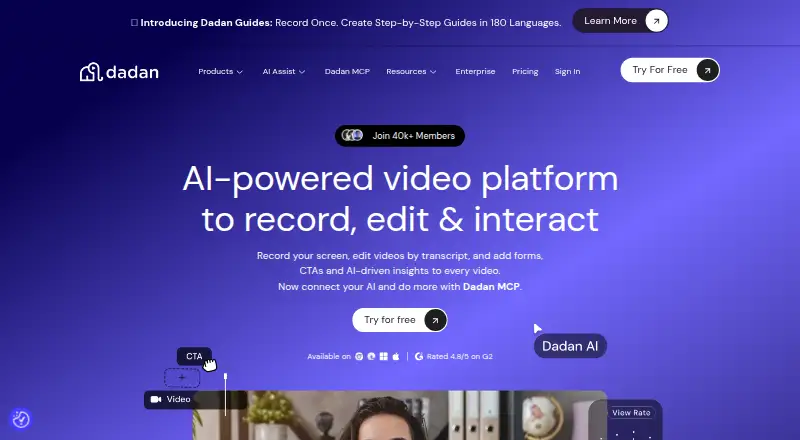
What Dadan is
Dadan is a screen and video recording tool available on the web, as a browser extension, and for Windows, macOS, and Linux. It records a screen, webcam, or both, with system audio and microphone input; recordings can reach 4K resolution. Its online editor handles trimming, zooming, text, shapes, audio adjustment, and screen blur. A transcript editor lets users edit videos through text and use AI to remove silence and filler words. Videos can include forms, calls to action, polls, quizzes, chapters, and feedback prompts. Teams can collaborate in shared workspaces and automatically share videos, with more than 30 direct integrations and a custom webhook. Named integrations include MailChimp, Google Calendar, Microsoft Dynamics, YouTube, HubSpot, Shopify, Jira, and GitHub. The free plan allows up to 25 videos, 2 GB storage, 720p, 100 MB uploads, and five minutes per video; it also includes 10 AI credits and 10 minutes of meeting recording monthly. Annual paid pricing starts at $8 per user per month.
Who it suits
Dadan suits people and teams who need to record screen or webcam videos, edit them, and share them collaboratively. Its interactive video elements and integrations may suit teams making instructional or communication videos.
What it does well
- Records screen, webcam, or both with audio
- Online editing includes blur and audio adjustment
- Transcript editing can remove silence and fillers with AI
- Videos can include polls, quizzes, and forms
- Available on web, Windows, macOS, Linux, and extension
What to know first
- Free plan limited to 720p and 25 videos
- Free videos limited to five minutes each
- Free plan includes only 2 GB storage
- Annual paid pricing starts at $8 per user per month
Limits
The free plan includes up to 25 videos, 2 GB storage, 720p resolution, 100 MB uploads, 10 AI credits per month, and five minutes per video. It also includes 10 minutes of meeting recording per month. The Lite Annual plan lists 25 GB storage and 4K resolution; Business requires a minimum of three users.
Plans
| Plan | Billed and limits | Price |
|---|---|---|
| Free | billed monthly · 25 videos · 2 GB storage · 720p resolution · 100 MB upload limit · 10 AI credits/month · 5 minutes per video | Free |
| Lite | billed monthly · Unlimited videos · 25 GB storage · 4K resolution · 2 GB upload limit · 10 AI credits/month · 10 minutes meeting recording/month | $14 a month |
| Pro | Popular · Unlimited videos · 50 GB storage · 4K resolution · 5 GB upload limit · Unlimited AI credits · 10 hours meeting recording/month | $24 a month |
| Business | Billed annually; minimum 3 users · Unlimited videos · Unlimited storage · 25 GB upload limit · 15 hours meeting recording/month · Unlimited playlists · Minimum 3 users | $14 a month |
| Pro Annual | $14/month | $14 a month |
| Business Annual | $14 / month (Billed Annually) per seat | $14 a month |
| Lite Annual | $8/month | $8 a month |
As dadan.io lists them, read 28 Sept 2026. The maker's own page has the final word.
Getting started
- Visit https://www.dadan.io/.
- Choose the web version, extension, or a listed Windows, macOS, or Linux platform.
- Start with the free plan or choose a paid plan; annual pricing starts at $8 per user per month.
- Record your screen, webcam, or both, with audio.
Overview
Dadan is a screen and webcam recording service that adds editing, viewer interactions and team sharing. It is best suited to people making explainers, tutorials or collaborative video messages who want those tools in one workflow. Its feature set reaches well beyond capture, but the free tier’s five-minute video cap and 2 GB of storage are restrictive.
Record a screen, webcam or both with microphone and system audio. The editor handles trimming, zooming, text, shapes, audio adjustment and screen blur, while transcript editing can remove silence and filler words with AI. Interactive options such as polls, quizzes, forms and calls to action make Dadan more compelling for videos meant to prompt a response than for straightforward capture alone.
Teams can collaborate in shared workspaces and automatically share videos. More than 30 direct integrations and a custom webhook support connecting that work to other services; named integrations include HubSpot, Shopify, Jira, GitHub, YouTube and Google Calendar. Privacy controls let users manage who can view, share or interact with a video and revoke access. Dadan says data is encrypted and securely stored, and lists AICPA SOC 2 as in progress.
For a wider comparison, see our Video Messaging Software and Screen Recording Software lists.
Key features
Recording and editing
Dadan supports recording screen, webcam or both, with microphone and system audio. It lists video quality up to 4K, although Free is limited to 720p. Editing tools cover common cleanup and emphasis tasks without requiring a separate editor. Transcript-based editing and AI removal of silence and filler words are useful for polishing spoken material, but the free allowance of 10 AI credits per month is modest.
Interactive video and sharing
Forms, CTAs, polls, quizzes, chapters, feedback prompts, open-text responses and true-or-false interactions give creators ways to structure a lesson or collect responses. That breadth is a real advantage for instructional and customer-facing videos, though it is more than a user who only needs a quick screen recording may need. Shared workspaces, online collaboration and automatic sharing help teams keep video work together. Recording requests can also be sent by link without requiring the recipient to sign up or install anything.
Guides and support
Dadan Guides can translate step-by-step guides into more than 180 languages, a useful reach for teams serving varied audiences. Support options include contact support, webinars and video tutorials; Business adds priority support and a dedicated account manager.
Pricing
Dadan has a free plan and paid tiers. The annual entry price is $8 per user per month, while the monthly Lite plan costs $14. The lower-cost annual Lite tier keeps unlimited videos, 25 GB of storage and up to 4K quality, but limits uploads to 2 GB and AI credits to 10 per month; it also includes 10 minutes of meeting recording per month.
| Plan | Price and terms | What it includes |
|---|---|---|
| Free | free | Up to 25 videos, 2 GB storage, 720p, 100 MB uploads, 10 AI credits per month and 5 minutes per video. Meeting recording is limited to 10 minutes per month. |
| Lite | $14 a month | Unlimited videos, 25 GB storage, up to 4K, 2 GB uploads, 10 AI credits per month and 10 minutes of meeting recording per month. |
| Lite Annual | $8 a month, billed annually | Unlimited videos, 25 GB storage and up to 4K. |
| Pro | $24 a month | Unlimited videos, 50 GB storage, up to 4K, 5 GB uploads, unlimited AI credits and 10 hours of meeting recording per month. |
| Pro Annual | $14 a month, billed annually | Unlimited videos, 50 GB storage, up to 4K and unlimited AI credits. |
| Business | $14 a month, billed annually; minimum 3 users | Unlimited videos and storage, 25 GB uploads, 15 hours of meeting recording per month, unlimited playlists, integrations, priority support and a dedicated account manager. |
Free is a narrow trial of the workflow: its video count, storage, resolution, upload size and per-video length all constrain regular use. Lite removes the video-count cap and raises quality, but retains a low AI allowance and limited meeting recording. Pro is the clearer fit for frequent AI-assisted editing or longer meeting capture. Pro Annual costs less per month than monthly Pro, while Business requires at least three seats and is aimed at teams that need unlimited storage and account support. Compare annual terms carefully: the listed annual plan summaries do not repeat every monthly tier’s upload and meeting limits.
Platforms
Dadan supports web, Windows, macOS and Linux, as well as a browser extension. That spread suits teams working across desktop systems, though the supported platform list does not include mobile apps.
Who it's for
Dadan is a strong fit for educators, customer-facing teams and coworkers who need to record demonstrations, edit them, add viewer prompts and share work with a team. The interactive elements and multilingual guides are particularly relevant when videos are part of instruction or a response-driven workflow. It is less suitable for occasional users who need only brief recordings or for teams that require a generous free allowance.
Pros and cons
- Pros: Recording, editing and transcript cleanup are brought together, reducing the need to move a clip between separate tools.
- Pros: Forms, quizzes, polls and other viewer interactions support instructional and feedback-oriented videos.
- Pros: Shared workspaces, automatic sharing, integrations and a webhook give teams several ways to fit video into collaborative work.
- Cons: Free limits videos to five minutes each, 720p, 2 GB storage and 100 MB uploads, so it is easy to outgrow for routine use.
- Cons: Lite includes only 10 AI credits and 10 minutes of meeting recording per month, even though video creation is unlimited.
- Cons: Business requires at least three users, making it a poor fit for an individual seeking its unlimited storage and team support.
- Cons: AICPA SOC 2 is in progress rather than a completed certification.
Alternatives
Choose Cap if open-source software under the AGPL license and publicly auditable code are priorities. Consider Dubb if its video messaging offering is a closer fit; its listed paid Pro plan costs $499 a year. Hippo Video is another freemium alternative with a free plan and free trial. Loom may suit someone seeking a free screen-recording tier: its Starter plan includes 25 videos and five-minute screen recordings. Screencastify is an alternative with a free plan and browser-extension support. Volley is worth considering for messaging built around video, audio and screen recordings. Bonjoro offers a free plan capped at 50 videos and a Starter plan at $15 a month. Jumpshare has a Basic tier with 25 uploads, five-minute recordings and a 250 MB upload limit.
Verdict
Choose Dadan if your work calls for more than capture: its mix of editing, transcript cleanup, interactive video and team sharing gives educators and collaborative teams a substantial toolkit. Look elsewhere if you need generous free recording limits, or if short, simple screen capture makes those extra capabilities unnecessary.
Verdict
Dadan combines recording, editing, interactive video elements, and team sharing across several platforms. The free plan has limits on storage, resolution, uploads, and video length; annual paid pricing starts at $8 per user per month.
Questions
Is Dadan free?
Yes. The free plan includes up to 25 videos, 2 GB storage, 720p resolution, and 100 MB uploads.
How much does Dadan cost?
Annual paid pricing starts at $8 per user per month. The listed Business annual price is $14 per month per seat and requires at least three users.
Which platforms does Dadan support?
Dadan lists web, Windows, macOS, Linux, and extension access.
Can Dadan record audio and webcam video?
Yes. Users can record a screen, webcam, or both with microphone and system audio.
What editing tools does Dadan include?
Its online editor supports trimming, zooming, text, shapes, audio adjustment, and screen blur. Transcript editing includes AI removal of silence and filler words.
What integrations does Dadan offer?
Dadan lists more than 30 direct integrations and a custom webhook. Named integrations include MailChimp, Google Calendar, Microsoft Dynamics, YouTube, HubSpot, Shopify, Jira, and GitHub.
Facts from Dadan's own pages
- Company Copyright
- The footer identifies the company as dadan, Inc. and shows a 2026 copyright. · dadan.io, 28 Sept 2026
- Video Editing
- The online editor supports trimming, zooming, text, shapes, audio adjustment, and screen blur. · dadan.io, 28 Sept 2026
- Founded
- 2024 · dadan.io, 23 Sept 2026
- Free AI Credits
- The free plan includes 10 AI credits per month. · dadan.io, 28 Sept 2026
- Free Meeting Limit
- The free plan includes 10 minutes of meeting recording per month. · dadan.io, 28 Sept 2026
- Free plan
- Yes · dadan.io, 20 Sept 2026
- Free Plan Limits
- The free plan allows up to 25 videos, 2 GB storage, 720p resolution, and 100 MB uploads. · dadan.io, 28 Sept 2026
- Guide Languages
- Dadan Guides can translate step-by-step guides into more than 180 languages. · dadan.io, 28 Sept 2026
- Headquarters
- 3601 Al Imam Saud Ibn Faysal Rd, Al Aqiq, Riyadh 13515, Saudi Arabia · dadan.io, 23 Sept 2026
- Direct Integrations
- Dadan offers more than 30 direct integrations and a custom webhook. · dadan.io, 28 Sept 2026
- Interactive Elements
- Videos can include forms, CTAs, polls, quizzes, chapters, feedback, open text, and true-or-false interactions. · dadan.io, 28 Sept 2026
- Maximum Video Quality
- Paid plans support high-definition video up to 4K. · dadan.io, 28 Sept 2026
- Microphone recording
- Yes · dadan.io, 20 Sept 2026
- Named Integrations
- Integrations include MailChimp, Google Calendar, Microsoft Dynamics, YouTube, HubSpot, Shopify, Jira, GitHub, and others. · dadan.io, 28 Sept 2026
- Paid Starting Price
- Paid plans start at $8 per month with annual pricing. · dadan.io, 28 Sept 2026
- Supported platforms
- web,windows,macos,linux,chrome_extension · dadan.io, 20 Sept 2026
- Privacy Controls
- Users can control who views, shares, and interacts with videos and remove access at any time. · dadan.io, 28 Sept 2026
- Recording Features
- Users can record their screen, webcam, or both with audio. · dadan.io, 28 Sept 2026
- Supported Platforms
- Recording is available through a browser, extension, and native app, with Chrome, Edge, Windows, and Mac downloads. · dadan.io, 28 Sept 2026
- Recording Requests
- Users can request videos by link without sign-up or installation. · dadan.io, 28 Sept 2026
- Security Certification
- The page lists AICPA SOC 2 as in progress. · dadan.io, 28 Sept 2026
- Security Encryption
- The page states that data is encrypted and securely stored, with HLS/m3u8 encryption listed. · dadan.io, 28 Sept 2026
- Sharing And Teams
- Teams can use shared workspaces, collaborate online, and automatically share videos with one another. · dadan.io, 28 Sept 2026
- Paid from
- 8 · dadan.io, 20 Sept 2026
Where Dadan stands on Freedom251
- Screen Recording Software#7 of 132
- Video Messaging Software#5 of 29