Freedom251 › Co-Parenting Apps

Custody X Change
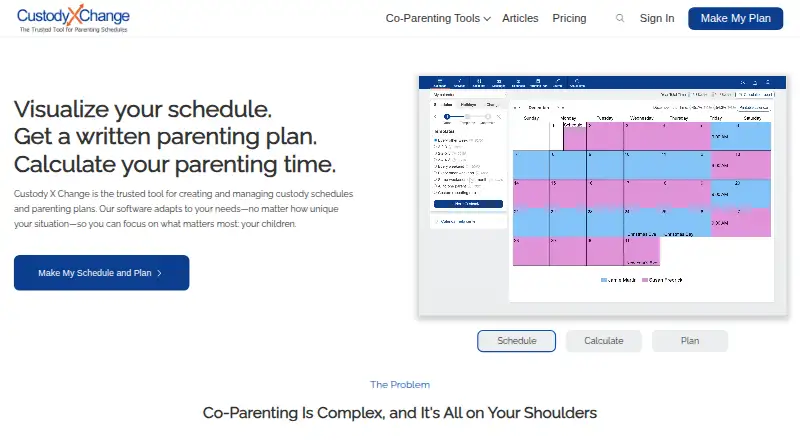
What Custody X Change is
Custody X Change helps users prepare custody schedules and parenting plans, calculate parenting time, and organize co-parenting information. Its calendars handle regular, seasonal, holiday, and one-time schedule changes, with calculations by hours or overnights. The parenting plan template offers 144 provisions, and users can add their own. Other tools include a private journal, actual parenting time tracker, expense tracking, child information, activities, and messaging. Messages can be printed with read receipts, and the system detects hostile language. Users can sync a custody calendar with services such as Google Calendar or Outlook. The product can also send children’s names, birth dates, and parenting time totals to the cloud version of Family Law Software for child support calculations. The free version has limited features: scheduling is limited to five holidays and printing is unavailable. The Parent plan starts at $6 a month, billed annually; the page does not list its plan limits. The company says user data is encrypted in the database and in transit, but its terms do not guarantee court acceptance of schedules or plans made with the app.
Who it suits
Custody X Change may suit parents organizing custody schedules, parenting plans, parenting time, expenses, and co-parent communication. Its professional product is described as designed for attorneys, mediators, and judges.
What it does well
- Calendars support regular, seasonal, holiday, and one-time changes.
- Parenting time can be calculated by hours or overnights.
- Template includes 144 provisions, with custom provisions available.
- Messages include read receipts and hostile-language detection.
- Calendar syncs with services such as Google Calendar or Outlook.
What to know first
- Free version limits scheduling to five holidays.
- Free version does not allow printing.
- No free trial is offered.
- Court acceptance of schedules or plans is not guaranteed.
Limits
The free version limits scheduling to five holidays and does not allow printing. Some features are limited without a subscription. The Parent plan’s page does not list its limits.
Plans
| Plan | Billed and limits | Price |
|---|---|---|
| Free version | limited feature set | Free |
| Parent plan | billed annually · starting price; plan limits not publicly listed | $6 a month |
As custodyxchange.com lists them, read 14 Oct 2026. The maker's own page has the final word.
Getting started
- Visit https://www.custodyxchange.com/.
- Choose the free version or review the Parent plan, which starts at $6 a month billed annually.
- Use Custody X Change on Android, iOS, macOS, web, or Windows.
- Create a custody schedule or parenting plan, then add co-parenting information as needed.
Overview
Custody X Change is a custody-planning and co-parenting record app for parents who need more than a shared calendar. Its strongest fit is a family managing detailed schedules alongside a written parenting plan and records of actual care. The breadth is useful, but the free version’s narrow limits and the lack of any court-acceptance guarantee make it a poor substitute for legal advice.
Key features
Schedules and parenting plans
Calendars cover regular routines, seasonal changes, holidays, and one-time adjustments, with parenting time calculated by hours or overnights. That flexibility suits families whose arrangements change during the year or who need to total time in different ways. Calendar syncing with services such as Google Calendar and Outlook can keep custody arrangements visible beside other commitments.
The plan template includes 144 provisions, with the option to add custom ones. That gives parents a substantial starting framework without forcing every family into identical terms. But a detailed document is not the same as an accepted legal order: Custody X Change says it cannot guarantee a court will accept a schedule or plan created with the app.
Records and communication
A private journal, actual parenting-time tracker, expense tracking, child information, activities, and document storage bring practical records into the same service as the plan. This is a meaningful advantage for parents who want to compare planned time with actual care and keep expense records together. Messaging adds printed messages and read receipts, while hostile-language detection may help flag heated exchanges; neither feature removes the need for parents to communicate carefully.
The app can send children’s names, birth dates, and parenting-time totals to the cloud version of Family Law Software for child-support calculations. That is a targeted connection for users working with that software, not a general promise of compatibility with other financial tools.
Security and support
The FAQ says data is encrypted in the database and in transit, and account-access requests are validated to restrict access to the account holder. The privacy policy also says personal information may be stored on company or third-party cloud servers and identifies Stripe and PostHog as US-based subprocessors, a consideration for users weighing where information is handled. Tutorials are available through the help center, and users can contact the company if those do not answer a question.
Pricing
Custody X Change uses a freemium model. The Free version costs nothing, but it is limited: scheduling is capped at five holidays and printing is unavailable. That makes it suitable for trying basic planning, not for families who need a complete holiday schedule or printable records.
Parent plan starts at $6 a month, billed annually. It is the paid option for users who need to move beyond the free caps; the starting price is published, but the plan’s limits are not. There is no free trial. The FAQ offers a 30-day full refund, and cancellation in account settings leaves paid features active until the license expires.
Platforms
Custody X Change is available on Android, iOS, macOS, web, and Windows. That range makes it practical for households using different device types, including desktop users who want to work on a longer plan.
Who it's for
This is a strong candidate for co-parents who want schedules, parenting-plan provisions, time calculations, expense records, and messages under one roof. It also has a professional product aimed at attorneys, mediators, and judges, with shared client records and collaboration for professional groups. Parents seeking only a simple calendar, or anyone who needs assurance that an app-generated plan will be accepted by court, should look elsewhere or seek appropriate legal guidance.
Pros and cons
- Pros: Detailed calendar patterns and hour- or overnight-based calculations suit changing custody arrangements.
- Pros: A 144-provision template, custom provisions, and practical records cover planning and day-to-day follow-through.
- Pros: Printed messages, read receipts, and hostile-language detection add useful structure to co-parent communication.
- Cons: The free version allows only five holidays and does not permit printing, limiting its usefulness for complete planning and records.
- Cons: The paid starting price is billed annually, and the published starting price does not establish what limits apply to the plan.
- Cons: The company makes no guarantee that a schedule or plan will be accepted by a court.
Alternatives
For a wider range of co-parenting options, see Co-Parenting Apps.
AppClose is worth considering if a fee-waiver account for financial hardship or domestic-violence survivors is important; its monthly web plan is $7.99 a month, billed monthly, and it also offers a free trial. Choose BestInterest if its free, no-expiration tier and included coaching sessions, secure messaging, shared calendar, and tasks better match your needs. CoreParent offers free options with stated expense and court-declaration caps, so compare those limits if you want to start without a subscription. Family Focus is another option, with a $7.99 a month Premium plan billed monthly and a free trial. CustodyTrac, dip, Fayr, and Kidtime are other options to compare.
Verdict
Choose Custody X Change if your priority is a detailed custody plan linked to schedules, actual-time tracking, expenses, and co-parent records across desktop and mobile platforms. The main reason to choose it is the breadth of planning and documentation in one service; the main reason to look elsewhere is that the free tier is sharply capped and no app-generated plan is guaranteed court acceptance.
Verdict
Custody X Change combines scheduling and parenting-plan tools with records for communication, expenses, and parenting time. The free version limits holiday scheduling and printing, and the company does not guarantee a court will accept plans made with the app.
Questions
Is Custody X Change free?
Yes. It has a limited free version, which restricts scheduling to five holidays and does not allow printing.
How much does the Parent plan cost?
It starts at $6 a month, billed annually.
Which platforms does it support?
Custody X Change is available on Android, iOS, macOS, web, and Windows.
Can the custody calendar sync with other calendars?
The maker says users can sync it with services such as Google Calendar or Outlook.
Can it connect to Family Law Software?
It can send children’s names, birth dates, and parenting time totals to the cloud version of Family Law Software for child support calculations.
Does the company guarantee court acceptance?
No. Its terms say it cannot guarantee a schedule or plan created with the app will be accepted by a court.
Facts from Custody X Change's own pages
- Account linking
- Accounts can link with co-parents, lawyers, children and guests, with different sharing permissions for each relationship. · custodyxchange.com, 14 Oct 2026
- App-store distribution
- The company says its Windows, iOS and Android apps are not distributed through app stores and are installed directly from the browser. · custodyxchange.com, 14 Oct 2026
- Calendar integrations
- Account settings allow calendar synchronization with another calendar application, and the product page specifically mentions Google Calendar. · custodyxchange.com, 14 Oct 2026
- Calendar sync
- The maker says users can sync their custody calendar with services such as Google Calendar or Outlook. · custodyxchange.com, 29 Sept 2026
- Child information
- The child-info tool stores searchable records such as school, medical and clothing information and starts with 11 forms per child. · custodyxchange.com, 14 Oct 2026
- Company history
- The company says Custody X Change began in 2005 when a family lawyer and software developer collaborated on parenting-time calculations. · custodyxchange.com, 14 Oct 2026
- Developer extensibility
- The public integration documentation describes an account-code connection to Family Law Software; the reviewed official pages do not describe a public API, SDK, source repository or self-hosted deployment. · custodyxchange.com, 14 Oct 2026
- Documentation
- The product includes a private journal, actual parenting time tracker, expense tracking, child information, activities, and co-parent messaging. · custodyxchange.com, 29 Sept 2026
- Expense tracking
- Gold-level subscribers can record child-related expenses, upload receipts, dispute entries and print or email expense reports. · custodyxchange.com, 14 Oct 2026
- Family Law Software integration
- The integration transfers children’s names, birth dates and parenting-time totals to the cloud version of Family Law Software through an account code. · custodyxchange.com, 14 Oct 2026
- Founded
- 2005 · custodyxchange.com, 28 Sept 2026
- Independent expert criticism
- A family-law attorney’s review rated the product 7/10, citing slow setup for complex plans, imperfect calendar detail, weak vacation provisions and documents that were not suitable for a Texas court without further work. · springer-lyle.com, 14 Oct 2026
- Installation
- The product is installed as a browser-based app on Windows, Mac and Android, or added to the iPhone home screen through Safari. · custodyxchange.com, 14 Oct 2026
- Integration
- Custody X Change can send children's names, birth dates, and parenting time totals to the cloud version of Family Law Software for child support calculations. · custodyxchange.com, 29 Sept 2026
- Journal
- The product includes a private journal for recording events and developments. · custodyxchange.com, 14 Oct 2026
- Legal limitation
- The terms say the company cannot guarantee that a schedule or plan created with the app will be accepted by a court. · custodyxchange.com, 29 Sept 2026
- Limit: offline collaboration
- Offline work cannot receive linked-user updates or send notifications until the device reconnects. · custodyxchange.com, 14 Oct 2026
- Limit: price
- A SoftwareConnect reviewer called the price the product’s biggest disadvantage and said competing services offer discounts or lower costs. · softwareconnect.com, 14 Oct 2026
- Limit: schedule responsibility
- A schedule cannot leave a time block unassigned; responsibility must be assigned to a parent or third party. · custodyxchange.com, 14 Oct 2026
- Limit: subscription access
- The BBB reviewer complained that viewing prior parenting plans required resubscribing and that no lifetime purchase option exists; the company confirmed those conditions. · bbb.org, 14 Oct 2026
- Maker headquarters
- Crunchbase lists the company headquarters in Riverton, Utah, United States. · crunchbase.com, 14 Oct 2026
- Maker size
- LinkedIn lists Custody X Change as a privately held individual-and-family-services company with 2–10 employees. · linkedin.com, 14 Oct 2026
- Messaging
- Subscribers can message a linked co-parent with read receipts, message reports and a hostility monitor; messages cannot be edited or deleted. · custodyxchange.com, 14 Oct 2026
- Offline mode
- The app and browser version can work offline for activities, expenses, message searches and journal entries, synchronizing after reconnection. · custodyxchange.com, 14 Oct 2026
Where Custody X Change stands on Freedom251
- Co-Parenting Apps#4 of 33
- Family Law Software#2 of 15