Freedom251 › Co-Parenting Apps

CoreParent
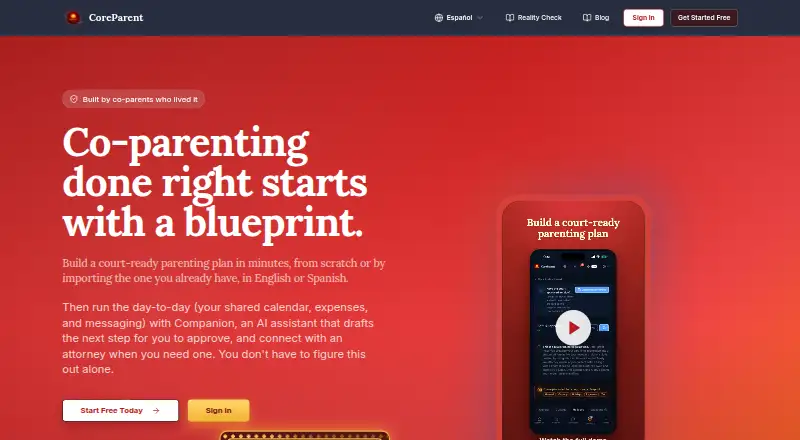
What CoreParent is
CoreParent is a co-parenting organizer for parenting plans, calendars, expenses, messages, and records, available on iOS, macOS, and the web. Its 14-section parenting blueprint can be built from scratch or from an existing plan or court order. The custody calendar supports schedules such as 2-2-3 and week-on/week-off, tracks parenting time, and exports through iCal to Google, Apple, or Outlook. Its child support calculator covers all 50 states. Messages are screened for hostile, accusatory, or threatening language before sending. Companion can suggest calmer wording and identify events or expenses, but requires user approval to send; it can also be switched off. Accounts are private by default, and users choose what to share with a co-parent. CoreParent says it encrypts data in transit and at rest, and limits access by role. The free plan includes up to 15 expenses, five court deadlines, and three child support calculations. Annual Solo is $129 a year; annual Family is $199 a year. Expense payments incur a 2% platform fee, and both parents need payout accounts. CoreParent is an organizational tool, not legal advice.
Who it suits
It suits co-parents who need shared planning and recordkeeping tools, and attorneys or mediators who want a directory of family law professionals. The site says the directory lists more than 1,000 professionals, searchable by state, specialty, and language.
What it does well
- Parenting blueprint has 14 sections.
- Calendar supports common schedules and iCal export.
- Child support calculator covers all 50 states.
- Accounts are private by default.
- Companion messages need user approval before sending.
What to know first
- Free plan limits expenses, deadlines, and calculations.
- Expense payments incur a 2% platform fee.
- Both parents need payout accounts for expense payments.
- CoreParent is not a source of legal advice.
Limits
The free plan includes up to 15 expenses, five court deadlines, and three child support calculations. Solo annual is $129 a year and includes one parent, unlocked tools, PDF and DOCX export, and priority support; Family annual is $199 a year and includes both parents, a shared calendar, messaging, and expense settlement. In-app expense payments on the Solo and Family plans carry a 2% fee, and both parents need payout accounts.
Plans
| Plan | Billed and limits | Price |
|---|---|---|
| Partner | Attorneys and mediators · 3 demo exports · Unlimited exports after 1 client referral | Free |
| Free | Up to 15 expenses · Up to 5 court deadlines · Up to 3 child support calculations | Free |
| Solo annual | Annually · One parent · Everything unlocked · PDF and DOCX export · Priority support | $129 a year |
| Family annual | Annually · Both parents · Shared calendar · Co-parent messaging · Expense settlement | $199 a year |
| Solo | Every 3 months; auto-renewing · One parent · Unlimited tools and exports · 2% fee on in-app expense payments | $393 a month |
| Family | Every 3 months; auto-renewing · Both parents · 2% fee on in-app expense payments | $593 a month |
As coreparent.app lists them, read 3 Oct 2026. The maker's own page has the final word.
Getting started
- Open https://coreparent.app/ and choose the Free plan or a plan that fits your needs.
- Use the iOS app, macOS app, or web service.
- Start a parenting plan from scratch or import an existing plan or court order.
- Set up the custody calendar and export it through iCal to Google, Apple, or Outlook.
- Choose what to share with a co-parent; turn Companion AI off in settings if desired.
CoreParent is a co-parenting organizer built around plans, calendars, expenses, messages, and records. It is a strong fit for parents who want a structured planning tool alongside practical coordination features, rather than a calendar alone. Its range is useful, but the free tier is capped and paid expense settlement adds a 2% fee.
Overview
The central appeal is bringing day-to-day coordination and longer-term planning into one service. The guided parenting blueprint, custody calendar, expense tracking, and messaging address different parts of co-parenting, while account-level sharing controls let users decide which items a co-parent can see. That flexibility matters for parents who need to keep some records private while sharing selected information.
CoreParent also draws a clear boundary around legal use: it is an organizational tool, not a law firm or source of legal advice. Parents assembling a plan or preparing court documents should have an attorney review them before filing.
Key features
The 14-section parenting blueprint can be started from scratch or built by importing an existing plan or court order. That makes it useful both for parents beginning a plan and for those who want to organize an existing document. The child support calculator covers all 50 states, although Free users can run only three calculations.
The custody calendar supports schedules such as 2-2-3 and week-on/week-off, tracks parenting time, and exports via iCal to Google, Apple, or Outlook. That cross-service export is practical when parents use different calendar apps. The annual Family plan specifically includes a shared calendar; the annual Solo plan is for one parent, so buyers should check the plan distinction before expecting shared scheduling.
Messages are screened for hostile, accusatory, or threatening language before sending. Companion can suggest calmer rewrites and identify events or expenses in messages, but it waits for the user's approval before sending. Users can switch off Companion AI. CoreParent says Companion uses Anthropic, submitted content is not used to train models, and content is deleted within 30 days.
Payments between co-parents run through Stripe; CoreParent says it does not hold the funds or store card details. However, in-app expense payments incur a 2% platform fee, and both parents must set up payout accounts. That fee makes the settlement feature less attractive for frequent or substantial reimbursements than tracking expenses without paying through the app.
CoreParent says data is encrypted in transit and at rest, uploaded files use short-lived signed links, and role-based permissions limit access. Its directory includes more than 1,000 family law professionals and can be searched by state, specialty, and language, a useful starting point for finding counsel without treating the app as a legal adviser.
Pricing
The two free options serve different audiences. Partner costs nothing and is aimed at attorneys and mediators: it includes three demo exports, with unlimited exports after one client referral. Free costs nothing for parents and caps use at 15 expenses, five court deadlines, and three child support calculations. It is a sensible way to try the core workflow, but those quotas can be restrictive for ongoing recordkeeping.
Solo annual costs $129 a year, billed annually, for one parent. It unlocks everything and includes PDF and DOCX export plus priority support, making it the lower-cost paid fit for a parent who wants full tools and document exports without a second parent's seat.
Family annual costs $199 a year, billed annually, and includes both parents, a shared calendar, co-parent messaging, and expense settlement. It is the relevant annual choice for parents who need shared coordination; the higher price buys the joint features rather than simply a larger quota.
Solo costs $393 a month, billed every 3 months, auto-renewing, for one parent, with unlimited tools and exports and a 2% fee on in-app expense payments. Family costs $593 a month, billed every 3 months, for both parents, also with the 2% payment fee. These quarterly-billed options are substantially more expensive than the annual plans, so compare the included features and billing terms carefully before choosing them. Custom pricing applies where no price is given.
Platforms
CoreParent supports iOS, macOS, and the web. It does not list Android or Windows among its supported platforms, so households relying on those systems should consider whether web access meets their needs.
Who it's for
CoreParent suits co-parents who want a guided plan, an adaptable custody calendar, expense and record organization, and communication safeguards under one roof. It is particularly compelling for users who value control over what they share or need calendar exports across services. It is less suitable for parents who need uncapped free use, want to avoid transaction fees, or require a mobile app on Android.
Pros and cons
- Broad coordination toolkit: Plans, schedules, expenses, messages, and records sit in one organizer, reducing the need to piece together those functions.
- Flexible planning and calendar support: A 14-section blueprint, imports, multiple custody patterns, and iCal export accommodate different starting points and schedules.
- Controlled communication: Pre-send language checks and approval-required AI suggestions offer guardrails without letting Companion send messages on its own.
- Constrained free tier: The 15-expense, five-deadline, and three-calculation caps may not last for parents who use the organizer regularly.
- Payment costs and setup: Settlement carries a 2% fee, and both parents need payout accounts.
- Platform gap: Support for iOS, macOS, and web leaves Android and Windows users without a listed native platform.
Alternatives
Co-Parenting Apps is the broader category list for readers who want to compare more options. Choose Custody X Change if platform availability across Android, iOS, macOS, web, and Windows matters; its free version is limited without a subscription. Consider AppClose if a fee-waiver account or a monthly web plan is a better fit. Beacon Co-Parenting App offers a free everyday plan for both parents, with no subscription or credit card required.
BestInterest is worth comparing if a free, no-expiration plan with secure messaging, a shared calendar, tasks, and coaching sessions matches your needs. Peaceful CoParenting Messenger is a more focused alternative for free messaging with attachments and message filters. CustodyTrac offers all features free forever for both parents, while dip is a free-forever option for both parents with no ads or data sale.
Fayr has a free Lite plan and a Premium plan on request, billed monthly or annually; compare it if those terms suit your household better.
Verdict
Choose CoreParent if you want one organizer for structured parenting plans, custody scheduling, expenses, and guarded co-parent communication, and are comfortable paying for the shared features or working within the free caps. Look elsewhere if Android support, uncapped free use, or fee-free in-app settlements are essential.
Verdict
CoreParent brings planning, calendars, expense tracking, and communication into one co-parenting organizer. Review the plan limits and payment fee, and consult an attorney before filing legal documents.
Questions
Is CoreParent free?
Yes. The Free plan costs nothing and allows up to 15 expenses, five court deadlines, and three child support calculations.
What platforms does CoreParent support?
CoreParent is available on iOS, macOS, and the web.
What do the paid plans cost?
Solo annual costs $129 a year. Family annual costs $199 a year. Solo costs $393 a month, billed every three months and auto-renewing; Family costs $593 a month on the same billing schedule.
Does CoreParent give legal advice?
No. CoreParent describes itself as an organizational tool, not a law firm or source of legal advice, and recommends attorney review before filing.
How does Companion handle message content?
Companion uses Anthropic. CoreParent says submitted content is not used to train models and is deleted within 30 days; users can turn Companion AI off in settings.
Are in-app expense payments free?
No. They incur a 2% platform fee, and both parents need to set up a payout account. CoreParent says payments flow through Stripe and it does not hold funds or store card details.
Facts from CoreParent's own pages
- AI data handling
- Companion uses Anthropic; the company says submitted content is not used to train models and is deleted within 30 days, and Companion AI can be turned off in settings. · thecoreparent.com, 3 Oct 2026
- Attorney directory
- The site says its directory lists more than 1,000 family law professionals, searchable by state, specialty, and language. · thecoreparent.com, 3 Oct 2026
- Calendar export
- The custody calendar supports schedules such as 2-2-3 and week-on/week-off, tracks parenting time, and exports via iCal to Google, Apple, or Outlook. · thecoreparent.com, 3 Oct 2026
- Companion
- Companion can suggest calmer rewrites and identify events or expenses in messages, but does not send messages without the user's approval. · thecoreparent.com, 3 Oct 2026
- Legal scope
- CoreParent describes itself as an organizational tool, not a law firm or source of legal advice, and recommends attorney review before filing. · thecoreparent.com, 3 Oct 2026
- Limit
- In-app expense payments incur a 2% platform fee, and both parents need to set up a payout account. · thecoreparent.com, 3 Oct 2026
- Messaging
- In-app co-parent messages are checked for hostile, accusatory, or threatening language before sending. · thecoreparent.com, 3 Oct 2026
- Parenting plan
- Its guided parenting blueprint has 14 sections and can be built from scratch or by importing an existing plan or court order. · thecoreparent.com, 3 Oct 2026
- Payment processing
- Payments between co-parents flow through Stripe, and CoreParent says it does not hold funds or store card details. · thecoreparent.com, 3 Oct 2026
- Privacy
- Data is private to each account by default; a co-parent sees only items the user chooses to share. · thecoreparent.com, 3 Oct 2026
- Purpose
- CoreParent helps co-parents build parenting plans and organize calendars, expenses, messages, and records. · thecoreparent.com, 3 Oct 2026
- Security
- The company says data is encrypted in transit and at rest, uploaded files use short-lived signed links, and access is limited by role-based permissions. · thecoreparent.com, 3 Oct 2026
- State coverage
- The child support calculator covers all 50 states. · thecoreparent.com, 3 Oct 2026
- Support
- The Solo plan includes priority email support. · thecoreparent.com, 3 Oct 2026
Where CoreParent stands on Freedom251
- Co-Parenting Apps#3 of 33