Freedom251 › Photo Culling Software

CullBench
What CullBench is
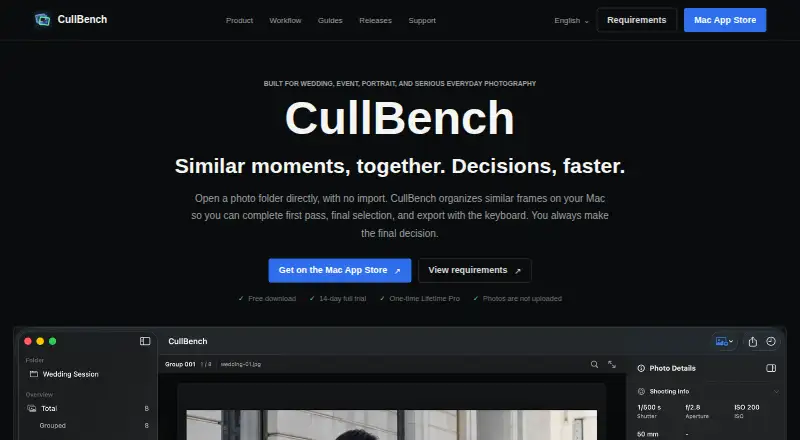
CullBench is a macOS app for photographers reviewing and selecting similar photo frames on their computer. Open a folder directly without importing it into a catalog; the app groups bursts, repeated compositions, and frames with changed angles or poses, while leaving other photos available. Review images with arrow keys, mark Picks with Space, and rate photos with number keys. Selected originals can be copied to a folder or sent with AirDrop, and RAW files remain originals. The app lists JPG/JPEG, PNG, TIFF, WebP, BMP, HEIC/HEIF, and attempted support for several camera RAW formats. It offers AI-assisted culling and RAW previews, but not Lightroom integration. Photo content, previews, filenames, shooting information, and people information are not uploaded to a CullBench cloud for culling. A 14-day trial includes the full culling workflow and begins after the first successful AI analysis. Lifetime Pro costs 29.99 USD once. CullBench requires macOS 14 Sonoma or later and an Apple Silicon Mac; Intel Macs are not supported.
Who it suits
CullBench suits wedding, event, portrait, travel, and everyday photographers using an Apple Silicon Mac with macOS 14 Sonoma or later. It is a fit for local photo review workflows that do not depend on Lightroom integration.
What it does well
- Groups bursts and similar compositions for review
- Selected originals can be copied or sent with AirDrop
- Photo content is not uploaded to a CullBench cloud for culling
- Full workflow available during a 14-day trial
What to know first
- Requires macOS 14 Sonoma or later
- Intel Macs are not supported
- No Lightroom integration
- Video and XMP write-back are not supported
Limits
The trial provides the full culling workflow for 14 days and starts after the first successful AI analysis. CullBench does not support video, Live Photo companion MOV files, RAW editing, or XMP write-back.
Plans
| Plan | Billed and limits | Price |
|---|---|---|
| Free trial | 14 days, starting after the first successful AI analysis. · Full culling workflow during trial | Free |
| Lifetime Pro | One-time purchase for permanent use; App Store displays the final local price and applicable taxes. · Permanent use · complete culling workflow | $29.99, paid once |
As cullbench.com lists them, read 9 Oct 2026. The maker's own page has the final word.
Getting started
- Open the CullBench website
- Install CullBench on an Apple Silicon Mac running macOS 14 Sonoma or later
- Start the 14-day trial after the first successful AI analysis
- Open a photo folder directly in the app
- Review groups with arrow keys, mark Picks with Space, and rate with number keys
- Copy selected originals to a folder or send them with AirDrop
Verdict
CullBench provides a local workflow for sorting similar photos, with keyboard controls and original-file export options. Its system requirements, lack of Lightroom integration, and unsupported video and XMP write-back are worth checking before trying it.
Questions
How much does CullBench cost?
Lifetime Pro costs 29.99 USD as a one-time purchase. The App Store shows the final local price and applicable taxes.
Is there a free plan?
No. A 14-day free trial provides the full culling workflow.
Which Macs can run CullBench?
CullBench requires macOS 14 Sonoma or later and an Apple Silicon Mac. Intel Macs are not supported.
Where does culling take place?
Culling takes place locally, and listed photo and shooting information are not uploaded to a CullBench cloud.
Facts from CullBench's own pages
- Diagnostics
- Crash reports and anonymous usage metrics are off by default and can be enabled separately in App Settings. · cullbench.com, 9 Oct 2026
- Export
- Users can copy selected originals to a folder or send them with AirDrop, and RAW files remain originals. · cullbench.com, 9 Oct 2026
- Formats
- The site lists JPG/JPEG, PNG, TIFF, WebP, BMP, HEIC/HEIF, and attempted support for several camera RAW formats. · cullbench.com, 9 Oct 2026
- Grouping
- The app groups bursts, repeated compositions, and frames with changed angles or poses while leaving ungrouped photos available. · cullbench.com, 9 Oct 2026
- Limits
- Video, Live Photo companion MOV, RAW editing, and XMP write-back are not currently supported. · cullbench.com, 9 Oct 2026
- Privacy
- Photo content, previews, filenames, shooting information, and people information are not uploaded to a CullBench cloud for culling. · cullbench.com, 9 Oct 2026
- Provider
- The terms identify Qiang Fu as the application provider. · cullbench.com, 9 Oct 2026
- Purpose
- CullBench organizes similar photo frames locally to help photographers review and select images. · cullbench.com, 9 Oct 2026
- Review controls
- Users navigate with arrow keys, toggle Pick with Space, and rate photos with number keys. · cullbench.com, 9 Oct 2026
- Support
- Product support is available at [email protected], while Apple handles App Store purchases and refunds. · cullbench.com, 9 Oct 2026
- Supported users
- The site describes CullBench as built for wedding, event, portrait, travel, and everyday photography. · cullbench.com, 9 Oct 2026
- System requirements
- CullBench requires macOS 14 Sonoma or later and an Apple Silicon Mac; Intel Macs are not supported. · cullbench.com, 9 Oct 2026
- Workflow
- Users open a photo folder directly without importing it into a catalog. · cullbench.com, 9 Oct 2026
Where CullBench stands on Freedom251
- Photo Culling Software#16 of 26