Freedom251 › Photo Culling Software

BirdCull
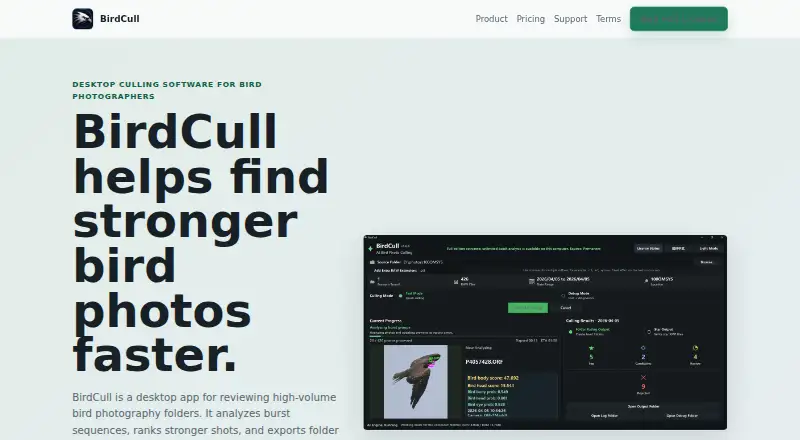
What BirdCull is
BirdCull is desktop software for choosing stronger photographs from bird-photo burst sequences. It groups similar images and brings forward stronger candidates, helping reduce comparisons between near-duplicates. Its bird-focused scoring considers head and eye visibility, sharpness, pose, and differences among photos in a burst. AI-assisted culling and RAW preview are supported.
After sorting, BirdCull can export grouped hard-link folders or star-rated XMP sidecars for use with Lightroom, Bridge, Photo Mechanic, and similar tools. Lightroom integration is supported. Processing takes place on the user's computer; photo files, paths, and EXIF metadata are not uploaded. License activation may use non-reversible device verification data, license status, activation time, and purchase information. Paddle processes payments and handles card details, local tax calculation, invoices, and receipts.
The free trial processes up to 200 photos per capture date. The Full license costs 49.00 USD as a one-time purchase, allows one user, and includes batch processing beyond the trial limit, folder rating output, star XMP output, and email support for purchase and activation issues. BirdCull runs on Windows 10 or 11 (64-bit) and currently targets Apple silicon Macs with M-series processors. For large photo days, it recommends 16 GB or more of RAM, SSD storage, and local drives over network folders.
Who it suits
BirdCull suits bird photographers who sort burst sequences and want scoring to help surface promising frames. It is for users on supported Windows systems or Apple silicon Macs who want to continue their workflow in Lightroom, Bridge, Photo Mechanic, or similar tools.
What it does well
- Groups similar photos to surface stronger burst candidates.
- Scores head and eye visibility, sharpness, pose, and burst differences.
- Supports AI-assisted culling and RAW preview.
- Exports hard-link folders or star-rated XMP sidecars.
- Processes photos locally without uploading photo files, paths, or EXIF metadata.
What to know first
- No free plan; the trial is limited to 200 photos per capture date.
- The current Mac package targets M-series Apple silicon, not Intel Macs.
- A full license is a one-time 49.00 USD purchase and is non-refundable.
Limits
The free trial processes up to 200 photos per capture date. The 49.00 USD Full license removes that trial batch limit and covers one user; completed license purchases are non-refundable.
Plans
| Plan | Billed and limits | Price |
|---|---|---|
| Full license | one-time purchase · Full batch processing beyond the trial limit · Folder rating output · Star XMP output · Email support for purchase and activation issues | $49, paid once |
As birdcull.site lists them, read 9 Oct 2026. The maker's own page has the final word.
Getting started
- Visit https://birdcull.site/.
- Download the desktop software for Windows 10 or 11 (64-bit), or for an Apple silicon Mac with an M-series processor.
- Use the free trial to process up to 200 photos per capture date.
- Buy the Full license for 49.00 USD as a one-time purchase if you need batch processing beyond the trial limit.
- Activate the license for one user.
- Export grouped hard-link folders or star-rated XMP sidecars for a supported photo workflow.
Verdict
Choose BirdCull if you sort bird-photo bursts on a supported computer and want bird-focused scoring plus folder or XMP output. Look elsewhere if you need a free plan, use an Intel Mac, or need a license that supports multiple users; one full license covers one user.
Questions
Is BirdCull free?
There is no free plan. A free trial processes up to 200 photos per capture date.
How much does the Full license cost?
It costs 49.00 USD as a one-time purchase. Completed license purchases are non-refundable.
Which computers does it support?
BirdCull supports Windows 10 or 11 in 64-bit. Its current Mac package targets Apple silicon Macs with M-series processors.
Does BirdCull upload my photos?
It processes photos on your computer and does not upload photo files, paths, or EXIF metadata.
Can I use its results in Lightroom?
BirdCull supports Lightroom integration and can export star-rated XMP sidecars. It can also export grouped hard-link folders for Lightroom, Bridge, Photo Mechanic, and similar tools.
How many people can use one license?
A purchased Full license allows one user to activate and use the desktop software.
Facts from BirdCull's own pages
- Burst selection
- It groups similar photos and surfaces stronger candidates to reduce comparisons among near-duplicates. · birdcull.site, 9 Oct 2026
- Editing workflow
- It exports grouped hard-link folders or star-rated XMP sidecars for Lightroom, Bridge, Photo Mechanic, and similar tools. · birdcull.site, 9 Oct 2026
- License data
- License activation may use non-reversible device verification data, license status, activation time, and purchase information. · birdcull.site, 9 Oct 2026
- License scope
- A purchased full license allows one user to activate and use the desktop software. · birdcull.site, 9 Oct 2026
- Local processing
- BirdCull processes photos on the user's computer and does not upload photo files, paths, or EXIF metadata. · birdcull.site, 9 Oct 2026
- Mac support
- The current Mac package targets Apple silicon Macs with M-series processors; Intel Macs are not the target platform. · birdcull.site, 9 Oct 2026
- Payments
- Paddle processes payments and handles payment card details, local tax calculation, invoices, and receipts. · birdcull.site, 9 Oct 2026
- Purpose
- BirdCull is desktop software that analyzes bird-photo burst sequences, highlights stronger shots, and exports folders or XMP star ratings. · birdcull.site, 9 Oct 2026
- Refunds
- Completed license purchases are non-refundable, and the site asks customers to test the free trial before buying. · birdcull.site, 9 Oct 2026
- Scoring
- Its bird-focused scoring considers head and eye visibility, sharpness, pose, and differences within bursts. · birdcull.site, 9 Oct 2026
- Support
- BirdCull provides email support for purchase, activation, compatibility, and privacy questions at [email protected]. · birdcull.site, 9 Oct 2026
- System recommendations
- For large photo days, BirdCull recommends 16 GB or more of RAM, SSD storage, and local drives over network folders. · birdcull.site, 9 Oct 2026
- Trial limit
- The free trial processes up to 200 photos per capture date. · birdcull.site, 9 Oct 2026
- Windows support
- The supported Windows platforms are Windows 10 or Windows 11, 64-bit. · birdcull.site, 9 Oct 2026
Where BirdCull stands on Freedom251
- Photo Culling Software#12 of 26