Freedom251 › Photo Culling Software
BLOCK WORKS
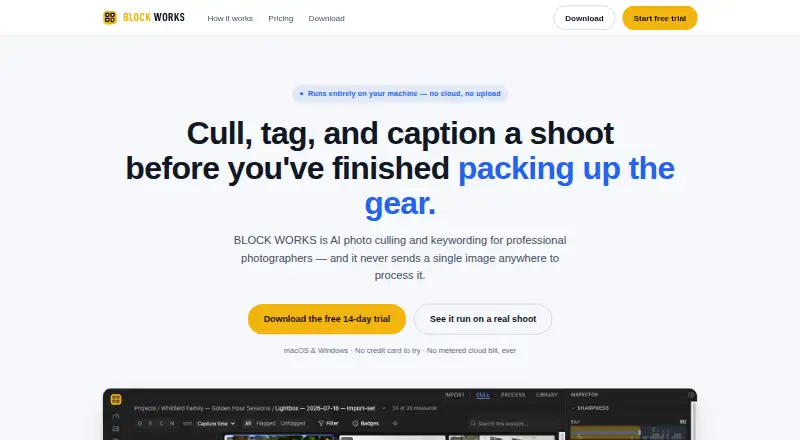
What BLOCK WORKS is
BLOCK WORKS is AI photo culling and keywording software for professional photographers. It processes images locally with an embedded vision model; the maker says images are not uploaded for processing. Import photos from folders or cards, or drag and drop files, including RAW files that the app decodes automatically. Its culling tools score blur, exposure, blinks, and near-duplicates. Adjustable thresholds, burst clustering, and a keep-best action help organize review.
The app generates 21 types of metadata, such as keywords, captions, titles, themes, and on-image text, and writes results to IPTC/XMP fields. You can approve, edit, or reject each AI result before export. Exports can include EXIF/IPTC/XMP metadata, a project report, and a C2PA Content Credentials manifest. After you download a model tier once, it runs offline. BLOCK WORKS supports macOS 13 or later on Apple Silicon or Intel, and 64-bit Windows 10 or later. Its 14-day trial includes full features, is capped at 500 images, and needs no account or payment details. Afterward, you can keep browsing and organizing imported work; a license unlocks culling and processing on new work. Paid access is a one-time purchase with pricing on request.
Who it suits
BLOCK WORKS suits professional photographers who want local photo culling and keywording, including offline use after downloading a model tier. It may also suit photographers who need to review RAW files and retain approval or editing control over AI-generated metadata before export.
What it does well
- Processes images locally; the maker says they are not uploaded.
- Scores blur, exposure, blinks, and near-duplicates.
- Generates 21 types of metadata in IPTC/XMP fields.
- Users can approve, edit, or reject each AI result.
- The downloaded model tier runs offline.
What to know first
- There is no free plan.
- The 14-day trial is limited to 500 images.
- Paid pricing is available on request.
- Studio or team licensing for multiple seats is coming soon.
Limits
The full-featured trial lasts 14 days and is limited to 500 images. After it expires, you can browse and organize imported work, while a license is required to cull and process new work.
Plans
| Plan | Billed and limits | Price |
|---|---|---|
| BLOCK WORKS | Contact for pricing; one-time purchase · Unlimited local imports and exports · All 21 AI analysis types · macOS & Windows · Free updates within your major version | On request |
As theblock.works lists them, read 8 Oct 2026. The maker's own page has the final word.
Getting started
- Visit the BLOCK WORKS website.
- Choose the macOS or Windows version that matches your computer.
- Start the 14-day trial; it requires no account or payment details.
- Import a folder, card, or files by drag and drop.
- Download a model tier once to use it offline.
- After the trial, obtain a license to cull and process new work.
Verdict
Choose BLOCK WORKS if you want local, offline-capable photo culling and AI keywording with RAW support and review control over generated metadata. Look elsewhere if you need a free plan, need to process beyond the 500-image trial without purchasing a license, or require multiple-seat team licensing now.
Questions
How is BLOCK WORKS priced?
It is a paid, one-time purchase with pricing on request.
Is there a free plan or trial?
There is no free plan. The trial lasts 14 days, includes full features, is limited to 500 images, and requires no account or payment details.
Which platforms does it support?
It supports macOS 13 or later on Apple Silicon or Intel, and 64-bit Windows 10 or later.
Can BLOCK WORKS run offline?
Yes. The selected model tier is downloaded once and then runs offline.
What happens when the trial expires?
You can continue browsing and organizing imported work. A license unlocks culling and processing on new work.
Is multiple-seat team licensing available?
Studio or team licensing for multiple seats is described as coming soon.
Facts from BLOCK WORKS's own pages
- Culling
- It scores blur, exposure, blinks, and near-duplicates, with adjustable thresholds, burst clustering, and a keep-best action. · theblock.works, 8 Oct 2026
- Export and provenance
- Exports include EXIF/IPTC/XMP metadata, a project report, and a C2PA Content Credentials manifest. · theblock.works, 8 Oct 2026
- Import
- The app accepts folders, cards, and drag-and-drop files, including RAW files, which it decodes automatically. · theblock.works, 8 Oct 2026
- Local processing
- Its embedded vision model runs on the user's machine, and the maker says images are not uploaded for processing. · theblock.works, 8 Oct 2026
- Metadata
- The app generates 21 types of metadata, including keywords, captions, titles, themes, and on-image text, and writes them to IPTC/XMP fields. · theblock.works, 8 Oct 2026
- Notable limit
- Studio or team licensing for multiple seats is described as coming soon. · theblock.works, 8 Oct 2026
- Offline model
- The selected model tier is downloaded once and then runs offline. · theblock.works, 8 Oct 2026
- Platform requirements
- The app supports macOS 13 or later on Apple Silicon or Intel, and 64-bit Windows 10 or later. · theblock.works, 8 Oct 2026
- Purpose
- BLOCK WORKS is AI photo culling and keywording software for professional photographers. · theblock.works, 8 Oct 2026
- Review
- A person can approve, edit, or reject each AI result before export. · theblock.works, 8 Oct 2026
- Trial
- The free trial lasts 14 days, includes full features, is limited to 500 images, and requires no account or payment details. · theblock.works, 8 Oct 2026
- Trial after expiry
- After the trial, users can keep browsing and organizing imported work, while a license unlocks culling and processing on new work. · theblock.works, 8 Oct 2026
Where BLOCK WORKS stands on Freedom251
- Photo Culling Software#13 of 26
- AI Photo Culling Software#23 of 29