
CryptoWoo
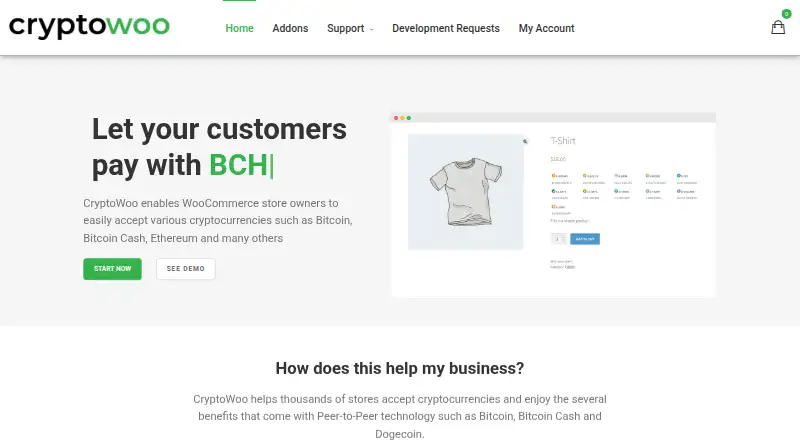
What CryptoWoo is
CryptoWoo is a self-hosted WooCommerce plugin for merchants who want to accept cryptocurrency payments in an online store. Its homepage lists Bitcoin, Bitcoin Cash, Litecoin, Dogecoin, Monero, Dash, Vertcoin, Ethereum, USDT, USDC, and DAI. During configuration, merchants select a payment processing API that checks the blockchain for incoming payments. The free main plugin has limited functions and requires merchants to periodically refill its list of unused cryptocurrency addresses when used without add-ons.
Optional add-ons extend payment and wallet support. The HD Wallet add-on derives payment addresses from an extended public key, supports public keys for Bitcoin, Bitcoin Cash, Dogecoin, Litecoin, BlackCoin, and Bitcoin Testnet, and supports multisignature wallets with up to five cosigners. The Ethereum and ERC-20 add-on works with Web3 wallets including MetaMask, Brave Browser, WalletConnect, Torus, and Formatic. It sends payments directly to the merchant’s wallet and requires customers to send the exact amount to a reused wallet address. Other options include add-ons for Dokan, Solana, Monero, and Vertcoin, plus custom coin or ERC-20 token integrations. CryptoWoo is based in Vinterbro, Norway, and its terms describe the offer as intended for companies, business customers, traders, freelancers, and public institutions.
Who it suits
CryptoWoo suits WooCommerce merchants who want to accept the listed cryptocurrencies and are prepared to configure a payment processing API. Its add-ons may suit merchants who need extended wallet support, multisignature wallets, or Ethereum and ERC-20 payments.
What it does well
- The homepage lists eleven supported cryptocurrencies and stablecoins.
- HD Wallet supports multisignature wallets with up to five cosigners.
- Ethereum add-on lists five compatible Web3 wallets.
- Free main plugin is available.
What to know first
- The free main plugin has limited functions.
- Without add-ons, merchants must periodically refill unused cryptocurrency addresses.
- Dokan add-on does not support cryptocurrency payouts to vendors.
- Support excludes general WordPress, WooCommerce, theme, and third-party plugin issues.
Limits
The free main plugin is described as having limited functions. Without add-ons, merchants must periodically refill the list of unused cryptocurrency addresses.
Plans
| Plan | Billed and limits | Price |
|---|---|---|
| CryptoWoo | Free basic version with limited functions | Free |
| CryptoWoo HD Wallet Add-on | All CryptoWoo licenses include one year of updates and support · Requires the free CryptoWoo plugin | $119, paid once |
| Dokan Add-on | Requires CryptoWoo and the Dokan Multivendor plugin | $19.99, paid once |
| Vertcoin Add-on | Requires the main CryptoWoo plugin and HD Wallet add-on | $19.99, paid once |
| Add coin | No yearly fee to maintain an added cryptocurrency · Custom cryptocurrency integration; integration cost is non-refundable | $2,499, paid once |
| Solana Add-on | €29.99 yearly · Requires the free CryptoWoo plugin | €29.99 a year |
| Monero Add-on | Requires the free CryptoWoo plugin | $29.99, paid once |
| Add ERC-20 Token | No yearly fee to maintain an added token · Token is made available to merchants using the Ethereum and ERC-20 Add-on | $499, paid once |
The first 8 of 9 plans, as cryptowoo.com lists them, read 11 Oct 2026. The maker's own page has the final word. Every plan
Getting started
- Visit the CryptoWoo website.
- Install the free main plugin in the self-hosted WooCommerce environment.
- Select a payment processing API to check the blockchain for incoming payments.
- Choose any required add-ons and check their prerequisites before purchase.
- Configure the relevant cryptocurrency address or wallet options.
Verdict
Choose CryptoWoo if you run a WooCommerce store and want to accept cryptocurrency through a self-hosted plugin, with add-ons for wallet and currency options. Look elsewhere if you need vendor payouts through Dokan or support for general WordPress and third-party plugin issues.
Questions
Is CryptoWoo free?
A free basic version is available free of charge, with limited functions. The pricing note says paid plans start from €19.99; individual add-on plans are listed separately.
Which cryptocurrencies does CryptoWoo list?
The homepage lists BTC, BCH, LTC, DOGE, XMR, DASH, VTC, ETH, USDT, USDC, and DAI.
What platforms does CryptoWoo support?
CryptoWoo is listed for self-hosted use as a WooCommerce plugin.
What does the HD Wallet add-on support?
It derives payment addresses from an extended public key, supports public keys for Bitcoin, Bitcoin Cash, Dogecoin, Litecoin, BlackCoin, and Bitcoin Testnet, and supports multisignature wallets with up to five cosigners.
How much do the add-ons cost?
Listed plans include the Vertcoin Add-on at $19.99, paid once, the Solana Add-on at $29.99 a year, the Monero Add-on at $29.99, paid once, the Ethereum and ERC-20 Add-on at $89, paid once, and the CryptoWoo HD Wallet Add-on at $119, paid once. Other listed plans include Add ERC-20 Token at $499, paid once and Add coin at $2,499, paid once.
What support comes with add-on licenses?
The HD Wallet and Ethereum add-on pages say licenses include one year of updates and support. CryptoWoo support covers product issues and excludes general WordPress, WooCommerce, theme, and third-party plugin support.
Facts from CryptoWoo's own pages
- Address management
- Without add-ons, the free main plugin requires merchants to periodically refill the list of unused cryptocurrency addresses. · cryptowoo.com, 11 Oct 2026
- Configuration
- The installation guide says merchants select a payment processing API to check the blockchain for incoming payments. · cryptowoo.com, 11 Oct 2026
- Dokan limitation
- The Dokan add-on supports accepting cryptocurrency but does not support cryptocurrency payouts to vendors. · cryptowoo.com, 11 Oct 2026
- Ethereum integrations
- The Ethereum add-on lists MetaMask, Brave Browser, WalletConnect, Torus, and Formatic among compatible Web3 wallets. · cryptowoo.com, 11 Oct 2026
- HD wallet support
- The HD Wallet add-on supports public keys for Bitcoin, Bitcoin Cash, Dogecoin, Litecoin, BlackCoin, and Bitcoin Testnet. · cryptowoo.com, 11 Oct 2026
- Headquarters
- Vinterbro, Norway · cryptowoo.com, 28 Sept 2026
- Intended customers
- The terms state that the offer is aimed exclusively at companies, business customers, traders, freelancers, and public institutions. · cryptowoo.com, 11 Oct 2026
- License support term
- The HD Wallet and Ethereum add-on pages say licenses include one year of updates and support. · cryptowoo.com, 11 Oct 2026
- Multisignature
- The HD Wallet add-on supports multisignature wallets with up to five cosigners. · cryptowoo.com, 11 Oct 2026
- Payment destination
- The Ethereum and ERC-20 add-on sends payments directly to the merchant’s own wallet and requires customers to send the exact amount to a reused wallet address. · cryptowoo.com, 11 Oct 2026
- Purpose
- CryptoWoo is a WooCommerce plugin that lets store owners accept cryptocurrency payments. · cryptowoo.com, 11 Oct 2026
- Refund limit
- The refund policy says purchases are generally final, with possible refunds within 14 days in certain unresolved installation or basic-function cases. · cryptowoo.com, 11 Oct 2026
- Supported currencies
- The homepage lists BTC, BCH, LTC, DOGE, XMR, DASH, VTC, ETH, USDT, USDC, and DAI. · cryptowoo.com, 11 Oct 2026
- Support scope
- The support policy covers CryptoWoo product issues and excludes general WordPress, WooCommerce, theme, and third-party plugin support. · cryptowoo.com, 11 Oct 2026
- Wallet security
- The HD Wallet add-on derives payment addresses from an extended public key, and the page says this prevents an attacker compromising the WooCommerce store from accessing private keys. · cryptowoo.com, 11 Oct 2026
Where CryptoWoo stands on Freedom251
- Payment Gateways#11 of 66