Freedom251 › Video Thumbnail Makers
CropWolf
What CropWolf is
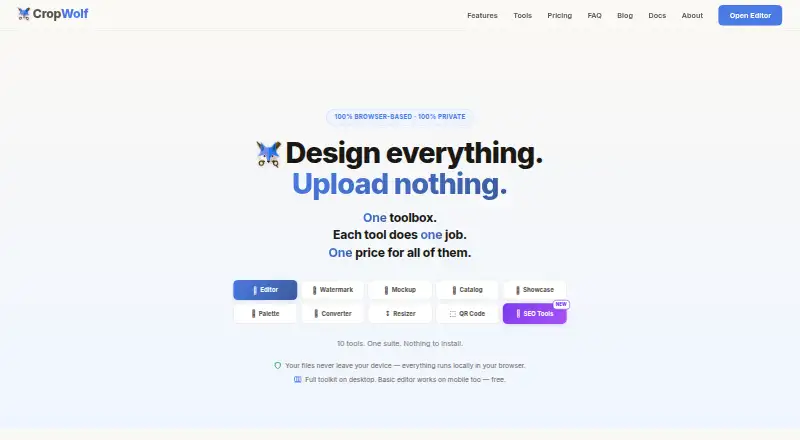
CropWolf is a browser-based suite for image design and editing that, according to its maker, processes images locally on the user's device rather than sending them to a server. Its tools include an editor, watermarking, mockup generation, catalog making, showcase presentations, palette extraction, image conversion and resizing, and QR code generation. The editor provides layers, 151 text styles, 250 fonts, more than 900 templates, filters, color adjustments, clipping masks, and drawing tools. The palette extractor checks WCAG contrast and exports colors as CSS, SCSS, Tailwind, or JSON. Resizer packs are listed for services including Instagram, TikTok, YouTube, Etsy, and Substack. The free plan needs no account, but some free downloads may include a CropWolf watermark or require Pro. Free downloads are listed in PNG and JPG; WebP and PDF exports are Pro features. Pro costs $6.99 per month or $49 per year, and Founding Lifetime costs $349 one-time. The basic editor works on mobile, while the other tools require a desktop or laptop.
Who it suits
CropWolf suits photographers, small business owners, web designers, content creators, students, educators, and hobbyists who want image tools in a browser. Mobile users should note that only the basic editor is described as working on mobile.
What it does well
- Image processing is described as local to the user's device.
- Editor includes layers, templates, filters, and drawing tools.
- Palette exports include CSS, SCSS, Tailwind, and JSON.
- Free plan does not require an account.
- Resizer packs cover multiple listed platforms and services.
What to know first
- Some free downloads may include a CropWolf watermark.
- Some tool downloads require Pro.
- Most tools require a desktop or laptop.
- Safari may not support some advanced features.
Limits
Free users can download two of eight sizes per resizer pack, and the converter handles one image at a time. Free downloads are PNG or JPG and may have a CropWolf watermark; WebP, PDF, batch conversion, and some tool downloads require Pro.
Plans
| Plan | Billed and limits | Price |
|---|---|---|
| Free | $0 / forever · No account needed · Editor, Converter, and Resizer downloads may have CropWolf watermark · some tool downloads require Pro | Free |
| Founding Lifetime | $349 / one-time · All Wolf tools, forever | $349, paid once |
| Pro Yearly | $49 / year · Just $4.08 / month · Pro features and clean exports | $49 a year |
| Pro Monthly | $6.99 / month · Cancel anytime · Pro features and clean exports | $6.99 a month |
As cropwolf.com lists them, read 8 Oct 2026. The maker's own page has the final word.
Getting started
- Open https://cropwolf.com/ in a supported browser.
- Choose the Free plan, which does not require an account, or select a Pro plan.
- Use Chrome, Edge, or Firefox for full browser support; Safari supports basic editing.
- Use the basic editor on mobile, or a desktop or laptop for the other tools.
- Choose an editor or other tool and download in an available format.
CropWolf is a browser-based image editor and a collection of related tools for preparing, adapting and presenting images. It is best suited to people who want several image tasks in one place, especially when keeping files on their own device matters. Its broad free toolkit is appealing, but Pro gates clean exports and useful batch options, and most tools are desktop-only.
Overview
CropWolf brings editing, resizing, conversion, watermarking, mockups, catalogs, showcase presentations, palette extraction and QR-code creation together in a browser suite. The range makes it a practical option for small creative jobs that would otherwise mean switching between separate utilities. Its locally processed workflow is a notable privacy advantage: CropWolf says images stay in the browser rather than being sent to a server.
The free tier needs a close look before it becomes part of a regular workflow. Some downloads carry a CropWolf watermark, several tools reserve downloads or batch actions for Pro, and the resizer limits free downloads to two of eight sizes in each pack. The editor works on mobile, but the rest of the toolset is intended for desktop or laptop use.
Key features
Editing and design
The editor combines layers, clipping masks, drawing tools, filters and color adjustments with 151 text styles, 250 fonts and more than 900 templates. That gives occasional designers and content creators a useful range of options for composing graphics without leaving the browser. The editor is the strongest fit for mobile users too, since it is the one tool CropWolf says works on phones.
Batch image utilities
The watermark tool can apply text or logo marks to as many as 20 images at once, a useful time-saver for photographers and small businesses handling a batch. However, downloading the batch as a ZIP requires Pro. The converter is similarly constrained: free use handles one image at a time, while batch conversion and WEBP export are Pro features.
Resizing and color work
Resizer packs cover Instagram, TikTok, YouTube, Pinterest, Twitter/X, Facebook, LinkedIn, Etsy, the web, Twitch, Discord and Substack. This breadth helps when the same image needs platform-specific versions, but free users can download only two of the eight sizes in a pack. The palette extractor exports CSS, SCSS, Tailwind or JSON and includes a WCAG contrast checker, which makes it more relevant to web designers than a basic color picker.
CropWolf also includes mockup generation, catalog creation, showcase presentations and QR-code generation. PNG and JPG downloads are free; WebP and PDF exports require Pro. The site lists background removal and a standard HD maximum export resolution, so it is not positioned as a high-resolution production tool.
Pricing
The Free plan costs nothing, is billed at $0 forever and requires no account. It includes the editor, converter and resizer, but downloads from those tools may carry a CropWolf watermark, some tool downloads require Pro, and the limits on resizer downloads and converter batches make it better for occasional use than repeated production work.
Pro Monthly costs $6.99 a month, billed $6.99 / month, and can be cancelled anytime. Pro Yearly costs $49 a year, billed $49 / year, or $4.08 / month. Both include Pro features and clean exports; the yearly plan suits regular users willing to pay upfront, while monthly is the more flexible choice for short-term needs. Founding Lifetime costs $349, paid once, billed $349 / one-time, and includes all Wolf tools forever. It is a larger commitment, best considered by someone who expects sustained use of the full suite.
Platforms
CropWolf is a browser-based product, with Android, iOS and web listed as platforms. In practice, the basic editor is the mobile-friendly part; other tools require a desktop or laptop. Chrome, Edge and Firefox are fully supported, while Safari is suitable for basic editing but may lack some advanced features.
Who it's for
Photographers can use the batch watermarking and resizing tools, while small business owners and content creators may value the combination of templates, mockups, catalogs and platform packs. Web designers have a more specialized reason to use the palette exporter and contrast checker. Students, educators and hobbyists can start without an account, but should expect Pro restrictions if they need clean, frequent or batch exports.
CropWolf is less suitable for anyone who needs the entire toolset on a phone, depends on Safari for advanced editing, or needs higher-than-standard-HD exports. Email support is available at [email protected], with replies targeted within a few business days.
Pros and cons
- Pro: A wide set of image tools lives in one browser suite, reducing the need to move between separate utilities for common design and preparation tasks.
- Pro: Browser-local processing keeps images from being sent to a server, according to CropWolf.
- Pro: The free plan needs no account, so it is easy to try the editor and basic utilities without a subscription.
- Con: Watermarks and Pro-only downloads can make the free tier unsuitable for polished deliverables.
- Con: Two-of-eight resizer downloads and single-image conversion restrict the free plan for recurring batch work.
- Con: Most tools require a computer, limiting the usefulness of the listed mobile platforms.
Alternatives
For a dedicated video thumbnail workflow, browse Video Thumbnail Makers. Choose CapCut instead if mobile-focused editing, free templates or cloud storage matter more than CropWolf’s image utility range. BeFunky is another freemium photo editor, with basic editing, limited templates and assets, and exports without a subscription.
Canva is worth considering when a core design editor, content library and basic collaboration are the priority. Kapwing is the more relevant option for video-oriented work, though its free plan is limited to 10 credits, four-minute exports and 720p. For slideshow creation, Renderforest Slideshow Maker offers a free HD video option with a watermark.
vidIQ is an alternative for YouTube-focused keyword research and daily content ideas. Visme may suit presentation work, with a free Basic plan that includes 500MB of storage and 50 slides or pages per project. VistaCreate is another freemium design option, with a Starter plan featuring a large template and royalty-free media library, basic editing and social scheduling.
Verdict
CropWolf is a sensible choice for photographers, small businesses and creators who want a varied set of browser-based image tools and value local processing. Its no-account free tier makes it easy to start, but watermarking, restricted downloads and desktop requirements are meaningful caveats. Choose Pro if clean exports and batch workflows justify the cost; look elsewhere if you need a mobile-first suite or more generous free production limits.
Verdict
CropWolf combines a broad set of browser-based image tools, with local processing and a no-account free tier. Check which downloads require Pro and whether the tools you need work on your device.
Questions
Is CropWolf free?
Yes. The Free plan costs $0 forever and does not require an account. Pro Monthly costs $6.99 per month, and Pro Yearly costs $49 per year.
What platforms does CropWolf support?
CropWolf is listed for Android, iOS, and the web. The basic editor works on mobile; the other tools require a desktop or laptop.
What can CropWolf export?
Free downloads include PNG and JPG. Pro adds WebP and PDF export, and the palette extractor can export colors as CSS, SCSS, Tailwind, or JSON.
Does CropWolf process images on its servers?
The maker says images are processed in the browser and are not sent to a server.
Which browsers does CropWolf support?
The maker says Chrome, Edge, and Firefox are fully supported. Safari works for basic editing but may not support some advanced features.
What does CropWolf Pro cost?
Pro Monthly costs $6.99 per month, and Pro Yearly costs $49 per year. Founding Lifetime costs $349 one-time.
Facts from CropWolf's own pages
- Browser support
- The maker says Chrome, Edge, and Firefox are fully supported; Safari works for basic editing but may not support some advanced features. · cropwolf.com, 8 Oct 2026
- Editor features
- The editor includes layers, 151 text styles, 250 fonts, 900+ templates, filters, color adjustments, clipping masks, and drawing tools. · cropwolf.com, 8 Oct 2026
- Export formats
- The site lists PNG and JPG downloads for free, with WebP and PDF export available with Pro. · cropwolf.com, 8 Oct 2026
- Free tier limits
- Free users can download two of eight sizes per resizer pack; converter use is limited to one image at a time, while batch conversion and WEBP export are Pro features. · cropwolf.com, 8 Oct 2026
- Intended users
- The site presents CropWolf for photographers, small business owners, web designers, content creators, students and educators, and hobbyists. · cropwolf.com, 8 Oct 2026
- Mobile support
- The basic editor works on mobile, while the site says the other tools require a desktop or laptop. · cropwolf.com, 8 Oct 2026
- Palette export
- The palette extractor can export colors as CSS, SCSS, Tailwind, or JSON and includes a WCAG contrast checker. · cropwolf.com, 8 Oct 2026
- Privacy
- The maker says images are processed in the browser and are not sent to a server. · cropwolf.com, 8 Oct 2026
- Product
- CropWolf is a browser-based suite of image design and editing tools that runs locally on the user's device. · cropwolf.com, 8 Oct 2026
- Resizer integrations
- The resizer provides packs for Instagram, TikTok, YouTube, Pinterest, Twitter/X, Facebook, LinkedIn, Etsy, Web, Twitch, Discord, and Substack. · cropwolf.com, 8 Oct 2026
- Support
- CropWolf lists email support at [email protected] and says it tries to reply within a few business days. · cropwolf.com, 8 Oct 2026
- Toolset
- The suite includes an editor, watermark tool, mockup generator, catalog maker, showcase presentations, color palette extractor, image converter, image resizer, and QR code generator. · cropwolf.com, 8 Oct 2026
- Watermarking
- The watermark tool supports text or logo watermarks on up to 20 images at once, with batch ZIP download listed as a Pro feature. · cropwolf.com, 8 Oct 2026
Where CropWolf stands on Freedom251
- Video Thumbnail Makers#6 of 46