Freedom251 › Creative Project Management Software

CreativeOps Tracker
What CreativeOps Tracker is
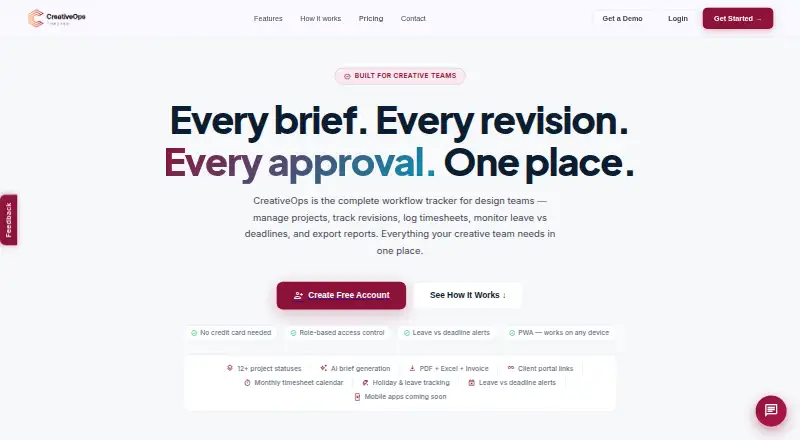
CreativeOps Tracker is a workflow tool for design teams to manage projects, revisions, timesheets, leave, and reporting. Its project tools include timelines, revision tracking, monthly timesheets, media asset logs, and working-day countdowns. Managers can receive alerts when logged leave overlaps an approaching deadline, and weekends are excluded from overdue-day counts. Teams can share project or batch status links that update automatically without requiring client login. Reporting includes PDF summaries and multi-sheet Excel exports for meetings, KPIs, assets, and billing. The product also lists workload planning, proofing and approvals, asset versioning, and an AI brief generator. Individual plans list a 60-day free trial; workspace plans list 30-day trials. If a trial ends without a paid subscription, the workspace becomes read-only: users can view data and export reports, but cannot add projects or log work. Plans include Individual at $79.99 per year, Workspace Starter at $329.99 per year, and Workspace Agency at $659.99 per year. The site describes mobile access through browser-based PWA installation, with native app listings still forthcoming.
Who it suits
CreativeOps Tracker is presented for solo designers and freelancers, creative agencies, and in-house design teams. Its project tracking, client status links, and workload features may fit teams coordinating deadlines and revisions.
What it does well
- Tracks revisions, timesheets, assets, and project timelines.
- Client status links update automatically without login.
- Exports PDF summaries and multi-sheet Excel reports.
- Leave alerts flag overlap with upcoming deadlines.
What to know first
- Trial workspaces become read-only without a paid subscription.
- Native app store listings are still forthcoming.
- Enterprise pricing is custom and not listed.
Limits
Individual supports one user and has a 60-day free trial; Workspace Starter supports up to five users and Workspace Agency up to 15, each with a 30-day trial. When a trial ends without a paid subscription, the workspace is read-only: users can view data and export reports but cannot add projects or log work.
Plans
| Plan | Billed and limits | Price |
|---|---|---|
| Workspace Starter | $329.99/yr Save 25% · Up to 5 users · 30-day free trial · Team workload view · Multi-designer assignment · Leave vs deadline alerts · Manager performance reports · Workspace admin panel | $329.99 a year |
| Workspace Agency | $659.99/yr Save 25% · Up to 15 users · 30-day free trial · Advanced workload planning · Custom branding · Invoice reports per client · Priority support | $659.99 a year |
| Individual | $79.99/yr Save 22% · 1 user · 60-day free trial · Unlimited projects · Timesheets & leave tracking · PDF + Excel reports · AI brief generator · Client portal links · KPI targets & reports | $79.99 a year |
| Enterprise | Custom · Unlimited users · SSO / SAML login · Dedicated account manager · SLA guarantee · Custom integrations | On request |
As creativeopstracker.com lists them, read 2 Oct 2026. The maker's own page has the final word.
Getting started
- Open the CreativeOps Tracker website.
- Choose the Individual, Workspace Starter, Workspace Agency or Enterprise plan.
- Start the free trial available for the selected plan.
- Use the web app or a listed desktop platform; install on mobile through the browser-based PWA route.
- For a paid plan, select the option that matches your user count and team needs.
Verdict
CreativeOps Tracker brings project tracking, reporting, and client-facing status sharing together for creative work. Before choosing a plan, note the trial duration and the read-only limits after a trial ends.
Questions
Is CreativeOps Tracker free?
It has a free plan and a free trial. Paid plans start at $79.99 a year for Individual.
What do the listed plans cost?
Individual is $79.99 a year, Workspace Starter is $329.99 a year, and Workspace Agency is $659.99 a year. Enterprise pricing is custom.
Which platforms does it support?
The listed platforms are Android, iOS, macOS, web and Windows. Mobile access is described through browser-based PWA installation, with native App Store and Google Play listings coming soon.
What happens after a trial ends?
Without a paid subscription, the workspace becomes read-only. Users can view data and export reports, but cannot add projects or log work.
Does it connect to other software?
Custom integrations are listed for Enterprise, but no specific integrations are named.
Who makes CreativeOps Tracker?
The product lists its headquarters as Kerala, India.
Facts from CreativeOps Tracker's own pages
- AI feature
- The product lists an AI brief generator for creative briefs. · creativeopstracker.com, 2 Oct 2026
- Client portal
- Users can share project or batch status links that update automatically and require no client login. · creativeopstracker.com, 2 Oct 2026
- Compliance and privacy
- The privacy policy describes GDPR and India DPDP legal bases where applicable and says personal data is not sold or rented. · creativeopstracker.com, 2 Oct 2026
- Headquarters
- Kerala, India · creativeopstracker.com, 28 Sept 2026
- Integrations
- The pricing page lists custom integrations for Enterprise, but does not name any integrations. · creativeopstracker.com, 2 Oct 2026
- Intended users
- The site presents the product for solo designers and freelancers, creative agencies, and in-house design teams. · creativeopstracker.com, 2 Oct 2026
- Leave alerts
- The product warns managers when logged leave overlaps an upcoming deadline, and weekends do not count as overdue days. · creativeopstracker.com, 2 Oct 2026
- Mobile apps
- The page describes browser-based installation as a Progressive Web App and says App Store and Google Play native app listings are coming soon. · creativeopstracker.com, 2 Oct 2026
- Project tracking
- The product lists project timelines, revision tracking, monthly timesheets, media asset logs, and working-day countdowns. · creativeopstracker.com, 2 Oct 2026
- Purpose
- CreativeOps is a workflow tracker for design teams to manage projects, revisions, timesheets, leave versus deadlines, and reports. · creativeopstracker.com, 2 Oct 2026
- Reports
- The product offers PDF summaries and multi-sheet Excel exports covering meetings, KPIs, assets, and billing. · creativeopstracker.com, 2 Oct 2026
- Security
- The privacy policy says safeguards include TLS encryption in transit, encrypted database storage, role-based access controls, row-level security, backups, and audit logging. · creativeopstracker.com, 2 Oct 2026
- Support
- Workspace Agency includes priority support, and the site provides [email protected] for enquiries. · creativeopstracker.com, 2 Oct 2026
- Trial limit
- After a trial ends without a paid subscription, the workspace enters read-only mode so users can view data and export reports but cannot add projects or log work. · creativeopstracker.com, 2 Oct 2026