Freedom251 › Legal E-Filing Software
Court File America
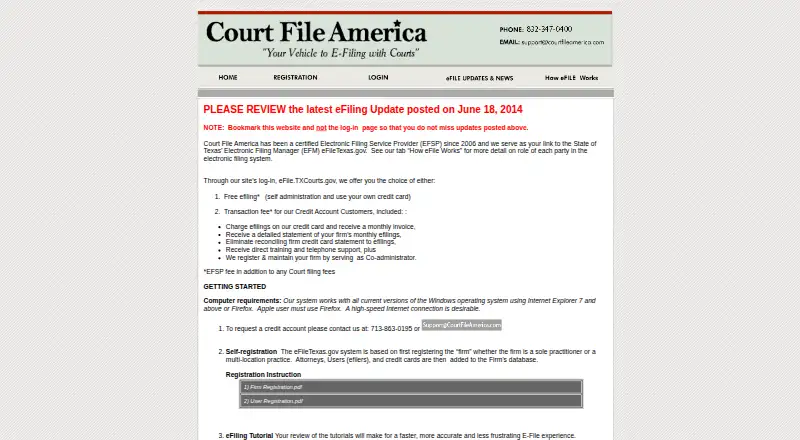
What Court File America is
Court File America is a web-based electronic filing provider for Texas courts connected to eFileTexas.gov. The company says it has been a certified Electronic Filing Service Provider since 2006. Users can file into an existing case or submit an original petition, and the site provides registration and filing tutorials. It accepts Word, ASCII text and PDF documents. A submission acknowledgement records a trace number and the filing's date and time. When a clerk accepts a filing, the attorney generally receives a file-stamped copy by email the next business day. Only the lead document receives a stamp, so documents needing separate stamps must be filed separately. Standalone e-Service lets users email discovery to opposing counsel without filing it with the court and provides proof of delivery by email. The free e-filing option is self-administered and uses the customer's credit card; an EFSP fee may apply in addition to court filing fees. The listed example total is $12.27, or $17.89 with eService to opposing counsel.
Who it suits
It is for people filing electronically in Texas courts connected to eFileTexas.gov, including those who need to file an original petition or serve discovery by email.
What it does well
- Supports existing-case filings and original petitions.
- Acknowledgements include trace number, date and time.
- Standalone e-Service provides email delivery proof.
- Credit account customers can receive training and phone support.
What to know first
- Only the lead document receives a file stamp.
- An EFSP fee may apply beyond court filing fees.
- Apple users must use Firefox, according to the homepage.
Limits
The free e-filing plan is self-administered, uses your own credit card, and may incur an EFSP fee in addition to court filing fees. Only the lead document receives a file stamp, so documents needing separate stamps must be filed separately.
Plans
| Plan | Billed and limits | Price |
|---|---|---|
| Free efiling | Self administration · Use your own credit card · EFSP fee may apply in addition to court filing fees | Free |
| Credit Account Customers | Monthly invoice · Transaction fee · Firm efilings charged to Court File America’s credit card · Detailed monthly statement · Training and telephone support · Firm registration and maintenance as co-administrator | On request |
As courtfileamerica.com lists them, read 3 Oct 2026. The maker's own page has the final word.
Getting started
- Open https://www.courtfileamerica.com/.
- Complete registration and review the filing tutorials.
- Use internet access and Adobe PDF Reader; use a scanner for non-electronic documents.
- Use a current Windows version with Internet Explorer 7 or later or Firefox; Apple users must use Firefox.
- Choose self-administered free e-filing with your own credit card, or contact the company to request a credit account.
- Prepare an accepted Word, ASCII text, or PDF document and file into an existing case or submit an original petition.
Court File America is a web-based filing service for Texas courts connected to eFileTexas.gov. It is best suited to Texas attorneys and firms that want email records of submissions and accepted filings, or a separate way to serve discovery. Its self-service plan costs nothing, but possible transaction fees and the one-document stamping rule should shape the decision.
Overview
Court File America connects filers to Texas’s eFileTexas.gov Electronic Filing Manager. Users can file into an existing case or submit an original petition, and the company provides registration and filing tutorials. It says it has been a certified Electronic Filing Service Provider since 2006.
Standalone e-Service handles a different task: users can email discovery to opposing counsel without filing it with the court, and receive proof of delivery by email. That is useful when a document must be served but is not meant to become a court filing.
A submission acknowledgement records a trace number and the date and time of filing. When the clerk accepts a submission, the attorney receives a file-stamped copy by email, usually the next business day. The stamp applies only to the lead document, so documents that each need a stamp must be filed separately. That constraint can add steps to filings with multiple separately stamped documents.
Key features
- Texas court filing: The service covers Texas courts and jurisdictions connected to eFileTexas.gov. It accepts Microsoft Word (.doc), ASCII text (.txt), and Adobe Acrobat (.pdf) files. The supported formats give filers options, though non-electronic documents require a scanner for submission.
- Filing records and alerts: Submission acknowledgements provide a trace number and timestamp, while accepted filings generate an emailed file-stamped copy. Rejection alerts and filing status tracking help filers follow a submission through the process.
- Standalone electronic service: Send discovery to opposing counsel without filing it with the court, with email proof of delivery. The current fee example rises from $12.27 to $17.89 when eService is included, so serving documents this way has a stated additional cost.
- Firm support: Credit-account customers receive direct training and telephone support. The firm account can also be maintained with Court File America as co-administrator, which may suit practices that want centralized billing and support rather than individual card payments.
- Integration: Login currently routes through eFile.TXCourts.gov, and API access is not available. Firms seeking a direct API connection should look elsewhere.
Pricing
Free efiling costs nothing. It is self-administered and uses the filer’s own credit card; an EFSP fee may apply in addition to court filing fees. This is the straightforward fit for occasional filers comfortable handling their own account and costs. “Free” does not mean every filing is fee-free: the current example is $12.27 in addition to paper filing fees, or $17.89 with eService to opposing counsel.
Credit Account Customers has custom pricing, billed by monthly invoice with a transaction fee. Firm e-filings are charged to Court File America’s credit card, with a detailed monthly statement, training and telephone support, and firm registration and maintenance as co-administrator. This option trades self-service and direct card use for account support and consolidated billing; firms should weigh the transaction fee and custom price against that convenience.
Platforms
Court File America is web-based. The site calls for internet access, completed registration, and Adobe PDF Reader; a scanner is needed to submit documents that are not electronic. Its homepage specifies current Windows versions with Internet Explorer 7 or later or Firefox, and says Apple users must use Firefox. The stated browser guidance is narrow, so users should confirm their setup meets it before relying on the service.
Who it's for
This is a focused option for Texas attorneys and firms filing in jurisdictions connected to eFileTexas.gov, especially those who value emailed acceptance copies, submission records, rejection alerts, or separate discovery service with delivery proof. Occasional users can start with the free self-administered plan; firms wanting training, telephone support, and monthly statements may prefer the credit account. It is not the right fit for users outside the covered Texas courts or firms that require API access.
Pros and cons
Pros
- Free self-service option: There is no plan charge for basic self-administered e-filing, though court fees and an EFSP fee may apply.
- Useful filing trail: Trace-number acknowledgements, status tracking, rejection alerts, and emailed file-stamped copies provide distinct checkpoints.
- Separate e-Service: Discovery can be served without a court filing, with proof of delivery by email.
- Firm account support: Credit customers receive training, telephone support, monthly statements, and co-administrator maintenance.
Cons
- Stamping is limited: Only the lead document is stamped, requiring separate filings when multiple documents need individual stamps.
- Costs can exceed the free plan price: Court fees and possible EFSP fees apply; the stated example also shows a higher total when eService is added.
- No API access: Firms needing programmatic integration will need another service.
- Browser requirements are specific: The homepage directs Apple users to Firefox and gives legacy-style Windows browser guidance.
Alternatives
Legal E-Filing Software is a category directory for comparing filing options. Consider eFileTexas.gov if a state-provided EFSP with free basic e-filing and e-service functionality is the better fit; transaction and service fees may still apply. CM/ECF is another free option for readers whose filing needs align with its federal court system; existing court fees still apply, and PACER charges apply for viewing. LegalAtoms may suit readers seeking a broader legal application that includes a free domestic-violence application plan. MyFileRunner is worth considering for users who want free full-service eService or a separately priced self-service e-filing plan. eLawServices offers a free basic plan and a $2.99 a month plan for readers comparing low-cost e-filing choices. eLodgment is a free service to consider when its coverage fits; court fees may apply to some document types. iDocket eFile charges no iDocket fee for e-filing, though statutory court fees and a 2.89% state e-filing credit-card transaction fee may apply. CrimsonLogic Digital Filing is another web-based alternative.
Verdict
Texas attorneys who want clear submission records, emailed acceptance copies, and optional standalone service should put Court File America on their shortlist. The free self-service plan makes it a practical starting point, while credit-account support gives firms a more managed workflow. Look elsewhere if separate stamps are routinely needed for multiple documents, API access is essential, or the applicable fees outweigh the benefit of this Texas-focused service.
Verdict
Court File America provides Texas e-filing and standalone electronic service, with submission acknowledgements and emailed acceptance copies. Check the stamping limitation and applicable fees before filing.
Questions
Is Court File America free?
It offers a free e-filing plan at no cost. An EFSP fee may apply in addition to court filing fees.
What does the listed filing cost example include?
The listed current example total is $12.27 in addition to current paper filing fees. It increases to $17.89 when eService to opposing counsel is included.
Which courts does it cover?
It covers Texas courts and jurisdictions connected to eFileTexas.gov/eFiling for Courts.
What documents can I submit?
The service accepts Microsoft Word (.doc), ASCII text (.txt), and Adobe Acrobat (.pdf) files.
Does it provide electronic service?
Yes. Standalone e-Service lets users email discovery to opposing counsel without filing it with the court and provides email proof of delivery.
Can I get a credit account?
Credit account customers receive direct training and telephone support. Contact Court File America at 713-863-0195 or [email protected] to request an account.
Facts from Court File America's own pages
- Accepted documents
- The service accepts Microsoft Word (.doc), ASCII text (.txt), and Adobe Acrobat (.pdf) files. · courtfileamerica.com, 3 Oct 2026
- Accepted filings
- When a court clerk accepts a filing, the attorney receives a file-stamped copy by email, usually the next business day. · courtfileamerica.com, 3 Oct 2026
- Browser and OS
- The homepage says the system works with current Windows versions using Internet Explorer 7 or later or Firefox, and Apple users must use Firefox. · courtfileamerica.com, 3 Oct 2026
- Credit account support
- Credit account customers receive direct training and telephone support, and can contact the company at 713-863-0195 or [email protected] to request an account. · courtfileamerica.com, 3 Oct 2026
- Current fee example
- The page lists a $12.27 total in addition to current paper filing fees, and says the total increases to $17.89 when eService to opposing counsel is included. · courtfileamerica.com, 3 Oct 2026
- Document stamping limit
- Only the lead document receives a file stamp, so documents needing separate stamps must be filed separately. · courtfileamerica.com, 3 Oct 2026
- Established
- The company says it has been a certified EFSP since 2006. · courtfileamerica.com, 3 Oct 2026
- Filing receipts
- A submission acknowledgement includes a trace number and the time and date the filing was submitted. · courtfileamerica.com, 3 Oct 2026
- Filing workflow
- Users can electronically file into an existing case or file an original petition, with registration and filing tutorials provided. · courtfileamerica.com, 3 Oct 2026
- Integration and API
- The company says its login currently routes through eFile.TXCourts.gov and that it planned to offer its own API connection when the state API path became equivalent to the direct connection. · courtfileamerica.com, 3 Oct 2026
- Service
- Court File America is a certified Electronic Filing Service Provider that connects users to Texas’s eFileTexas.gov Electronic Filing Manager. · courtfileamerica.com, 3 Oct 2026
- Standalone e-Service
- Standalone e-Service lets users email discovery to opposing counsel without filing it with the court and provides email proof of delivery. · courtfileamerica.com, 3 Oct 2026
- Technical requirements
- The site lists internet access, completed registration, Adobe PDF Reader, and a scanner for submitting non-electronic documents as requirements. · courtfileamerica.com, 3 Oct 2026
Where Court File America stands on Freedom251
- Legal E-Filing Software#2 of 22